
Introduzione
The Philips AJ5000/12 is a digital tuning clock radio designed to provide timekeeping, alarm functions, and FM radio reception. It features a clear digital display, dual alarm settings, and mood-lighting capabilities to enhance your waking experience. This manual provides detailed instructions for setting up and operating your device.
Prodotto finitoview
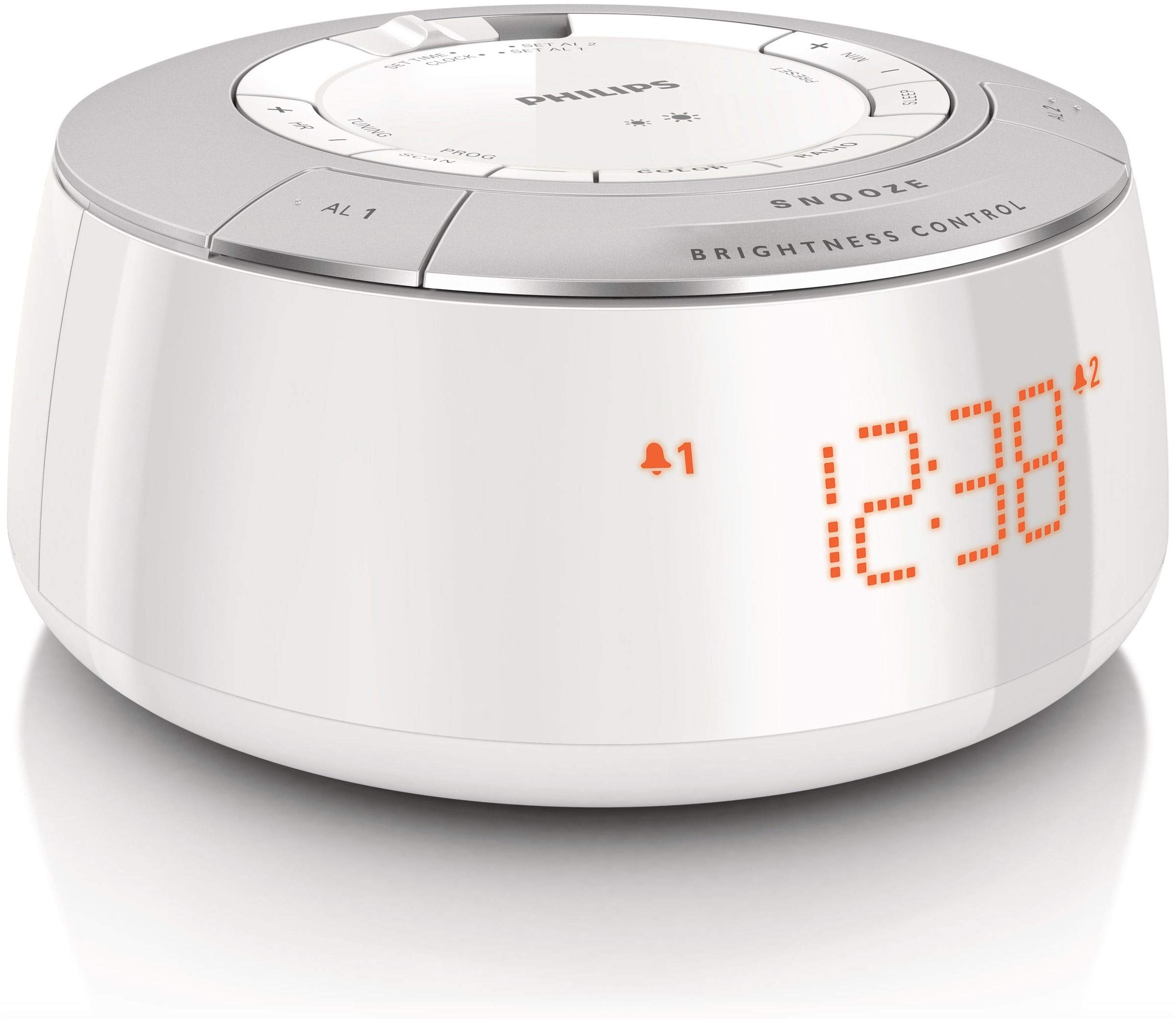
Figura 1: Davanti view of the Philips AJ5000/12 Digital Tuning Clock Radio, displaying the time and alarm indicators.
The Philips AJ5000/12 combines a clock, alarm, and FM radio into a compact unit. Key features include:
- Digital FM radio tuner for clear reception.
- Dual alarm function for separate wake-up times.
- Snooze feature for additional sleep time.
- Luminosità del display regolabile.
Impostare
1. Collegamento elettrico
Connect the power adapter to the DC input jack on the back of the clock radio and then plug the adapter into a wall outlet. The unit will power on and the display will illuminate.
2. Installazione della batteria (backup)
Per l'alimentazione di backup durante il lavorotages, install 2 Lithium Ion batteries (not included) into the battery compartment located on the bottom of the unit. Ensure correct polarity (+/-) as indicated inside the compartment. These batteries maintain time and alarm settings during a power interruption but do not power the main functions of the device.
3. Configurazione dell'antenna
Extend the FM antenna wire fully for optimal radio reception. Adjust its position to improve signal clarity if needed.
Istruzioni per l'uso
1. Impostazione dell'ora
- Press and hold the 'TIME SET' button until the hour digits flash.
- Use the 'HOUR' and 'MINUTE' buttons to adjust the time.
- Press 'TIME SET' again to confirm the setting.
2. Impostazione degli allarmi (allarme 1 e allarme 2)
La radiosveglia è dotata di due sveglie indipendenti.
- Press and hold the 'ALARM 1' or 'ALARM 2' button until the alarm time digits flash.
- Use the 'HOUR' and 'MINUTE' buttons to set the desired alarm time.
- Press the 'ALARM 1' or 'ALARM 2' button again to select the alarm source (Buzzer or FM Radio). The corresponding alarm icon will appear on the display.
- To deactivate an alarm, press the 'ALARM 1' or 'ALARM 2' button repeatedly until the alarm icon disappears.
3. Funzione snooze
When an alarm sounds, press the 'SNOOZE' button (located on top) to temporarily silence the alarm. The alarm will sound again after approximately 9 minutes.
4. Funzionamento della radio FM
- Premere il pulsante 'RADIO ON/OFF' per accendere la radio FM.
- Press the 'TUNE +' or 'TUNE -' buttons to manually tune to a desired frequency.
- To auto-scan for stations, press and hold 'TUNE +' or 'TUNE -' until the frequency starts scanning.
- To preset a station, tune to the desired station, then press and hold a 'PRESET' button (e.g., P1, P2) until the preset number flashes. Release the button to save.
5. Controllo della luminosità del display
Use the 'BRIGHTNESS CONTROL' button (located on top) to adjust the intensity of the digital display. Press repeatedly to cycle through different brightness levels.
Manutenzione
Pulizia
Wipe the unit with a soft, dry cloth. Do not use abrasive cleaners, solvents, or strong detergents, as these may damage the plastic enclosure. Ensure the unit is unplugged before cleaning.
Sostituzione della batteria
If the backup batteries are depleted, replace them with new Lithium Ion batteries to ensure time and alarm settings are retained during power outages. Dispose of old batteries responsibly.
Risoluzione dei problemi
| Problema | Possibile causa | Soluzione |
|---|---|---|
| Nessuna alimentazione / Display spento | Adattatore di alimentazione non collegato o presa difettosa. | Controllare il collegamento elettrico e provare una presa diversa. |
| Scarsa ricezione della radio FM | Antenna non estesa o interferenza. | Extend and reposition the FM antenna. Move unit away from other electronic devices. |
| L'allarme non suona | Allarme non attivato o volume troppo basso. | Ensure alarm icon is displayed. Increase radio volume if alarm source is radio. |
| Impostazioni di ora/sveglia perse dopo lo spegnimentotage | Le batterie di riserva sono scariche o non installate. | Install or replace backup batteries. |
Specifiche
- Marca: Philips
- Numero modello: AJ5000/12
- Fonte di energia: AC Power (with 2 Lithium Ion batteries for backup)
- Peso dell'articolo: 0.6 chilogrammi
- Tipo di visualizzazione: Digitale
- Materiale della custodia: Plastica
- Caratteristiche speciali: Sveglia, Radio
Garanzia e supporto
Per informazioni sulla garanzia e assistenza clienti, fare riferimento alla scheda di garanzia inclusa con il prodotto o visitare il sito ufficiale di supporto Philips websito. Conservare la ricevuta d'acquisto come prova d'acquisto per eventuali reclami in garanzia.