
1. Introduzione
The D-Link DES-1008E is an 8-Port Fast Ethernet Desktop Switch designed to expand your network connectivity. This unmanaged switch provides eight 10/100 Mbps Ethernet ports, allowing you to connect multiple devices such as computers, printers, and network-attached storage (NAS) to your network. It supports full-duplex mode, delivering up to 200 Mbps throughput per port for efficient data transfer. The plug-and-play design ensures easy installation without the need for software configuration.
2. Contenuto della confezione
Si prega di verificare che il pacco contenga i seguenti articoli:
- D-Link DES-1008E 8-Port Fast Ethernet Desktop Switch
- Adattatore di alimentazione
- Guida di installazione rapida
Se uno qualsiasi degli articoli risulta mancante o danneggiato, contattare il rivenditore D-Link locale per ricevere assistenza.
3. Impostazione
Follow these steps to set up your D-Link DES-1008E switch:
- Posizionare l'interruttore: Place the switch on a flat, stable surface or mount it to a wall using appropriate hardware (not included). Ensure adequate ventilation around the device.
- Collegare l'adattatore di alimentazione: Plug the provided power adapter into the power port on the back of the DES-1008E switch. Connect the other end of the power adapter to a standard electrical outlet. The power LED on the front of the switch should illuminate.
- Connetti dispositivi di rete: Connect your network devices (e.g., computers, routers, game consoles) to any of the eight Ethernet ports on the switch using standard Ethernet cables. The corresponding port LED on the front of the switch will illuminate when a connection is established.
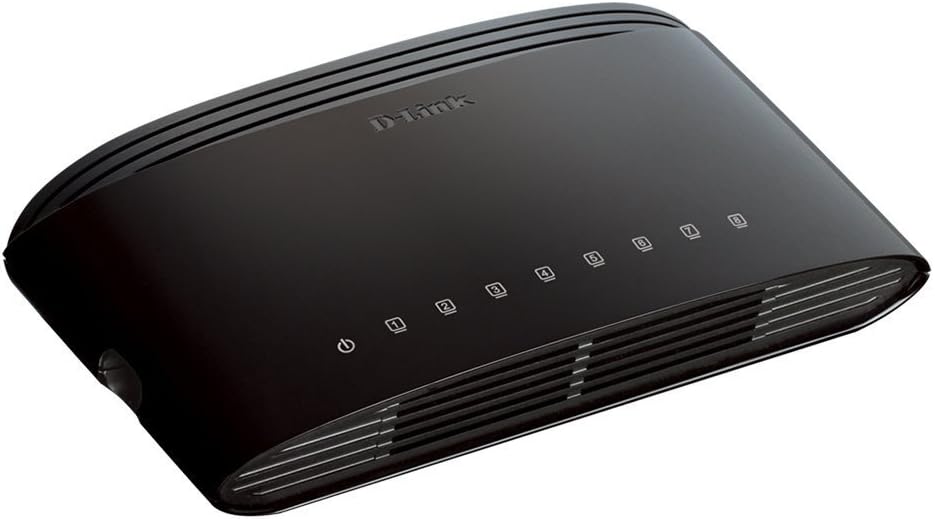
Figura 1: Fronte view of the D-Link DES-1008E switch, showing the power indicator and eight port status LEDs.

Figura 2: Posteriore view of the D-Link DES-1008E switch, illustrating the eight Ethernet ports for device connections.
The D-Link DES-1008E is a plug-and-play device, requiring no software installation or configuration. Once connected, your devices should automatically detect the network connection.
4. Funzionamento dell'interruttore
The DES-1008E operates automatically once powered on and connected. It functions as an unmanaged switch, meaning it requires no user intervention for basic network traffic management.
Indicatori LED:
- LED di potenza: Illuminates green when the switch is receiving power.
- LED delle porte (1-8): Each port has an associated LED. This LED illuminates green when a device is connected to the port and flashes to indicate network activity (data transmission).
5. Manutenzione
To ensure optimal performance and longevity of your D-Link DES-1008E switch, consider the following maintenance guidelines:
- Pulizia: Gently wipe the exterior of the switch with a soft, dry cloth. Avoid using liquid or aerosol cleaners directly on the device.
- Ventilazione: Ensure that the ventilation slots on the switch are not blocked. Proper airflow prevents overheating.
- Ambiente: Operate the switch within its specified temperature and humidity ranges. Avoid exposing it to direct sunlight, excessive heat, or moisture.
- Ciclo di alimentazione: If the switch experiences issues, a simple power cycle (unplugging and replugging the power adapter) can often resolve minor problems.
6. Risoluzione Dei Problemi
If you encounter issues with your D-Link DES-1008E switch, refer to the following troubleshooting tips:
- Nessun potere:
- Assicurarsi che l'adattatore di alimentazione sia collegato saldamente sia allo switch sia a una presa elettrica funzionante.
- Verificare che la presa elettrica funzioni collegandovi un altro dispositivo.
- Controllare che l'adattatore di alimentazione non presenti danni visibili.
- Nessun collegamento/attività su una porta:
- Verificare che il cavo Ethernet sia collegato saldamente sia alla porta dello switch sia al dispositivo connesso.
- Provare un cavo Ethernet diverso per escludere che si tratti di un cavo difettoso.
- Connect a different device to the same port to check if the port is functional.
- Assicurarsi che il dispositivo connesso sia acceso e che la sua scheda di rete sia abilitata.
- Prestazioni di rete lente:
- Verificare che tutti i dispositivi connessi funzionino alla velocità prevista.
- Verificare la presenza di traffico di rete eccessivo o di applicazioni che richiedono molta larghezza di banda in esecuzione sui dispositivi connessi.
- Ensure your internet service provider (ISP) is delivering the expected speeds to your router.
- High-Pitched Sound from Power Adapter:
- Some users have reported a high-pitched sound from the included power adapter. If this occurs, consider using an alternative 5V power supply with compatible specifications. Ensure the replacement power supply meets the voltage and current requirements of the switch to avoid damage.
7. Specifiche
| Numero di modello | DES-1008E |
| Numero di porte | 8 |
| Standard Ethernet | 10/100 Mbps Fast Ethernet |
| Velocità di trasferimento dati | Up to 200 Mbps (full-duplex) |
| Capacità di commutazione | 1.6 Gbps |
| Dimensioni tabella indirizzi MAC | 1K voci |
| Potenza in ingresso | 5V CC |
| Peso dell'articolo | 9.44 once |
| Colore | Nero |
8. Garanzia e supporto
The D-Link DES-1008E 8-Port Fast Ethernet Desktop Switch comes with a Garanzia a vita limitata. For detailed warranty terms and conditions, please refer to the warranty information provided with your product or visit the official D-Link websito.
For technical support, product registration, or to download the latest firmware and documentation, please visit the D-Link support website or contact D-Link customer service in your region. Support contact information can typically be found on the D-Link official websito.