
1. Introduzione
This manual provides essential instructions for the safe and effective use of the Mitutoyo 543-264B Absolute LCD Digimatic Indicator ID-C. This precision instrument is designed for accurate measurement in bore gage applications, featuring an absolute encoder for reliable readings. Please read this manual thoroughly before operation and retain it for future reference.
2. Precauzioni di sicurezza
- Always handle the indicator with care to prevent damage to the precision components.
- Do not expose the indicator to extreme temperatures, humidity, or direct sunlight.
- Evitare di far cadere o sottoporre lo strumento a forti impatti.
- Keep the measuring surfaces clean and free from dust, oil, or other contaminants.
- Do not attempt to disassemble or modify the indicator, as this may void the warranty and cause malfunction.
3. Prodotto finitoview
The Mitutoyo 543-264B is a compact and robust digital indicator. It features an LCD display for clear readings and an absolute sensor that retains the origin point even when the power is turned off. The lug back design allows for versatile mounting options, particularly for bore gage setups.
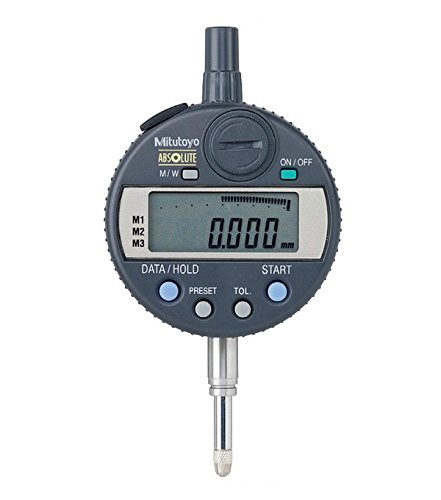
Questa immagine mostra un lato view of the Mitutoyo 543-264B Absolute LCD Digimatic Indicator ID-C. Key components visible include the main body, the stem, the measuring contact point, and the knurled adjustment knob at the top. The digital display area is on the opposite side, not visible in this view.
4. Impostazione
- Disimballaggio: Carefully remove the indicator from its packaging. Inspect for any visible damage.
- Installazione della batteria: If not already installed, open the battery cover (usually on the back or side) and insert the specified battery type, ensuring correct polarity.
- Montaggio: Attach the indicator to your bore gage or fixture using the lug back. Ensure it is securely fastened to prevent movement during measurement. The 8mm stem diameter is standard for many mounting solutions.
- Accensione: Press the ON/OFF button to power on the indicator. The LCD display should illuminate.
- Impostazione iniziale dello zero: Before taking measurements, ensure the indicator is properly zeroed according to your application's requirements. This may involve setting it against a master ring or a known reference point.
5. Istruzioni per l'uso
- Impostazione zero: Press the ZERO/ABS button to set the current spindle position as the zero reference point. In ABS mode, this button switches between absolute and incremental measurement.
- Misurazione: Gently bring the measuring contact point into contact with the workpiece. The displacement will be displayed on the LCD. For bore gage applications, ensure the indicator is properly aligned within the bore.
- Lettura del display: Read the measurement value directly from the LCD. The indicator provides a 0.001mm graduation for precise readings.
- Funzione Hold (se disponibile): Some models may have a HOLD button to freeze the displayed value.
- Unit Conversion (if available): If your model supports it, use the mm/inch button to switch between metric and imperial units.
- Spegni: Press the ON/OFF button to turn off the indicator when not in use to conserve battery life. The absolute position will be retained.
6. Manutenzione
- Pulizia: Wipe the indicator body and measuring surfaces with a clean, dry, lint-free cloth. For stubborn dirt, a cloth lightly dampened with isopropyl alcohol may be used, avoiding the display area.
- Magazzinaggio: Store the indicator in its original case or a protective container in a dry, stable environment, away from direct sunlight and extreme temperatures.
- Sostituzione della batteria: When the low battery indicator appears on the display, replace the battery promptly with the specified type (e.g., SR44). Ensure correct polarity.
- Calibrazione: Regular calibration by a qualified technician is recommended to maintain accuracy, especially for critical applications.
7. Risoluzione Dei Problemi
| Problema | Possibile causa | Soluzione |
|---|---|---|
| Il display non si accende | Batteria scarica; installazione errata della batteria | Sostituire la batteria; controllare la polarità della batteria |
| Letture imprecise | Dirty measuring surfaces; Loose mounting; Indicator not zeroed correctly; Environmental factors | Clean surfaces; Secure mounting; Re-zero indicator; Ensure stable environment |
| Il display mostra un messaggio di errore | Malfunzionamento interno; problema del sensore | Try turning off and on; If persistent, contact customer support |
8. Specifiche
- Numero modello: 543-264B
- Allineare: 0-12.7mm
- Laurea: 0.001mm
- Precisione: -0.003mm
- Filo: M2.5X0.45
- Stem Diameter: 8mm
- Tipo di retro: Lug Back
- Peso dell'articolo: 290 grammi
- Dimensioni del prodotto: Dimensioni: 19.3 x 10.92 x 7.62 cm
9. Informazioni sulla garanzia
Mitutoyo products are manufactured to high standards and typically come with a manufacturer's warranty against defects in materials and workmanship. Please refer to the warranty card included with your product or visit the official Mitutoyo website for specific warranty terms and conditions applicable to the 543-264B model. Keep your proof of purchase for warranty claims.
10. Assistenza clienti
For technical assistance, service, or inquiries regarding your Mitutoyo 543-264B Absolute LCD Digimatic Indicator ID-C, please contact your local Mitutoyo distributor or visit the official Mitutoyo website. Provide the model number (543-264B) and a detailed description of your issue when seeking support.