
VTech 80-109744
VTech Schulstart Laptop E Instruction Manual
Modello: 80-109744
1. Introduzione
This manual provides essential information for the safe and effective use of your VTech Schulstart Laptop E. This learning computer is designed for children aged 6 and up, offering 160 educational games in both German and English. It covers subjects such as letters, words, mathematics, nature, science, and creativity.
Si prega di leggere attentamente il presente manuale prima di utilizzare il dispositivo e di conservarlo per riferimento futuro.
2. Informazioni sulla sicurezza
AVVERTIMENTO: Choking hazard due to small parts that can be swallowed. Not suitable for children under 36 months.
AVVERTIMENTO: Strangulation hazard. Keep packaging materials away from children.
- Sorvegliare sempre i bambini durante l'uso.
- Non esporre il dispositivo a temperature estreme o alla luce solare diretta.
- Keep the device dry. Do not immerse in water or other liquids.
- Pulire il dispositivo con un panno morbido e asciutto. Non utilizzare detergenti abrasivi.
- Assicurarsi che le batterie siano inserite correttamente, rispettando la polarità indicata.
- Rimuovere prontamente le batterie scariche.
- Non mischiare batterie vecchie e nuove o diversi tipi di batterie.
- Le batterie non ricaricabili non devono essere ricaricate.
- Le batterie ricaricabili devono essere caricate solo sotto la supervisione di un adulto.
- Rimuovere le batterie ricaricabili dal giocattolo prima di caricarlo.
- I terminali di alimentazione non devono essere cortocircuitati.
3. Contenuto della confezione
The VTech Schulstart Laptop E package includes:
- 1 x VTech Schulstart Laptop E
- 1 x Cursor Mouse
- 3 x AA Demonstration Batteries (for test purposes only)
Note: A VTech power adapter and VTech laptop bag are sold separately and are not included.
4. Impostazione
4.1 Installazione della batteria
The device requires 3 AA batteries. The included demonstration batteries are for testing purposes only and should be replaced with new batteries for regular use.
- Individuare il vano batteria nella parte inferiore del portatile.
- Utilizzando un cacciavite, aprire il coperchio del vano batteria.
- Remove the old demonstration batteries (if present).
- Inserire 3 batterie AA nuove, assicurandosi che la polarità (+/-) sia corretta, come indicato all'interno del vano.
- Riposizionare il coperchio del vano batteria e fissarlo con la vite.

Figure 4.1: Battery installation guide. Replace demonstration batteries with new ones for extended play.
4.2 Connecting the Cursor Mouse
The VTech Schulstart Laptop E comes with a wired cursor mouse for interactive play.
- Individuare la porta del mouse sul lato del portatile.
- Carefully insert the mouse connector into the port.
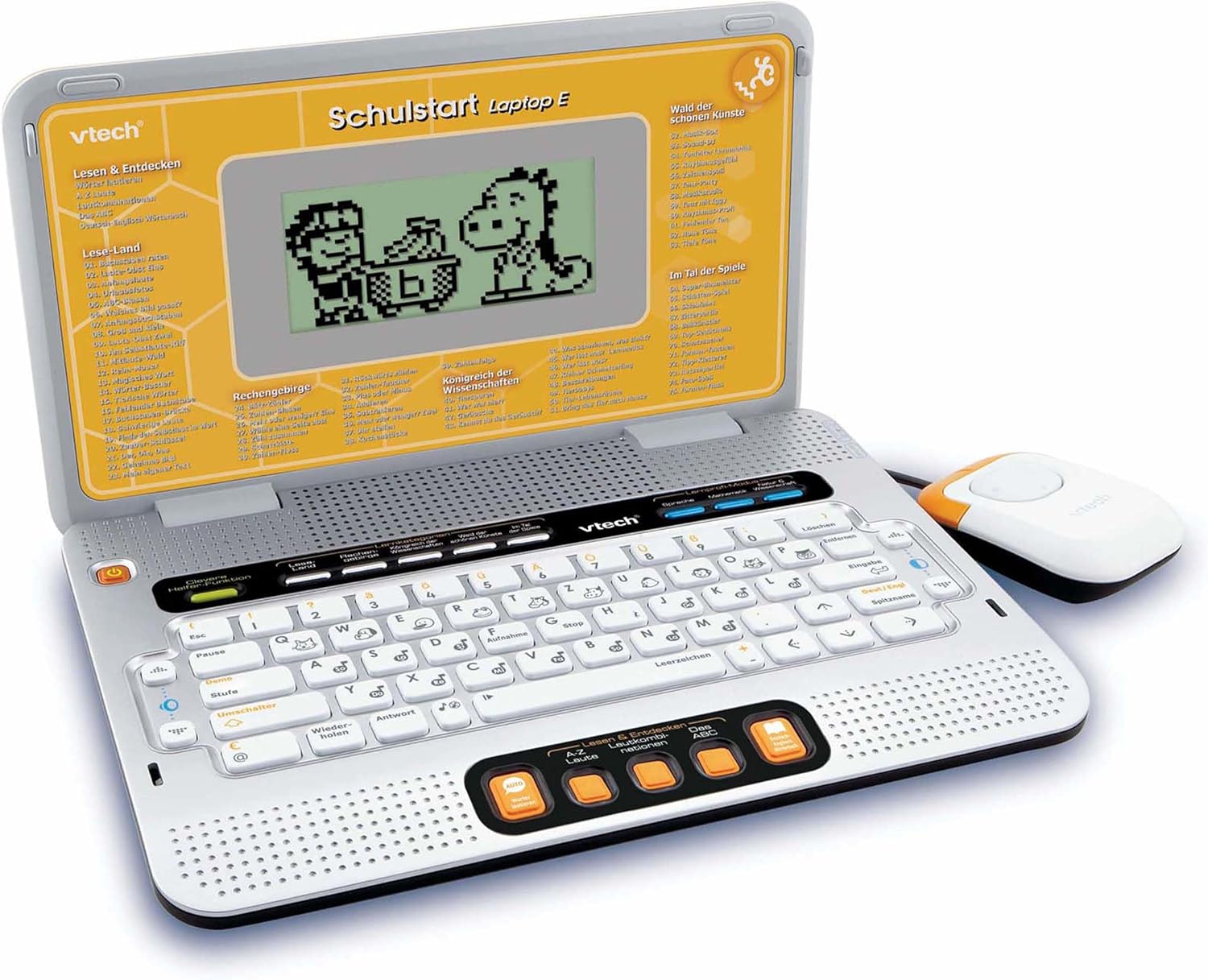
Figure 4.2: VTech Schulstart Laptop E with connected cursor mouse.
5. Istruzioni per l'uso
5.1 Accensione/spegnimento
Per accendere il portatile, premere il tasto Energia button, usually located on the top left of the keyboard area. To turn off, press the Energia button again or the laptop will automatically shut down after a period of inactivity to conserve battery life.
5.2 Selezione della lingua
The VTech Schulstart Laptop E supports both German and English. You can switch between languages using the dedicated language selection button or through the settings menu, if available. Refer to the on-screen prompts for initial setup.
5.3 Game Categories and Selection
The laptop features 160 educational games categorized as follows:
- Language Tools: 5 programmi
- Letters & Words: 23 programmi
- Matematica: 16 programmi
- Nature & Science: 12 programmi
- Creatività: 12 programmi
- Logica e giochi: 12 programmi
Use the arrow keys and the Enter button on the keyboard, or the cursor mouse, to navigate through the menu and select a game.

Figure 5.1: Navigating game categories on the VTech Schulstart Laptop E.
5.4 Tutor Function and Learning Modes
The laptop includes a Tutor function and a Learning Pro mode to enhance the learning experience:
- Tutor Function: Features 5 direct-dial keys for language tools (sounds, phonics, sound combinations, ABC with example words, German-English dictionary). These programs assist with letter pronunciation and reading.
- Learning Pro Mode: Offers progressive learning through increasing difficulty levels, adapting to the child's progress.
- Smart Helper Function: Provides additional hints and tips in many educational games upon request.

Figure 5.2: Child using the VTech Schulstart Laptop E's interactive learning features.
6. Manutenzione
6.1 Pulizia
To clean the VTech Schulstart Laptop E, use a soft, slightly damp panno. Non utilizzare prodotti chimici aggressivi o detergenti abrasivi. Assicurarsi che il dispositivo sia spento e scollegato da qualsiasi fonte di alimentazione prima di pulirlo.
6.2 Conservazione
Store the laptop in a cool, dry place away from direct sunlight and extreme temperatures. If the device will not be used for an extended period, remove the batteries to prevent leakage.

Figure 6.1: Optional VTech laptop bag for storage and transport (sold separately).
7. Risoluzione Dei Problemi
| Problema | Possibile causa | Soluzione |
|---|---|---|
| Il dispositivo non si accende. |
|
|
| Lo schermo è vuoto o tremolante. |
|
|
| Keys or mouse not responding. |
|
|
| Il suono è distorto o assente. |
|
|
8. Specifiche
- Numero modello: 80-109744
- Dimensioni (L x P x A): 4 x 28 x 20 cm (1.57 x 11.02 x 7.87 pollici)
- Peso: 1.29 kg (2.84 libbre)
- Età consigliata: 6 anni e oltre
- Batterie: 3 x AA (not included for regular use)
- Lingue: Tedesco, Inglese
- Numero di partite: 160
- Data di rilascio: 31 luglio 2010
9. Garanzia e supporto
Per informazioni sulla garanzia e sull'assistenza clienti, fare riferimento al sito ufficiale VTech webo contattare il distributore VTech locale. Conservare la ricevuta d'acquisto come prova d'acquisto.
VTech Official Websito: www.vtech.com
Ask a question about this manual
Ask about setup, troubleshooting, compatibility, parts, safety, or missing instructions. Manuals+ will review the question and use this page’s manual context to help answer it.