
1. Introduzione
This manual provides detailed instructions for the safe and effective use of your Olympus IC Recorder Voice-Trek DS-61. Please read this manual thoroughly before using the device and keep it for future reference. The Olympus Voice-Trek DS-61 is a digital voice recorder designed for high-quality audio capture and playback, featuring 2 GB of internal memory and USB connectivity.
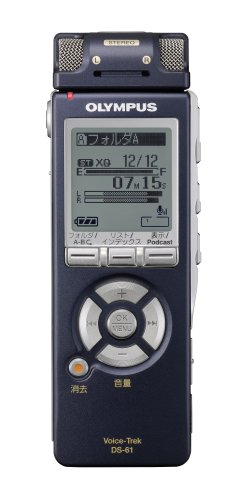
Figura 1: Davanti view of the Olympus IC Recorder Voice-Trek DS-61, showing the display and control buttons.
2. Precauzioni di sicurezza
Per garantire un funzionamento sicuro ed evitare danni al dispositivo, osservare le seguenti precauzioni:
- Non esporre il dispositivo a temperature estreme, alla luce solare diretta o a elevata umidità.
- Evitare di far cadere il dispositivo o di sottoporlo a forti impatti.
- Keep the device away from water and other liquids. If liquid enters the device, discontinue use immediately and consult a service professional.
- Use only the specified batteries and accessories. Incorrect battery types may cause fire or explosion.
- Do not attempt to disassemble or modify the device. This may result in electric shock or damage and will void the warranty.
- Pulire il dispositivo con un panno morbido e asciutto. Non utilizzare detergenti abrasivi o solventi.
3. Contenuto della confezione
Verificare che tutti gli articoli siano presenti nel pacco:
- Olympus IC Recorder Voice-Trek DS-61
- Cavo USB
- Stereo Microphone (optional, may be included depending on package)
- Remote Control (optional, may be included depending on package)
- Manuale di istruzioni (questo documento)
4. Nomi e funzioni delle parti
Familiarize yourself with the various parts of your Voice-Trek DS-61 and their functions.
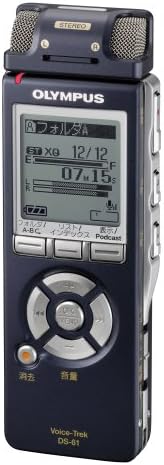
Figura 2: Olympus IC Recorder Voice-Trek DS-61, showing the main display and control layout.
4.1 Pannello frontale
- Display: Mostra lo stato di registrazione, file information, menu options, and battery level.
- Control Buttons (Play, Stop, Record, Rewind, Fast Forward): Used for recording, playback, and navigation.
- Pulsante OK/Menu: Conferma le selezioni e accede al menu.
- Folder/Index Buttons: Navigates between folders and sets index marks.
4.2 pannelli laterali
- Interruttore di accensione/mantenimento: Turns the device on/off and locks buttons.
- Pulsanti del volume (+/-): Regola il volume di riproduzione.
- Porta USB: Connects the recorder to a computer.
- Jack per microfono: Per collegare un microfono esterno.
- Spinotto degli auricolari: Per collegare le cuffie.
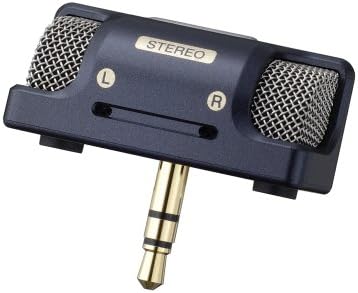
Figura 3: An external stereo microphone accessory, which can be connected to the device for enhanced audio capture.

Figura 4: A wired remote control accessory, allowing for convenient operation from a distance.
5. Impostazione
5.1 Installazione della batteria
- Aprire il coperchio del vano batteria sul retro del dispositivo.
- Inserire due batterie AAA, assicurandosi della corretta polarità (+/-).
- Chiudere saldamente il coperchio del vano batterie.
5.2 Impostazioni iniziali (data e ora)
Upon first use or after battery replacement, you may need to set the date and time.
- Turn on the device using the Power switch.
- If prompted, follow the on-screen instructions to set the year, month, day, hour, and minute.
- Use the navigation buttons to adjust values and the OK button to confirm.
5.3 Collegamento a un computer
The Voice-Trek DS-61 can be connected to a computer for file trasferimento.
- Assicurarsi che il registratore sia acceso.
- Connect the smaller end of the USB cable to the USB port on the recorder.
- Collega l'estremità più grande del cavo USB a una porta USB disponibile sul tuo computer.
- The recorder will appear as a removable disk drive on your computer, allowing you to drag and drop audio files.
6. Istruzioni per l'uso
6.1 Registrazione di base
- Accendi il dispositivo.
- Premere il tasto Documentazione button. The recording indicator will light up, and recording will begin.
- Per mettere in pausa la registrazione, premere il Documentazione di nuovo il pulsante. Premerlo ancora una volta per riprendere.
- Per interrompere la registrazione, premere il pulsante Fermare pulsante. Il registrato file verrà salvato automaticamente.
6.2 Riproduzione
- Naviga verso il desiderato file using the Folder and navigation buttons.
- Premere il tasto Giocare pulsante per avviare la riproduzione.
- Utilizzare il Volume +/- pulsanti per regolare il volume di riproduzione.
- Premere Fermare per terminare la riproduzione.
6.3 File Gestione
The Voice-Trek DS-61 allows you to organize and manage your recorded files.
- Cartelle: Use the Folder buttons to switch between different recording folders (e.g., A, B, C).
- Erasing Files: Selezionare il file you wish to erase, then access the menu and select the 'Erase' option. Confirm your selection.
6.4 Navigazione nel menu
Premere il tasto Menù/OK button to access the device settings. Use the navigation buttons to scroll through options and OK per selezionare. Premere Menù/OK nuovamente per uscire dal menu.
7. Manutenzione
7.1 Pulizia
Wipe the exterior of the recorder with a soft, dry cloth. Do not use liquid cleaners, solvents, or abrasive materials, as these can damage the finish or internal components.
7.2 Conservazione
Quando non si utilizza il dispositivo per lunghi periodi, rimuovere le batterie per evitare perdite. Conservare il dispositivo in un luogo fresco e asciutto, lontano dalla luce solare diretta e da temperature estreme.
8. Risoluzione Dei Problemi
If you encounter issues with your Voice-Trek DS-61, refer to the following common problems and solutions:
| Problema | Possibile causa | Soluzione |
|---|---|---|
| Il dispositivo non si accende. | Le batterie sono scariche o inserite in modo errato. | Sostituire le batterie o controllare la polarità. |
| Nessun suono durante la riproduzione. | Volume is too low; headphones not connected properly. | Increase volume; ensure headphones are fully inserted. |
| Impossibile registrare. | Memory is full; device is in HOLD mode. | Elimina vecchio files to free up space; slide the HOLD switch to the OFF position. |
| Il computer non riconosce il dispositivo. | USB cable is faulty or not connected properly. | Try a different USB port or cable; ensure the device is powered on. |
9. Specifiche
| Caratteristica | Dettaglio |
|---|---|
| Marca | Olimpo |
| Numero di modello | DS-61 |
| Capacità di archiviazione della memoria | 2 GB |
| Interfaccia Hardware | USB |
| Peso dell'articolo | 80 grammi |
| Fonte di alimentazione | Batterie AAA (x2) |
| Formato di registrazione | DSS, MP3 (check device for exact formats) |
| Microfono | Built-in stereo microphone, external microphone jack |
| Oratore | Altoparlante incorporato |
10. Garanzia e supporto
Olympus products are manufactured to high-quality standards. For information regarding warranty coverage, please refer to the warranty card included with your product or visit the official Olympus website. For technical support, product registration, or service inquiries, please contact Olympus customer support through their official channels.
Supporto online: Visit the official Olympus support websito per FAQ, download di software e informazioni di contatto.
Assistenza clienti: Refer to your product packaging or the Olympus websito per i dettagli di contatto del servizio clienti regionale.