
1. Introduzione
The Mitsubishi HC1500 is a high-definition 720p DLP home theater projector designed to deliver clear and vibrant images. This manual provides essential information for the proper setup, operation, and maintenance of your projector, ensuring optimal performance and longevity.
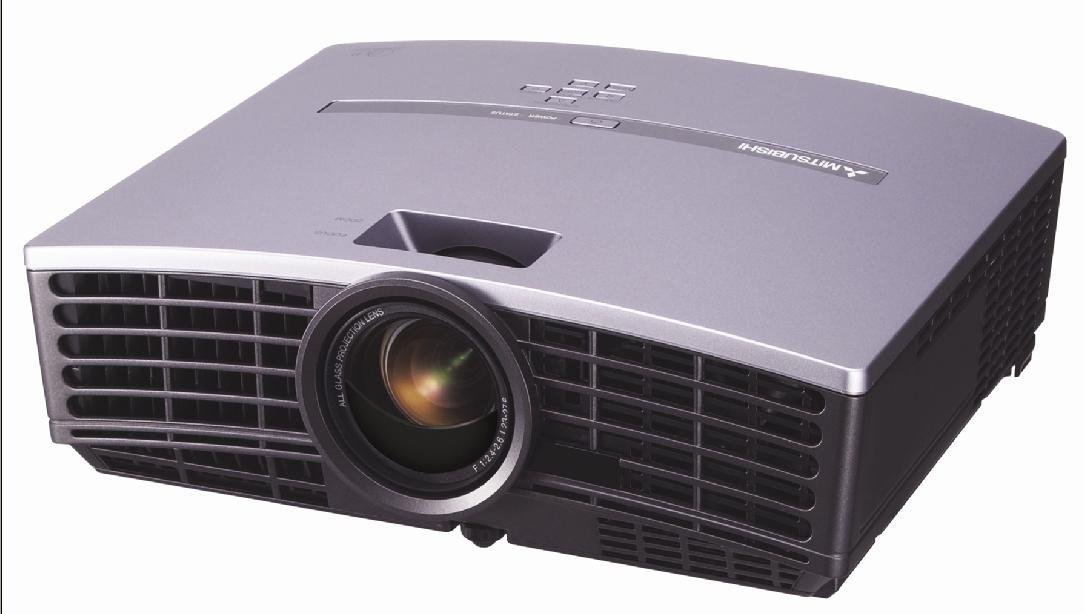
Figura 1: Davanti view of the Mitsubishi HC1500 projector. This image displays the projector's front panel, featuring the central projection lens and the prominent ventilation grilles on both sides, designed for efficient heat dissipation.
2. Informazioni sulla sicurezza
Please read all safety instructions before operating the projector. Failure to follow these instructions may result in electric shock, fire, or damage to the projector.
- Non ostruire le aperture di ventilazione. Assicurarsi che vi sia spazio sufficiente attorno al proiettore per un corretto flusso d'aria.
- Non guardare direttamente nell'obiettivo del proiettore quando lamp è acceso, poiché la luce intensa può causare danni agli occhi.
- Non posizionare il proiettore su un carrello, supporto o tavolo instabile.
- Scollegare il proiettore dalla presa di corrente prima di pulirlo o quando non lo si utilizza per un periodo prolungato.
- Affidare tutti gli interventi di assistenza a personale qualificato.
3. Cosa c'è nella scatola
Verifica che tutti gli articoli elencati di seguito siano inclusi nel tuo pacchetto:
- Mitsubishi HC1500 Projector
- Cavo di alimentazione CA.
- Cavo RGB
- Cavo RS-232C
- Remote Unit with Battery
- Light Shade Cover
- Scheda di avvio rapido
- Manuale dell'utente (questo documento)
- Manuale di sicurezza
4. Impostazione
4.1 Posizionamento
Position the projector on a stable surface or mount it to the ceiling. Ensure the projector is placed at an appropriate distance from the screen to achieve the desired image size. The HC1500 can project an image from 40 inches to 275 inches diagonally. Maintain clear space around the projector for ventilation.
4.2 Connessioni
Connect your video sources to the projector using the appropriate cables.
- HDMI: For high-definition digital video and audio signals. Use an HDMI 1.2 compatible cable for optimal performance.
- Componente: For high-definition analog video signals.
- RS-232C: Per il controllo del proiettore tramite computer o sistema di controllo.
- 12-Volt Trigger: To control a compatible motorized screen.
4.3 Accensione/spegnimento
- Connect the AC power cable to the projector and a power outlet.
- Premere il pulsante di accensione sul proiettore o sul telecomando per accendere l'unità. La spia di accensione si illuminerà.
- To turn off the projector, press the power button again. Confirm shutdown if prompted. The projector will enter a cooling cycle before fully powering down.
5. Funzionamento del proiettore
5.1 telecomando
The included remote control allows for convenient operation of all projector functions, including power, input selection, menu navigation, and image adjustments. The remote features backlit buttons for use in dark environments.
5.2 Selezione dell'ingresso
Press the 'Input' or 'Source' button on the remote control or projector control panel to cycle through available input sources (e.g., HDMI, Component, RGB). Select the input corresponding to your connected device.
5.3 Regolazione dell'immagine
- Anello di messa a fuoco: Rotate the focus ring on the projector lens to sharpen the image.
- Anello dello zoom: Regolare l'anello dello zoom per modificare le dimensioni dell'immagine senza spostare il proiettore.
- Correzione trapezoidale: Use the digital keystone correction feature (vertical and horizontal) via the on-screen menu to correct trapezoidal image distortion if the projector is not perfectly perpendicular to the screen.
5.4 Lamp Modalità
The projector offers different lamp modes to balance brightness and lamp vita:
- Modalità luminosa: Provides maximum brightness (1600 ANSI lumens) for well-lit environments. Lamp life is approximately 2000 hours.
- Modalità bassa: Reduces brightness for darker environments, extending lamp life to approximately 3000 hours and reducing fan noise (25dBA).
6. Manutenzione
6.1 Lamp Sostituzione
The projector features a convenient side-loading lamp design for easy replacement. When the lamp life is nearing its end, a warning message will appear on the screen. Always use a genuine Mitsubishi replacement lamp. Refer to the detailed instructions in the full user manual for the lamp procedura di sostituzione.
6.2 Pulizia
- Esterno: Pulisci il proiettore casincon un panno morbido e asciutto. Per lo sporco ostinato, utilizzare un panno leggermente damp panno con un detergente delicato, quindi asciugare.
- Lente: Use a lens cleaning cloth and lens cleaning solution specifically designed for optical surfaces. Do not use abrasive cleaners.
- Ventilazione: Ensure the ventilation grilles are free from dust and obstructions. Use a soft brush or compressed air to gently clean the grilles.
7. Risoluzione Dei Problemi
Se riscontri problemi con il proiettore, fai riferimento ai seguenti problemi comuni e alle relative soluzioni:
| Problema | Possibile causa | Soluzione |
|---|---|---|
| Nessuna immagine visualizzata | Power cable disconnected; incorrect input source selected; source device not powered on. | Check power connections; select correct input source; ensure source device is on. |
| L'immagine è sfocata | Lente fuori fuoco; proiettore troppo vicino/lontano dallo schermo. | Adjust the focus ring on the lens; reposition the projector or adjust the zoom. |
| L'immagine è trapezoidale | Proiettore non perpendicolare allo schermo. | Use keystone correction in the projector menu or adjust projector angle. |
| Nessun suono | No internal speaker; external audio system not connected or muted. | The HC1500 does not have an internal speaker. Connect an external audio system to your source device. |
| Il proiettore si surriscalda o si spegne | Ventilazione bloccata; temperatura ambiente elevata. | Ensure ventilation openings are clear; operate in a well-ventilated area. |
8. Specifiche
- Modello: HC1500
- Tecnologia di visualizzazione: DLP (Digital Light Processing)
- Risoluzione nativa: Risoluzione 1280 x 720 (720p)
- Luminosità: 1600 ANSI Lumen
- Rapporto di contrasto: 2500:1
- Lamp Vita: Up to 3000 hours (Low Mode), 2000 hours (Bright Mode)
- Livello di rumore: 25dBA (Low Mode)
- Connettività: HDMI, Component, RS-232C, 12-Volt Trigger
- Dimensioni della proiezione: Da 40 a 275 pollici (diagonale)
- Correzione trapezoidale: Vertical and Horizontal Digital
- Dimensioni: Circa 16.3 x 13.9 x 14 pollici
- Peso: Circa 6.39 libbre
9. Garanzia e supporto
9.1 Informazioni sulla garanzia
The Mitsubishi HC1500 projector is backed by a Garanzia limitata di 1 anno su parti e manodoperaIl proiettore lamp is covered by a separate 90-day lamp garanziaSi prega di conservare la prova d'acquisto per eventuali reclami in garanzia.
9.2 Assistenza clienti
For technical assistance, troubleshooting beyond this manual, or warranty service, please contact Mitsubishi customer support. Refer to the official Mitsubishi website or the quick start guide for current contact information.