
Introduzione
This manual provides detailed instructions for the setup, operation, and maintenance of your Teac SR-L200i-W Hi-Fi Table Radio with iPod Dock. Please read this manual thoroughly before using the product to ensure proper and safe operation. Keep this manual for future reference.
Informazioni sulla sicurezza
- Do not expose this appliance to rain or moisture to reduce the risk of fire or electric shock.
- Non ostruire le aperture di ventilazione. Installare secondo le istruzioni del produttore.
- Non installare vicino a fonti di calore come radiatori, bocchette di riscaldamento, stufe o altri apparecchi (inclusi amplificatori) che producono calore.
- Proteggere il cavo di alimentazione dall'essere calpestato o schiacciato, in particolare in corrispondenza di spine, prese di corrente e nel punto in cui escono dall'apparecchio.
- Utilizzare solo accessori/componenti specificati dal produttore.
- Scollegare l'apparecchio durante i temporali o quando non viene utilizzato per lunghi periodi di tempo.
Contenuto della confezione
Verifica che tutti gli articoli elencati di seguito siano inclusi nel tuo pacchetto:
- Teac SR-L200i-W Hi-Fi Table Radio with iPod Dock
- Telecomando
- Multiple iPod Dock Adapters
- Copertura del bacino
- Manuale dell'utente (questo documento)
Prodotto finitoview
The Teac SR-L200i-W is a versatile Hi-Fi table radio featuring an integrated iPod dock, AM/FM tuner, and auxiliary input. It is designed to provide clear audio performance in a compact form factor.
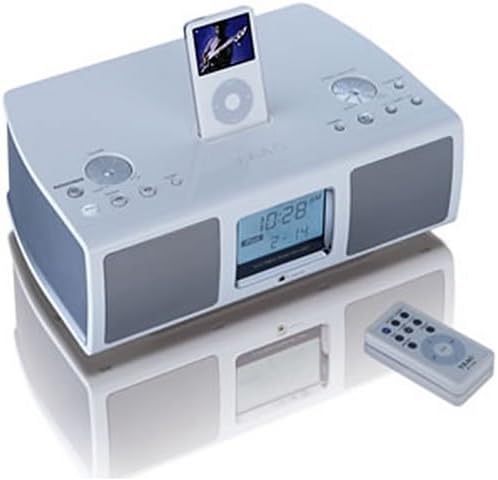
Image: The Teac SR-L200i-W Hi-Fi Table Radio in white, featuring a docked iPod, front-facing speakers, an LCD display showing time and date, and various control buttons on the top panel. A matching remote control is positioned to the right of the unit.
Componenti chiave:
- Dock per iPod: Located on the top panel for connecting and charging compatible iPod models.
- Schermo LCD: Shows time, radio frequency, and iPod information. Features a dimmer function.
- Pulsanti di controllo: Various buttons on the top panel for power, volume, mode selection, tuning, and alarm settings.
- Relatori: Two 2.5-inch full-range speakers for audio output.
- Sensore del telecomando: Riceve segnali dal telecomando incluso.
- Jack per cuffie: Per l'ascolto privato.
- Ingresso ausiliario: Per collegare dispositivi audio esterni.
Impostare
1. Disimballaggio e posizionamento:
Carefully remove the unit from its packaging. Place the radio on a stable, flat surface away from direct sunlight, heat sources, and moisture. Ensure adequate ventilation around the unit.
2. Collegamento elettrico:
Connect the AC power cord to the power input on the back of the unit, then plug the other end into a standard wall outlet.
3. Collegamento dell'antenna:
For optimal AM/FM reception, connect the supplied AM loop antenna and FM wire antenna to their respective jacks on the rear of the unit. Adjust their position for the best signal.
4. iPod Docking:
Select the appropriate iPod dock adapter for your specific iPod model from the included accessories. Insert the adapter into the dock on the top of the unit, then carefully place your iPod into the dock. The iPod will begin charging automatically when docked.
5. Ingresso ausiliario:
To connect an external audio device (e.g., MP3 player, personal CD player), use a 3.5mm audio cable (not included) to connect the device's headphone or line-out jack to the AUX IN jack on the front of the SR-L200i-W.
Istruzioni per l'uso
1. Accensione/spegnimento:
Premere il tasto ENERGIA button on the unit or the remote control to turn the unit on or off.
2. Controllo del volume:
Ruotare il VOLUME manopola sull'unità o utilizzare il VOL+/- pulsanti sul telecomando per regolare il livello del suono.
3. Selezione della modalità:
Premere il tasto MODALITÀ button on the unit or remote to cycle through available sources: iPod, FM Radio, AM Radio, and AUX.
4. iPod Playback:
- Assicurati che l'iPod sia correttamente inserito.
- Select iPod mode using the MODALITÀ pulsante.
- Use the iPod's controls or the remote control's iPod-specific buttons (Play/Pause, Skip, etc.) to manage playback.
5. Radio Operation (AM/FM):
- Selezionare la modalità AM o FM utilizzando il MODALITÀ pulsante.
- Sintonizzazione manuale: Utilizzare il SINTONIA + / - buttons on the unit or remote to manually adjust the frequency.
- Scansione automatica: Premere e tenere premuto il tasto SINTONIA + / - pulsanti per cercare automaticamente la stazione disponibile successiva.
- Preselezioni: The unit supports 10 AM and 10 FM station presets. To store a station, tune to the desired frequency, then press and hold a PRESET number button until the display confirms storage. To recall a preset, press the corresponding PRESET pulsante numerico.
6. Clock and Alarm Functions:
- Impostazione dell'orologio: Refer to the detailed instructions in the full user manual for setting the current time.
- Impostazione della sveglia: The SR-L200i-W allows you to set an alarm to wake to either the AM/FM tuner or your docked iPod. Consult the full user manual for specific alarm setting procedures.
- Sveglia: Activate the sleep timer function to automatically turn off the unit after a set period (e.g., 90, 60, 30 minutes).
7. LCD Display and Dimmer:
The large LCD display shows relevant information. Use the DIMENSIONATORE button on the unit or remote to adjust the brightness of the display for comfortable viewing, soprattutto in condizioni di scarsa illuminazione.
8. Controllo remoto:
The included remote control provides convenient access to most functions, including power, volume, mode selection, tuning, iPod playback controls, and alarm settings. Ensure the remote is pointed towards the unit's sensor during use.
Manutenzione
Pulizia:
Wipe the exterior of the unit with a soft, dry cloth. Do not use abrasive cleaners, waxes, or solvents. Ensure the unit is unplugged before cleaning.
Dock per iPod:
Keep the iPod dock connector free of dust and debris to ensure proper connection and charging.
Risoluzione dei problemi
| Problema | Possibile causa | Soluzione |
|---|---|---|
| Nessun potere | Power cord not connected; power outlet not active | Assicurarsi che il cavo di alimentazione sia collegato saldamente; testare la presa con un altro dispositivo. |
| Nessun suono | Volume too low; incorrect mode selected; headphones connected | Increase volume; select correct source mode (iPod, AM, FM, AUX); disconnect headphones. |
| iPod non riproduce/non si carica | iPod not properly docked; incorrect adapter; iPod issue | Re-dock iPod; ensure correct adapter is used; check iPod functionality independently. |
| Scarsa ricezione radio | Antenna not connected/positioned correctly; interference | Connect and adjust AM/FM antennas; move unit away from other electronic devices. |
| Il telecomando non funziona | Batteries depleted; obstruction; not pointing at sensor | Replace remote batteries; remove obstructions; point remote directly at the unit's sensor. |
Specifiche
- Modello: SR-L200i-W
- Dimensioni del prodotto (L x A x P): 13.5 x 4.38 x 9.12 pollici (34.3 x 11.1 x 23.2 cm)
- Peso dell'articolo: Circa 8 libbre (3.6 kg)
- Relatori: Two 2.5-inch, full-range dynamic speakers
- Sintonizzatore: Digital AM/FM tuner with 10 AM and 10 FM presets
- Connettività: iPod Dock, Auxiliary Input (3.5mm), Headphone Jack
- Display: Large LCD with dimmer function
- Fonte di energia: Alimentazione CA
- Colore: Bianco
Informazioni sulla garanzia
The Teac SR-L200i-W Hi-Fi Table Radio with iPod Dock comes with a one-year limited warranty from the date of purchase. This warranty covers manufacturing defects under normal use. Please retain your proof of purchase for warranty claims. For specific terms and conditions, refer to the warranty card included with your product or contact Teac customer support.
Assistenza clienti
If you encounter any issues not covered in the troubleshooting section or require further assistance, please contact Teac customer support. Visit the official Teac websito per informazioni di contatto, FAQ e risorse aggiuntive.