
1. Introduzione
This manual provides instructions for the setup, operation, and maintenance of your Bose MediaMate Computer Speakers. These speakers are designed to enhance the audio experience for your computer, whether for music, movies, or gaming. The compact design and upward-angled sound projection optimize audio delivery for desktop use, occupying minimal desk space.
2. Informazioni sulla sicurezza
Please read and follow all safety instructions before using this product to prevent electric shock, fire, or injury. Keep this manual for future reference.
- Non esporre gli altoparlanti all'acqua o all'umidità.
- Non posizionare gli altoparlanti vicino a fonti di calore quali radiatori, bocchette di riscaldamento, stufe o altri apparecchi (inclusi amplificatori) che producono calore.
- Utilizzare solo gli accessori specificati dal produttore.
- Scollegare l'apparecchio durante i temporali o quando non viene utilizzato per lunghi periodi di tempo.
- Affidare tutti gli interventi di assistenza a personale di assistenza qualificato. L'assistenza è richiesta quando l'apparecchio è stato danneggiato in qualsiasi modo, ad esempio se il cavo di alimentazione o la spina sono danneggiati, se è stato versato del liquido o sono caduti degli oggetti nell'apparecchio, se l'apparecchio è stato esposto a pioggia o umidità, se non funziona normalmente o se è caduto.
3. Contenuto della confezione
Verifica che tutti gli articoli siano presenti nel tuo pacco:
- Bose MediaMate Computer Speakers (2 units)
- Adattatore di alimentazione
- Audio Cable (3.5mm stereo jack)
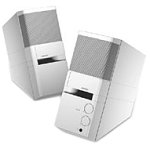
Image: The Bose MediaMate Computer Speakers in Gray. The image shows two compact speakers, one with visible volume and mix controls, and a headphone jack.
4. Impostazione
Follow these steps to set up your Bose MediaMate Computer Speakers:
- Posizionamento: Place the speakers on a flat, stable surface on either side of your computer monitor. Ensure they are angled slightly upward towards your listening position for optimal sound.
- Collegare il cavo audio: Connect the 3.5mm audio cable from the back of the primary speaker (the one with controls) to the audio output jack on your computer.
- Connetti alimentazione: Plug the power adapter into the power input on the primary speaker, then plug the adapter into a wall outlet.
- Accensione: Turn on the speakers using the volume knob. The power indicator light should illuminate.
5. Istruzioni per l'uso
Once set up, operating your MediaMate speakers is straightforward:
- Controllo del volume: Use the large knob labeled "VOLUME" on the front of the primary speaker to adjust the overall sound level.
- Controllo della miscelazione: The "MIX" knob allows you to blend audio from two different sources if you have a second device connected to the auxiliary input.
- Jack per cuffie: For private listening, plug your headphones into the headphone jack located on the front of the primary speaker. This will mute the speakers.
- Doppi ingressi: The speakers feature dual inputs, allowing you to connect and mix two audio sources simultaneously. For example, you can connect your computer and a portable music player.
6. Manutenzione
Per garantire la longevità e le prestazioni ottimali dei tuoi altoparlanti:
- Pulizia: Use a soft, dry cloth to clean the exterior surfaces of the speakers. Do not use liquid cleaners or aerosols.
- Polvere: Spolverare regolarmente le griglie degli altoparlanti per evitare accumuli che potrebbero compromettere la qualità del suono.
- Magazzinaggio: Se si conservano gli altoparlanti per un periodo prolungato, scollegarli dall'alimentazione e conservarli in un luogo fresco e asciutto.
7. Risoluzione Dei Problemi
If you encounter issues with your Bose MediaMate speakers, refer to the following common problems and solutions:
| Problema | Possibile causa | Soluzione |
|---|---|---|
| Nessun suono |
|
|
| Suono distorto |
|
|
| Funziona solo un altoparlante |
|
|
8. Specifiche
- Marca: Bose
- Modello: MediaMate
- Connettività: 3.5mm Audio Input, AC Power
- Uscita audio: Stereo
- Tipo di altoparlante: Multimedia
- Materiale: Metallo
- Dimensioni altoparlante: 6 Centimeters (Audio Driver)
- Peso dell'articolo: 3 libbre
- Colore: Grigio
9. Garanzia e supporto
Bose MediaMate Computer Speakers come with a limited warranty. For specific warranty details and duration, please refer to the warranty card included with your product or visit the official Bose websito.
For technical support, product registration, or service inquiries, please contact Bose customer service:
- Telefono: Numero di telefono: 800-444-2673
- Websito: www.bose.com
Please have your product model number (MediaMate) and purchase date available when contacting support.