
Inngangur
Welcome to the HP OmniDesk M03 AI Desktop PC. This manual provides essential information for setting up, operating, maintaining, and troubleshooting your new computer. The HP OmniDesk M03 is designed for performance and efficiency, featuring an Intel Core Ultra 7 265 processor with dedicated AI cores, 16GB DDR5 RAM, and a 2TB NVMe SSD, running on Windows 11 Home.
Hvað er í kassanum
Gakktu úr skugga um að allir íhlutir séu til staðar í umbúðunum:
- HP OmniDesk Desktop PC
- Þráðlaust lyklaborð
- Mús
- Quick Setup Guide
- Rafmagnssnúra

Image: The HP OmniDesk M03 desktop PC, wireless keyboard, mouse, and power cable, illustrating the contents of the product box.
Uppsetning
1. Tengja jaðartæki
Before powering on your PC, connect your monitor, keyboard, and mouse.
- Skjár: Connect your monitor to the PC using an HDMI or DisplayPort cable. The ports are located on the rear of the PC.
- Lyklaborð og mús: The included keyboard and mouse are wireless. Insert batteries (if not pre-installed) and connect their USB receiver to an available USB port on the PC.
- Kraftur: Connect the power cable to the PC's power input on the rear and then to a wall outlet.
- Net (valfrjálst): For a wired internet connection, connect an Ethernet cable from your router to the RJ45 port on the rear of the PC.

Image: Rear panel of the HP OmniDesk M03, highlighting the DisplayPort, HDMI, USB, and Ethernet ports for connecting external devices.

Mynd: Hlið view of the HP OmniDesk M03 AI Desktop PC, showing its compact tower design.
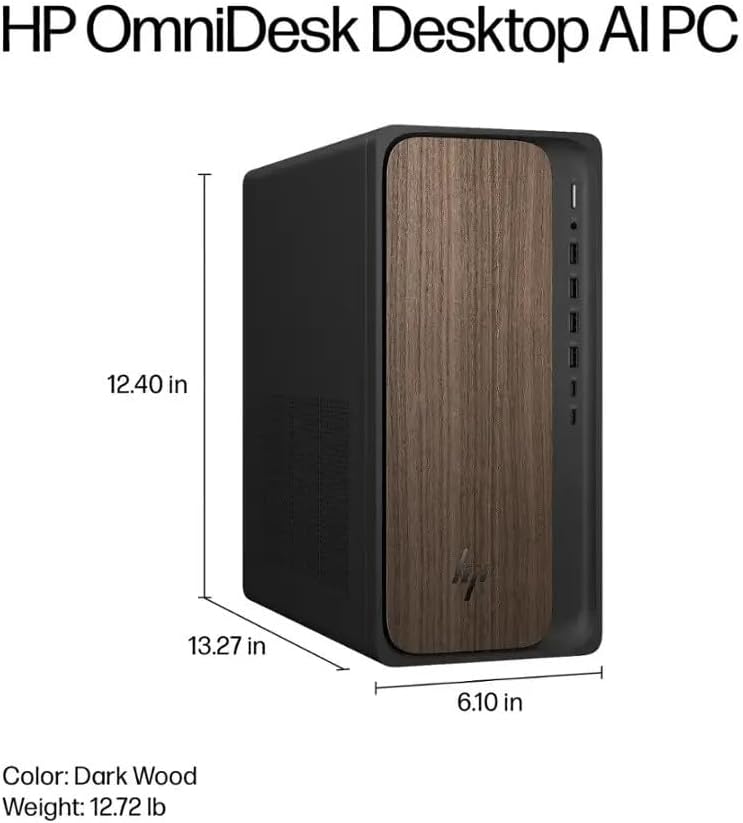
Image: Diagram illustrating the location and type of front and rear ports on the HP OmniDesk M03, including USB-A, USB-C, HDMI, DisplayPort, and audio jacks.
2. Kveikja og upphafleg uppsetning
Þegar öll jaðartæki eru tengd:
- Ýttu á rofann sem er staðsettur á framhlið tölvunnar.
- Follow the on-screen instructions to complete the Windows 11 Home initial setup, including language selection, network connection (if not wired), account creation, and privacy settings.

Mynd: Framan view of the HP OmniDesk M03, showing the power button at the top right and various USB ports below it.
Að stjórna tölvunni þinni
Windows 11 Home
Your HP OmniDesk M03 comes pre-installed with Windows 11 Home. Familiarize yourself with the operating system's interface, Start menu, and settings. Microsoft provides extensive online resources for Windows 11 usage.
AI eiginleikar
The Intel Core Ultra 7 265 processor includes dedicated AI cores and Intel AI Boost, enhancing performance for AI-driven applications and features within Windows 11, such as AI Copilot. These features can assist with tasks, content creation, and system optimization.
Tengingar
- Þráðlaust net 6 (802.11ax): Connect to wireless networks for internet access. Manage Wi-Fi settings through the Windows 11 network settings.
- Bluetooth 5.4: Pair wireless devices such as headphones, speakers, or additional input devices. Access Bluetooth settings via the Windows 11 settings menu.
- Ethernet: For a stable, high-speed wired connection, ensure an Ethernet cable is connected to the RJ45 port.
Viðhald
Cleaning Your PC
- Að utan: Notaðu mjúkan, lólausan klút örlítið dampened with water or a mild cleaning solution to wipe down the exterior. Avoid harsh chemicals.
- Loftop: Hreinsið reglulega ryk af loftræstigrindum með þrýstilofti til að tryggja rétta loftflæði og koma í veg fyrir ofhitnun.
- Hafnir: Haldið höfnum lausum við ryk og rusl.
Hugbúnaðaruppfærslur
Regularly update Windows 11 and device drivers to ensure optimal performance, security, and compatibility. Access Windows Update through the Settings menu.
Öryggisafritun gagna
Mælt er með að taka reglulega öryggisafrit af mikilvægum gögnum á utanaðkomandi disk eða skýgeymslu til að koma í veg fyrir gagnatap.
Úrræðaleit
Þessi hluti fjallar um algeng vandamál sem þú gætir rekist á.
- Enginn kraftur:
- Gakktu úr skugga um að rafmagnssnúran sé vel tengd bæði við tölvuna og innstunguna.
- Staðfestu að innstungan virki með því að stinga í samband annað tæki.
- Enginn skjár:
- Check that the monitor is powered on and correctly connected to the PC via HDMI or DisplayPort.
- Gakktu úr skugga um að rétt inntaksgjafi sé valinn á skjánum þínum.
- Engin nettenging:
- Fyrir Wi-Fi skaltu athuga hvort Wi-Fi millistykkið sé virkt og hvort þú sért tengdur við rétt net með réttu lykilorði.
- Fyrir snúrutengda tengingu skaltu ganga úr skugga um að Ethernet-snúran sé rétt tengd og að leiðin þín virki.
- Lyklaborð/mús svarar ekki:
- Athugaðu rafhlöðustöðu þráðlausra tækja.
- Ensure the USB receiver is plugged into a functional USB port.
- Reyndu að endurræsa tölvuna.
Fyrir flóknari mál, vinsamlegast vísið til HP þjónustudeildar websíðuna eða hafðu samband við þjónustuver.
Tæknilýsing
Detailed technical specifications for the HP OmniDesk M03 AI Desktop PC:
| Hluti | Forskrift |
| Örgjörvi | Intel Core Ultra 7 265 (20-Core, up to 5.3 GHz, Intel AI Boost) |
| Stýrikerfi | Windows 11 Home (64-bita) |
| Minni (RAM) | 16GB DDR5 5600 MHz |
| Geymsla | 2TB PCIe NVMe M.2 SSD diskur |
| Grafík | Innbyggt Intel grafík |
| Myndbandsúttak | 1x HDMI 2.1, 1x DisplayPort 1.4a |
| USB tengi (framan) | 2x USB-A 5Gbps, 2x USB-A 10Gbps, 1x USB-C 5Gbps, 1x USB-C 10Gbps |
| USB tengi (aftan) | 4x USB 2.0 Type-A |
| Hljóðtengi | 1x Headphone/Microphone Combo, 1x Line Input, 1x Line Output |
| Net | Wi-Fi 6 (802.11ax), Bluetooth 5.4, Gigabit Ethernet (RJ45) |
| Mál (H x B x D) | 13.3" x 6.1" x 12.4" (33.8 cm x 15.5 cm x 31.5 cm) |
| Þyngd | 11.77 lb (5.34 kg) |

Image: Diagram showing the height (13.27 inches), width (6.10 inches), and depth (12.40 inches) of the HP OmniDesk M03 desktop PC.
Ábyrgð og stuðningur
Upplýsingar um ábyrgð
Your HP OmniDesk M03 AI Desktop PC comes with a 90 daga takmörkuð ábyrgð. This warranty covers defects in materials and workmanship under normal use. For detailed terms and conditions, please refer to the warranty documentation included with your product or visit the official HP support websíða.
Þjónustudeild
For technical assistance, troubleshooting, or warranty claims, please contact HP Customer Support:
- Stuðningur á netinu: Heimsæktu embættismanninn HP stuðningur Websíða fyrir rekla, handbækur og leiðbeiningar um bilanaleit.
- Símastuðningur: Refer to the Quick Setup Guide or HP's websíða fyrir svæðisbundin tengiliðanúmer.
Þegar þú hefur samband við þjónustuver skaltu hafa vörugerðina þína (M03) og raðnúmerið tilbúið.