
1. Okwu mmalite
This manual provides essential information for the safe and effective use of your LIGE EF18 Smartwatch. Please read it thoroughly before using the device and retain it for future reference. The LIGE EF18 is a versatile smartwatch designed for daily wear, fitness tracking, and communication, compatible with both iOS and Android smartphones.
2. Ihe ngwugwu
Chọpụta na ihe niile dị na ngwugwu gị:
- LIGE EF18 Smartwatch (with 1 stainless steel band attached)
- 2 x Silicone Bands (additional)
- Charging Cable (USB-A)
- Ịchaji eriri (USB-C)
- Band Adjustment Tool (for stainless steel band)
- Akwụkwọ ntuziaka onye ọrụ

Image: The LIGE EF18 Smartwatch, showing its large round display, accompanied by two additional silicone bands, two charging cables (USB-A and USB-C), and a band adjustment tool.
3. Ngwaahịa gafereview
The LIGE EF18 Smartwatch features a robust design with a 1.85-inch high-definition touch display. It includes physical buttons for navigation and quick access to features.
3.1. Lelee akụrụngwa
- Ngosipụta: 1.85-inch LCD touchscreen with 2000 nits peak brightness.
- Bọtịnụ: Side buttons for power, menu navigation, and LED flashlight activation.
- Ihe mmetụta: Heart rate, blood oxygen, accelerometer, sleep tracker.
- Speaker & Microphone: For Bluetooth calling and voice assistant.
- Ọdụ ụgbọ mmiri na-ebufe: Magnetic charging pins on the back.
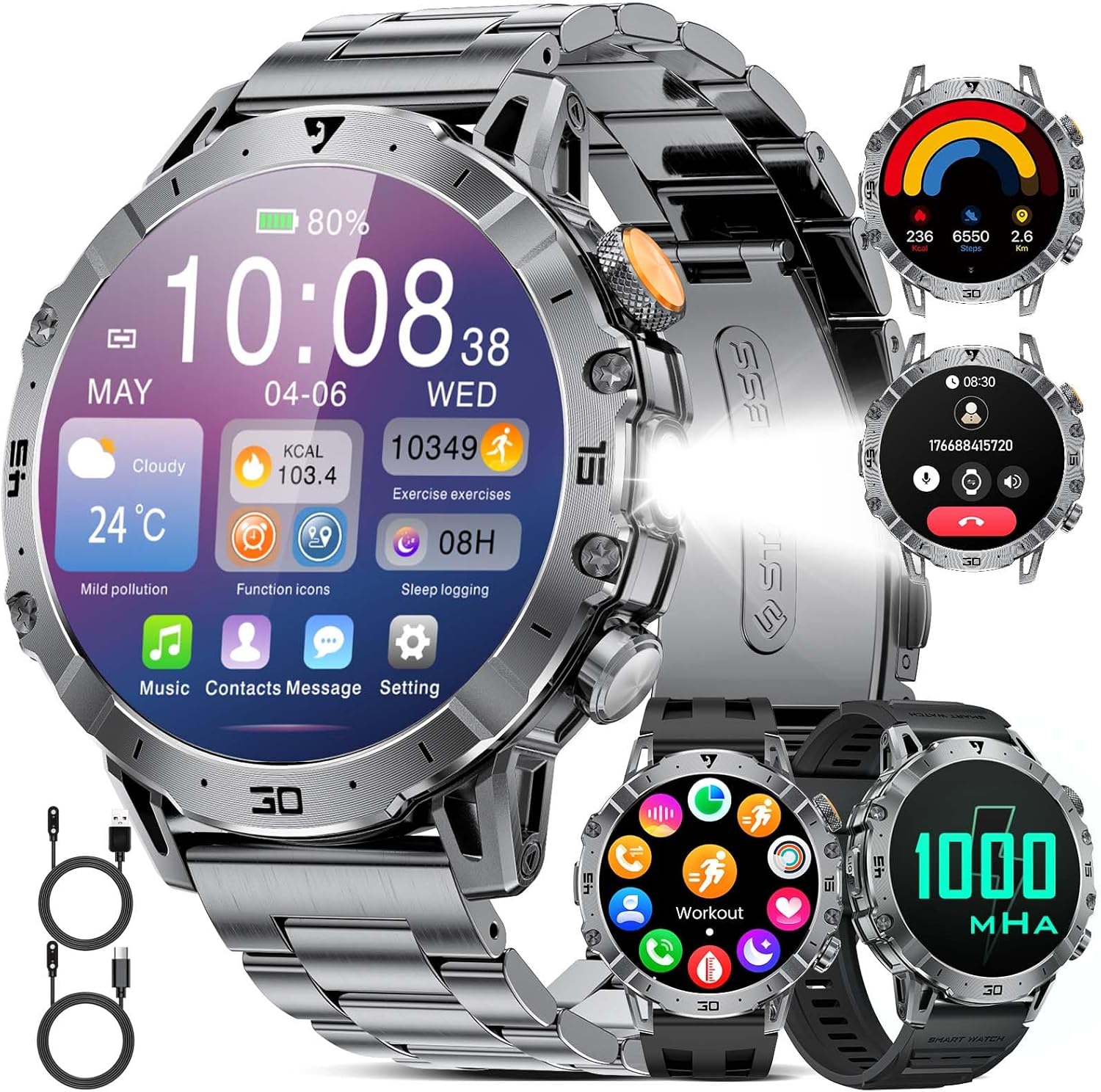
Image: A close-up of the LIGE EF18 Smartwatch, highlighting its large 1.85-inch display, metallic casing, and side buttons. The screen shows various health metrics and time.
4. Nhazi
4.1. Ịchaji smartwatch
Before first use, fully charge your smartwatch. Connect the magnetic charging cable to the charging pins on the back of the watch and plug the USB end into a power adapter (not included) or a computer USB port. A full charge takes approximately 3 hours.

Image: The LIGE EF18 Smartwatch connected to its magnetic charging cable, illustrating the charging process. The screen displays a charging animation.
4.2. Ngwa nwụnye na ijikọ
- Scan the QR code in the manual or on the watch screen to download the companion app (e.g., FitCloudPro).
- Install the app on your iOS (11.0 or higher) or Android (5.0 or higher) smartphone.
- Open the app and follow the on-screen instructions to create an account and set up your profile.
- Kwado Bluetooth na ekwentị gị.
- In the app, search for your LIGE EF18 device and pair it. Ensure the watch is powered on and near your phone.
- For Bluetooth calling functionality, ensure your iOS device is running iOS 13 or higher and follow any additional pairing prompts for call audio.
4.3. Band Installation and Adjustment
The smartwatch comes with one stainless steel band and two silicone bands. You can easily swap them to suit your style or activity.
- Otu egwu na-agbanwe: Use the quick-release pins to detach the current band and attach a new one.
- Adjusting Stainless Steel Band: Use the provided band adjustment tool to remove or add links for a comfortable fit.

Image: The LIGE EF18 Smartwatch displayed with its three interchangeable bands: a sleek stainless steel band and two flexible silicone bands, offering versatility for different occasions.
5. Ntuziaka ọrụ
5.1. Ọrụ ndị bụ isi
- Gbanyụọ/ Gbanyụọ: Press and hold the power button on the side.
- Teta ihuenyo: Raise your wrist or press any button.
- Ntugharị: Swipe left/right, up/down on the touchscreen to navigate menus. Press the side buttons for quick access or to return to the previous screen.
- Lelee ihu: Customize your watch face through the app or by long-pressing the watch screen. Over 200 online watch faces are available.

Image: The LIGE EF18 Smartwatch showcasing a selection of its over 200 customizable watch faces, allowing users to personalize their device's appearance.
5.2. Oku Bluetooth
Once paired with your smartphone, you can make and receive calls directly from your smartwatch.
- Ịkpọ oku: Access the dial pad or contact list on the watch.
- Ịnata oku: Zaa ma ọ bụ jụ oku mbata ozugbo site na ihuenyo nche.

Image: The LIGE EF18 Smartwatch worn on a wrist, showing an active incoming call notification on its display, demonstrating its Bluetooth calling capability.
5.3. Amamọkwa
Receive real-time notifications from various apps (LINE, email, SMS, SNS) directly on your watch. Manage which app notifications appear via the companion app settings.

Image: The LIGE EF18 Smartwatch screen showing multiple notification icons from popular messaging and social media applications, indicating its notification feature.
5.4. Ụdị egwuregwu
The smartwatch supports over 100 sports modes, including walking, running, cycling, strength training, yoga, and more. It automatically records your activity data such as steps, distance, and calories burned.
- Select your desired sport mode from the watch menu to start tracking.
- Review your exercise records and progress in the companion app.

Image: A LIGE EF18 Smartwatch on a user's wrist during a cycling activity, with the screen showing real-time exercise data such as duration, calories, and distance.
5.5. Nlekọta ahụike
The EF18 smartwatch provides comprehensive health monitoring features:
- Nyochaa ụra: Tracks your sleep patterns, including deep sleep, light sleep, and awake times. View nyocha zuru ezu na ngwa.
- Pedometer & Calorie Counter: Automatically counts your steps and estimates calories burned throughout the day.
- Ọnụọgụgụ obi: Monitors your heart rate continuously or on demand.
- Oxygen ọbara: Na-enyocha ọkwa oxygen dị n'ọbara gị.
- Ncheta ịnọdụ ala: Na-agwa gị ka ị gaa ebe ọzọ mgbe oge ụfọdụ nke enweghị mmega ahụ gasịrị.
- Ihe ncheta mmiri ọṅụṅụ: Prompts you to drink water at regular intervals.

Image: A user sleeping with the LIGE EF18 Smartwatch on their wrist, illustrating the device's sleep tracking capabilities and displaying sleep data on the screen.
5.6. Ikanam Light
The smartwatch is equipped with a built-in LED flashlight for convenience in dark environments.
- Activate the LED light via a dedicated button or menu option.
- Useful for night activities, finding items in the dark, or as an emergency light.

Image: The LIGE EF18 Smartwatch with its powerful LED flashlight turned on, projecting a beam of light, useful for outdoor activities or in emergencies.
5.7. Ọrụ ndị ọzọ
The LIGE EF18 Smartwatch offers a variety of additional features:
- Amụma ihu igwe: Displays current weather and forecasts when connected to your phone.
- Njikwa egwu: Jikwaa egwu egwu na ekwentị gị (kpọọ, kwụsịtụ, wụpụ egwu).
- Njikwa igwefoto dị anya: Jiri elekere gị dị ka ihe mkpuchi anya maka igwefoto ekwentị gị.
- Chọta ekwentị: Helps locate your paired smartphone by making it ring.
- Elekere mkpu: Set multiple alarms with vibration alerts.
- Mgbako: Basic calculator function.
- Enyemaka Olu: Access your phone's voice assistant (e.g., Siri, Google Assistant) through the watch.
- Ụdị nsogbu adịghị: Mutes notifications during specified times.

Image: The LIGE EF18 Smartwatch showcasing its multi-functional capabilities, including weather display, music control interface, and remote camera activation, among others.
6. Mmiri Na-eguzogide Mmiri (IP68)
The LIGE EF18 Smartwatch is IP68 rated, meaning it is resistant to dust and can withstand immersion in water up to 1.5 meters for 30 minutes. It is suitable for daily use such as hand washing, rain, and splashes during sports activities.
Ihe ndetu dị mkpa:
- Do not use the watch for prolonged periods underwater.
- Not suitable for diving, hot water, seawater, or sauna environments.
- Water resistance may decrease over time with normal wear and tear.

Image: The LIGE EF18 Smartwatch with water splashing on it, visually representing its IP68 water-resistant design, suitable for everyday exposure to water.
7. Ndụ batrị
The LIGE EF18 is equipped with a 1000mAh ultra-large capacity lithium polymer battery, offering extended usage times.
- Nkezi Ojiji: Up to 10-20 days depending on feature usage.
- Oge njikere: Over 40 days.
- Oge nchaji: Ihe dị ka awa 3 maka ụgwọ zuru ezu.

Image: The LIGE EF18 Smartwatch with a prominent graphic emphasizing its 1000mAh battery, illustrating its long-lasting power for extended use.
8. Nlekọta
To ensure the longevity and optimal performance of your LIGE EF18 Smartwatch, follow these maintenance guidelines:
- Keep the watch clean and dry. Wipe it with a soft, dry cloth regularly.
- Avoid exposing the watch to extreme temperatures, direct sunlight for prolonged periods, or harsh chemicals.
- Clean the charging contacts periodically to ensure proper charging.
- If the bands become dirty, clean them according to their material type (e.g., mild soap and water for silicone, dry cloth for stainless steel).
9. Nchọpụta nsogbu
If you encounter issues with your LIGE EF18 Smartwatch, refer to the following common solutions:
| Nsogbu | Ngwọta enwere ike |
|---|---|
| Elekere anaghị agbanye | Hụ na elekere ahụ chajịchara nke ọma. Pịa ma jide bọtịnụ ike ahụ ruo ọtụtụ sekọnd. |
| Enweghị ike ijikọ na smartphone | Ensure Bluetooth is enabled on your phone. Make sure the watch is within range. Restart both the watch and phone. Check app permissions. |
| Anabataghị ọkwa | Check app notification settings on your phone and in the smartwatch app. Ensure the watch is connected via Bluetooth. Disable 'Do Not Disturb' mode. |
| Data ahụike ezighi ezi | Ensure the watch is worn snugly on your wrist. Clean the sensor on the back of the watch. Note that smartwatch data is for reference and not for medical use. |
| Ndụ batrị dị mkpụmkpụ | Reduce screen brightness, turn off unnecessary features, limit frequent heart rate monitoring. Ensure background app usage is optimized. |
10. Nkọwapụta
| Njirimara | Nkọwa |
|---|---|
| Nlereanya | EF18 (AK80) |
| Ngosipụta | 1.85-inch LCD Touchscreen, 2000 nits max brightness |
| Ike batrị | 1000mAh Lithium Polymer |
| Nkezi Ndụ batrị | 10-20 days (usage), 40+ days (standby) |
| Oge Nchaji | Ihe ruru. awa 3 |
| Njikọta | Bluetooth (BT4.0) |
| Mmiri Nguzogide | IP68 |
| Sistemụ nrụọrụ | AsteroidOS |
| Nchekwa ebe nchekwa | 512 MB |
| Ngwa dakọtara | iOS 11.0+ (iOS 13+ for calls), Android 5.0+ |
| Ngwa igwe | Igwe anaghị agba nchara, silicone |
| Ihe gbasara ikpe | Ọla |
| Atụmatụ | LED Flashlight, Bluetooth Call, 100+ Sports Modes, Health Monitoring (Sleep, Steps, Calories, Heart Rate, Blood Oxygen), Notifications, Weather, Music Control, Remote Camera, Find Phone, Alarm, Calculator, Voice Assistant, Drink Water Reminder, Sedentary Reminder, Do Not Disturb Mode |
11. Akwụkwọ ikike na nkwado
LIGE provides comprehensive support for your EF18 Smartwatch:
- Akwụkwọ ikike: 24-month (2-year) limited warranty from the date of purchase.
- Nkwado n'ịntanetị: 24-hour online customer support is available.
- Ọrụ nloghachi: 6-month return service is offered.
If you encounter any issues with parts, quality, operation, or charging, please contact customer support within 24 hours for a resolution.

Image: A graphic displaying the LIGE brand logo and details about their customer service, including 24-hour online support, 6-month return service, and a 2-year quality warranty.