
1. Okwu mmalite
This manual provides detailed instructions for the safe installation, operation, and maintenance of your Philips LED 4-Inch Slim Downlight. This product features a canless design, dimmable functionality, and offers five selectable color temperatures (CCTs) to suit various lighting needs. Please read this manual thoroughly before installation and retain it for future reference.

Figure 1: Philips LED 4-inch slim downlight showing its canless design, dimmable function, 5 CCT options, and suitability for damp ebe.
2. Ozi nchekwa
ỊDỌ AKA NA NTỊ: Ihe ize ndụ nke ọkụ ma ọ bụ ọkụ eletrik.
- Gbanyụọ ọkụ mgbe ọ bụla na ihe nbibi sekit tupu ịwụnye ma ọ bụ rụọ ọrụ.
- A ga-etinyerịrị ngwaahịa a dịka koodu nrụnye ọdabara si dị site n'aka onye maara ihe nrụpụta na arụmọrụ nke ngwaahịa na ihe egwu dị.
- Gbaa mbọ hụ na njikọ eletrik niile nwere nchekwa ma soro koodu na iwu mpaghara.
- Agbanwela, bugharịa, ma ọ bụ wepụ wiring, lamp ndị na-ejide ihe, ma ọ bụ ihe ndị ọzọ metụtara eletriki.
- Kwesịrị ekwesị maka damp locations. Do not use in areas with direct water exposure.
- IC kwadoro maka kọntaktị ozugbo na mkpuchi.
3. Ihe ngwugwu
Chọpụta na akụrụngwa niile dị tupu ịmalite nrụnye:
- Philips LED 4-Inch Slim Downlight (quantity as per pack)
- Junction Box (one per downlight)
- Akwụkwọ ntuziaka (akwụkwọ a)
4. Ntuziaka nwụnye
- Gbanyụọ ike: Before starting, ensure the power to the installation area is turned off at the circuit breaker.
- Prepare Ceiling Opening: Cut a circular hole in the ceiling at the desired location. Refer to the product specifications for the exact hole size (typically 4.25 inches or 108 mm for a 4-inch downlight). Ensure there are no obstructions behind the ceiling before cutting.
-
Wire the Junction Box: Open the junction box cover. Connect the household electrical wires (live, neutral, ground) to the corresponding wires inside the junction box using the provided screwless connectors. Ensure all connections are secure. Close the junction box cover.

Figure 2: Screwless junction box wiring for easy connection.
-
Select Color Temperature (CCT): Before inserting the downlight into the ceiling, locate the CCT selection switch on the side of the junction box or the downlight itself. Choose your desired color temperature (2700K, 3000K, 3500K, 4000K, or 5000K) by sliding the switch to the appropriate setting.

Figure 3: CCT selection switch on the junction box.
- Connect Downlight to Junction Box: Plug the downlight's connector cable into the corresponding receptacle on the junction box. Ensure a firm connection.
-
Fanye Downlight: Gently push the spring clips on the downlight upwards and insert the downlight into the prepared ceiling opening. The clips will secure the fixture in place. Ensure the downlight is flush with the ceiling surface.
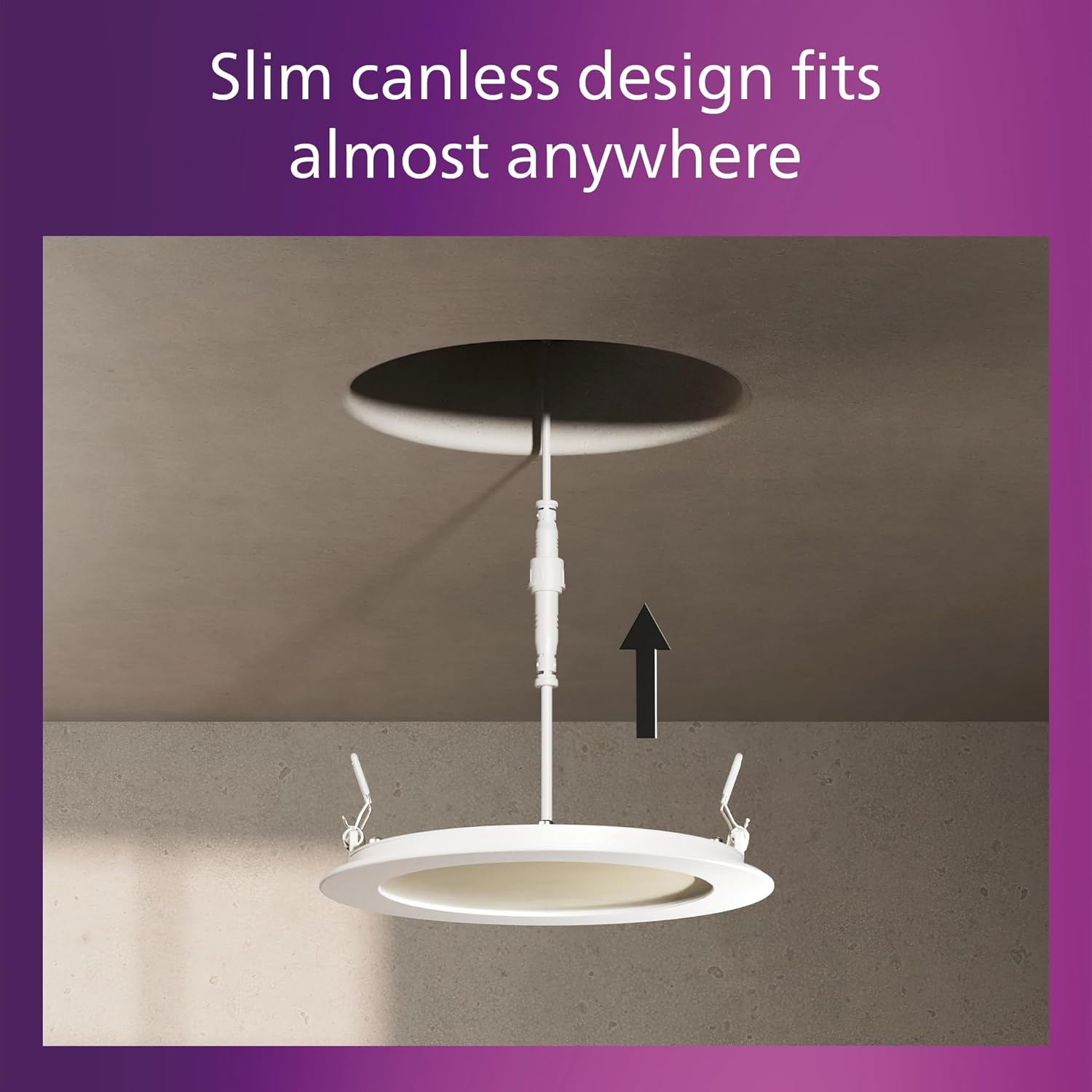
Figure 4: Installing the slim canless downlight into the ceiling.
- Weghachi ike: Ozugbo echichi mechara, weghachi ike na sekit nke na-agbaji.
The Philips LED Slim Downlight is IC rated, meaning it is suitable for direct contact with insulation, providing safe installation in various ceiling types.

Figure 5: IC rated for safe installation in insulated ceilings.
5. Ntuziaka ọrụ
The Philips LED Slim Downlight is designed for simple operation:
- Gbanyụọ/ Gbanyụọ: Use your standard wall switch to turn the downlight on or off.
-
Igha: This downlight is dimmable from 100% down to 5% brightness. Use a compatible dimmer switch (sold separately) to adjust the light output to your preferred level. Refer to the troubleshooting section for dimmer compatibility information.

Figure 6: Smooth dimming capability from 100% to 5% brightness.
- Okpomọkụ agba: The color temperature is set during installation using the switch on the junction box. It cannot be changed during normal operation without accessing the junction box.
6. Nlekọta
The Philips LED Slim Downlight requires minimal maintenance:
- Gbaa mbọ hụ na agbanyụrụ ọkụ tupu ihicha.
- Wipe the fixture with a soft, dry, or slightly damp akwa . Ejila ihe nchacha abrasive ma ọ bụ ihe mgbaze.
- No user-serviceable parts inside. Do not attempt to open or repair the fixture.
7. Nchọpụta nsogbu
| Nsogbu | Ihe nwere ike ime | Ngwọta |
|---|---|---|
| Ìhè anaghị agbanwuo. |
|
|
| Ọkụ na-enwu ma ọ bụ na-ebelata nke ọma. |
|
|
| Okpomọkụ agba na-ezighi ezi. |
|
|
Chart ndakọrịta dimmer
For optimal dimming performance, use dimmers listed in the compatibility chart below. Performance may vary with other dimmer models.

Figure 7: Dimmer compatibility chart.
8. Nkọwapụta
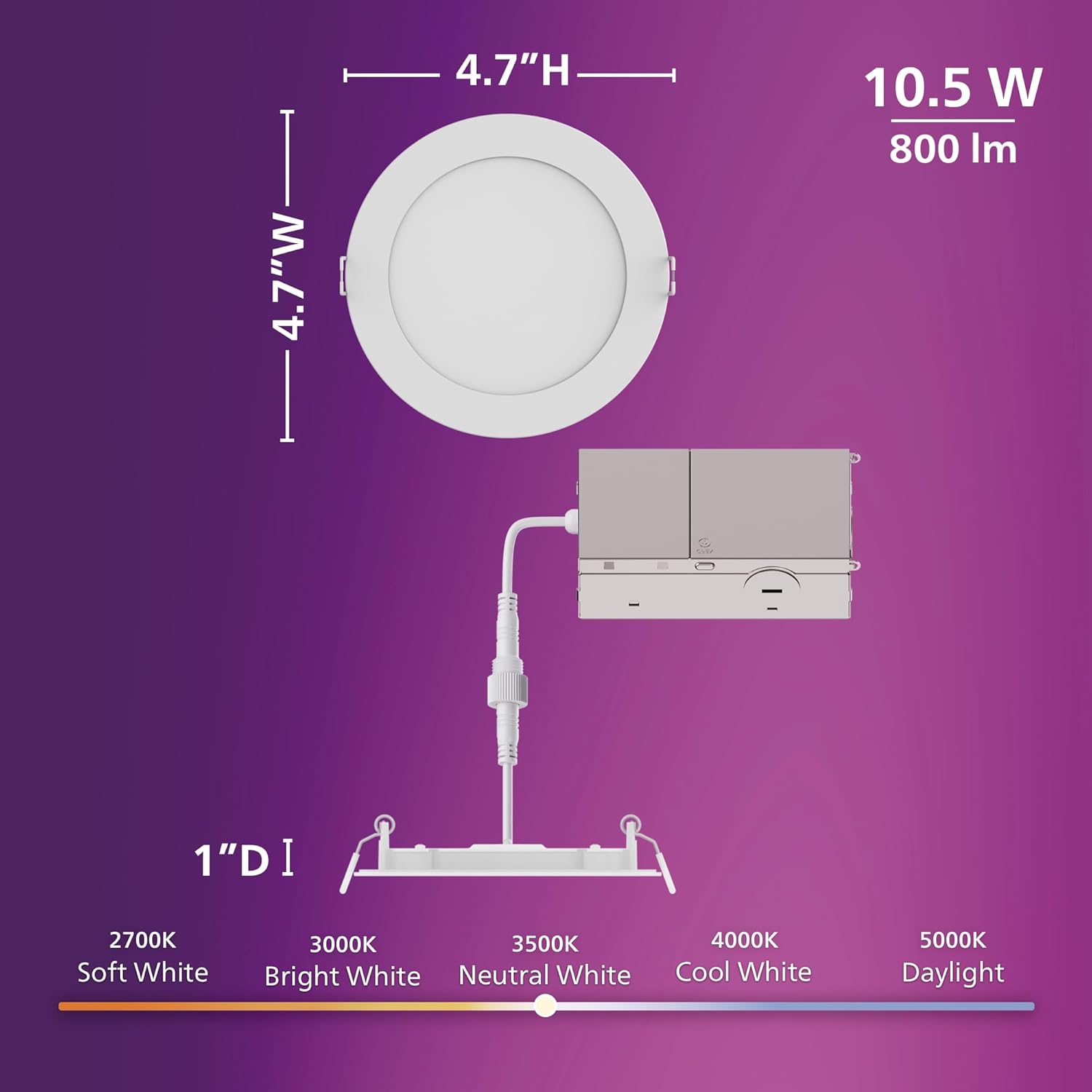
Figure 8: Product dimensions and CCT switch location.
| Njirimara | Nkọwa |
|---|---|
| Nọmba nlereanya | 608869 |
| Ụdị | FILIPS |
| Isi Iyi Ìhè | Ikanam |
| Wattage | 10.5 watt |
| Icha ọkụ | 800 lumen |
| Voltage | 120 volt |
| Okpomọkụ agba (CCT) | 2700K, 3000K, 3500K, 4000K, 5000K (selectable) |
| Enwere ike ibelata | Yes (down to 5%) |
| Oge ndụ | awa 25,000 |
| Ụdị nwụnye | Flush Mount, Canless Design |
| Ụdị ụlọ | Ime ụlọ |
| Ihe onwunwe | Plastic |
| Akụkụ ngwaahịa | 11.9L x 11.9W x 11.9H centimetres (approx. 4.7 x 4.7 x 4.7 inches) |
| Ọkwa Nguzogide mmiri | Water Resistant (Suitable for damp ebe) |
| Asambodo | IC Rated, ETL, FCC certified |
9. Akwụkwọ ikike Ozi
This Philips LED 4-Inch Slim Downlight is covered by a Akwụkwọ ikike nke onye nrụpụta afọ 2 site na ụbọchị ịzụrụ. Akwụkwọ ikike a na-ekpuchi ntụpọ dị na ngwa na arụ ọrụ n'okpuru ojiji nkịtị. Biko dowe ihe akaebe nke ịzụrụ ihe maka akwụkwọ ikike.
Akwụkwọ ikike ahụ anaghị ekpuchi mmebi nke nrụnye na-ezighi ezi, iji ya eme ihe n'ụzọ na-ezighi ezi, mmegbu, ihe mberede ma ọ bụ mgbanwe na-akwadoghị.
10. Nkwado ndị ahịa
If you have any questions, require technical assistance, or need to make a warranty claim, please contact Philips customer support. Refer to the product packaging or the official Philips websaịtị maka ozi kọntaktị kacha ugbu a.
Maka ozi ndị ọzọ, gaa na: www.fipa.com