
Okwu mmalite
Thank you for choosing the Philips Solar Security Light. This manual provides essential information for the safe and efficient operation of your solar-powered, wall-mounted flood light with PIR motion sensor. Please read these instructions carefully before installation and use, and retain them for future reference.
Ozi nchekwa
- Ensure the mounting surface is stable and can support the weight of the light fixture.
- Anwala ịkwasa ma ọ bụ gbanwee ngwaahịa a. Nke a nwere ike mebie akwụkwọ ikike ma weta ihe egwu nchekwa.
- Keep the solar panel clean to ensure optimal charging performance.
- Avoid looking directly into the light source when it is active, as it may cause eye strain.
- Dispose of the product and its components responsibly according to local regulations at the end of its lifespan.
Ihe ngwugwu
Gbaa mbọ hụ na ihe niile dị tupu echichi ya:
- Philips Solar Security Light (1 unit)
- Njikwa anya (otu nkeji)
- Ihe nkwado mgbakwunye (otu nkeji)
- kposara (nkeji 2)
- Wall Plugs (2 units)
Ngwaahịa gafereview
The Philips Solar Security Light is an outdoor, solar-powered flood light designed for enhanced security and illumination. It features a PIR motion sensor, high-brightness LEDs, and multiple lighting modes.

Foto: Ofeview of the Philips Solar Security Light, highlighting its durable design with a solar panel, three LED light heads, and an integrated motion sensor.
Akụkụ ndị bụ isi:
- Icha ọkụ dị elu: 800 lumens with 6500K cool daylight color temperature.
- Sensọ ngagharị PIR: Detects motion up to 49.2 feet with a 180-degree detection angle.
- Ụdị ọkụ 3: Customizable illumination settings for various needs.
- Ike anyanwụ: Equipped with an upgraded polycrystalline solar panel and a 2000 mAh high-capacity battery for efficient charging and extended use.
- Ikpuchi ihu igwe: IP65 rated for resistance against heavy rain, humidity, and extreme temperatures.
- Njikwa anya: Allows convenient adjustment of light modes without manual interaction.
Ntọala na nwụnye
The Philips Solar Security Light is designed for easy wall-mounted installation with no wiring required. It comes pre-assembled.
Nzọụkwụ nwụnye:
- Họrọ ebe: Select an outdoor location that receives direct sunlight for most of the day to ensure optimal charging of the solar panel. The light should be mounted on a wall.
- Kaa akara ebe a na-egwupụta ihe: Hold the mounting bracket against the desired wall location and mark the positions for the two screws.
- Oghere egwu egwu: Gwuo oghere abụọ n'ebe akara akara. Tinye ihe nkwụnye mgbidi n'ime oghere ndị a gwuru egwu.
- Gbakwunye mkpịrị mgbago: Chekwaa ihe nkwado mgbago na mgbidi site na iji skru ndị enyere.
- Ugwu ọkụ: Slide the solar security light onto the mounting bracket until it clicks securely into place.
- Gbanwee Isi na Sensọ Ọkụ: Adjust the three light heads and the PIR motion sensor to cover the desired area. The motion sensor has an adjustable angle of 180 degrees.
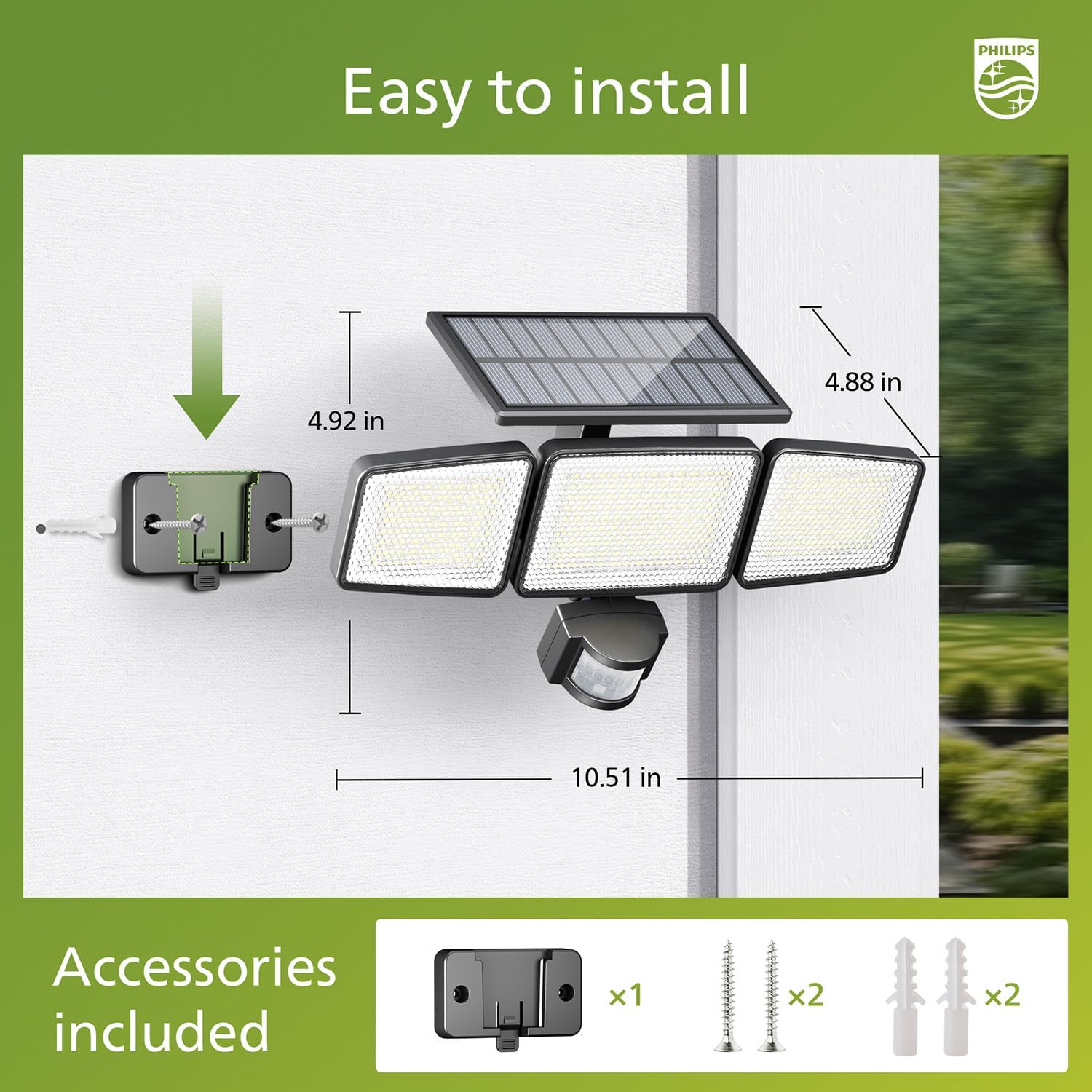
Image: Visual guide for installing the Philips Solar Security Light, including dimensions and the accessories provided for wall mounting.
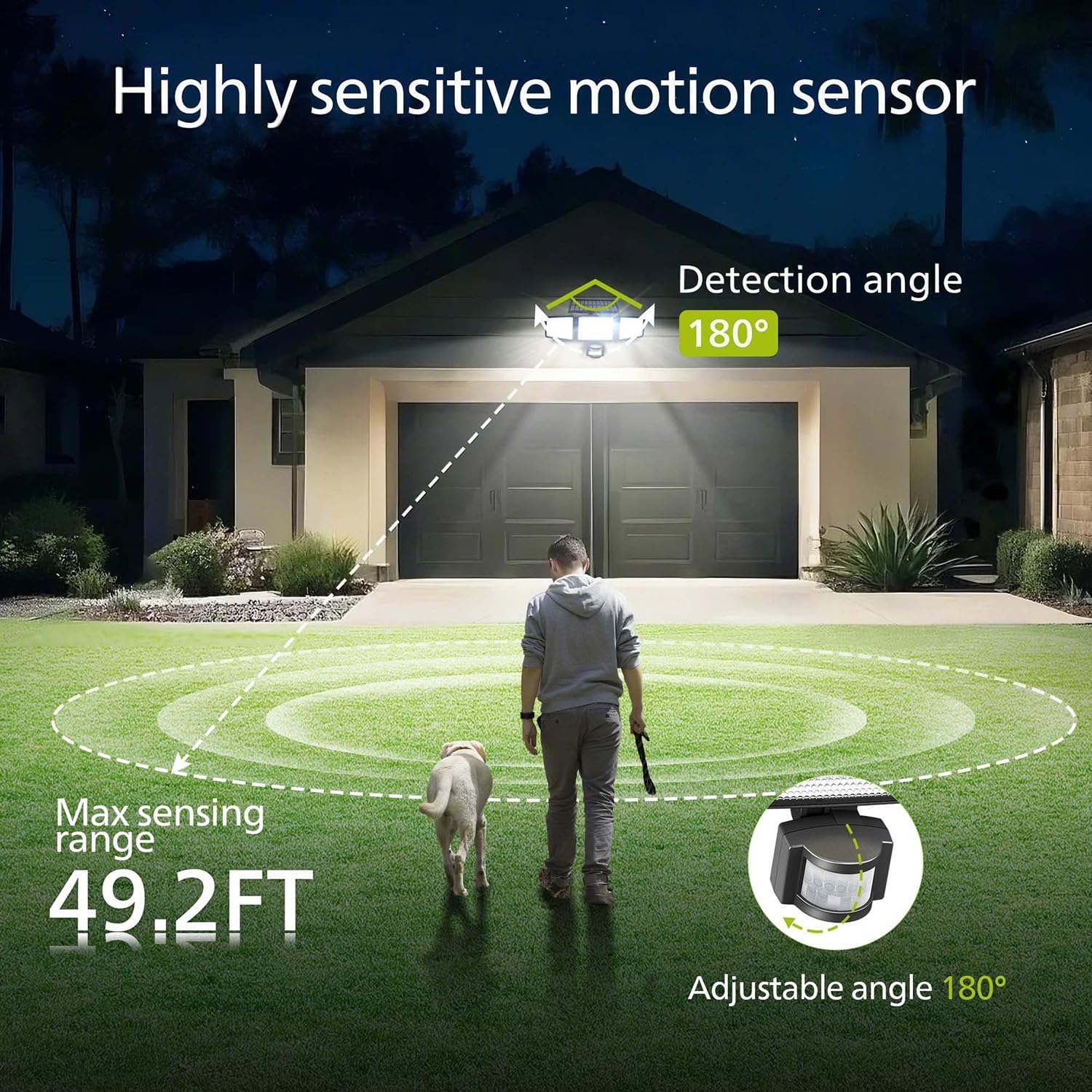
Image: Illustration of the motion sensor's coverage, showing a 180-degree detection angle and a maximum sensing range of 49.2 feet.
Ntuziaka ọrụ
The Philips Solar Security Light features three distinct lighting modes, controllable via the included remote control.
Ụdị ọkụ:
- Ụdị ihe mmetụta: The light remains off until motion is detected. Upon detection, it illuminates at 100% brightness (800 lumens) for approximately 25 seconds, then turns off.
- Ụdị nhụsianya: The light stays on continuously at a low brightness of 10% (80 lumens) throughout the night.
- Dim + Sensor Mode: The light stays on continuously at a very low brightness of 2-3% (16-24 lumens). When motion is detected, it brightens to 100% (800 lumens) for approximately 25 seconds, then returns to the dim state.

Image: Detailed explanation of the three operational modes, showing how the light behaves in Sensor, Dim, and Dim + Sensor modes based on motion detection and ambient light.
Use the remote control to switch between these modes as needed. Ensure the remote control has a clear line of sight to the light fixture for proper function.
Nlekọta
Regular maintenance ensures optimal performance and longevity of your Philips Solar Security Light.
- Nchacha akụkụ anyanwụ: Jiri nwayọọ hichaa panel anyanwụ mgbe ụfọdụ.amp cloth to remove dust, dirt, or debris. A clean solar panel ensures maximum sunlight absorption and charging efficiency.
- Nchacha ihe ndozi: Clean the light fixture with a soft, dry cloth. Avoid using abrasive cleaners or solvents that could damage the finish or electronic components.
- Batrị: The integrated high-capacity 2000 mAh battery is designed for long-term use. No user maintenance or replacement is required for the battery.
- Nguzogide ihu igwe: The IP65 rating ensures the light is protected against dust and water jets. However, avoid submerging the unit in water.

Image: Focus on the high-quality solar panel, illustrating its role in providing power for 8-10 hours of operation and its 1800mAh high-capacity battery.
Nchọpụta nsogbu
If you encounter issues with your Philips Solar Security Light, refer to the following common problems and solutions:
- Ìhè anaghị agbanye n'abalị:
- Hụ na panel anyanwụ na-enweta ezigbo ìhè anyanwụ kpọmkwem n'ehihie.
- Check if the light is in the correct operating mode (e.g., not in 'off' state if the remote has an off button).
- Verify that the remote control battery is functional.
- Light is dim or only stays on for a short period:
- The solar panel may not be fully charged. Ensure it is clean and exposed to direct sunlight for at least 6-8 hours.
- Ambient temperature can affect battery performance; extreme cold may reduce operating time.
- Ihe mmetụta mmegharị anaghị achọpụta mmegharị:
- Ensure the sensor lens is clean and unobstructed.
- Verify the light is in a motion-activated mode (Sensor Mode or Dim + Sensor Mode).
- Adjust the angle of the motion sensor to cover the desired detection area.
If problems persist, please contact Philips customer support for further assistance.
Nkọwapụta
| Njirimara | Nkọwapụta |
|---|---|
| Ụdị | FILIPS |
| Nlereanya | 929004621403 |
| Agba | Nwa |
| Ihe onwunwe | Aluminom |
| Ụdị ihe nrụnye ọkụ | Ìhè idei mmiri |
| Ojiji ime ime/n'èzí | N'èzí |
| Isi Iyi Ike | Ike anyanwụ |
| Usoro njikwa | Ime ime |
| Isi Iyi Ìhè | Ikanam |
| Ọnụọgụ nke isi mmalite ọkụ | 4 |
| Voltage | 3.7 volts DC |
| Agba ọkụ | Ọcha ọcha (6500K) |
| Icha ọkụ | 800 lumens (max) |
| Ọkwa Nguzogide mmiri | Ihe mgbochi mmiri IP65 |
| Ụdị nkwụnye | Ugwu mgbidi |
| Ike batrị | 2000 mAh |
| Akụkụ mmetụta | ogo 180 |
| Oke nghọta | Ruo 49.2 ft |

Image: A comparison table highlighting key specifications of the Philips solar security light, such as brightness, lighting modes, battery capacity, and waterproof rating.
Akwụkwọ ikike na nkwado
Maka ozi gbasara akwụkwọ ikike na nkwado ndị ahịa, biko gaa na Philips gọọmentị websaịtị ma ọ bụ kpọtụrụ ngalaba ọrụ ndị ahịa ha. Debe nnata nzụta gị ka ihe akaebe nke ịzụrụ.
Maka enyemaka ọzọ, gaa na: www.philips.com/support