
1. Okwu mmalite
This manual provides detailed instructions for the safe and efficient operation of your DazzlingStage 180W Dual-Color COB LED Par Light. This high-performance stage light features two 90W COB LEDs, offering both cool white (6500K) and warm white (3200K) illumination. It is designed for various applications including stage lighting, events, and parties. Please read this manual thoroughly before use and retain it for future reference.

Figure 1: DazzlingStage 180W Dual-Color COB LED Par Light. This image shows the front view of the black stage light with two circular COB LED elements, one emitting cool white light and the other warm white light.
2. Ozi nchekwa
Iji hụ na arụ ọrụ adịghị mma, biko debe ihe ndị a kpachara anya:
- Jikọọ ngwaọrụ ahụ na ebe a na-etinye ọkụ eletrik n'ala mgbe niile.
- Ewepụla unit ahụ na mmiri ozuzo ma ọ bụ mmiri.
- Gbaa mbọ hụ na ikuku ikuku dị mma iji gbochie ikpo oke ọkụ.
- Zere ikpughe anya ozugbo na isi iyi ọkụ, n'ihi na ọ nwere ike imebi anya.
- Kwupu ike tupu ihicha ma ọ bụ ije ozi.
- Naanị ndị ọrụ ruru eru kwesịrị ịrụzi ihe.
- Use the included safety rope ring when suspending the light.
3. Ihe ngwugwu
Chọpụta na ihe niile dị na ngwugwu:
- COB Light (quantity varies by pack size)
- Igwe ọkụ ọkụ
- Akwụkwọ ntuziaka
- Jikwaa
- Mkpịsị (2)
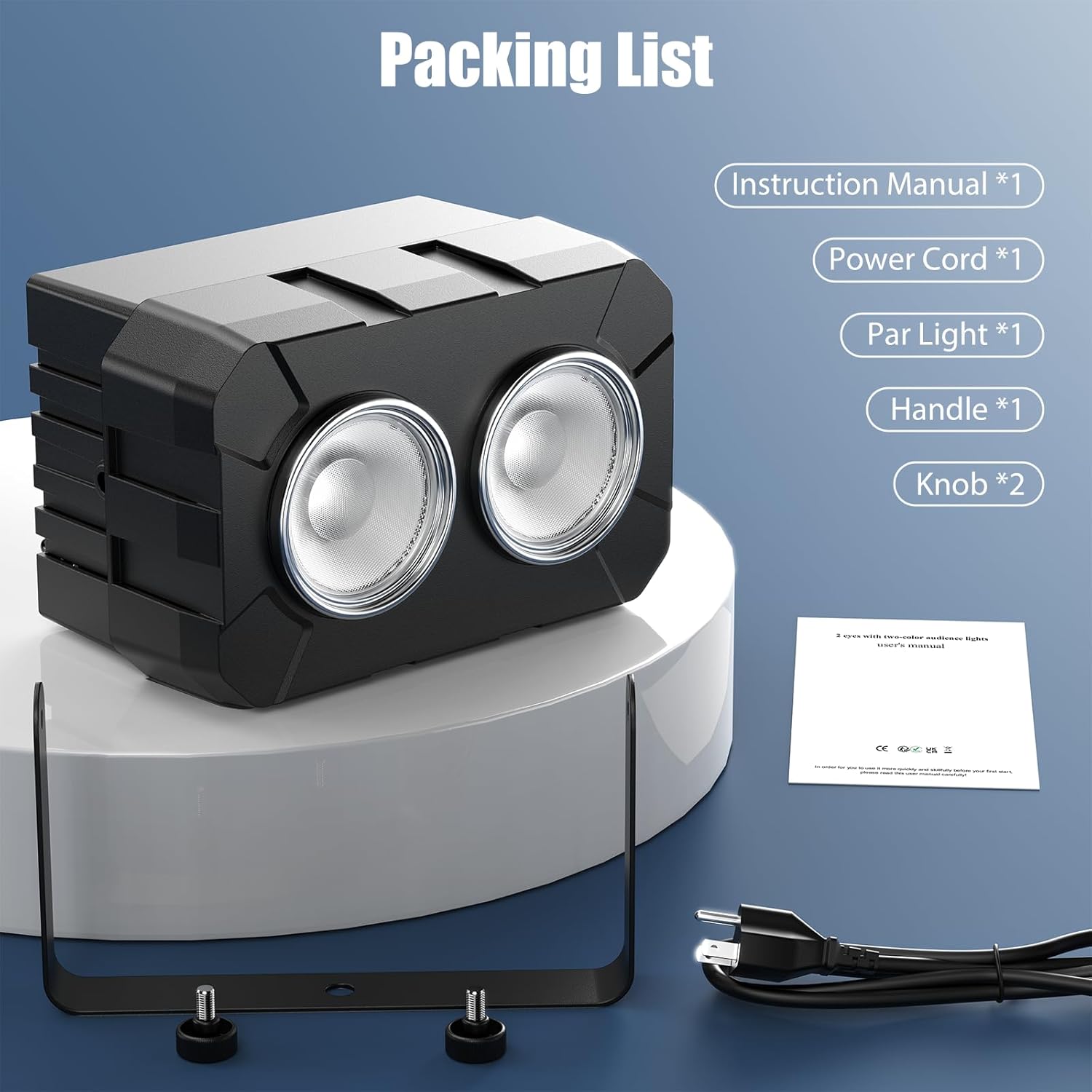
Figure 2: Illustrated packing list showing the COB light, power cord, handle, knobs, and instruction manual.
4. Ntọala na nwụnye
The DazzlingStage COB LED Par Light is designed for flexible installation. It can be placed on a flat surface, mounted on a truss, or hung from a ceiling.
4.1 Na-arịgo
- Attach the adjustable mounting bracket to the light using the provided knobs.
- Securely fasten the light to a truss, ceiling, or stand using appropriate clamps (not included) and the mounting bracket.
- Always use the safety rope ring to provide an additional layer of security when suspending the light.
4.2 Power Connection and Daisy-Chaining
Connect the power cable to the "Power In" port on the rear of the unit. For multiple units, you can daisy-chain up to 6 lights using the "Power Out" port to connect to the next unit's "Power In" port.

Figure 3: Four COB LED Par Lights connected in a daisy-chain configuration, illustrating easy power linking for multiple units.
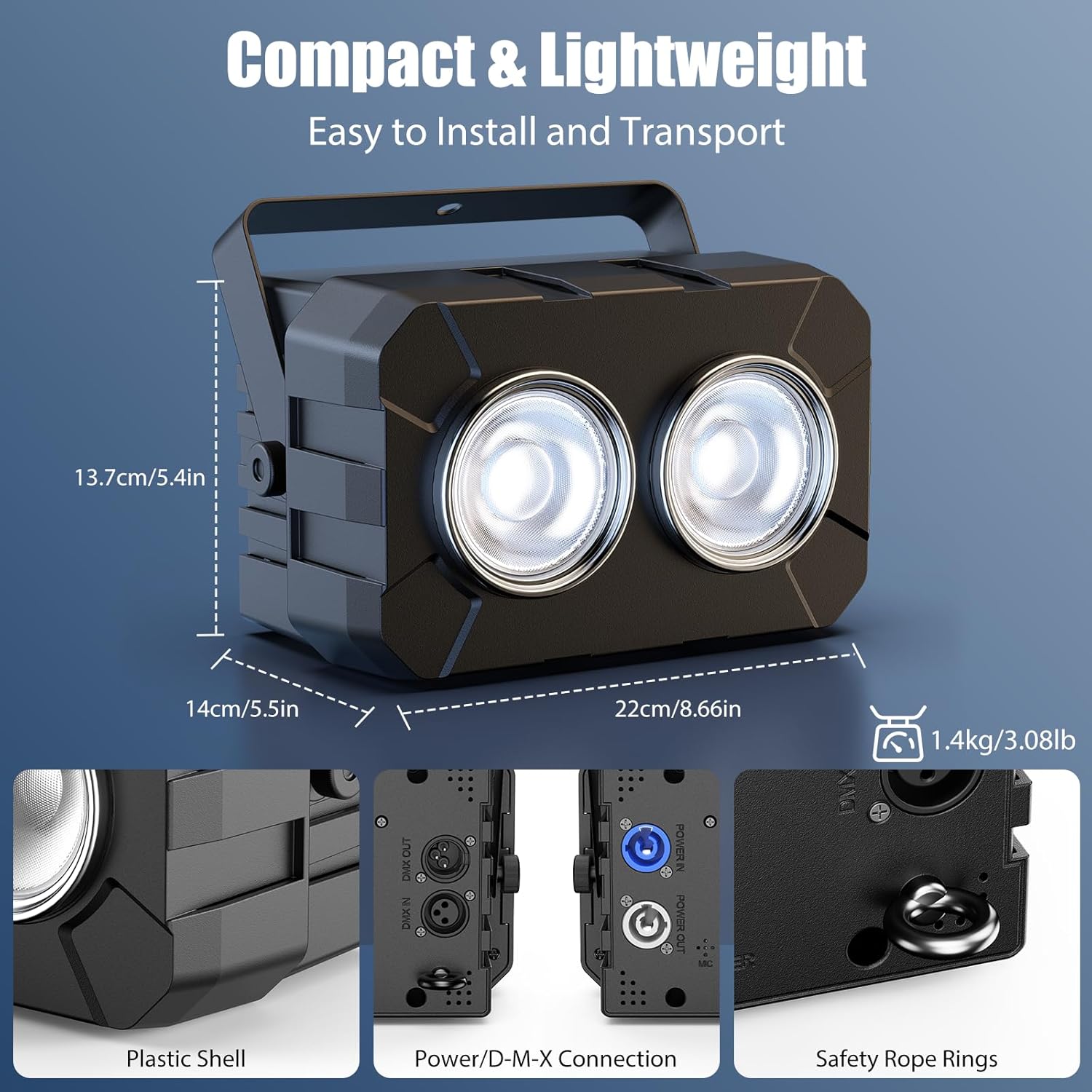
Ọgụgụ 4: Zuru ezu view of the light's rear panel, highlighting the Power In/Out, DMX In/Out, 4-digit display, control buttons, and safety rope ring.
5. Ụdị arụ ọrụ
The DazzlingStage COB LED Par Light offers four primary control modes:
- Ụkpụrụ Nna-ukwu: Connect multiple units via DMX cables. Set one unit as the master, and others as slaves. Slave units will mirror the master's settings.
- DMX512 Mode (8 Channel): For professional control, connect the light to a DMX controller. Use the 4-digit display and buttons to set the DMX address and channel mode (8 channels). Refer to your DMX controller's manual for specific programming.
- Nchekwa onwe na ọnọdụ: The light cycles through pre-programmed patterns and effects automatically.
- Ụdị agbanyere ụda: The light reacts to ambient sound and music, changing patterns and intensity in sync with the audio.
Video 1: Demonstration of the DazzlingStage 180W Dual-Color COB LED Par Light's various lighting effects and modes, including warm white, cool white, mixed white, strobe, jump, gradient, pulse, and DMX control.
6. Atụmatụ na Ọrụ Ndị Dị Mkpa
6.1 Adjustable Color Temperature
The light features both cool white (6500K) and warm white (3200K) COB LEDs, allowing for a wide range of color temperatures. You can adjust the mix to achieve desired ambient lighting, from crisp cool white to rich warm white.

Figure 5: An illustration showing the adjustable color temperature range (3200K-6500K) of the COB LED Par Light, transitioning from warm white to cool white.
6.2 Dimming and Strobe Effects
- Igha: Smooth 0-100% linear dimming allows for precise control over light intensity.
- Okpokoro: The light supports strobe effects from 1 to 25 times per second, creating dynamic visual impacts.

Figure 6: Three lights demonstrating various light sources and effects, including jump, gradient, pulse, and strobe modes.
7. Nlekọta
Regular maintenance ensures optimal performance and extends the lifespan of your DazzlingStage COB LED Par Light.
- Nhicha: Periodically clean the lens and housing with a soft, dry cloth. Do not use abrasive cleaners or solvents.
- Nyocha: Regularly check power cables and DMX connections for any signs of damage.
- Nchekwa: When not in use, store the light in a dry, dust-free environment.
8. Nchọpụta nsogbu
| Nsogbu | Ihe nwere ike ime | Ngwọta |
|---|---|---|
| Ìhè anaghị agbanwuo | Enweghị ike ọkọnọ ma ọ bụ eriri adịghị mma. | Check power connection and cable. Ensure the power outlet is functional. |
| Enweghị njikwa DMX | Incorrect DMX address, faulty DMX cable, or incorrect DMX mode setting. | Verify DMX address and channel settings. Check DMX cable connections. Ensure the unit is in DMX512 mode. |
| Ìhè na-egbukepụ nnọọ egbukepụ | Dimming level not adjusted. | Adjust the dimming setting via the control panel or DMX controller. |
| Ụdị agbanyere ụda anaghị arụ ọrụ | No sound input or microphone sensitivity too low. | Ensure there is sufficient sound near the unit. Check microphone sensitivity settings if available. |
9. Nkọwapụta
| Njirimara | Nkọwa |
|---|---|
| Ogo Voltage | AC100-240V, 50/60Hz |
| Lamp Beads | 2 x 90W COB LED (Cool White + Warm White) |
| Output Angle | 35° |
| Okpomọkụ agba (CCT) | 3200K-6500K |
| Nkezi ndụ LED | awa 50,000 |
| Na-ebelata | 0-100% Linear Dimming |
| Ugboro strok | 1-25 ugboro / sekọnd |
| Ụdị arụ ọrụ | DMX512, Master-Slave, Auto, Sound-Activated |
| Ọwa njikwa | 8 DMX Owa |
| Ngosipụta | 4-Digit Digital Display + 4 Buttons |
| Ọkwa nchekwa | IP20 |
| Akụkụ ngwaahịa (L x W x H) | 22cm x 14cm x 13.7cm (8.66in x 5.5in x 5.4in) |
| Ibu ngwaahịa | 1.4kk (3.08lb) |
| Ihe onwunwe | Acrylonitrile Butadiene Styrene (ABS) |
10. Akwụkwọ ikike na nkwado
For warranty information or technical support, please contact DazzlingStage customer service through the retailer where the product was purchased. Please have your model number (ZQ01321) and purchase date available when contacting support.