
Amgico GH0717
Amgico Digital Alarm Clock (Model: GH0717) Instruction Manual
Ntuziaka gị zuru oke maka ịtọlite , ịrụ ọrụ na mmezi.
Okwu mmalite
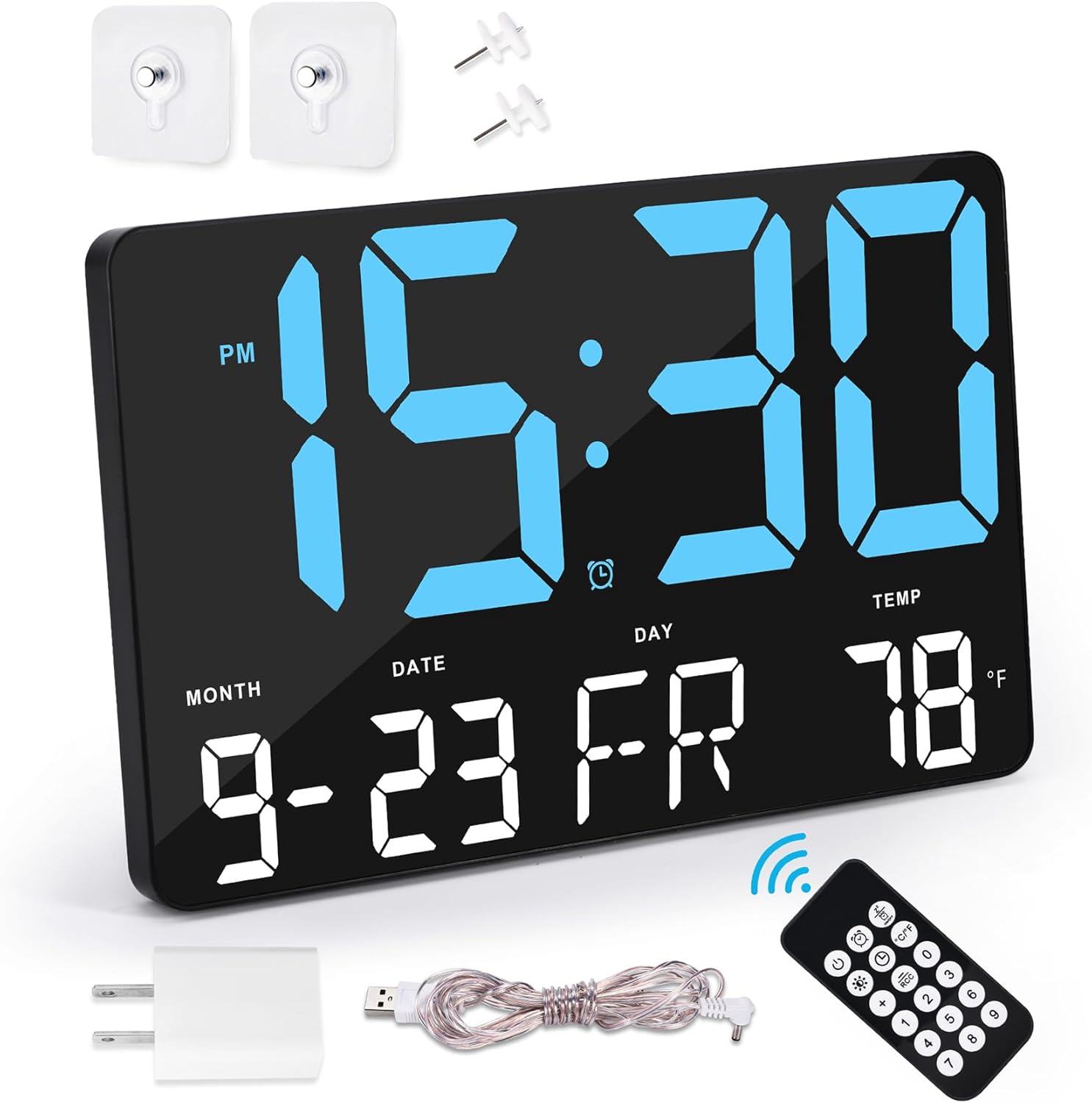
Thank you for choosing the Amgico Digital Alarm Clock, Model GH0717. This device features an 11.5-inch large LED display, showing time, date, calendar, and indoor temperature. Designed for versatility, it can be used as a desk or wall clock. This manual provides detailed instructions to help you set up and operate your new clock effectively.
Ihe ngwugwu
Biko chọpụta na ihe niile dị na ngwugwu gị:
- 1 x Amgico Digital Wall Clock (Model: GH0717)
- 1 x 5V DC Power Cord
- 1 x 5V 1A nkwụnye ọkụ
- 1 x Njikwa ime ikuku ikuku
- 2 x CR2032 Batteries (for backup)
- 1 x Akwụkwọ ntuziaka ngwaahịa
- Mounting accessories (e.g., stands, hooks, screws)
Melite
Njikọ Ike
- Insert the 5V DC power cord into the designated input port on the back of the clock.
- Jikọọ ihe nkwụnye ọkụ na eriri ọkụ.
- Plug the power adapter into a standard electrical outlet. The clock is designed for external power and is not battery-powered for primary operation.
- Install the included CR2032 backup battery into the battery compartment on the back of the clock. This battery retains time and settings during a power outage but does not power the display.

Nhọrọ nkwụnye
The clock can be placed on a desk or mounted on a wall:
- Ndokwa oche: Attach the two sturdy stands to the bottom of the clock for stable placement on any flat surface.
- Ịkwanye mgbidi: Use the integrated hanging holes on the back of the clock. Securely fasten the clock to a wall using appropriate screws or hooks (included).

Ntuziaka ọrụ
Iji Remote Control
The wireless remote control allows for convenient adjustment of settings from up to 30 feet away.

Ịtọ oge na ụbọchị
- Press the "SET" button on the remote control or the corresponding button on the back of the clock.
- Use the "+" and "-" buttons to adjust the hour, then press "OK" or "SET" to confirm and move to minutes.
- Repeat the process for minutes, year, month, and day.
- Select 12-hour or 24-hour format using the "12/24H" button.
- Choose between Fahrenheit (°F) or Celsius (°C) for temperature display using the "°C/°F" button.

Ntọala mkpu
The clock features a loud alarm suitable for heavy sleepers and a snooze function.
- Press the "ALARM" button on the remote or the back of the clock to enter alarm setting mode.
- Use the "+" and "-" buttons to set the desired alarm time.
- Press "OK" or "SET" to confirm.
- To activate the snooze function, press the "SNOOZE" button on top of the clock or the remote when the alarm sounds.
- To turn off the alarm, press the "ALARM OFF" button on the remote.

Ndozi ihie
The clock offers 4 levels of brightness and an auto-dimming feature to suit various lighting conditions and preferences.
- Press the "LIGHT" button on the remote control or the corresponding button on the back of the clock to cycle through the 4 brightness levels.
- The auto-dimming feature adjusts the display brightness automatically based on ambient light, ensuring optimal visibility without disturbing sleep.

Nhọrọ asụsụ
The clock supports 7 languages for the day of the week display: English, German, French, Spanish, Italian, Dutch, and DR.
- Refer to the detailed product manual for specific instructions on how to change the display language.
Nlekọta
- Clean the clock's display and body with a soft, dry cloth. Avoid using abrasive cleaners or solvents.
- Ensure the clock is always connected to its external power supply for continuous operation. The CR2032 battery is for backup only.
- Replace the CR2032 backup battery annually or as needed to ensure settings are retained during power interruptions.
Nchọpụta nsogbu
| Nsogbu | Ihe nwere ike ime | Ngwọta |
|---|---|---|
| Agbanyụrụ ihe ngosi elekere. | Enweghị ọkụ. | Ensure the power cord and adapter are securely connected to the clock and a working electrical outlet. |
| Settings are lost after power outage. | Backup battery is dead or missing. | Replace the CR2032 backup battery. |
| Njikwa anya anaghị arụ ọrụ. | Remote battery is dead or obstruction. | Ensure there are no obstructions between the remote and the clock. Replace the remote control batteries. |
| Alarm is not loud enough. | Ntọala olu dị ala. | Adjust the alarm volume using the controls on the back of the clock or the remote. |
Nkọwapụta
| Njirimara | Nkọwa |
|---|---|
| Ụdị | Amgico |
| Nọmba nlereanya | GH0717 |
| Ụdị ngosi | Igwe ọkụ dijitalụ |
| Nha ihuenyo | 11.5 sentimita asatọ |
| Akụkụ ngwaahịa | 9.8"W x 6.3"H |
| Isi Iyi Ike | Corded Electric (5V 1A adapter) |
| Batrị ndabere | 1 x CR2032 (gụnyere) |
| Atụmatụ pụrụ iche | Adjustable Brightness, Calendar Display, Large Display, Loud Alarm, Snooze, Indoor Temperature, 7 Languages |
| Ụdị nkwụnye | Desk Stand / Wall Mount |
| Ihe onwunwe | Polycarbonate (PC) |
| Ibu Ibu | 1.28 pound |
Vidiyo ngwaahịa ngwaahịa
Amgico Digital Wall Clock Features
Video: This video demonstrates the various features of the Amgico Digital Wall Clock, including its RGB color modes, pure color modes, and the requirement for external power. It highlights the different display options and how to freeze a favorite color.
Akwụkwọ ikike na nkwado
The Amgico Digital Alarm Clock comes with a 12-month warranty.
For any questions or support regarding your product, please contact Amgico customer service. Refer to the product packaging or the official Amgico websaịtị maka nkọwa kọntaktị.
Ask a question about this manual
Ask about setup, troubleshooting, compatibility, parts, safety, or missing instructions. Manuals+ will review the question and use this page’s manual context to help answer it.