
1. Lebihview
The Philips TAZ2200 is a versatile portable sound machine designed for enjoying various audio formats. It features a top-loading CD player, a front-loading cassette player, FM radio, Bluetooth 6.0 connectivity, USB playback, and a 3.5mm audio input. Equipped with dynamic bass boost and 6W stereo speakers, it delivers rich sound. The unit can be powered by AC mains or batteries and includes a carrying handle for portability.
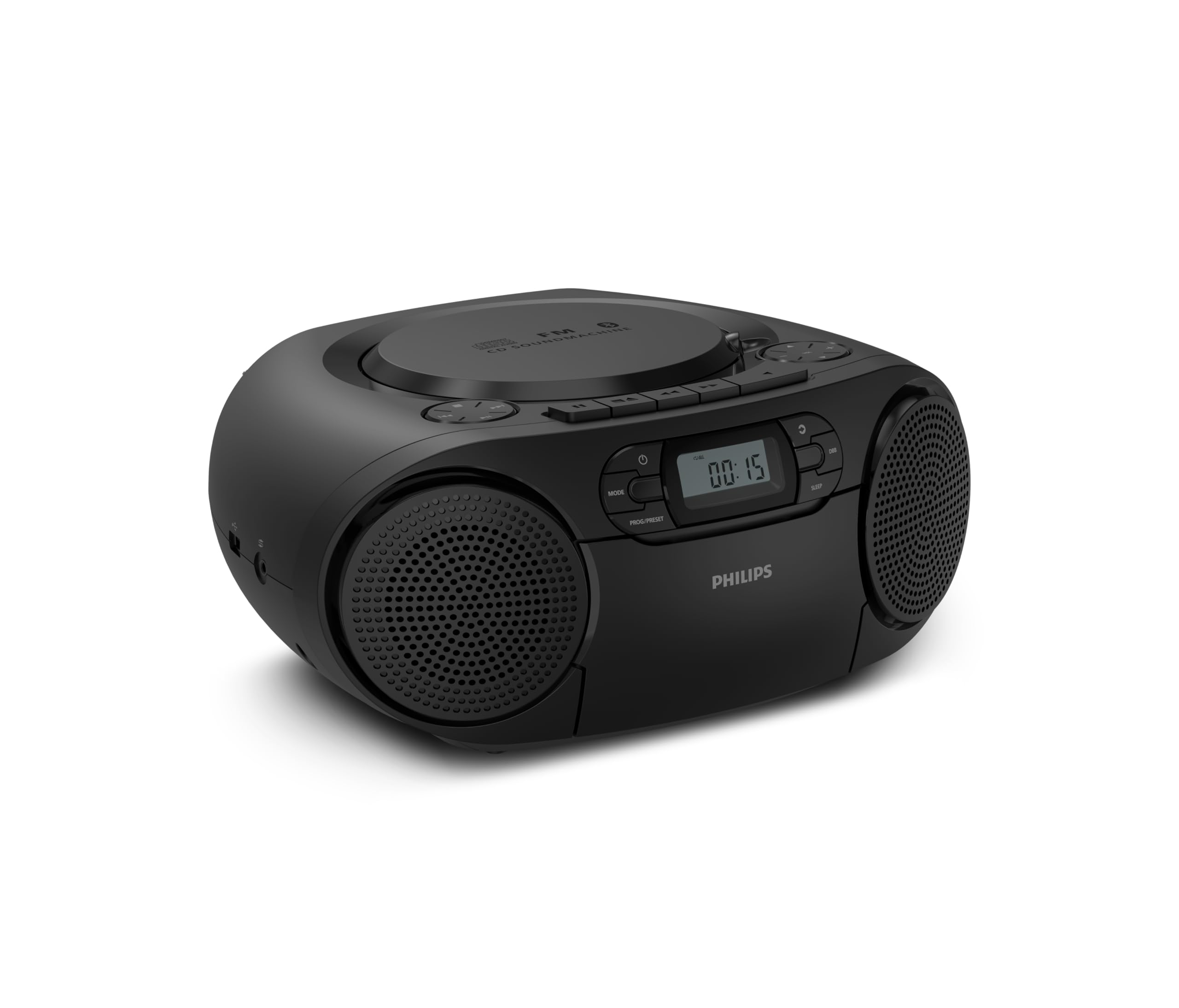
Depan view of the Philips TAZ2200 CD Soundmachine, showing the main display and control buttons.
2. Informasi Keselamatan
Please read these safety instructions carefully before using your device and keep them for future reference. Incorrect use may result in hazards.
- Sumber Daya: Gunakan hanya adaptor daya atau baterai yang telah ditentukan. Pastikan tegangantage sesuai dengan persyaratan unit tersebut.
- Air dan Kelembaban: Jangan biarkan unit terkena hujan, kelembapan, tetesan, atau cipratan. Jangan letakkan benda berisi cairan, seperti vas, di atas unit.
- Ventilasi: Pastikan ventilasi yang memadai. Jangan menghalangi lubang ventilasi apa pun. Jaga jarak minimum di sekitar unit untuk ventilasi yang cukup.
- Panas: Jangan letakkan unit di dekat sumber panas seperti radiator, pemanas, kompor, atau peralatan lainnya (termasuk amppengangkat) yang menghasilkan panas.
- Baterai: Follow correct polarity when inserting batteries. Do not mix old and new batteries, or different types of batteries. Remove batteries if the unit is not used for a long period.
- Pembersihan: Cabut unit dari stopkontak sebelum membersihkan. Gunakan kain lembut dan kering. Jangan gunakan cairan pembersih atau pembersih aerosol.
- Pelayanan: Jangan mencoba untuk memperbaiki produk ini sendiri. Rujuk semua servis ke personel servis yang berkualifikasi.
3. Apa yang ada di dalam kotak
Saat membuka kemasan, pastikan semua barang yang tercantum di bawah ini ada:
- Philips TAZ2200 CD Soundmachine
- Kabel listrik
- Panduan memulai cepat
- Buku garansi
- Lembar keselamatan
4. Kontrol dan Koneksi
Kontrol Panel Depan
The front panel features the main display, power button, mode selection, program/preset buttons, and dynamic bass boost (DBB) control. Playback controls for CD and USB are also located here.

Detail bagian depan view showing the display, power, mode, program/preset, and DBB buttons.
Koneksi Samping dan Belakang
The side of the unit provides a USB port for digital audio playback and a 3.5mm audio input jack for connecting external devices.

Samping view illustrating the USB port and Audio Input jack.
The top of the unit houses the CD compartment and additional playback controls, while the rear features the AC power input and the FM antenna.

Atas view showing the CD compartment and associated controls.

Belakang view displaying the AC power input and the telescopic FM antenna.
5. Pengaturan
5.1 Catu Daya
Daya AC
- Pastikan unit dimatikan.
- Connect the supplied power cable to the AC IN socket on the rear of the sound machine.
- Plug the other end of the power cable into a wall power outlet.
Daya Baterai
For portable use, the unit can operate on 6 x C-type batteries (not included).
- Buka penutup kompartemen baterai yang terletak di bagian bawah unit.
- Insert 6 C-type batteries, ensuring correct polarity (+/-) as indicated inside the compartment.
- Tutup penutup ruang baterai dengan rapat.
5.2 Penyesuaian Antena
For optimal FM radio reception, fully extend the telescopic antenna located at the rear of the unit. Adjust its position and angle to achieve the clearest signal.
6. Petunjuk Pengoperasian
6.1 Operasi Umum
- Daya Hidup/Mati: Tekan tombol KEKUATAN tombol untuk menghidupkan atau mematikan unit.
- Kontrol Volume: Gunakan VOL+ or JILID - tombol untuk mengatur tingkat volume.
- Peningkatan Bass Dinamis (DBB): Tekan tombol DBB button to activate or deactivate the dynamic bass boost feature for enhanced bass sound.
- Pemilihan Mode: Tekan tombol MODE button repeatedly to switch between CD, Cassette, FM Radio, Bluetooth, USB, and Audio Input modes.
6.2 Pemutaran CD
- Buka penutup kompartemen CD di bagian atas unit.
- Place a CD (CD, CD-R, or CD-RW) with the label side facing up onto the spindle.
- Tutup penutup kompartemen CD.
- Tekan tombol MODE tombol untuk memilih mode CD.
- Tekan tombol PUTAR/JEDA tombol untuk memulai pemutaran.
- Gunakan MELEWATI tombol (Bahasa Indonesia: or >>|) untuk melewati trek.
- Tekan dan tahan Bahasa Indonesia: or >>| to search within a track.
- Tekan tombol BERHENTI tombol untuk menghentikan pemutaran.
6.3 Pemutaran Kaset
- Open the cassette compartment door on the front of the unit.
- Masukkan kaset dengan sisi terbuka menghadap ke atas.
- Tutup pintu kompartemen kaset.
- Tekan tombol MODE tombol untuk memilih mode Kaset.
- Tekan tombol BERMAIN tombol untuk memulai pemutaran.
- Gunakan MAJU CEPAT or MEMUTAR ULANG tombol untuk memajukan atau memundurkan kaset dengan cepat.
- Tekan tombol BERHENTI tombol untuk menghentikan pemutaran.
6.4 Radio FM
- Tekan tombol MODE tombol untuk memilih mode Radio FM.
- Pemindaian Otomatis: Tekan dan tahan tombol PROG/PRESET tombol untuk memindai dan menyimpan stasiun FM yang tersedia secara otomatis.
- Penyetelan Manual: Tekan tombol PENYETELAN tombol (Bahasa Indonesia: or >>|) untuk menyetel secara manual ke frekuensi yang diinginkan.
- Menyimpan Preset: After tuning to a station, press PROG/PRESET once, then use Bahasa Indonesia: or >>| untuk memilih nomor yang sudah ditentukan, lalu tekan PROG/PRESET sekali lagi untuk konfirmasi.
- Mengingat Preset: Dalam mode FM, tekan PROG/PRESET repeatedly to cycle through saved preset stations.
6.5 Pemutaran Bluetooth
- Tekan tombol MODE button to select Bluetooth mode. The display will show 'BT' and flash, indicating it's in pairing mode.
- Pada perangkat Anda yang mendukung Bluetooth (smartphone, tablet), aktifkan Bluetooth dan cari perangkat yang tersedia.
- Select "Philips TAZ2200" from the list of devices.
- Once paired, the unit will emit a confirmation sound, and 'BT' will stop flashing.
- Start playing audio on your connected device. The sound will be streamed to the sound machine.
6.6 Pemutaran USB
- Masukkan flash drive USB ke port USB di sisi perangkat.
- Tekan tombol MODE tombol untuk memilih mode USB.
- Perangkat akan secara otomatis mendeteksi dan mulai memutar audio yang kompatibel. files (MP3, WAV, WMA).
- Gunakan kontrol pemutaran (PUTAR/JEDA, MELEWATI, BERHENTI) as you would for CD playback.
6.7 Audio Input (AUX)
- Connect one end of a 3.5mm audio cable (not included) to the AUDIO IN jack on the side of the sound machine.
- Connect the other end of the audio cable to the headphone jack or audio output of your external device (e.g., MP3 player, turntable).
- Tekan tombol MODE button to select Audio Input mode.
- Start playing audio on your external device. The sound will be played through the sound machine.
7. Pemeliharaan
- Membersihkan Unit: Usap bagian luar unit dengan kain lembut yang sedikit kering.amp kain. Jangan gunakan pembersih atau pelarut yang bersifat abrasif.
- Perawatan Pemutar CD: Keep the CD compartment clean. If the lens is dirty, use a specialized CD lens cleaner. Avoid touching the lens.
- Perawatan Pemutar Kaset: Bersihkan kepala pita dan rol penjepit secara berkala dengan kapas yang dibasahi sedikit air.ampdengan isopropil alkohol.
- Penggantian Baterai: If using batteries, replace all 6 C-type batteries when the unit's performance diminishes or if the unit will not be used for an extended period.
- Penyimpanan: Saat tidak digunakan, simpan unit di tempat yang bersih dan kering, jauh dari sinar matahari langsung dan suhu ekstrem.
8. Penyelesaian masalah
If you encounter any issues with your Philips TAZ2200, please refer to the table below for common problems and solutions.
| Masalah | Kemungkinan Penyebab | Larutan |
|---|---|---|
| Tidak ada daya | Kabel daya tidak terhubung; Baterai habis atau terpasang dengan tidak benar. | Periksa sambungan daya AC; Ganti baterai atau pastikan polaritasnya benar. |
| Tidak ada suara | Volume terlalu rendah; Mode yang dipilih salah; Headphone tersambung. | Increase volume; Select the correct source mode (CD, FM, BT, etc.); Disconnect headphones. |
| CD tidak dapat diputar | CD inserted incorrectly; CD is dirty or scratched; CD format not supported. | Insert CD with label side up; Clean or replace CD; Ensure CD is CD-R/RW compatible. |
| Cassette not playing | Cassette inserted incorrectly; Tape is damaged. | Insert cassette correctly; Try a different cassette. |
| Penerimaan FM buruk | Antena tidak diperpanjang atau diposisikan dengan benar; Sinyal lemah. | Rentangkan sepenuhnya dan sesuaikan antena teleskopik; Cobalah memindahkan unit ke lokasi yang berbeda. |
| Bluetooth tidak terhubung | Unit not in pairing mode; Bluetooth device too far; Device already paired with another unit. | Ensure unit is in Bluetooth mode and flashing; Move device closer; Disconnect from other devices. |
| Masalah pemutaran USB | USB drive tidak terpasang dengan benar; Tidak kompatibel file format; drive USB rusak. | Masukkan kembali drive USB; Pastikan files are MP3, WAV, or WMA; Try a different USB drive. |
9. Spesifikasi
| Fitur | Spesifikasi |
|---|---|
| Merek | PILIHAN |
| Nomor Model | TAZ2200/10 |
| Teknologi Konektivitas | Bluetooth 6.0, USB, Audio Input (3.5mm) |
| Jenis Pembicara | Stereo (2 speakers) |
| Daya Keluaran | 6 Watt (maks) |
| Media yang Didukung | CD, CD-R, CD-RW, Cassette, USB (MP3, WAV, WMA) |
| Penyetel Radio | Digital FM with 20 presets |
| Sumber Daya | AC (wired), 6 x C-type batteries (not included) |
| Dimensi (P x L x T) | Ukuran 24.5x28.5x12.5 cm |
| Berat | 1.35 Kilogram |
| Warna | Perak |
10. Garansi dan Dukungan
10.1 Garansi Produk
This Philips TAZ2200 CD Soundmachine comes with a Garansi 2 tahun sejak tanggal pembelian. Harap simpan bukti pembelian Anda untuk klaim garansi. Garansi mencakup cacat produksi dan malfungsi dalam kondisi penggunaan normal.
10.2 Dukungan Pelanggan
For technical assistance, troubleshooting beyond this manual, or warranty service, please refer to the contact information provided in the warranty booklet included with your product. You can also visit the official Philips support website for your region for further assistance and FAQs.