
1. Produk Lebihview
The ATK N9 Tri-Mode Gaming Headset is designed for gamers requiring flexible connectivity, clear audio, and reliable communication across multiple devices. It supports 3.5 mm wired, 2.4G wireless, and Bluetooth connections, allowing seamless switching between gaming consoles, PC, and mobile devices. Stereo-tuned dynamic drivers deliver balanced sound, enhancing in-game audio cues such as footsteps, gunfire, and environmental effects. The detachable noise-canceling microphone improves voice clarity for team communication, online gaming, and voice calls. Its over-ear design, with soft ear cushions and an adjustable headband, ensures a comfortable fit for extended gaming sessions. The headset is compatible with PS5, PS4, PC, Nintendo Switch, and mobile devices. For Xbox Series X|S, audio and microphone functions are supported via the 3.5 mm wired connection.

2. Isi Paket
Verifikasi bahwa semua item yang tercantum di bawah ini disertakan dalam paket Anda:
- ATK N9 Pro/White Gaming Headset
- Mikrofon Peredam Kebisingan yang Dapat Dilepas
- Kabel Pengisian Daya USB-C
- Kabel Audio 3.5mm
- 2.4G Wireless USB Adapter
- User Manual (dokumen ini)

3. Pengaturan Awal
3.1. Mengisi Daya Headset
Before first use, fully charge the headset using the provided USB-C charging cable. Connect the USB-C end to the headset's charging port and the USB-A end to a compatible USB power source (e.g., PC, wall adapter). The LED indicator will show charging status.
3.2. Memasang Mikrofon
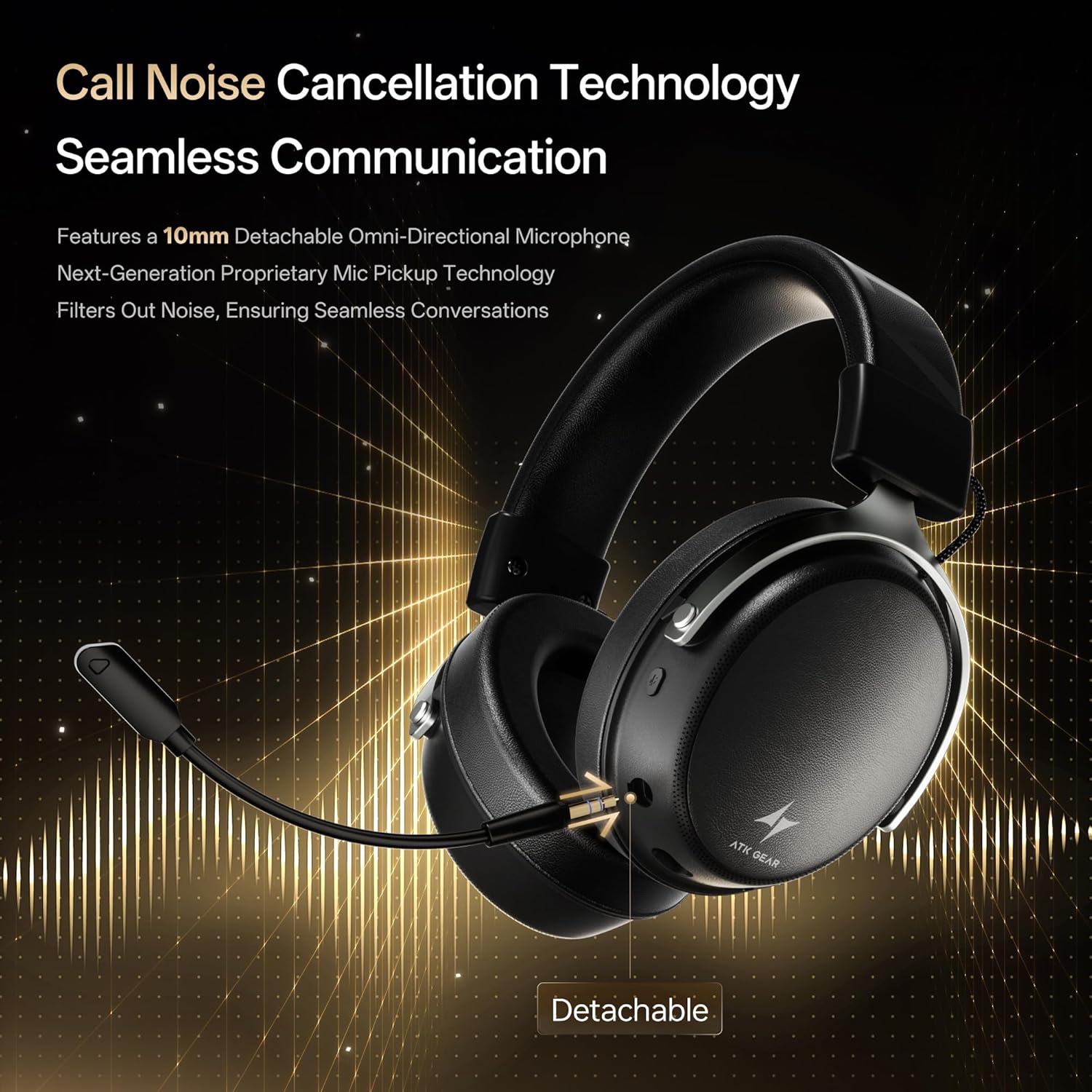
Insert the detachable boom microphone into the microphone port on the left earcup until it clicks into place. Ensure it is securely connected for optimal voice pickup.
3.3. Opsi Konektivitas
The ATK N9 Pro/White headset offers three connectivity modes:
- Mode Nirkabel 2.4G: For PC, PS4, PS5, and Nintendo Switch (docked mode).
- Plug the 2.4G wireless USB adapter into an available USB port on your device.
- Nyalakan headset.
- Switch the headset to 2.4G mode using the mode switch. The headset will automatically pair with the adapter.
- Adjust audio output settings on your device if necessary to select the headset.
- Mode Bluetooth: For mobile devices, PC, and Nintendo Switch (handheld mode).
- Power on the headset and switch to Bluetooth mode. The LED indicator will flash, indicating pairing mode.
- On your device, go to Bluetooth settings and select "ATK N9 Pro" from the list of available devices.
- Once connected, the LED indicator will show a steady light.
- Mode Kabel 3.5 mm: For Xbox Series X|S, PS4, PS5, PC, Nintendo Switch, and mobile devices.
- Hubungkan salah satu ujung kabel audio 3.5 mm ke jack 3.5 mm pada headset.
- Connect the other end to the 3.5mm audio port on your device (e.g., controller, PC audio jack).
- Headset akan beroperasi dalam mode kabel, melewati fungsi nirkabel.

4. Petunjuk Pengoperasian
4.1. Kontrol Headset
The ATK N9 Pro/White headset features intuitive controls located on the earcups:
- Tombol Daya: Press and hold to power on/off. Short press for play/pause (in 2.4G/Bluetooth mode).
- Sakelar Mode: Toggle between 2.4G wireless, Bluetooth, and wired modes.
- Tombol pengatur volume naik/turun: Putar untuk menyesuaikan volume audio.
- Tombol Bisukan Mikrofon: Tekan untuk menonaktifkan/mengaktifkan suara mikrofon.
- Spatial Audio Button: Press to activate/deactivate 3D Spatial Audio.
- Mic Monitoring Button: Press to enable/disable microphone monitoring (sidetone).
4.2. Penggunaan Mikrofon
The detachable noise-canceling microphone is designed for clear communication. Position the microphone approximately 1-2 inches from your mouth for optimal voice pickup. Use the microphone mute button on the headset to quickly mute your voice when needed.
4.3. Menyesuaikan Kesesuaian
The headset features an adjustable headband and soft ear cushions for comfort. Extend or retract the headband to achieve a snug yet comfortable fit. The earcups are designed to fully enclose your ears for passive noise isolation and comfort during long gaming sessions.
5. Spesifikasi Teknis
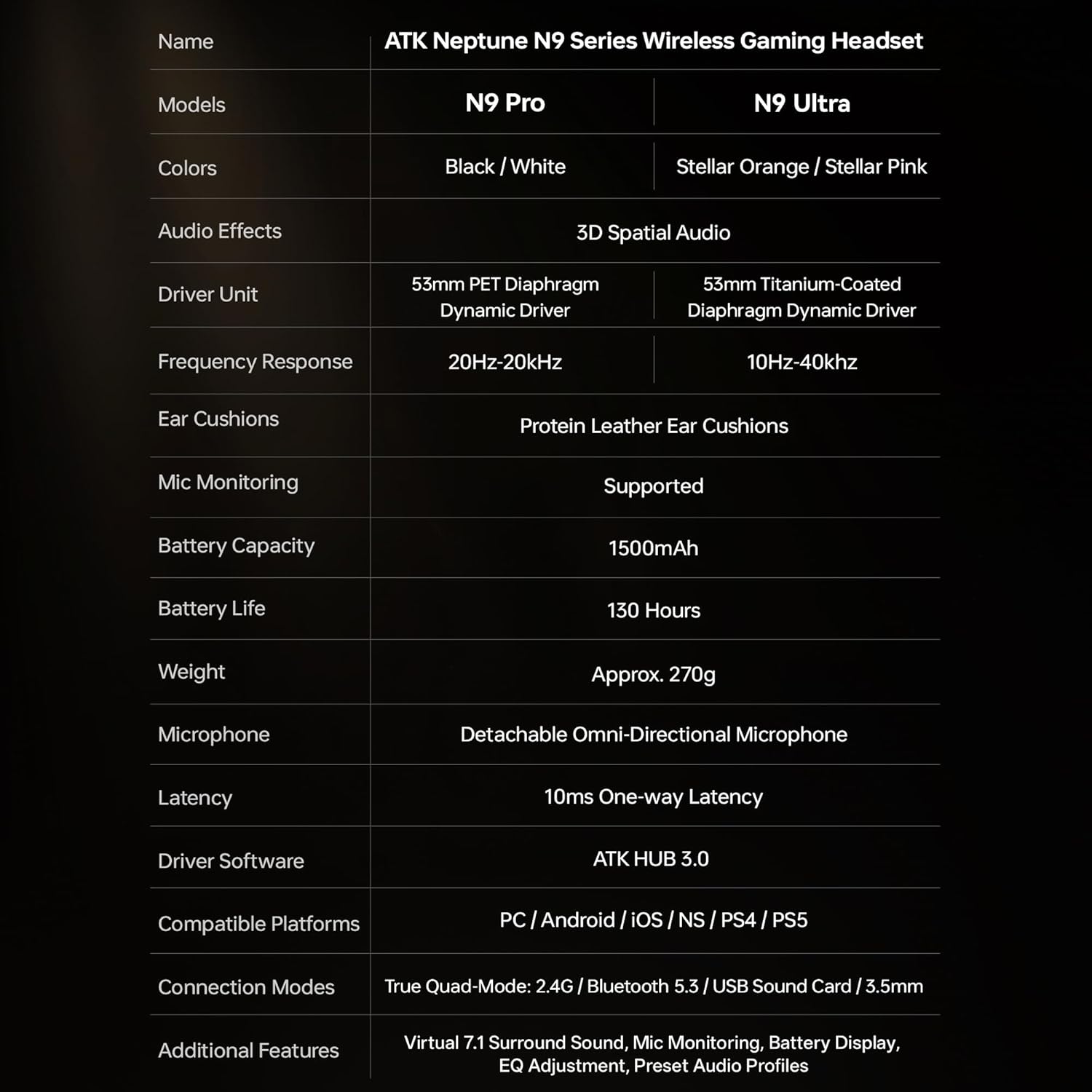
| Fitur | Spesifikasi |
|---|---|
| Nama Model | ATK N9 Pro |
| Konektivitas | 3.5mm Wired, 2.4G Wireless, Bluetooth 5.3 |
| Tipe Pengemudi | Driver Dinamis |
| Ukuran Pengemudi | 53 mm |
| Rentang Frekuensi | 20 Hz - 20,000 Hz |
| Impedansi | 64 Ohm |
| Mikropon | Detachable Noise-Canceling Omni-Directional |
| Kapasitas Baterai | 1500 mAh |
| Daya Tahan Baterai | Hingga 130 Jam |
| Latency (2.4G) | 10 Milliseconds (one-way) |
| Berat | 270 gram |
| Penempatan Telinga | Di Atas Telinga |
| Perangkat yang Kompatibel | PS5, PS4, PC, Nintendo Switch, Mobile Devices, Xbox Series X|S (wired) |
| Fitur Tambahan | 3D Spatial Audio, Mic Monitoring, Volume Control |

6. Perawatan dan Pemeliharaan
- Pembersihan: Gunakan kain lembut dan kering untuk membersihkan headset. Hindari penggunaan bahan kimia keras atau bahan abrasif.
- Penyimpanan: Simpan headset di tempat yang sejuk dan kering, jauhkan dari sinar matahari langsung dan suhu ekstrem.
- Perawatan Baterai: Untuk memperpanjang masa pakai baterai, hindari sering-sering menguras daya headset sepenuhnya. Isi daya secara teratur, meskipun tidak digunakan dalam waktu lama.
- Tahan Air: Headset ini tidak tahan air. Hindari paparan cairan.
7. Penyelesaian masalah
7.1. Tidak Ada Suara / Volume Rendah
- Ensure the headset is powered on and connected in the correct mode (2.4G, Bluetooth, or 3.5mm wired).
- Periksa roda pengatur volume pada headset dan pengaturan volume perangkat Anda.
- For wireless modes, ensure the headset is paired correctly and selected as the audio output device in your system settings.
- If using 3.5mm wired, ensure the cable is fully inserted into both the headset and the device.
7.2. Mikrofon Tidak Berfungsi
- Pastikan mikrofon terpasang dengan aman pada headset.
- Periksa apakah tombol mute mikrofon pada headset sudah diaktifkan.
- Verify that the headset microphone is selected as the input device in your device's sound settings.
- For Xbox Series X|S, ensure you are using the 3.5mm wired connection for microphone support.
7.3. Masalah Konektivitas
- Nirkabel 2.4G: Ensure the USB adapter is firmly plugged in. Try a different USB port.
- Bluetooth dapat digunakan untuk berbagai keperluan, seperti: Ensure the headset is in pairing mode. Forget the device on your phone/PC and re-pair. Keep the headset within the 5-meter Bluetooth range.
- Umum: Power cycle both the headset and your connected device.
8. Garansi dan Dukungan
8.1. Informasi Garansi
The ATK N9 Pro/White Gaming Headset comes with a Garansi 6 Bulan Terhitung sejak tanggal pembelian. Garansi ini mencakup cacat produksi dan pengerjaan dalam penggunaan normal. Garansi ini tidak mencakup kerusakan yang disebabkan oleh penyalahgunaan, kecelakaan, modifikasi tanpa izin, atau keausan normal.
8.2. Dukungan Pelanggan
For further assistance, technical support, or warranty claims, please contact ATK customer service through the retailer where the product was purchased or visit the official ATK websitus untuk informasi kontak dukungan.