
1. Pendahuluan
This manual provides instructions for the setup, operation, and maintenance of your Retroid Pocket Classic handheld gaming console. The Retroid Pocket Classic is a portable Android-based gaming device featuring a 3.92-inch OLED touchscreen, designed for a versatile gaming experience.

Image 1.1: Retroid Pocket Classic consoles in white and yellow.
2. Apa yang ada di dalam kotak
Verifikasi bahwa semua item ada dalam paket:
- Retroid Pocket Classic Gaming Console
- Kabel Pengisian Daya (USB-C)
- User Manual (dokumen ini)
3. Perangkat Berakhirview
Familiarize yourself with the physical components and controls of your Retroid Pocket Classic.
3.1 Depan View

Gambar 3.1: Depan view of the Retroid Pocket Classic.
- 3.92-inch OLED Touchscreen: The primary display for all operations and gaming.
- D-Pad: Directional input for navigation and gameplay.
- Tombol Tindakan: (A, B, X, Y or similar layout) for in-game actions.
- Tombol Mulai/Pilih: For game and system functions.
- Kisi-kisi Speaker: Keluaran audio.
3.2 Top and Back View

Gambar 3.2: Atas view showing shoulder buttons and ports.
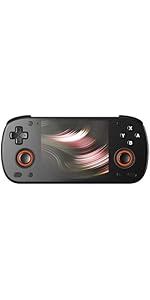
Image 3.3: Curved back design and trigger buttons.
- Tombol Bahu (L1, R1): Terletak di tepi atas.
- Tombol Pemicu (L2, R2): Located on the back, below the shoulder buttons.
- Port USB-C: Untuk pengisian dan transfer data.
- Jack Audio 3.5mm: Untuk menghubungkan headphone.
- Slot Kartu Micro SD: Untuk memperluas penyimpanan.
- Tombol Daya: Untuk menghidupkan/mematikan perangkat atau menidurkannya.
- Tombol Volume: To adjust audio output.
3.3 Internal Components (Cooling)

Image 3.4: Integrated active cooling system.
The Retroid Pocket Classic features an integrated active cooling system designed to maintain optimal performance and manage heat during extended use.
4. Pengaturan
4.1 Pengisian Awal
Before first use, fully charge the device. Connect the provided USB-C charging cable to the console's USB-C port and the other end to a compatible USB power adapter (not included). The device has a 5000mAh battery.
4.2 Menghidupkan/Mematikan
- Untuk menghidupkan: Tekan dan tahan tombol daya hingga layar menyala.
- Untuk mematikan: Tekan dan tahan tombol Daya, lalu pilih "Matikan" dari opsi yang tersedia di layar.
- Untuk Tidur/Bangun: Tekan sebentar tombol Daya.
Koneksi Wi-Fi 4.3
To access online features and download applications, connect to a Wi-Fi network:
- Pergi ke Pengaturan.
- Memilih Jaringan & internet.
- Mengetuk Wifi gratis dan menyalakannya.
- Pilih jaringan yang Anda inginkan dari daftar dan masukkan kata sandi jika diminta.
4.4 Pengaturan Akun Google
The Retroid Pocket Classic runs Android 14 and supports the Google Play Store. To download apps and games, you will need to sign in with a Google account during the initial setup process or later via the Settings menu.
4.5 Instalasi Kartu Micro SD
To expand the device's storage (128GB internal), insert a Micro SD card into the designated slot. Ensure the card is inserted correctly until it clicks into place. The device supports various Micro SD card capacities.
5. Petunjuk Pengoperasian
5.1 Menavigasi Antarmuka Android
The device operates on Android 14. Use the touchscreen for navigation, tapping icons to open applications, swiping to scroll, and using gestures for system controls. The D-pad and action buttons can also be used for navigation within compatible applications and games.
5.2 Downloading and Installing Applications
Applications and games can be downloaded from the Google Play Store. Open the Play Store app, search for your desired content, and follow the on-screen prompts to download and install.
Note: The Retroid Pocket Classic does not come with preloaded games. Users are responsible for acquiring and installing their own game content.
5.3 Mengelola Penyimpanan
Ke view and manage internal and external storage, go to Pengaturan > Penyimpanan. Here you can see storage usage and manage files. For optimal performance, ensure sufficient free space is available.
5.4 Konektivitas Bluetooth
The device supports Bluetooth 5.1 for connecting wireless accessories such as headphones or external controllers.
- Pergi ke Pengaturan.
- Memilih Perangkat yang terhubung.
- Mengetuk Pasangkan perangkat baru lalu pilih aksesori Anda dari daftar.
6. Pemeliharaan
6.1 Membersihkan Perangkat
Use a soft, dry, lint-free cloth to clean the device's exterior. For the screen, a screen cleaner specifically designed for electronics can be used. Avoid using harsh chemicals or abrasive materials.
6.2 Perawatan Baterai
Untuk memperpanjang masa pakai baterai:
- Hindari suhu ekstrem.
- Jangan sering-sering mengosongkan baterai sepenuhnya.
- Store the device with a partial charge if not used for extended periods.
6.3 Pembaruan Perangkat Lunak
Periksa dan instal pembaruan sistem secara berkala untuk memastikan kinerja dan keamanan yang optimal. Buka Pengaturan > Sistem > Pembaruan sistem untuk memeriksa pembaruan yang tersedia.
7. Penyelesaian masalah
7.1 Perangkat Tidak Menyala
- Ensure the device is sufficiently charged. Connect it to a power source for at least 30 minutes.
- Cobalah menekan dan menahan tombol daya selama 10-15 detik untuk memaksa perangkat memulai ulang.
7.2 Masalah Konektivitas Wi-Fi
- Pastikan Wi-Fi diaktifkan di Pengaturan.
- Mulai ulang router Wi-Fi Anda.
- Forget the network and reconnect, ensuring the password is correct.
7.3 Aplikasi Mengalami Crash atau Freeze
- Tutup dan buka kembali aplikasi.
- Bersihkan cache dan data aplikasi melalui Pengaturan > Aplikasi > [Nama Aplikasi] > Penyimpanan & cache.
- Pastikan aplikasi telah diperbarui ke versi terbaru.
- Mulai ulang perangkat.
7.4 Layar Tidak Responsif
- Nyalakan ulang perangkat dengan menekan dan menahan tombol Daya.
- Pastikan layar bersih dan bebas dari kotoran.
8. Spesifikasi

Image 8.1: Retroid Pocket Classic detailed specifications.
| Fitur | Detil |
|---|---|
| Nama Model | RP CLASSIC |
| Prosesor | G1 Gen2 (8-Core Kryo CPU, 2 Performance Cores, 6 Efficiency Cores) |
| GPU | Adreno A12 |
| RAM | 6GB LPDDR4x @2133M |
| Penyimpanan | 128GB EMMC 5.1 (expandable via Micro SD card) |
| Layar | 3.92-inch AMOLED, 1240x1080 @60fps |
| Sistem Operasi | Android 14 |
| Wifi gratis | Wi-Fi 5 |
| Bahasa Indonesia: Bluetooth | Bluetooth 5.1 |
| Antarmuka | USB-C / 3.5mm Audio Jack / TF Card Slot |
| Keluaran Video | Tidak tersedia |
| Baterai | 5000 mAh |
| Kecepatan Pengisian Daya | 27Watt |
| Ukuran | 138 x 89.8 x 26 mm (5.43 x 3.53 x 1 inci) |
| Berat | 223g (7.9 ons) |
9. Garansi dan Dukungan
For warranty information and technical support, please refer to the official Retroid Pocket websitus web atau hubungi layanan pelanggan mereka. Simpan bukti pembelian Anda untuk klaim garansi.
Online resources and community forums may also provide helpful information and troubleshooting tips.