
Perkenalan
This manual provides instructions for the MangoKit CD-X Portable CD Player. This device allows you to enjoy your favorite audio CDs, MP3, and WMA files on the go, with versatile connectivity options including Bluetooth 5.3, wired headphones, and AUX output. It features a rechargeable battery and anti-skip protection for uninterrupted listening.
Informasi Keselamatan
- Jangan biarkan perangkat terkena suhu ekstrem, sinar matahari langsung, atau kelembapan tinggi.
- Hindari menjatuhkan atau membenturkan perangkat dengan keras.
- Jangan mencoba membongkar atau memperbaiki sendiri perangkat ini. Hubungi dukungan pelanggan untuk bantuan.
- Use only the provided charging cable and a compatible power adapter (5V/1A recommended, not included) to charge the device.
- Jauhkan perangkat dari air dan cairan lainnya.
- When using headphones, adjust the volume to a moderate level to prevent hearing damage.
Isi Paket
Verifikasi bahwa semua item ada dalam paket:
- 1 x MangoKit CD-X Portable CD Player
- 1 x Earphone Berkabel
- 1 x Kabel Pengisian Tipe-C USB
- 1 x Kabel AUX 3.5mm ke 3.5mm
- 1 x Panduan Pengguna

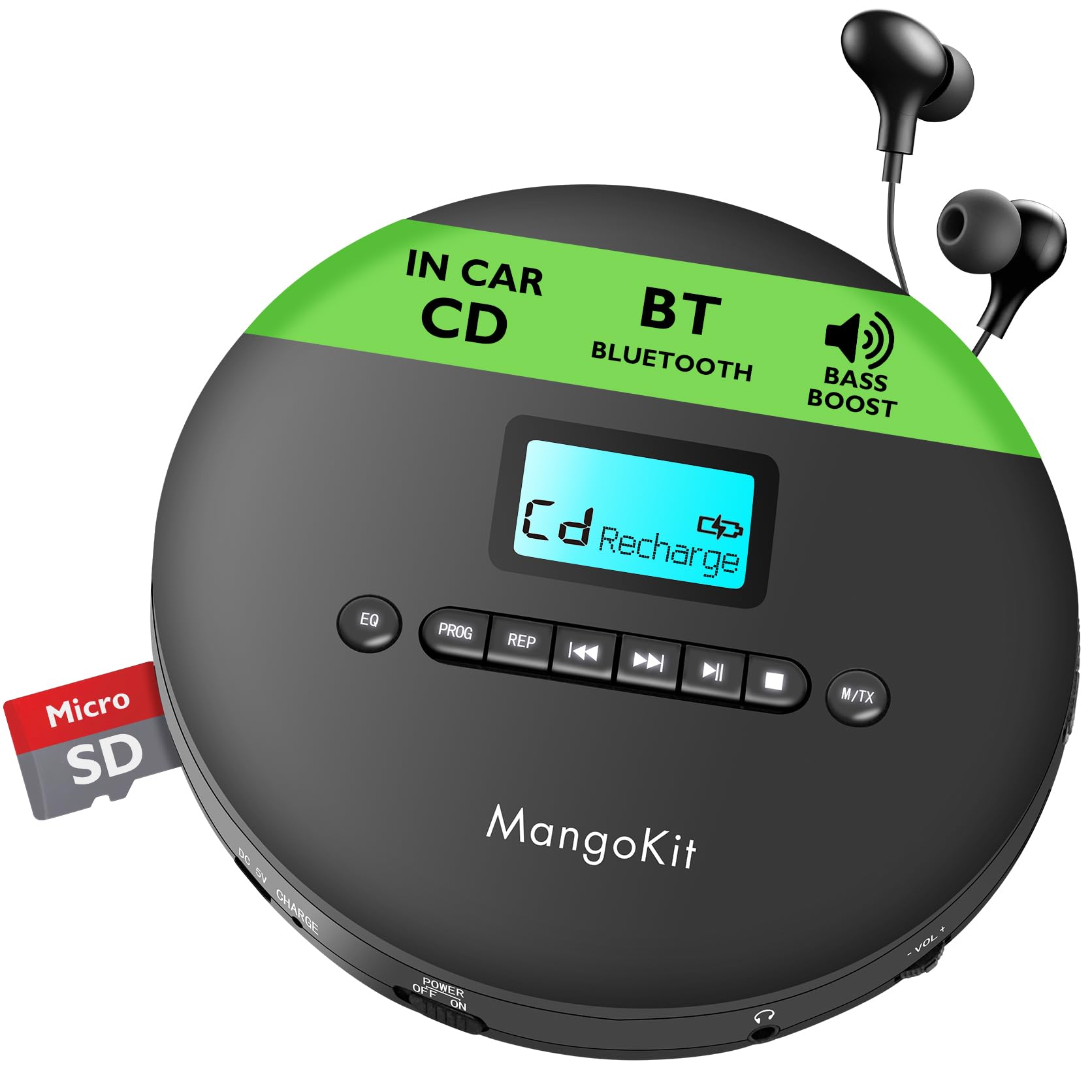
The MangoKit CD-X Portable CD Player and its included accessories, ready for use.
Produk Selesaiview
The MangoKit CD-X features an intuitive layout for easy operation.
Kontrol Panel Depan:
- Tombol EQ: Press to cycle through equalizer sound modes.
- Tombol PROG: Used for programming track playback order.
- REP Button: Cycles through repeat modes (repeat one, repeat all, random).
- Tombol Sebelumnya/Mundur: Short press for previous track, long press to rewind.
- Tombol Putar/Jeda: Memulai atau menjeda pemutaran.
- Tombol Maju/Berikutnya: Short press for next track, long press to fast forward.
- Tombol Berhenti: Menghentikan pemutaran.
- M/TX Button: Mode/Bluetooth Transmit button.
- Layar LCD: Shows track number, time, battery status, and mode.
Side Panel Ports and Switches:
- DC 5V CHARGE Port: USB Type-C input for charging.
- Tombol MATIKAN/HIDUPKAN DAYA: Menyalakan atau mematikan perangkat.
- Jack Headphone (3.5mm): Connect wired headphones or AUX cable.
- VOL- / VOL+: Tombol pengatur volume.
- Slot Kartu TF: Untuk memutar MP3/WMA files dari kartu TF.

Terperinci view of the MangoKit CD-X Portable CD Player's controls and ports.
Pengaturan
1. Menagih Pemain
Sebelum penggunaan pertama, isi daya perangkat hingga penuh.
- Connect the USB Type-C charging cable to the DC 5V CHARGE port on the player.
- Connect the other end of the USB cable to a compatible USB power adapter (5V/1A recommended, not included) or a computer's USB port.
- The battery indicator on the LCD display will show charging status. It will indicate full when charging is complete.
Pengisian daya penuh dapat memutar hingga 12 jam.
The CD player's compact design and long battery life for portable use.
2. Memasukkan CD
- Gently slide the "OPEN" switch to open the CD compartment lid.
- Place the CD with the label side facing up onto the center spindle.
- Press the CD gently until it clicks into place.
- Tutup rapat tempat CD hingga terkunci.
3. Connecting Headphones or AUX Cable
- For wired listening, plug the included earphones or your own 3.5mm headphones into the headphone jack.
- To connect to an external speaker or car audio system, use the included 3.5mm AUX cable. Plug one end into the player's headphone jack and the other end into the AUX input of your external device.

Connecting the CD player to a car audio system using the AUX cable.
4. Bluetooth Pairing (for Headphones/Earphones)
The CD-X player supports Bluetooth 5.3 for wireless audio transmission to Bluetooth headphones or earphones.
- Ensure the CD player is powered on and a CD is inserted.
- Turn on your Bluetooth headphones/earphones and put them into pairing mode (refer to your headphone's manual for specific instructions).
- On the CD player, long press the M/TX button. The Bluetooth icon on the LCD display will flash, indicating it's searching for devices.
- Once paired, the Bluetooth icon will stop flashing and remain solid. You can now play audio wirelessly.
Note: Bluetooth is for connecting to headphones/earphones only and does not support car audio systems directly via Bluetooth. Use the AUX cable for car audio.

The CD player's Bluetooth feature for wireless headphone connection.
Petunjuk Pengoperasian
Daya Hidup/Mati
Geser DAYA MATI / HIDUP switch to "ON" to turn on the player. Slide to "OFF" to turn it off.
Pemutaran Dasar
- After inserting a CD and powering on, the player will automatically start reading the disc.
- Tekan tombol Putar/Jeda untuk memulai atau menjeda pemutaran.
- Tekan tombol Berikutnya tombol untuk melompat ke trek berikutnya.
- Tekan tombol Sebelumnya button to go back to the beginning of the current track or to the previous track.
- Tekan lama Berikutnya button for fast forward.
- Tekan lama Sebelumnya button for rewind.
- Tekan tombol Berhenti tombol untuk menghentikan pemutaran.
Kontrol Volume
Gunakan VOL+ Dan VOL- buttons on the side of the player to adjust the volume level.
EQ (Equalizer) Settings
Tekan tombol EQ button repeatedly to cycle through different sound modes (e.g., Bass, Pop, Jazz, Rock, Classic).
Repeat and Program Modes
Tekan tombol REPUTASI button repeatedly to select playback modes:
- PERNYATAAN 1: Mengulangi trek saat ini.
- SEMUA: Memutar ulang semua lagu di dalam cakram.
- RAN: Memutar trek dalam urutan acak.
- PERKENALAN: Plays the first 10 seconds of each track (if available).
Pemutaran Program
- Dalam mode berhenti, tekan tombol PROG tombol. Layar akan menampilkan "PROG" dan "01".
- Gunakan Sebelumnya or Berikutnya untuk memilih nomor trek yang diinginkan.
- Tekan PROG again to confirm the track and move to the next program slot.
- Ulangi langkah 2-3 untuk memprogram hingga 20 trek.
- Tekan tombol Putar/Jeda button to start programmed playback.
Perlindungan Anti-Lewati
The player features electronic skip protection: 100 seconds for standard CDs and 180 seconds for MP3 CDs. This function helps maintain continuous playback during movement or minor shocks.
Playing MP3/WMA CDs or TF Card
When an MP3/WMA CD is inserted or a TF card with MP3/WMA files is inserted into the TF CARD slot, the player will automatically detect the file type. Use the navigation buttons to browse folders and tracks.

The CD player is ideal for language learning and listening to audiobooks.
Pemeliharaan
Membersihkan Perangkat
Wipe the player with a soft, dry cloth. Do not use abrasive cleaners or solvents.
Membersihkan Lensa
If the player experiences reading errors, use a specialized CD lens cleaning disc (not included) to clean the laser lens.
Perawatan Baterai
- Untuk memperpanjang masa pakai baterai, hindari mengosongkan baterai sepenuhnya secara sering.
- If the device will not be used for an extended period, charge it at least once every three months.
Penyelesaian Masalah
| Masalah | Larutan |
|---|---|
| Pemutar tidak menyala. | Ensure the POWER switch is in the "ON" position. Check if the battery is charged; connect to power if necessary. |
| Tidak ada suara. | Check headphone connection. Adjust volume. Ensure headphones are properly paired if using Bluetooth. |
| Disc skipping or not playing. | Ensure the CD is clean and free of scratches. Make sure the CD is inserted correctly. Try a different CD. Clean the laser lens. |
| Pemasangan Bluetooth gagal. | Ensure your Bluetooth headphones are in pairing mode and close to the player. Turn off and on both devices and try again. |
Spesifikasi
| Fitur | Detil |
|---|---|
| Nomor Model | CD-X |
| Merek | ManggaKit |
| Ukuran | Ukuran 14x14x2.8 cm |
| Berat | 400 gram |
| Baterai | 2000 mAh Rechargeable (up to 12 hours playback) |
| Konektivitas | Bluetooth 5.3, AUX (3.5mm Jack) |
| Format Audio yang Didukung | CD, CD-R, CD-RW, MP3, WMA |
| Perlindungan Anti-Lewati | 100 detik (CD), 180 detik (MP3) |
| Komponen Termasuk | CD Player, Earphones, USB Type-C Cable, AUX Cable, User Manual |
Garansi dan Dukungan
MangoKit products come with a standard manufacturer's warranty. For detailed warranty information, technical support, or any questions regarding your CD player, please refer to the contact information provided on the product packaging or visit the official MangoKit weblokasi.
Video Produk
Video ini memberikan gambaran visualview of the MangoKit CD-X Portable CD Player, showcasing its design, features, and various usage scenarios.