Perkenalan
Terima kasih sudah membeliasing the SKMEI 1762 Digital Watch. This manual provides detailed instructions on how to set up, operate, and maintain your watch. Please read this manual carefully to ensure proper use and to enjoy all the features of your new timepiece.
The SKMEI 1762 is a versatile digital watch designed for daily wear and outdoor activities, featuring water resistance, an alarm, calendar, stopwatch, and backlight.
Produk Selesaiview
The SKMEI 1762 watch features a clear digital display and four control buttons for various functions.
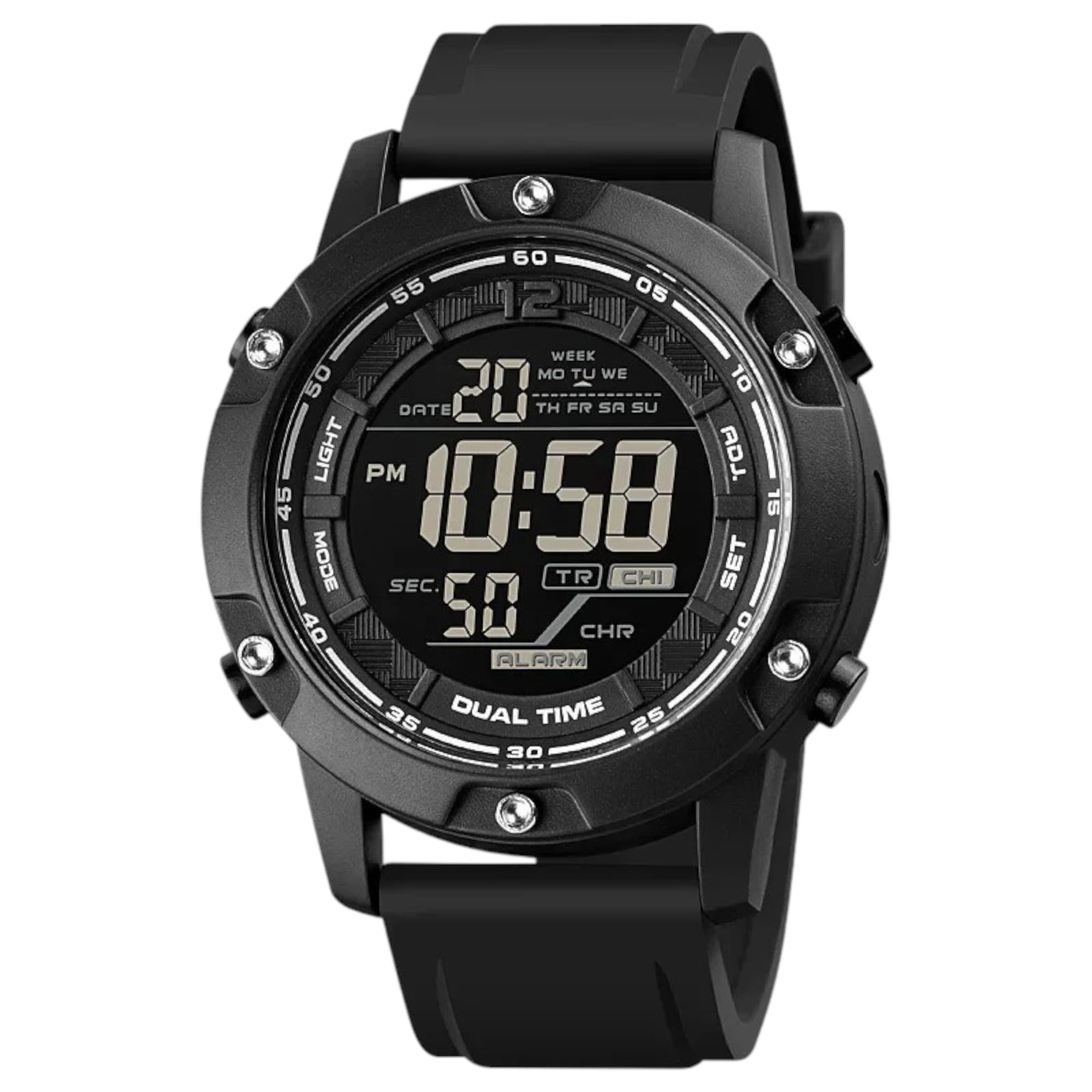
This image displays the front of the SKMEI 1762 digital watch, highlighting its digital display and the four control buttons located on the sides of the watch case.
Fungsi Tombol:
- CAHAYA (Kiri Atas): Mengaktifkan lampu latar untuk penerangan dalam kondisi cahaya redup.
- MODE (Kiri Bawah): Cycles through different modes: Time, Chronograph (Stopwatch), Alarm, and Dual Time.
- ADJ (Top Right): Used to adjust settings within a mode (e.g., incrementing values).
- SET (Bottom Right): Used to confirm settings or move to the next setting item.
Elemen Tampilan:
- Tampilan Waktu: Menampilkan jam, menit, dan detik. Dapat diatur ke format 12 jam atau 24 jam.
- Tampilan Tanggal: Menampilkan bulan dan tanggal.
- Hari dalam Seminggu: Menunjukkan hari ini.
- Indikator Alarm: Icon displayed when the alarm is active.
- Chronograph Display: Shows elapsed time in stopwatch mode.
Pengaturan
Pengaturan Waktu dan Tanggal:
- Dari Mode Waktu, tekan tombol MODE Tekan tombol berulang kali hingga detik mulai berkedip. Ini menandakan Anda berada dalam mode pengaturan waktu.
- Tekan tombol MENGATUR button to cycle through the settings: seconds → hours → minutes → 12/24-hour format → month → day → year.
- Gunakan ADJ button to increase the flashing value. Hold ADJ to quickly advance the numbers.
- Setelah semua pengaturan disesuaikan, tekan tombol MODE untuk keluar dari mode pengaturan dan kembali ke tampilan waktu normal.
Mengatur Alarm:
- Dari Mode Waktu, tekan tombol MODE button until you reach the Alarm Mode (usually indicated by an 'AL' or alarm icon).
- Tekan dan tahan tombol MENGATUR tekan tombol hingga angka jam alarm mulai berkedip.
- Gunakan ADJ untuk mengatur jam alarm yang diinginkan.
- Tekan tombol MENGATUR button to move to the alarm minutes. Use the ADJ tombol untuk mengatur menit alarm yang diinginkan.
- Tekan tombol MODE untuk keluar dari mode pengaturan alarm.
- Untuk menghidupkan/mematikan alarm, dalam Mode Alarm, tekan tombol ADJ tombol. Ikon alarm akan muncul/menghilang di layar.
Pengaturan Waktu Ganda:
- Dari Mode Waktu, tekan tombol MODE button repeatedly until you reach Dual Time Mode (often indicated by 'DT' or a second time display).
- Tekan dan tahan tombol MENGATUR button until the dual time hours start flashing.
- Gunakan ADJ button to set the desired dual time hour.
- Tekan tombol MENGATUR button to move to the dual time minutes. Use the ADJ button to set the desired dual time minutes.
- Tekan tombol MODE tombol untuk keluar dari mode pengaturan waktu ganda.
Mode Operasi
Mode Waktu:
This is the default display mode, showing the current time, date, and day of the week. Press the ADJ button in Time Mode to switch between 12-hour and 24-hour formats.
Mode Kronograf (Stopwatch):
- Tekan tombol MODE button until you reach the Chronograph Mode (usually indicated by 'ST' or 'CH').
- Tekan ADJ untuk memulai stopwatch.
- Tekan ADJ lagi untuk menjeda stopwatch.
- Tekan MENGATUR to reset the stopwatch to zero while it is paused.
- Tekan MODE to return to Time Mode.
Mode Alarm:
In Alarm Mode, you can view the set alarm time and toggle the alarm ON or OFF using the ADJ tombol.
Mode Waktu Ganda:
In Dual Time Mode, you can view the second time zone you have set. This is useful for tracking time in another region.
Menggunakan Lampu Latar:

This image illustrates the SKMEI 1762 digital watch with its luminous display activated, showing how the backlight illuminates the screen for visibility in the dark.
Tekan tombol LAMPU button (top left) at any time to illuminate the display for a few seconds, allowing you to read the time in dark environments.
Pemeliharaan
Pembersihan:
- Bersihkan casing dan tali jam dengan kain lembut dan kering.amp kain.
- Avoid using chemical cleaners, as they may damage the watch's finish or seals.
Tahan Air:

This image shows the SKMEI 1762 digital watch being splashed with water, demonstrating its water-resistant capabilities suitable for swimming and outdoor activities.
- The SKMEI 1762 is water-resistant up to 10 ATM (100 meters). This means it is suitable for swimming and showering.
- Do NOT press any buttons while the watch is submerged in water, as this can compromise the water resistance.
- Hindari memaparkan jam tangan pada air panas atau uap, karena dapat merusak segel.
Penggantian Baterai:
- The watch uses a CR123A battery.
- When the display becomes dim or functions become erratic, it may be time to replace the battery.
- Battery replacement should ideally be performed by a qualified watch technician to ensure the water resistance seal is properly maintained.
Penyelesaian Masalah
- Tampilan kosong atau redup: Baterai mungkin lemah atau habis. Ganti baterainya.
- Waktunya salah: Re-set the time and date according to the instructions in the "Setting Time and Date" section. Ensure the 12/24-hour format is correctly selected.
- Alarm tidak berbunyi: Check if the alarm is activated (alarm icon visible on display). Ensure the alarm time is set correctly.
- Air di dalam jam tangan: If moisture appears inside the watch, stop using it immediately and have it inspected by a professional. This indicates a compromised water seal.
Jika Anda mengalami masalah yang tidak tercakup di sini, silakan hubungi dukungan pelanggan.
Spesifikasi
| Fitur | Spesifikasi |
|---|---|
| Merek | SKMEI |
| Nomor Model | 1762 |
| Jenis Tampilan | Digital |
| Pergerakan | Kuarsa Jepang |
| Tahan Air | 10 ATM (100 meter) |
| Bahan Kasus | Baja tahan karat |
| Jenis Bahan Pita | Silikon |
| Jenis Jepitan | Gesper |
| Watch Glass Material | Kaca Mineral |
| Komponen yang Termasuk | Tali Karet |
| Berat Barang | 90 gram |
| Jenis Baterai | 1 buah baterai CR123A (termasuk) |
Garansi dan Dukungan
Your SKMEI 1762 Digital Watch is covered by a standard manufacturer's warranty against defects in materials and workmanship. Please refer to the warranty card included with your purchase for specific terms and conditions.
For technical support, warranty claims, or further assistance, please contact your retailer or visit the official SKMEI webSitus untuk informasi layanan pelanggan.