Perkenalan
Thank you for choosing the Lamzu Maya X Wireless Gaming Mouse. This manual provides detailed instructions for setting up, operating, maintaining, and troubleshooting your new gaming mouse. Please read this manual thoroughly to ensure optimal performance and longevity of your device.

Image: The Lamzu Maya X Wireless Gaming Mouse, split to show its internal structure and accompanied by its 8K wireless dongle.
Fitur Utama
- Sangat ringan: Weighing just 47g, the MAYA X mouse is designed to be lightweight yet sturdy, providing ultimate comfort during long gaming sessions.
- Symmetrical Shape Design: It is flexible and equally accommodating for palm, claw, or fingertip grip styles.
- Equipped with Optical Switches and Dust-Proof Encoder: Optical switches last three times longer than mechanical ones and can handle over 70 million cycles, respond quickly, give tactile feedback, and act fast. The Dust-Proof wheel encoder with 30-grid roller outputs 15 pulse signals, making games more precise and responsive.
- Pixart PAW 3950 Sensor: Powered by the latest flagship sensor. It supports up to 30,000 DPI and 750 IPS, with a maximum polling rate of 8,000 Hz when using the 8K dongle.
- Nordic 52840 MCU: Making battery more power efficient, providing fast response times, accurate motion tracking, and seamless performance without any lags during gameplay.
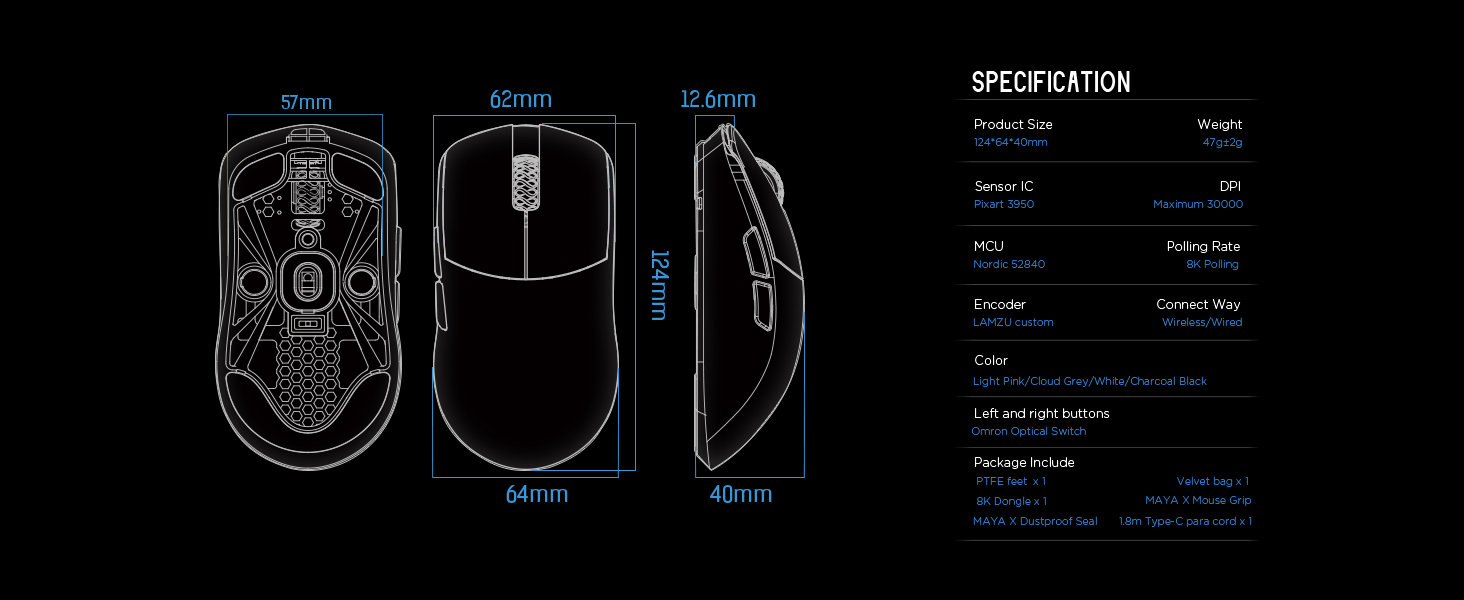
Image: Diagram illustrating the three common mouse grip types (palm, claw, fingertip) and how the symmetrical shape of the Maya X mouse accommodates them.

Gambar: Close-up view of the Pixart PAW 3950 sensor integrated circuit, highlighting its advanced technology.

Gambar: Detail view of the Nordic 52840 Microcontroller Unit (MCU), emphasizing its role in efficient performance and 8K Polling Rate compatibility.
Panduan Pengaturan
Isi Paket
- Lamzu Maya X Wireless Gaming Mouse
- PTFE Feet x 1 (extra set)
- 8K Dongle x 1
- Velvet Bag x 1
- MAYA X Mouse Grip
- MAYA X Dustproof Seal
- 1.8m Type-C Paracord x 1 (USB-C cable)
Koneksi Awal
The Lamzu Maya X mouse supports both 2.4G wireless and wired connections.
Koneksi Nirkabel 2.4G
- Insert the included 8K dongle into an available USB port on your computer.
- Turn on the mouse using the On/Off switch located on the underside of the mouse.
- The mouse should automatically connect to the dongle. If not, refer to the software section for pairing instructions.
For optimal wireless performance, ensure the dongle is placed close to the mouse and away from sources of interference.
Koneksi Kabel
- Connect the provided 1.8m Type-C Paracord cable to the USB-C port on the front of the mouse.
- Hubungkan ujung kabel yang lain ke port USB yang tersedia di komputer Anda.
- The mouse will function immediately in wired mode with a 1KHz polling rate.

Image: The Lamzu Maya X mouse demonstrating its dual connectivity modes: 2.4G wireless via dongle and wired via USB-C cable.
Software Installation (Optional but Recommended)
To unlock the full potential of your Lamzu Maya X mouse, including custom DPI settings, macro programming, and polling rate adjustments up to 8000Hz, download the official driver software from the Lamzu website. The software is web-based, eliminating the need for a local installation.
Mengunjungi: www.lamzu.com/support

Image: Screenshot of the Lamzu Aurora Web Driver interface, showing options for macro programming, button customization, DPI settings, polling rate, and LOD adjustment.
Mengoperasikan Mouse
Fungsi Tombol
The Lamzu Maya X is a 6-button gaming mouse. Refer to the diagram below for button identification:

Image: Diagram illustrating the six programmable buttons on the Lamzu Maya X mouse: Left Click, Right Click, Scroll Wheel, DPI button, Forward side button, and Back side button. Also shows the On/Off switch on the underside.
- Klik kiri: Tombol tindakan utama.
- Klik kanan: Tombol aksi sekunder.
- Roda Gulir: Untuk fungsi pengguliran dan klik tengah.
- Tombol DPI: Cycles through preset DPI levels. Customizable via software.
- Forward Side Button: Default for forward navigation. Customizable.
- Back Side Button: Default for backward navigation. Customizable.
- Sakelar Hidup/Mati: Located on the underside of the mouse to power on/off.
Penyesuaian DPI
The mouse features a Pixart PAW 3950 sensor supporting up to 30,000 DPI. You can adjust DPI settings through the dedicated DPI button or more precisely using the Lamzu Aurora Web Driver software.

Gambar: Sebuah gaya yang disederhanakan view of the Lamzu Maya X mouse highlighting its capability for up to 30,000 DPI, indicating high precision.
Tingkat Polling
The Lamzu Maya X supports a maximum polling rate of 8,000 Hz when using the included 8K dongle. This high polling rate ensures smoother cursor movement and reduced input lag.

Image: The Lamzu Maya X mouse and its 8K dongle, promoting the 8K Polling Rate with Aurora Technology for enhanced performance.
Pemeliharaan
Pembersihan
- Gunakan kain lembut dan kering untuk menyeka permukaan mouse.
- Untuk kotoran membandel, sedikit dampBilas kain dengan air atau larutan pembersih ringan. Hindari bahan kimia keras.
- Clean the optical sensor area on the underside regularly with a cotton swab to ensure accurate tracking.
Perawatan Baterai
- The mouse uses a Lithium Ion battery. Avoid fully discharging the battery frequently to prolong its lifespan.
- Charge the mouse using the provided USB-C cable.
- Simpan mouse di tempat yang sejuk dan kering saat tidak digunakan dalam jangka waktu lama.
Replacing PTFE Feet
The package includes an extra set of PTFE feet. If the existing feet show significant wear, carefully peel them off and apply the new ones, ensuring the surface is clean and dry before application.

Gambar: Bagian bawah view of the Lamzu Maya X mouse, showing the PTFE feet, optical sensor, and on/off switch.
Penyelesaian Masalah
Mouse Tidak Merespons
- Periksa Daya: Ensure the mouse is turned on using the switch on the underside.
- Tingkat Baterai: Isi daya mouse jika baterainya lemah.
- Koneksi Nirkabel: Ensure the 8K dongle is securely plugged into a USB port and within range. Try a different USB port.
- Koneksi Kabel: Pastikan kabel USB-C terhubung dengan aman ke mouse dan komputer. Coba port USB yang berbeda.
- Memperbaiki: If using wireless, try re-pairing the mouse with the dongle via the software.
Inconsistent Tracking or Cursor Jitter
- Sensor Bersih: Bersihkan sensor optik pada bagian bawah mouse.
- Permukaan: Use the mouse on a clean, uniform surface. Avoid highly reflective or transparent surfaces.
- Pengaturan DPI: Adjust DPI settings in the software to a suitable level.
- Tingkat Polling: Ensure the polling rate is stable and appropriate for your system.
Tombol Tidak Berfungsi dengan Benar
- Pemeriksaan Perangkat Lunak: Verify button assignments in the Lamzu Aurora Web Driver software.
- Hambatan Fisik: Check for any physical debris preventing button presses.
Spesifikasi
| Fitur | Detil |
|---|---|
| Dimensi Produk | 4.88x2.52x0.04 inci |
| Berat Barang | 1.66 ons (47g) |
| Nomor Model | Maya X |
| Baterai | 1 baterai Lithium Ion (termasuk) |
| Tanggal Pertama Tersedia | 28 Sept 2024 |
| Pabrikan | Lamzu |
| Negara Asal | Cina |
| Warna | Abu-abu |
| Teknologi Konektivitas | USB, Nirkabel 2.4G |
| Fitur Khusus | Ringan |
| Teknologi Deteksi Gerakan | Optik (Pixart PAW 3950) |
| DPI Maksimum | 30,000DPI |
| Tingkat Polling | Up to 8,000 Hz (with 8K dongle) |
| MCU | 52840 Nordic |
| Saklar | Optical Switches (Omron) |
| Pengkode | Dust-Proof Encoder (30-grid) |
Garansi dan Dukungan
Informasi Garansi
Lamzu products typically come with a manufacturer's warranty. Please refer to the warranty card included in your product packaging or visit the official Lamzu websitus untuk mengetahui ketentuan dan persyaratan garansi terperinci yang khusus untuk wilayah Anda.
Dukungan Pelanggan
For technical assistance, troubleshooting, or any inquiries regarding your Lamzu Maya X mouse, please contact Lamzu customer support:
- Weblokasi: www.lamzu.com/support
- E-mail: Rujuk ke pejabat websitus untuk email kontak.
When contacting support, please have your product model (Maya X) and purchase information ready.