
AWESAFE B0C2TY19LB
AWESAFE Android 12 Car Radio User Manual
Model: B0C2TY19LB
Merek: AWESAFE
Perkenalan
This manual provides detailed instructions for the installation, operation, and maintenance of your AWESAFE Android 12 Car Radio. Please read this manual thoroughly before use to ensure proper functionality and safety.
Produk Selesaiview
The AWESAFE Android 12 Car Radio is a multimedia system designed for various VW and Seat models, offering advanced features such as CarPlay, Android Auto, GPS navigation, Bluetooth connectivity, Wi-Fi, FM/RDS radio, and an integrated Equalizer (EQ).
Fitur Utama
- Sistem Operasi: Android 12
- Ingatan: RAM 1GB + Penyimpanan 32GB
- Konektivitas: Wireless CarPlay, Wireless Android Auto, Bluetooth, Wi-Fi
- Navigasi: GPS Terintegrasi
- Suara: FM/RDS Radio, EQ, DSP (Digital Sound Processor)
- Kontrol: Steering Wheel Controls (SWC) compatibility
- Menampilkan: Layar sentuh 7 inci
Komponen yang Termasuk
Please verify that all components listed below are present in your package.

Image: All accessories included with the AWESAFE Android 12 Car Radio.
- AWESAFE Android 12 Car Radio Unit
- Power Connector Harness
- Set Kabel RCA
- Antena GPS
- Mikrofon Eksternal
- USB Cables (4-PIN and 6-PIN)
- Dekoder CANBUS
- Removal Tools (Plastic pry tool, screwdriver)
- Manual Instruksi
- Radio Antenna / Original Car USB Adapter
Pengaturan dan Instalasi
Penting: Pemasangan oleh profesional sangat disarankan. Lepaskan baterai kendaraan sebelum memulai pekerjaan kelistrikan apa pun.
Panduan Instalasi Langkah demi Langkah
This video provides a visual guide for the installation process.
1. Melepas Radio Asli
Use the provided plastic pry tool to carefully remove the trim panels around the existing car radio. Unscrew any retaining screws and gently pull out the old unit.
2. Connecting Wiring Harnesses
Connect the main power harness, RCA cables, USB cables, and GPS antenna to the corresponding ports on the new AWESAFE unit. Ensure all connections are secure.
3. Installing External Components
Tempatkan antena GPS di lokasi dengan pandangan yang jelas. view of the sky (e.g., dashboard corner). Install the external microphone for hands-free calling.
4. Testing the Unit
Before fully reassembling the dashboard, temporarily connect the battery and power on the unit to verify all functions (radio, navigation, Bluetooth, steering wheel controls) are working correctly.
5. Perakitan kembali
Carefully slide the new AWESAFE unit into the dashboard opening. Secure it with screws and reattach all trim panels.
Petunjuk Pengoperasian
Operasi Dasar
The unit features a 7-inch touchscreen display and physical buttons for common functions.

Gambar: Depan view of the AWESAFE Android 12 Car Radio with labeled buttons.
- Daya Hidup/Mati: Press and hold the power button (usually integrated with the volume knob).
- Kontrol Volume: Putar kenop volume.
- Radio: Press the "RADIO" button to access FM/RDS radio.
- Media: Press the "MEDIA" button to select audio/video sources (USB, Bluetooth).
- Navigasi: Press the "NAV" button to launch the GPS application.
- Telepon: Press the "PHONE" button for Bluetooth calling functions.
- Pengaturan: Press the "SETUP" button to access system settings.
CarPlay dan Android Auto
Connect your smartphone wirelessly via Bluetooth and Wi-Fi to activate CarPlay or Android Auto. This allows seamless integration of your phone's apps, navigation, and media.
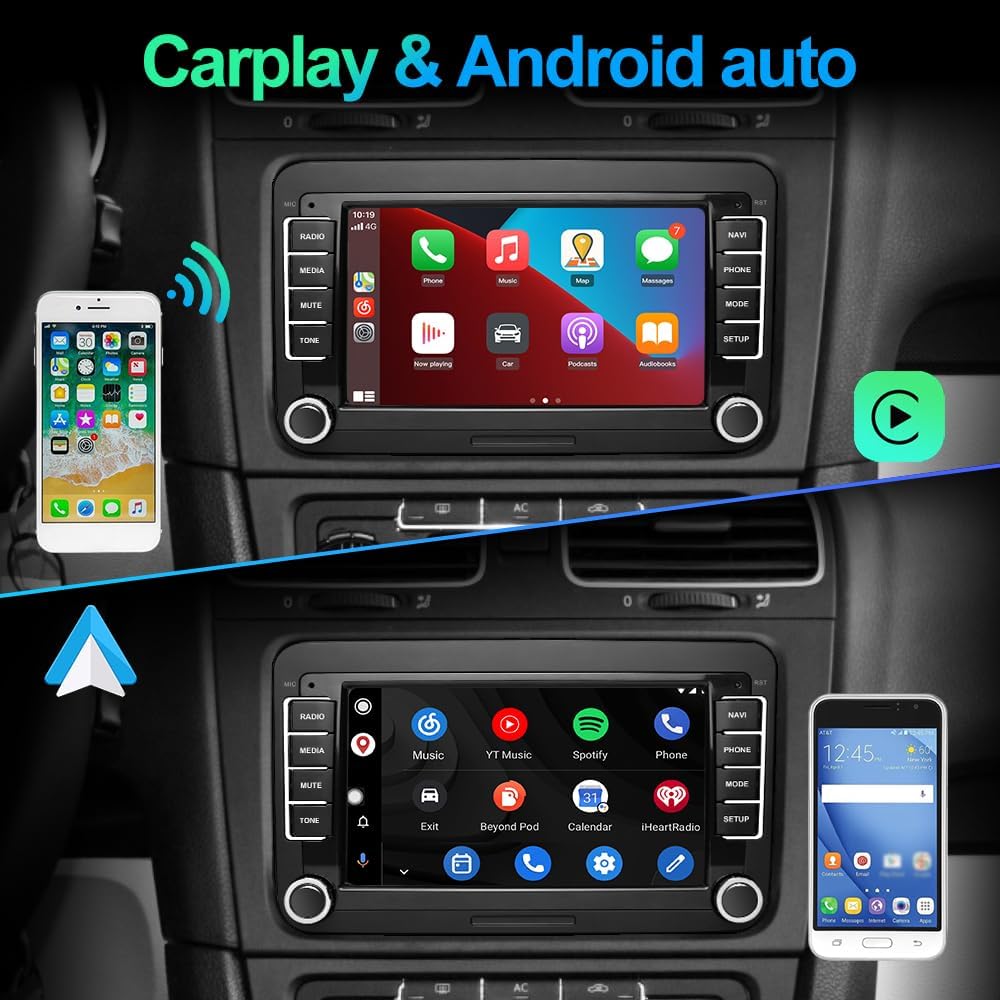
Image: CarPlay and Android Auto interfaces on the car radio.
Mirrorlink Function
The Mirrorlink feature allows you to mirror your iOS or Android smartphone screen directly onto the car radio display.

Image: Mirrorlink functionality via USB or Wi-Fi.
Kontrol Roda Kemudi (SWC)
The unit is compatible with your vehicle's original steering wheel buttons. Refer to the system settings for programming and customizing SWC functions.

Gambar: Antarmuka pembelajaran kendali roda kemudi.
Navigasi GPS
Utilize the integrated GPS for accurate navigation. The system supports various mapping applications.
Konektivitas Bluetooth
Pasangkan ponsel cerdas Anda melalui Bluetooth untuk panggilan bebas genggam dan streaming audio.
DSP and EQ Settings
Adjust the audio output using the Digital Sound Processor (DSP) and Equalizer (EQ) functions to customize your listening experience.
Pemeliharaan
- Pembersihan Layar: Use a soft, lint-free cloth to clean the touchscreen. Avoid abrasive cleaners.
- Pembaruan Perangkat Lunak: Periodically check for software updates through the system settings or the AWESAFE official websitus untuk memastikan kinerja optimal dan akses ke fitur baru.
- Perawatan Umum: Jaga agar unit terbebas dari debu dan kelembapan. Hindari memaparkannya pada suhu ekstrem.
Penyelesaian Masalah
| Masalah | Kemungkinan Penyebab | Larutan |
|---|---|---|
| Unit tidak menyala | Sambungan listrik longgar, sekering putus. | Check power cables and vehicle fuses. Ensure proper installation. |
| Tidak ada suara | Volume too low, incorrect audio source, loose speaker connections. | Increase volume, select correct audio source, check speaker wiring. |
| GPS tidak berfungsi | GPS antenna not connected or poorly positioned. | Pastikan antena GPS terhubung dengan aman dan memiliki pandangan yang jelas. view dari langit. |
| Masalah koneksi Bluetooth | Device not paired, Bluetooth off on phone or unit. | Ensure Bluetooth is enabled on both devices and re-pair if necessary. |
Spesifikasi
| Fitur | Detil |
|---|---|
| Merek | AMAN LUAR BIASA |
| Teknologi Konektivitas | Bluetooth, WiFi |
| Tipe Pengendali | Bahasa Indonesia: Android |
| Perangkat yang Kompatibel | Telepon pintar |
| Jumlah Port HDMI | 1 |
| Mode Keluaran Audio | Stereo |
| Konfigurasi Saluran Suara Surround | 5.1 |
| Pengkodean Video | H.264, H.265/HEVC, MPEG-4, dll. |
| Warna | Hitam |
| Jumlah Saluran | 2 |
| Ukuran Layar | 7 inci |
| Dimensi (kira-kira) | 21.5 cm (lebar) x 13 cm (tinggi) |

Image: Dimensions and rear view of the car radio.
Garansi dan Dukungan
For warranty information and technical support, please refer to the contact details provided in the product packaging or visit the official AWESAFE weblokasi.
Ask a question about this manual
Ask about setup, troubleshooting, compatibility, parts, safety, or missing instructions. Manuals+ will review the question and use this page’s manual context to help answer it.