
Perkenalan
This manual provides detailed instructions for the installation, operation, maintenance, and troubleshooting of the HP ProDesk 400 G3 MS-7957 motherboard. Please read this manual thoroughly before proceeding with any installation or operation to ensure proper functionality and safety.
Informasi Keselamatan
Selalu perhatikan tindakan pencegahan keselamatan berikut untuk mencegah kerusakan pada motherboard atau cedera pada diri Anda:
- Lepaskan catu daya dari stopkontak sebelum memasang atau melepas komponen apa pun.
- Wear an anti-static wrist strap or frequently touch a grounded metal object to discharge static electricity before handling the motherboard.
- Pegang motherboard pada bagian tepinya untuk menghindari menyentuh komponen sensitif.
- Pastikan ventilasi yang baik di dalam casing komputer untuk mencegah panas berlebih.
- Jauhkan motherboard dari kelembaban dan suhu ekstrem.
Produk Selesaiview
The HP ProDesk 400 G3 MS-7957 is a MicroATX motherboard designed for Intel processors with an LGA 1151 socket. It supports DDR4 RAM and features a B250 chipset, offering a reliable foundation for desktop computing.
Fitur Utama
- Compatible CPU Brand: Intel
- Tipe Soket: LGA 1151/Socket H4
- Faktor Bentuk: MikroATX
- Konektor I/O: Ethernet (RJ-45), USB 2.0, USB 3.0, VGA, DisplayPort, HD Audio Jack
Identifikasi Komponen
Familiarize yourself with the layout of the motherboard to facilitate proper installation and connection of components.

Gambar 1: Sudut view of the HP ProDesk 400 G3 MS-7957 motherboard. This image highlights the CPU socket (LGA 1151), four DDR4 RAM slots, PCIe slots, and various headers for front panel connections and storage devices.
Pengaturan dan Instalasi
Sebelum Anda Memulai
- Ensure your computer case is compatible with the MicroATX form factor.
- Gather all necessary components: CPU, RAM, CPU cooler, power supply, storage devices, and graphics card (if not using integrated graphics).
- Prepare your workspace by ensuring it is clean, well-lit, and static-free.
Instalasi Motherboard
- Install the CPU into the LGA 1151 socket. Carefully align the CPU with the socket's notch and gently lower it into place. Close the retention arm.
- Oleskan pasta termal ke CPU dan pasang pendingin CPU sesuai petunjuk pabrikan.
- Install the DDR4 RAM modules into the designated slots. Ensure they are fully seated until the clips lock into place.
- Mount the motherboard into the computer case using the appropriate standoffs and screws.
- Connect the main 24-pin ATX power connector and the 4-pin or 8-pin CPU power connector from your power supply to the motherboard.
- Install any expansion cards (e.g., graphics card) into the PCIe slots.

Gambar 2: Sudut atas-bawah view of the HP ProDesk 400 G3 MS-7957 motherboard. This perspective provides a clear view of the processor socket, memory slots, and the layout of the various internal connectors and components.
Menghubungkan Periferal
- Connect SATA storage devices (HDDs/SSDs) to the SATA ports on the motherboard.
- Connect front panel headers (power button, reset button, USB ports, audio jacks) to their respective pins on the motherboard. Refer to your case manual for specific pin assignments.
- Connect external peripherals such as monitor, keyboard, mouse, and Ethernet cable to the rear I/O panel.
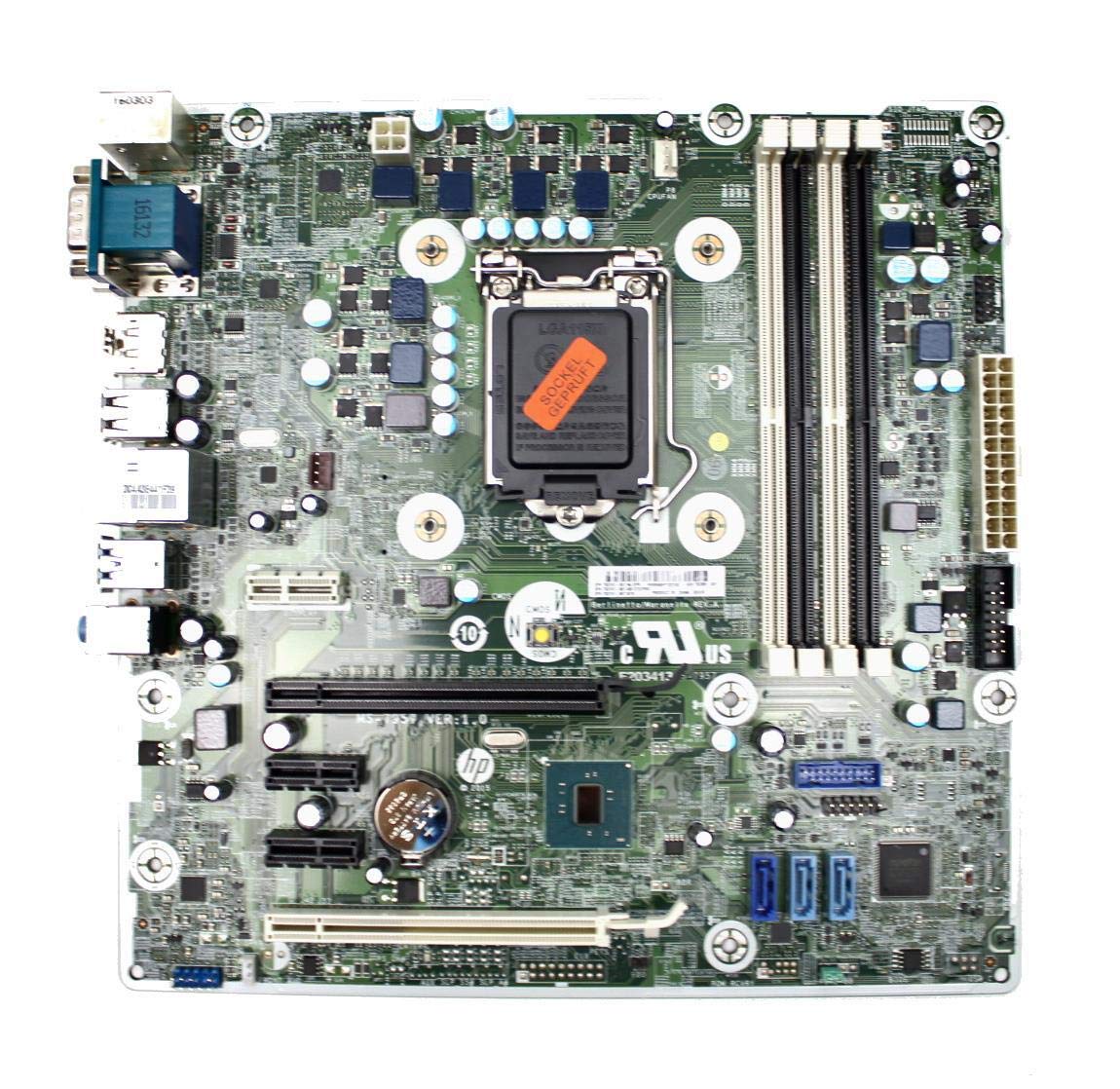
Figure 3: Rear I/O panel of the HP ProDesk 400 G3 MS-7957 motherboard. This image displays the available external connectivity options, including PS/2 ports, serial port, VGA, DisplayPort, USB 2.0, USB 3.0, Ethernet (RJ-45), and HD audio jacks.
Petunjuk Pengoperasian
Daya Awal Hidup
After all components are installed and connected, connect the power cable to the power supply and press the power button on your computer case. The system should initiate the boot process.
Konfigurasi BIOS/UEFI
Untuk mengakses utilitas pengaturan BIOS/UEFI, tekan tombol yang ditentukan (biasanya Menghapus, F2, F10, atau F12) during the initial boot sequence. Here you can configure boot order, system time, and other hardware settings.
Instalasi Driver
After installing your operating system, it is crucial to install the latest drivers for your motherboard's chipset, integrated graphics, audio, and network adapter. These drivers can typically be found on the HP support website or the chipset manufacturer's weblokasi.
Pemeliharaan
- Pembersihan: Bersihkan debu dari motherboard dan komponen secara teratur menggunakan udara bertekanan. Pastikan sistem dimatikan dan dicabut sebelum membersihkan.
- Pembaruan BIOS/UEFI: Periodically check for BIOS/UEFI updates from HP's official support website. Updates can improve stability, compatibility, and performance. Follow update instructions carefully to avoid system damage.
- Pembaruan Driver: Keep all system drivers updated to ensure optimal performance and compatibility with new software and hardware.
Penyelesaian Masalah
Bagian ini memberikan solusi untuk masalah umum yang mungkin Anda temui:
- Tidak Ada Daya: Check all power connections, including the 24-pin ATX and CPU power cables. Ensure the power supply is switched on and the wall outlet is functional.
- Tidak Ada Tampilan: Verify that your monitor is connected to the correct video output (VGA or DisplayPort) and is powered on. Reseat the graphics card (if applicable) and RAM modules.
- Ketidakstabilan/Kerusakan Sistem: This could be due to overheating, faulty RAM, or outdated drivers. Check CPU and GPU temperatures, run memory diagnostic tools, and update drivers.
- Periferal Tidak Terdeteksi: Ensure the peripheral is properly connected. Try a different port or update the relevant drivers.
- Masalah BIOS/UEFI: If you encounter issues after changing BIOS settings, try resetting the CMOS by removing the CMOS battery for a few minutes or using the clear CMOS jumper (refer to motherboard diagram for location).
Spesifikasi
| Fitur | Spesifikasi |
|---|---|
| Merek | HP |
| Soket CPU | LGA1151 |
| Perangkat yang Kompatibel | Komputer Desktop |
| Teknologi RAM | DDR4 |
| Prosesor yang Kompatibel | Intel Core i3-6xxx, Intel Core i5-6xxx, Intel Core i7-6xxx, Intel Core i3-7xxx, Intel Core i5-7xxx, Intel Core i7-7xxx, Intel Core i3-8xxx, Intel Core i5-8xxx, Intel Core i7-8xxx |
| Jenis Chipset | Intel B250 |
| Platform | Jendela |
| Nama Model | Bahasa Indonesia:MS-7957 |
| Model CPU | Core i3 (Note: Supports i3, i5, i7 as listed above) |
| Tipe Konektor Daya Utama | 24 jarum |
| Antarmuka Kartu Grafis | PCI Ekspres |
| Available Memory Slots | 4 |
| Total SATA Ports | 6 |
| Jumlah Port USB | 2 (Note: Refers to internal headers, rear I/O has more) |
| Jumlah Port Ethernet | 1 |
| Total PCIe Ports | 3 |
| Pabrikan | Computer Store Berlin (Reseller/Supplier) |
| Nomor Bagian | 4061435962741 |
| ASIN | B08CS13PTQ |
Garansi dan Dukungan
Produk ini dilengkapi dengan Garansi 1 tahun sejak tanggal pembelian. Garansi ini mencakup cacat bahan dan pengerjaan dalam penggunaan normal.
For technical support, warranty claims, or further assistance, please contact your point of purchase or refer to the official HP support resources for the ProDesk 400 G3 series.