
Perkenalan
Thank you for choosing the SKMEI SkmeiMW53 Digital Sports Watch. This manual provides detailed instructions for the proper setup, operation, and maintenance of your watch. Please read this manual carefully to ensure optimal performance and longevity of your device.
Produk Selesaiview
The SKMEI SkmeiMW53 watch features a digital display with multiple functions. Familiarize yourself with the buttons and their functions:
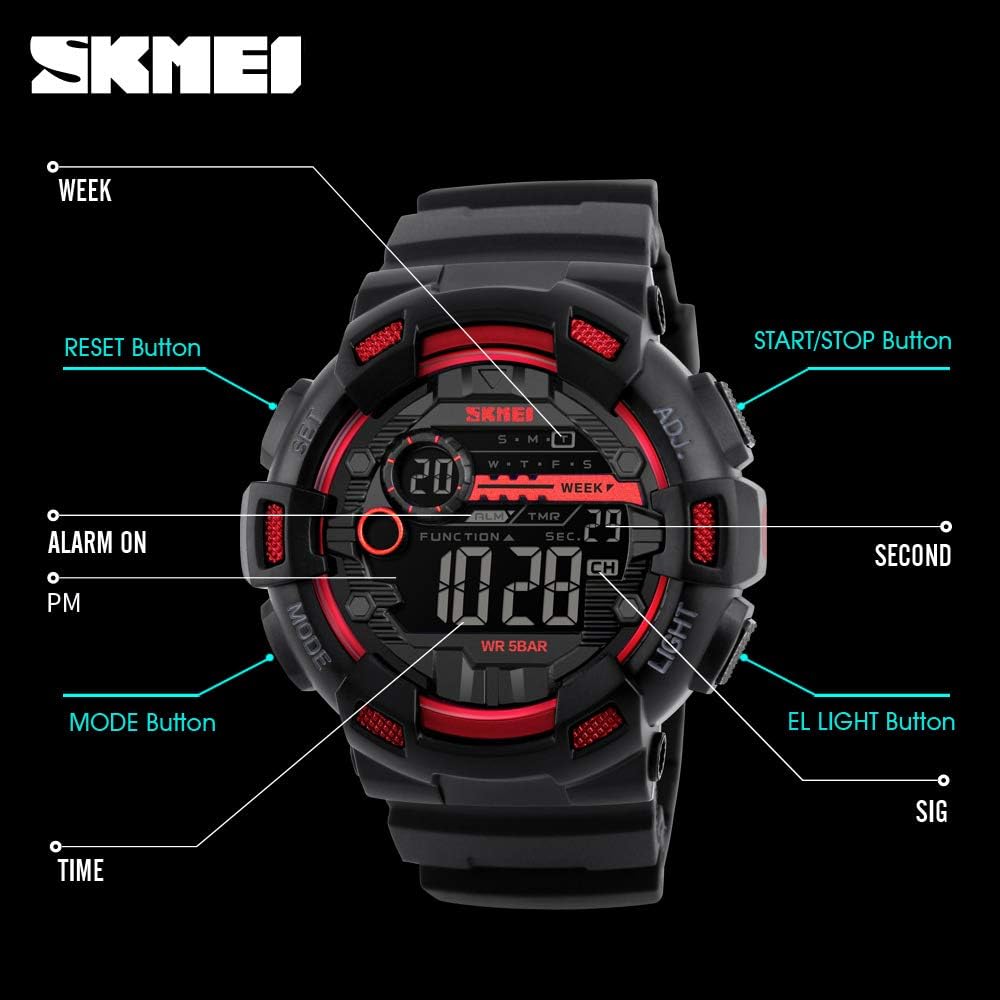
Gambar: Depan view of the SKMEI SkmeiMW53 watch with key buttons and display indicators labeled for easy identification. This includes the SET, MODE, LIGHT, and ADJ buttons, along with indicators for Alarm, PM, Seconds, Signal, and Time.
- Tombol MODE: Berganti-ganti antara berbagai mode (Waktu, Stopwatch, Alarm, Waktu Ganda, Hitung Mundur).
- Tombol CAHAYA: Mengaktifkan lampu latar LED agar dapat terlihat dalam kondisi kurang cahaya.
- ADJ (Adjust) Button: Digunakan untuk masuk dan keluar dari mode pengaturan, dan untuk mengkonfirmasi pilihan.
- Tombol ATUR: Used to select items for adjustment within a setting mode.
- Tombol MULAI/BERHENTI: Used to start/stop stopwatch, countdown, and adjust values.
- Tombol Atur ulang: Used to reset stopwatch or countdown, and adjust values.
Petunjuk Pengaturan
1. Pengaturan Waktu dan Tanggal
- Dalam mode tampilan waktu normal, tekan MODE Tekan tombol tiga kali untuk masuk ke mode pengaturan waktu. Detik akan berkedip.
- Tekan tombol MENGATUR untuk menelusuri item pengaturan: Detik → Jam → Menit → Bulan → Tanggal → Hari dalam Seminggu.
- Saat suatu barang berkedip, gunakan MULAI/BERHENTI or MENGATUR ULANG tombol untuk menyesuaikan nilai.
- To switch between 12-hour and 24-hour format, adjust the hour while it is flashing.
- Setelah semua pengaturan selesai, tekan tombol ADJ tombol untuk keluar dari mode pengaturan.
2. Pengaturan Alarm
- Dari tampilan waktu normal, tekan tombol MODE Tekan tombol dua kali untuk masuk ke mode pengaturan alarm. Jam akan berkedip.
- Tekan tombol MENGATUR tombol untuk beralih antara pengaturan jam dan menit.
- Gunakan MULAI/BERHENTI or MENGATUR ULANG untuk menyesuaikan nilai jam dan menit.
- Tekan tombol ADJ tombol untuk keluar dari mode pengaturan alarm.
- Untuk menghidupkan/mematikan alarm, dalam mode alarm, tekan tombol MULAI/BERHENTI tombol. Ikon alarm akan muncul/hilang.
Petunjuk Pengoperasian
1. Fungsi Stopwatch
- Dari tampilan waktu normal, tekan tombol MODE tombol sekali untuk masuk ke mode stopwatch.
- Tekan tombol MULAI/BERHENTI untuk memulai stopwatch.
- Tekan tombol MULAI/BERHENTI tombol lagi untuk menghentikan stopwatch.
- Tekan tombol MENGATUR ULANG untuk mengatur ulang stopwatch ke nol.
2. Penghitung Waktu Mundur
- Dari tampilan waktu normal, tekan tombol MODE Tekan tombol empat kali untuk masuk ke mode hitung mundur.
- Tekan tombol ADJ button to enter setting mode. The hour will flash.
- Tekan tombol MENGATUR button to cycle through setting hours, minutes, and seconds.
- Gunakan MULAI/BERHENTI or MENGATUR ULANG tombol untuk menyesuaikan nilai.
- Tekan tombol ADJ untuk keluar dari mode pengaturan.
- Tekan tombol MULAI/BERHENTI button to start the countdown. Press again to pause.
- Tekan tombol MENGATUR ULANG untuk mengatur ulang hitungan mundur ke waktu awal yang ditetapkan.
3. Lampu Latar LED
Tekan tombol LAMPU button at any time to illuminate the display. The backlight will remain active for a few seconds.
4. Tampilan Waktu Ganda
This watch supports a dual time display feature, allowing you to view a second time zone. To access and set the dual time:

Gambar: The watch face showing two distinct time displays, illustrating the dual time function. This feature is useful for tracking time in different zones.
- Dari tampilan waktu normal, tekan tombol MODE button five times to enter dual time mode.
- Tekan tombol ADJ button to enter setting mode. The hour will flash.
- Tekan tombol MENGATUR tombol untuk beralih antara pengaturan jam dan menit.
- Gunakan MULAI/BERHENTI or MENGATUR ULANG button to adjust the hour and minute values for the second time zone.
- Tekan tombol ADJ button to exit dual time setting mode.
Pedoman Ketahanan Air
The SKMEI SkmeiMW53 watch is water-resistant up to 50 meters (5 ATM). This means it is suitable for everyday use, including splashes, rain, and brief immersion in water. However, it is tidak direkomendasikan untuk:
- Hot water activities (e.g., showering, sauna), as steam can penetrate seals.
- Pressing buttons underwater, as this can compromise the water resistance.
- Deep diving or prolonged underwater activities.
Always ensure the crown (if applicable) is pushed in completely after setting the time to maintain water resistance.
Pemeliharaan
- Pembersihan: Lap jam tangan secara teratur dengan kain lembut dan kering. Untuk kotoran membandel, gunakan sedikit kain kering.amp Kain dapat digunakan, diikuti dengan pengeringan.
- Hindari Bahan Kimia: Jangan biarkan jam tangan terkena bahan kimia, pelarut, atau deterjen yang kuat, karena dapat merusak casing, tali, atau segel.
- Suhu Ekstrem: Avoid exposing the watch to extreme temperatures (hot or cold) for extended periods, as this can affect battery life and internal components.
- Dampak: Lindungi jam tangan dari benturan keras atau jatuh.
- Penggantian Baterai: When the display becomes dim or functions are erratic, the battery may need replacement. It is recommended to have this done by a professional to ensure proper sealing and water resistance.
Penyelesaian Masalah
- Tampilan kosong atau redup: Baterai mungkin lemah atau habis. Ganti baterainya.
- Waktunya salah: Re-set the time following the 'Time and Date Setting' instructions. Ensure 12/24-hour format is correctly selected.
- Tombol tidak responsif: Check if the watch is in a specific mode that locks button functions. Try pressing the MODE button to cycle through modes. If the issue persists, a battery replacement might be needed.
- Air di dalam jam tangan: If condensation or water appears inside the watch, stop using it immediately and take it to a professional for inspection and repair. Water damage is typically not covered under warranty if proper water resistance guidelines were not followed.
Spesifikasi

Gambar: Samping view of the SKMEI SkmeiMW53 watch with key dimensions highlighted, showing a case diameter of 51mm and a width of 50mm.
| Fitur | Detil |
|---|---|
| Nomor Model | SkmeiMW53 |
| Jenis Tampilan | Digital |
| Pergerakan | Kuarsa |
| Bahan Kasus | Baja tahan karat |
| Diameter Kasus | 46 mm |
| Bahan Pita | Karet |
| Lebar Pita | 30 mm |
| Kedalaman Tahan Air | 50 Meter (5 ATM) |
| Jenis Baterai | 1 Litium Ion (termasuk) |
| Fitur Khusus | Alarm, Backlight, Stopwatch, Countdown, Dual Time, 12/24H Format, Date, Day |
Garansi dan Dukungan
Jam tangan SKMEI ini hadir dengan Garansi pabrik 6 bulan terhadap cacat produksi. Harap simpan struk pembelian Anda sebagai bukti pembelian untuk klaim garansi.
Garansi tidak mencakup:
- Damage resulting from improper use or negligence.
- Normal wear and tear of the case, strap, or glass.
- Penggantian baterai.
- Water damage if the watch was exposed to conditions beyond its specified water resistance or if buttons were pressed underwater.
For support or warranty inquiries, please contact your retailer or the official SKMEI service center.