
1. Pendahuluan
Thank you for choosing the EJEAS V8 Bluetooth Intercom Motorcycle Helmet Headset. This device is designed to enhance your riding experience by providing seamless communication and entertainment. It supports full-duplex communication among up to 5 riders simultaneously, with a communication range of up to 1200 meters under ideal conditions. Featuring Bluetooth 3.0, NFC functionality, FM radio, and a convenient remote control, the V8 offers a comprehensive solution for motorcycle communication.
2. Informasi Keselamatan
Please read all safety information carefully before using the EJEAS V8. Improper use may result in damage to the device or personal injury.
- Selalu prioritaskan keselamatan jalan. Jangan mengoperasikan perangkat dengan cara yang mengalihkan perhatian Anda dari berkendara.
- Adjust volume to a safe level. Excessive volume can damage your hearing and prevent you from hearing important traffic sounds.
- Jangan mencoba membongkar atau memodifikasi perangkat. Hal ini dapat membatalkan garansi dan menyebabkan kerusakan.
- Keep the device away from extreme temperatures, moisture, and corrosive substances.
- Ensure the device is securely mounted to your helmet and the remote control to your handlebar to prevent detachment during riding.
3. Isi Paket
Verifikasi bahwa semua item yang tercantum di bawah ini disertakan dalam paket Anda:
- 1 x EJEAS V8 Intercom Unit
- 1x Kontrol Jarak Jauh
- 1 x Stereo Speaker with Microphone
- 1 x Klamp Gunung
- 1 x Obeng
- 2 x Sekrup
- 2 x Velcro Tapes (for speaker/microphone attachment)
- 1 x Kabel Pengisian Daya USB
- 1 x Panduan Pengguna

Figure 3.1: Contents of the EJEAS V8 Intercom package. This image displays the main intercom unit, the remote control, the stereo speaker and microphone assembly, mounting clamps, a screwdriver, screws, Velcro tapes, a USB cable, and the user manual, all neatly arranged.
4. Produk Lebihview
Familiarize yourself with the main components and controls of your EJEAS V8 intercom system.
4.1. Intercom Unit
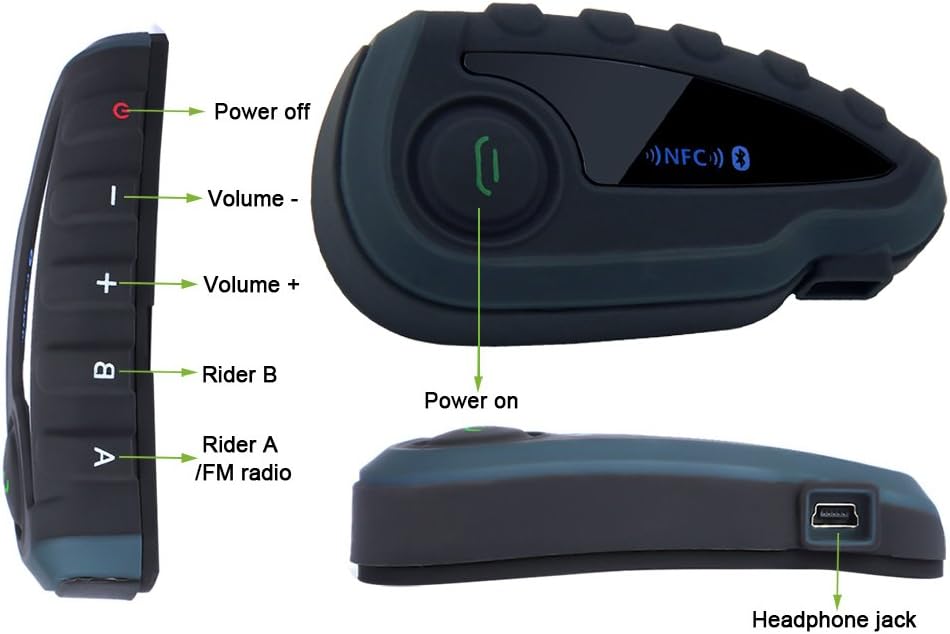
Gambar 4.1: Depan dan samping views of the EJEAS V8 intercom unit with key controls labeled. Labels include Power off, Volume -, Volume +, Rider B, Rider A/FM radio, Power on, and Headphone jack.

Gambar 4.2: Meledak view of the EJEAS V8 intercom unit connected to its headset and microphone. Labels indicate Rider A, Rider B, Volume+, Phone/Play button, Volume-, Power off button, Headphone jack, Earpiece, and Microphone.
4.2. Kontrol Jarak Jauh

Figure 4.3: The EJEAS V8 remote control unit, designed for handlebar mounting. It features large, easy-to-press buttons for safe operation while riding.
5. Pengaturan
5.1. Mengisi Daya Perangkat
Before first use, fully charge the V8 intercom unit. Connect the supplied USB cable to the charging port on the intercom unit and plug the other end into a USB power adapter (not included) or a computer USB port. The charging indicator will show the charging status. A full charge takes approximately 3 hours.
5.2. Pemasangan Helm
- Lampirkan clamp mount to the side of your helmet. Ensure it is securely fastened.
- Slide the V8 intercom unit onto the clamp mount until it clicks into place.
- Position the stereo speakers inside the helmet, aligning them with your ears. Use the provided Velcro tapes to secure them.
- Attach the microphone to the inside of the helmet, ensuring it is close to your mouth for clear audio pickup.
- Connect the speaker and microphone cable to the headphone jack on the V8 intercom unit.

Figure 5.1: The EJEAS V8 intercom unit securely mounted on the side of a motorcycle helmet, ready for use.
5.3. Instalasi Kendali Jarak Jauh
Install the remote control on your motorcycle's handlebar for easy access during rides.
- Buka clamp pada kendali jarak jauh.
- Position the remote control on a suitable section of your handlebar.
- Kencangkan klem dengan amanamp to ensure the remote control does not move during operation.

Figure 5.2: The EJEAS V8 remote control unit mounted on a motorcycle handlebar, providing convenient access to controls while riding.
6. Petunjuk Pengoperasian
6.1. Daya Hidup/Mati
- Nyalakan: Press and hold the Power On button (refer to Figure 4.1) until the indicator light illuminates.
- Matikan: Press and hold the Power Off button (refer to Figure 4.1) until the indicator light turns off.
6.2. Pemasangan Bluetooth
The V8 supports pairing with smartphones, GPS devices, and MP3 players via Bluetooth.
- Pemasangan NFC: If your smartphone supports NFC, enable NFC on your phone and simply tap it against the NFC area on the V8 intercom unit. The devices will automatically recognize and pair.
- Pemasangan Manual: Put the V8 into pairing mode (refer to specific instructions in the included user manual for button combinations). On your device (phone, GPS, MP3), search for Bluetooth devices and select "EJEAS V8" from the list.
6.3. Komunikasi Interkom
The V8 allows full-duplex communication among up to 5 riders. The communication range is up to 1200 meters in open terrain.
- To initiate an intercom call with Rider A, press the 'Rider A' button.
- To initiate an intercom call with Rider B, press the 'Rider B' button.
- Follow the specific pairing instructions in the detailed user manual to connect multiple V8 units for group intercom.
6.4. Panggilan Telepon
Once paired with your smartphone, the V8 supports hands-free calling.
- Menjawab Panggilan: Press the Phone/Play button once.
- Akhiri Panggilan: Press the Phone/Play button once during a call.
- Tolak Panggilan: Press and hold the Phone/Play button.
- Panggil Ulang Nomor Terakhir: Double-press the Phone/Play button.
6.5. Pemutaran Musik
Control music from your paired device directly through the V8.
- Putar/Jeda: Press the Phone/Play button once.
- Lagu Berikutnya: Tekan tombol Volume +.
- Lagu Sebelumnya: Tekan tombol Volume -.
6.6. Radio FM
The V8 features a built-in FM radio.
- Nyalakan/Matikan Radio FM: Press the 'Rider A/FM radio' button (refer to Figure 4.1) to toggle the FM radio on or off.
- Pindai Saluran: Refer to the detailed user manual for specific button combinations to scan and save FM channels.
6.7. Kontrol Volume
Adjust the volume for all audio outputs.
- Tingkatkan Volume: Tekan tombol Volume +.
- Kurangi Volume: Tekan tombol Volume -.
7. Pemeliharaan
Proper maintenance ensures the longevity and optimal performance of your EJEAS V8 intercom.
- Pembersihan: Gunakan yang lembut, damp cloth to wipe the surface of the intercom unit and remote control. Do not use harsh chemicals or abrasive cleaners.
- Penyimpanan: Saat tidak digunakan dalam jangka waktu lama, simpan perangkat di tempat yang sejuk dan kering, jauh dari sinar matahari langsung dan suhu ekstrem.
- Perawatan Baterai: To preserve battery life, avoid fully discharging the battery frequently. Charge the device regularly, even if not in use.
8. Penyelesaian masalah
If you encounter issues with your EJEAS V8, refer to the following common troubleshooting steps:
| Masalah | Kemungkinan Penyebab | Larutan |
|---|---|---|
| Perangkat tidak menyala | Baterai lemah; Perangkat macet | Charge the device fully; Perform a hard reset (refer to manual for specific steps). |
| Cannot pair with phone/other device | Perangkat tidak dalam mode pemasangan; Bluetooth dimatikan di ponsel; Terlalu banyak perangkat yang terpasang | Ensure V8 is in pairing mode; Turn on Bluetooth on your phone; Clear previous pairings on V8 and try again. |
| Intercom range is short or connection is unstable | Obstructions; Interference; Too far apart | Ensure line of sight between units; Move away from sources of strong electromagnetic interference; Reduce distance between riders. |
| Tidak ada suara dari speaker | Speakers not connected; Volume too low; Faulty speakers | Check speaker connection to the V8 unit; Increase volume; Test with another headset if possible. |
Jika masalah berlanjut setelah mencoba solusi ini, hubungi dukungan pelanggan.
9. Spesifikasi
Detailed technical specifications for the EJEAS V8 intercom system:
| Fitur | Spesifikasi |
|---|---|
| Versi Bluetooth | 3.0 |
| Jenis Baterai | Polimer Litium |
| Kapasitas Baterai | 530 mAh |
| Waktu Bicara | Hingga 8 jam |
| Waktu Siaga | 120 jam |
| Waktu Pengisian Daya | Sekitar 3 jam |
| Jangkauan Interkom | Up to 1200 meters (under ideal conditions) |
| Max Riders (Interkom) | 5 riders simultaneously |
| Teknologi Konektivitas | Bluetooth, NFC |
| Dimensi (Produk) | Ukuran 23x4.8x16 cm |
| Berat (Produk) | 0.5 g (likely unit weight, not package) |
| Sertifikasi | CE, RoHS |
10. Garansi & Dukungan
EJEAS provides a warranty for the V8 Bluetooth Intercom Motorcycle Helmet Headset.
- Periode Garansi: Produk ini dilengkapi dengan garansi 12 bulan sejak tanggal pembelian.
- Cakupan Garansi: The warranty covers manufacturing defects and malfunctions under normal use. It does not cover damage caused by misuse, accidents, unauthorized modifications, or natural disasters.
- Dukungan Pelanggan: If you experience any issues with your product or have questions not covered in this manual, please contact EJEAS customer support through the retailer where you purchased the product or visit the official EJEAS website for contact information. Please have your purchase receipt and product model number ready when contacting support.