
Ներածություն
Welcome to the user manual for your new HP OMEN 16-ae0002TX Gaming Laptop. This document provides essential information to help you set up, operate, maintain, and troubleshoot your device. Designed for high-performance gaming and demanding tasks, this laptop features a 14th Gen Intel Core i7 processor, NVIDIA GeForce RTX 4060 graphics, 16GB DDR5 RAM, and a 1TB SSD, all presented on a vibrant 16.1-inch FHD 165Hz display.
1. Նախնական կարգավորում
1.1 Unpacking Your Laptop
Զգուշորեն հանեք բոլոր բաղադրիչները փաթեթավորումից։ Համոզվեք, որ առկա են հետևյալ իրերը՝
- HP OMEN 16-ae0002TX Gaming Laptop
- Power Adapter
- Հոսանքի լարը
- Օգտագործողի ձեռնարկ (այս փաստաթուղթը)
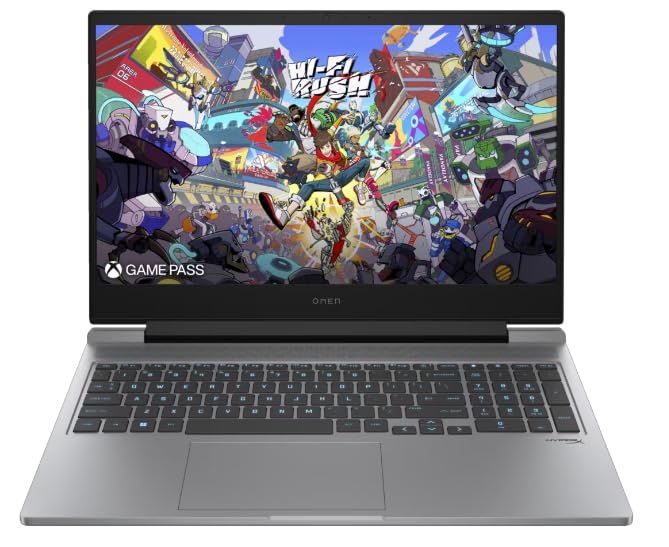
Figure 1: HP OMEN 16-ae0002TX Gaming Laptop overview.
1.2 Հոսանքի ադապտերի միացումը
- Միացրեք հոսանքի լարը հոսանքի ադապտերին:
- Միացրեք հոսանքի ադապտեր պատի վարդակից:
- Connect the adapter's output plug to the power port on your laptop.
Խորհուրդ է տրվում նոութբուքը լիովին լիցքավորել առաջին օգտագործումից առաջ։
1.3 Առաջին բեռնումը և Windows-ի տեղադրումը
Press the power button located on the laptop chassis. The laptop will boot up, and you will be guided through the Windows 11 Home setup process. Follow the on-screen instructions to configure your operating system, network settings, and user account.
1.4 Արտաքին սարքերի միացում
Your HP OMEN laptop provides various ports for connecting external devices:
- USB պորտեր. Մկնիկների, ստեղնաշարերի, արտաքին կրիչների և այլ USB սարքերի համար։
- HDMI պորտ. Արտաքին էկրաններին կամ հեռուստացույցներին միանալու համար։
- Աուդիո Jack: Ականջակալների կամ արտաքին բարձրախոսների համար։
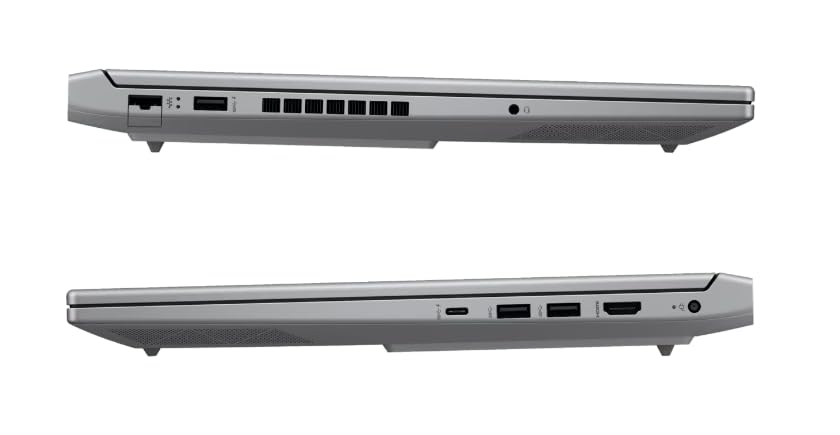
Նկար 2. Կողք view illustrating available ports.
2. Ձեր նոութբուքի շահագործումը
2.1 Միացում/անջատում և քնի ռեժիմ
- Միացում՝ Սեղմեք հոսանքի կոճակը:
- Անջատել. Windows-ում սեղմեք «Սկսել» կոճակը, այնուհետև ընտրեք «Սնուցում» > «Անջատել»։
- Քնելու ռեժիմ: Փակեք կափարիչը կամ «Սկսել» ցանկից ընտրեք «Սնուցում» > «Քնի ռեժիմ»։
2.2 Ստեղնաշար և սենսորային վահանակ
The laptop features a 1-zone RGB backlit full-size keyboard with HyperX tactile feedback for an enhanced gaming and typing experience. The integrated touchpad supports multi-touch gestures for navigation.
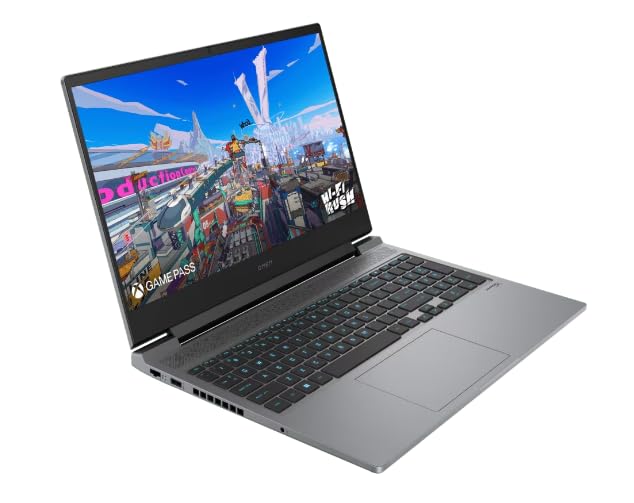
Նկար 3: Ստեղնաշարի և սենսորային վահանակի դասավորությունը:
2.3 Ցուցադրման առանձնահատկությունները
The 16.1-inch FHD (1920 x 1080) IPS display offers a 165Hz refresh rate and 7ms response time, providing smooth and responsive visuals for gaming and multimedia. Adjust brightness and display settings through Windows display options.
2.4 Network and Wireless Connectivity
- Wi-Fi: Connect to wireless networks via the Windows network settings.
- Bluetooth: Զուգակցեք Bluetooth-ով աշխատող սարքերը, ինչպիսիք են ականջակալները, մկնիկները կամ խաղային կառավարիչները։
2.5 HP True Vision 1080p FHD Camera
The integrated 1080p FHD webcam is suitable for video calls, online meetings, and streaming. Ensure proper lighting for optimal image quality.
3. Սպասարկում և խնամք
3.1 Ընդհանուր մաքրում
- Էկրան: Թեթև օգտագործեք փափուկ, առանց մզկի կտորի, դampջրով կամ էկրան մաքրող միջոցով։ Խուսափեք կոշտ քիմիական նյութերից։
- Ստեղնաշար և շասսի. Օգտագործեք փափուկ կտոր։ Փոշու համար օգտագործեք սեղմված օդ։
- Մաքրելուց առաջ համոզվեք, որ նոութբուքը անջատված է և վարդակից հանված։
3.2 Մարտկոցի խնամք
The laptop is equipped with a Lithium Ion battery. To maximize battery lifespan:
- Խուսափեք ծայրահեղ ջերմաստիճանից:
- Do not let the battery completely discharge frequently.
- Եթե նոութբուքը երկար ժամանակով եք պահում, համոզվեք, որ մարտկոցը լիցքավորված է մոտավորապես 50%-ով։
3.3 Ծրագրային ապահովման թարմացումներ
Regularly update your Windows operating system, drivers, and HP software to ensure optimal performance, security, and compatibility. These updates often include performance enhancements and bug fixes.
4. Ընդհանուր խնդիրների լուծում
Այս բաժինը անդրադառնում է այն տարածված խնդիրներին, որոնց կարող եք հանդիպել: Ավելի բարդ խնդիրների համար դիմեք HP աջակցության ծառայությանը: webկայք։
4.1 Հզորության հետ կապված խնդիրներ
- Նոութբուքը չի միանում. Ensure the power adapter is securely connected to both the laptop and a working power outlet. Check if the power adapter's indicator light is on.
- Մարտկոցը չի լիցքավորվում. Verify the power adapter connection. Try a different outlet.
4.2 Ցուցադրման խնդիրներ
- Էկրանին պատկեր չկա։ :( Համոզվեք, որ նոութբուքը միացված է։ Փորձեք միացնել արտաքին մոնիտոր՝ ստուգելու համար, թե արդյոք խնդիրը նոութբուքի էկրանի մեջ է։
- Flickering or distorted image: Թարմացրեք ձեր գրաֆիկական քարտի դրայվերները: Կարգավորեք էկրանի թարմացման հաճախականությունը Windows-ի կարգավորումներում:
4.3 Կապի հետ կապված խնդիրներ
- Wi-Fi-ը չի միանում. Ստուգեք, թե արդյոք Wi-Fi-ը միացված է Windows-ի կարգավորումներում։ Վերագործարկեք ձեր ռաութերը և նոութբուքը։
- Bluetooth սարքը չի զուգակցվում. Ensure the Bluetooth device is in pairing mode and within range. Check Bluetooth settings on your laptop.
5. Ապրանքի բնութագրերը
| Առանձնահատկություն | Հստակեցում |
|---|---|
| Բրենդ | HP |
| Մոդելի անվանումը | HP laptopOMEN (ae0002tx) |
| Պրոցեսոր | 14th Gen Intel® Core™ i7-14650HX (up to 5.2 GHz) |
| RAM հիշողություն | 16 GB DDR5 (Max 32 GB) |
| Պահպանում | 1 ՏԲ SSD (պինդ վիճակի սկավառակ) |
| Գրաֆիկական քարտ | NVIDIA GeForce RTX 4060 (8 ԳԲ GDDR6 նվիրված հիշողություն) |
| Ցուցադրել | 16.1-inch FHD (1920 x 1080) IPS, 165Hz, 7ms, 300 nits |
| Օպերացիոն համակարգ | Windows 11 Home |
| Ստեղնաշար | 1-zone RGB Backlit, HyperX tactile feedback |
| Webտեսախցիկ | HP True Vision 1080p FHD |
| Միացում | Wi-Fi, Bluetooth |
| Նավահանգիստներ | USB (Total: 1), HDMI (Total: 1) |
| Dimensions (L x W x Thickness) | 30L x 25W x 6Th Centimeters |
| Նյութի քաշը | 1.9 կգ |
| Մարտկոցի տեսակը | Lithium Ion (2.6 Watt Hours) |
6. Երաշխիքային տեղեկատվություն
Your HP OMEN 16-ae0002TX Gaming Laptop comes with an onsite warranty. Please retain your proof of purchase for warranty claims. For detailed terms and conditions, refer to the warranty card included with your product or visit the official HP support webկայք։
7. Հաճախորդների աջակցություն
For technical assistance, service, or further inquiries, please contact HP customer support:
- Արտադրող / ներմուծող: HP India Sales Pvt. Ltd., 24 Salarpuria Arena, Hosur Main Road, Adugodi, Bangalore-560030
- Առցանց աջակցություն. Այցելեք պաշտոնյային HP Աջակցություն Webկայք վարորդների, ձեռնարկների և խնդիրների լուծման ուղեցույցների համար։