
1. Ներածություն
The HANDA HK8 Pro Smart Watch is a versatile device designed to assist with daily activities, fitness tracking, and communication. It features an AMOLED display, Bluetooth calling, health monitoring, and various smart functions. This manual provides detailed instructions for setting up, operating, and maintaining your smart watch.
Փաթեթի բովանդակությունը.
- HANDA HK8 Pro Smart Watch (1)
- Interchangeable Strap (1) - Note: Package includes two straps, one stainless steel and one silicone.
- Magnetic Charging Cable (1)
- Օգտագործողի ձեռնարկ (1)
2. Անվտանգության տեղեկատվություն
- Do not expose the watch to extreme temperatures or direct sunlight for prolonged periods.
- Avoid using abrasive cleaners or chemicals on the watch.
- The watch is IP68 waterproof, suitable for hand washing, rain, and swimming. However, it is not recommended for hot showers, saunas, or diving, as steam and hot water can compromise the seal.
- Keep the magnetic charging cable away from metal objects to prevent short circuits.
- Խորհրդակցեք բժշկի հետ՝ նախքան որևէ նոր մարզական ռեժիմ սկսելը կամ եթե ունեք նախկինում առկա առողջական խնդիրներ: Առողջական վիճակի մոնիթորինգի գործառույթները միայն հղման համար են և չպետք է օգտագործվեն բժշկական ախտորոշման համար:
3. Կարգավորում
3.1 Խելացի ժամացույցի լիցքավորում
Before first use, fully charge the watch. Connect the magnetic charging cable to the charging points on the back of the watch and plug the USB end into a standard USB power adapter (not included). The watch display will indicate charging status. A full charge typically takes approximately 2 hours.
3.2 Appրագրի տեղադրում
Բոլոր գործառույթներին մուտք գործելու և տվյալները համաժամեցնելու համար ներբեռնեք FitCloudPro app on your smartphone. Scan the QR code in the manual or search for "FitCloudPro" in your device's app store (compatible with Android 4.4 / iOS 9.0 and above).
3.3 Սարքի զուգակցում
- Համոզվեք, որ ձեր ժամացույցը լիցքավորված է և միացված։
- Միացրեք Bluetooth-ը ձեր սմարթֆոնի վրա:
- Բացեք FitCloudPro հավելվածը և հետևեք էկրանին հայտնվող հրահանգներին՝ նոր սարք ավելացնելու համար։
- Select "HK8 Pro" from the list of available devices to establish a connection.
- Հաստատեք զուգավորման հարցումը ձեր ժամացույցի և սմարթֆոնի վրա։
3.4 Ժապավենի տեղադրում/փոխարինում
The HK8 Pro Smart Watch comes with interchangeable straps. To attach or remove a strap, locate the quick-release pins on the underside of the strap. Slide the pin inwards to detach or attach the strap to the watch body. Ensure the pin is securely seated in the lug holes.

Image: The HK8 Pro Smart Watch displayed with different strap materials and colors, illustrating the interchangeable design. A comparison highlights the clarity of the AMOLED screen.
4. Գործառնական հրահանգներ
4.1 Հիմնական նավարկություն
- Սենսորային էկրան. Սահեցրեք ձախ/աջ, վերև/ներքև՝ ընտրացանկերում և գործառույթներում նավարկելու համար: Հպեք՝ ընտրելու համար:
- Կողքի կոճակներ. Typically, one button serves as a power/back button, while others may provide quick access to specific functions or sports modes. Refer to the watch interface for specific button assignments.
4.2 Միացում/անջատում
- Միացում՝ Սեղմեք և պահեք միացման կոճակը, մինչև էկրանը լուսավորվի:
- Անջատել: Press and hold the power button, then select the 'Power Off' option on the screen.
4.3 Display Settings and Watch Faces
The HK8 Pro features an AMOLED display with an always-on function. You can customize watch faces directly on the watch or through the FitCloudPro app. The app offers a wide selection of dials and allows you to upload custom photos.
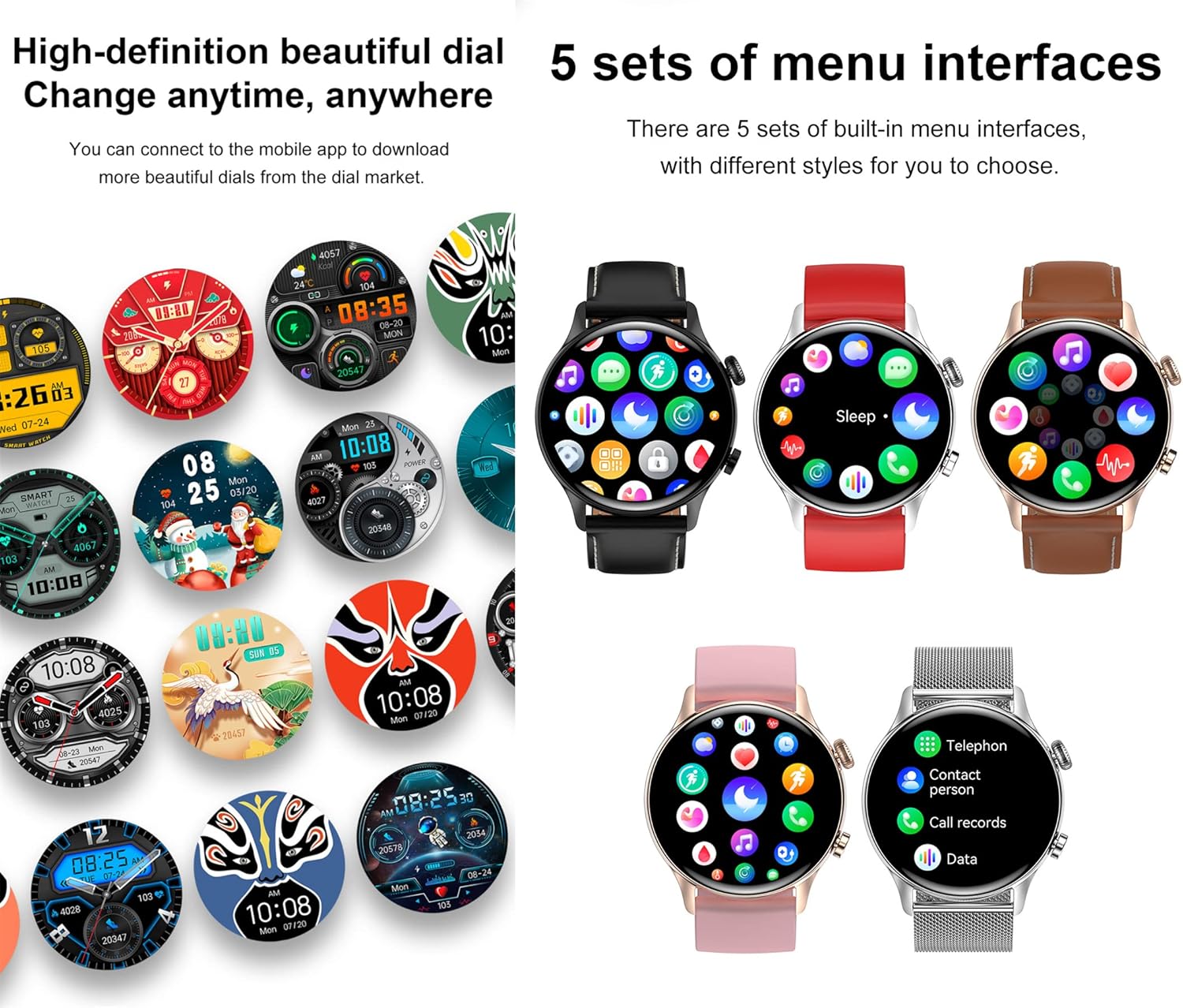
Image: Multiple watch faces and five distinct menu interface styles are shown, demonstrating customization options for the HK8 Pro Smart Watch.
4.4 Bluetooth զանգեր և ծանուցումներ
Once paired with your smartphone, the watch supports Bluetooth calls. You can dial numbers, answer incoming calls, view call records, and access contacts directly from your wrist. The watch also synchronizes with your mobile phone to display SMS, social media (e.g., Facebook, Twitter, WhatsApp), and other app notifications.

Image: Illustrations of the watch receiving messages and displaying options for dialing, answering, rejecting calls, and syncing contacts and call logs.
4.5 Առողջության մոնիտորինգ
The HK8 Pro Smart Watch monitors several key health indicators:
- Սրտի հաճախականությունը. Continuous monitoring throughout the day.
- Արյան թթվածին (SpO2): Չափում է արյան թթվածնի հագեցվածության մակարդակը։
- Արյան ճնշումը: Տրամադրում է արյան ճնշման մոտավոր ցուցանիշներ։
- Քնի մոնիտորինգ. Հետևում է քնի տևողությանըtages (deep sleep, light sleep, wake-up time) and provides analysis in the app.
Access these features from the watch menu or view detailed historical data in the FitCloudPro app.
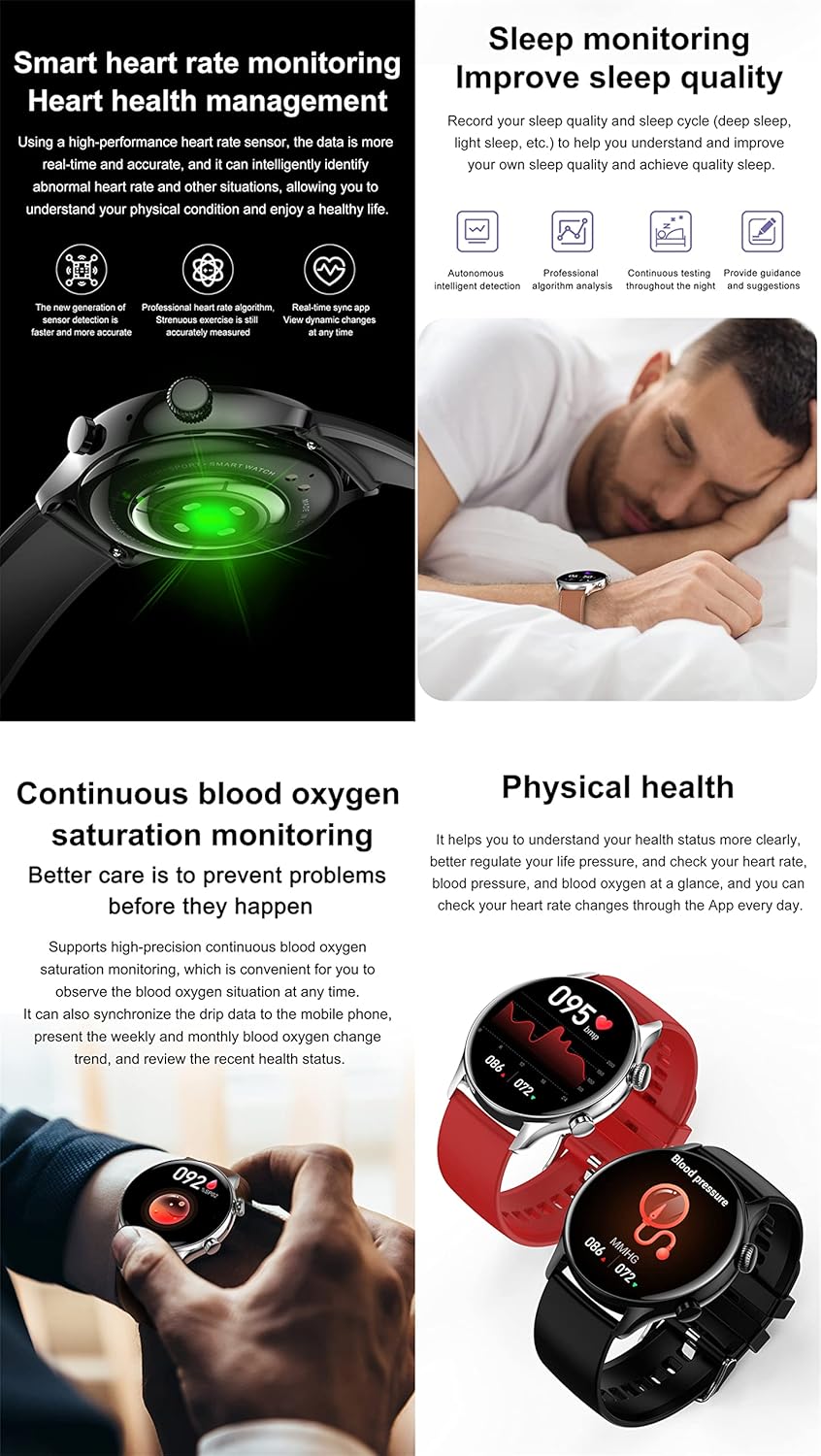
Image: Visuals demonstrating the watch's capabilities in monitoring heart rate, analyzing sleep quality, and measuring blood oxygen and blood pressure levels.
4.6 Ակտիվության հետևման և սպորտային ռեժիմներ
The watch accurately records daily activities such as steps, calories burned, and distance. It includes multiple sports modes (e.g., Elliptical, Basketball, Running, Walking, Football, Cycling) to track specific workouts. During exercise, the watch can monitor your movement time, distance, and calories consumed, providing data to optimize your training.

Image: The watch interface displaying routine exercise data and icons representing different sports modes like walking, running, and cycling.
4.7 Multifunctional NFC
The HK8 Pro supports NFC for convenient access control and offline payments (e.g., Alipay). To use NFC, ensure it is enabled and configured through the FitCloudPro app. You can simulate access cards for compatible systems by touching the watch to the reader.

Image: A user interacting with an NFC access control panel using the HK8 Pro Smart Watch, illustrating the swipe access feature.
4.8 Այլ խելացի գործառույթներ
- Ձայնային կառավարում. Փոխազդեք ձեր ժամացույցի հետ ձայնային հրամանների միջոցով։
- Երաժշտության վերահսկում. Կառավարեք երաժշտության նվագարկումը ձեր զուգակցված սմարթֆոնի վրա։
- Եղանակի տեսություն: Ստացեք իրական ժամանակի եղանակի թարմացումներ։
- Իգական ֆիզիոլոգիական ցիկլ. Հետևեք և կանխատեսեք դաշտանային ցիկլերը։
- Նստակյաց հիշեցում. Տեղեկացնում է ձեզ տեղաշարժվելու մասին անգործության ժամանակահատվածներից հետո։
- Գտեք հեռախոս. Գտեք ձեր զուգակցված սմարթֆոնը։
5. Պահպանում
5.1 Ժամացույցի մաքրում
Wipe the watch screen and body with a soft, lint-free cloth. For stubborn dirt, dampen the cloth slightly with water. Avoid using harsh chemicals or abrasive materials that could damage the finish.
5.2 Ջրակայունություն
The HK8 Pro is IP68 waterproof. This means it is resistant to dust and can withstand immersion in water up to 1.5 meters for 30 minutes. It is suitable for daily use, such as hand washing, rain, and shallow swimming. However, it is not designed for diving, high-pressure water activities, or exposure to hot water/steam, which can compromise its water resistance.

Image: The HK8 Pro Smart Watch shown submerged in water, illustrating its IP68 waterproof rating. Battery life estimates for typical use and standby are also displayed.
5.3 Մարտկոցի խնամք
To prolong battery life, avoid fully discharging the watch frequently. Charge the watch regularly, ideally before the battery level drops below 20%. Store the watch in a cool, dry place when not in use for extended periods.
6: Անսարքություն
- Ժամացույցը չի միանում՝ Համոզվեք, որ ժամացույցը լիովին լիցքավորված է։ Միացրեք այն լիցքավորիչին և սպասեք մի քանի րոպե, նախքան կրկին միացնելու փորձը։
- Հեռախոսի հետ կապ հաստատելը հնարավոր չէ. Make sure Bluetooth is enabled on your phone and the watch. Restart both devices and try pairing again. Ensure the FitCloudPro app has necessary permissions.
- Անճշտ առողջական տվյալներ. Ensure the watch is worn snugly on your wrist, not too tight or too loose. Clean the sensor on the back of the watch. Readings can be affected by movement, skin tone, and environmental factors.
- Ծանուցումները չեն երևում. Check app permissions on your phone for FitCloudPro. Ensure notifications are enabled within the app and on your phone's system settings for the relevant applications.
- Մարտկոցի կարճ կյանք. Reduce screen brightness, disable always-on display if not needed, limit frequent heart rate monitoring, and close unused background apps on the watch.
7. Տեխնիկական պայմաններ
| Առանձնահատկություն | Հստակեցում |
|---|---|
| Ցուցադրել | 1.36" AMOLED, 390*390 Resolution |
| CPU | Realtek 8762DT |
| Սենսոր | SC7A20 |
| Անջրանցիկ մակարդակ | IP68 |
| Հիշողություն | 128M Flash |
| Bluetooth | BT5.0 |
| Մարտկոց | 300 mAh լիթիում պոլիմեր |
| Լիցքավորման մեթոդ | Մագնիսական լիցքավորման մետաղալար |
| Համատեղելի համակարգ | Android 4.4 / iOS 9.0 և ավելի բարձր |
| Չափերը | 44.8 x 44.8 x 11 մմ (1.76 x 1.76 x 0.43 դյույմ) |
| Քաշը | 48.3 գ (1.7 ունցիա) |
| Ձեռքի ժապավենի չափս | Total length 220mm, adjustable length 145-190mm |
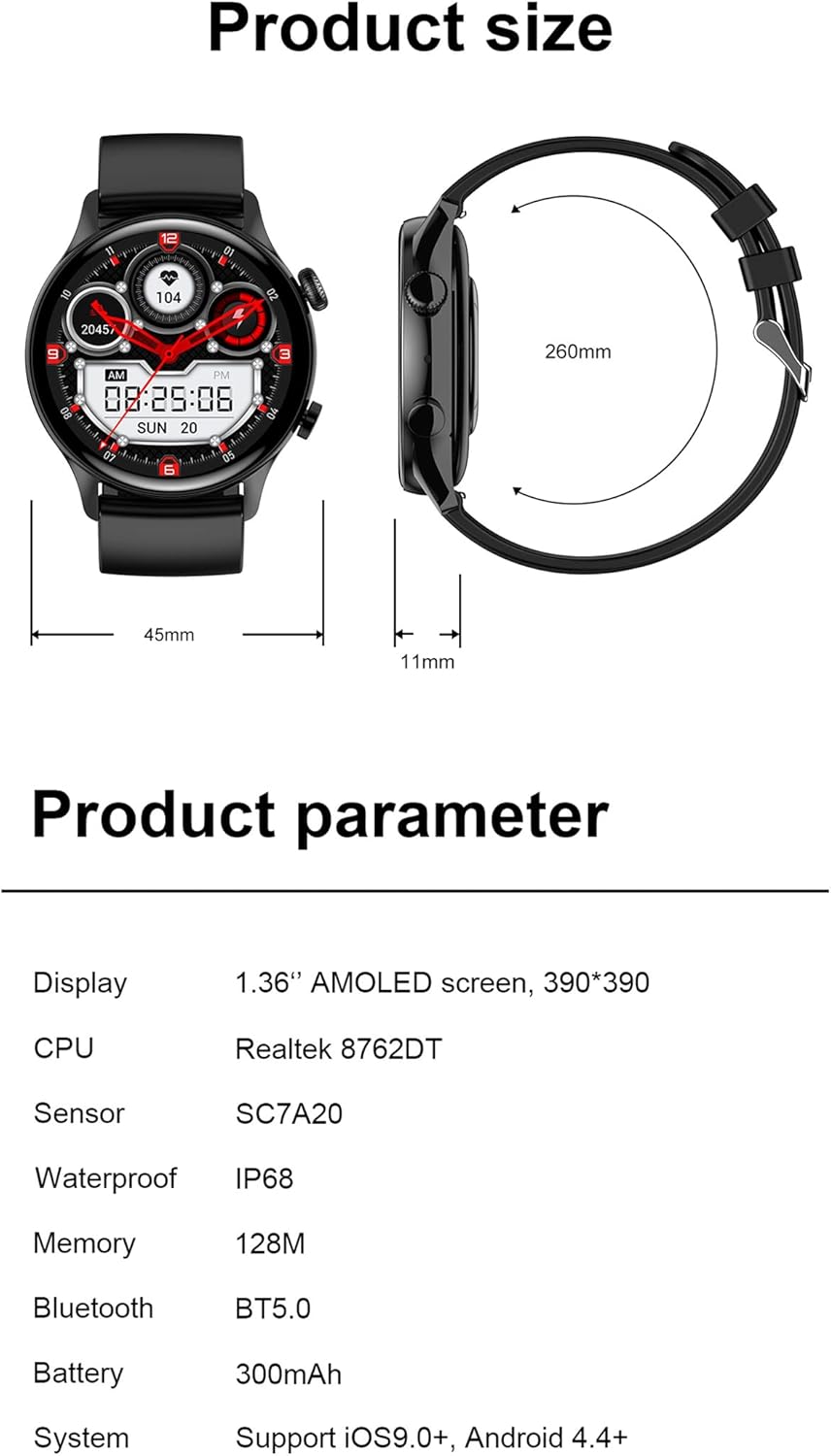
Image: A diagram illustrating the physical dimensions of the HK8 Pro Smart Watch, alongside a table detailing its product parameters such as display type, CPU, and battery capacity.
8. Երաշխիք և աջակցություն
The HANDA HK8 Pro Smart Watch comes with a standard manufacturer's warranty. For specific warranty terms, conditions, and support inquiries, please refer to the warranty card included in your package or contact the manufacturer directly through their official webկայքում կամ հաճախորդների սպասարկման ալիքներում: Խնդրում ենք պահպանել գնման ապացույցը երաշխիքային պահանջների համար: