
1. Ներածություն
Thank you for choosing the Baseus Encok S16 Neck Hung Bluetooth Wireless In-Ear Earphone. This manual provides detailed instructions for setup, operation, and maintenance to ensure optimal performance and longevity of your device. Please read this manual thoroughly before use.
2. Փաթեթի բովանդակությունը
Ստուգեք, որ բոլոր իրերը առկա են փաթեթում.
- 1 x Baseus Encok S16 Wireless Earphone
- 1 x լիցքավորման մալուխ
- 1 x Օգտագործողի ձեռնարկ
- 1 x Երաշխիքային քարտ

Image: Contents of the Baseus Encok S16 earphone package, showing the earphones, charging cable, user manual, and warranty card.
3. Ապրանքը ավարտված էview
The Baseus Encok S16 earphones feature a neck-hung design for comfortable and secure wear. Key features include:
- Մագնիսական ֆիքսացիա. Earbuds can be magnetically joined when not in use, preventing tangling and loss.
- Adjustable Coils: The earphone line length can be adjusted by sliding for a customized fit.
- High Fidelity Sound: Equipped with a dynamic speaker unit, composite diaphragm, and independent tune trope structure for clear audio.
- Efficient Power: Utilizes a British CSR chip and 120mAh battery for low power consumption and extended battery life.
- Համընդհանուր Համատեղելիություն. Smartly matches with smartphones and tablet PCs, compatible with all Bluetooth 4.0 enabled devices.

Image: Close-up of the Baseus Encok S16 earbuds demonstrating their magnetic connection capability.
4. Կարգավորում
4.1 Ականջակալների լիցքավորում
- Connect the provided charging cable to the charging port on the earphone's control unit.
- Լիցքավորման մալուխի մյուս ծայրը միացրեք USB սնուցման աղբյուրին (օրինակ՝ համակարգչի USB միացք, USB պատի ադապտեր):
- Լիցքավորման ընթացքում ցուցիչի լույսը կվառվի և լրիվ լիցքավորվելուց հետո կանջատվի կամ կփոխի գույնը։
- Լրիվ լիցքավորումը սովորաբար տևում է մոտ 1.5-ից 2 ժամ։
4.2 Bluetooth զուգավորում
- Համոզվեք, որ ականջակալները լիովին լիցքավորված են։
- Press and hold the Power button on the control unit until the indicator light flashes red and blue alternately, indicating pairing mode.
- Ձեր սմարթֆոնի կամ Bluetooth-ով աշխատող սարքի վրա անցեք Bluetooth կարգավորումներ։
- Որոնել available devices and select "Baseus Encok S16" from the list.
- Once connected, the indicator light will flash blue slowly or turn solid blue.
- Եթե գաղտնաբառ է պահանջվում, մուտքագրեք «0000»:
5. Գործառնական հրահանգներ
5.1 Հիմնական հսկողություն
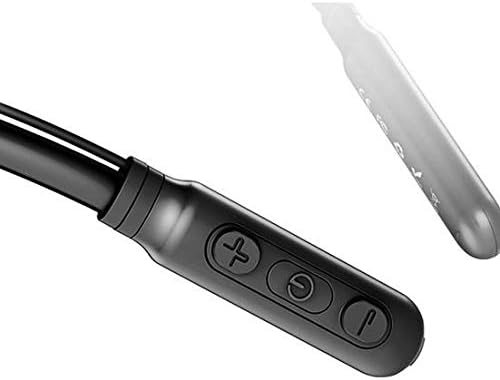
Image: Close-up of the Baseus Encok S16 earphone's inline control unit, showing the power/multi-function button, volume up, and volume down buttons.
| Կոճակ | Գործառույթ |
|---|---|
| Միացման կոճակ (կենտրոն) |
|
| Ձայնի բարձրացում (+) |
|
| Ծավալի անկում (-) |
|
5.2 Ականջակալներ կրելը
Place the neckband around your neck, ensuring the control unit is easily accessible. Insert the earbuds comfortably into your ears. Adjust the earphone line length using the sliding coils for a secure and comfortable fit.
6. Պահպանում
- Clean the earbuds and control unit regularly with a soft, dry cloth.
- Avoid exposing the earphones to extreme temperatures, humidity, or corrosive liquids.
- Store the earphones in a cool, dry place when not in use. The magnetic earbuds can help prevent tangling during storage.
- Do not attempt to disassemble or repair the earphones yourself, as this will void the warranty.
7: Անսարքություն
| Խնդիր | Լուծում |
|---|---|
| Հնարավոր չէ միացնել | Ensure the earphones are fully charged. Press and hold the Power button for 3 seconds. |
| Հնարավոր չէ զուգակցել սարքի հետ |
|
| Ոչ մի ձայն կամ ցածր ձայն |
|
| Ընդհատվող կապ |
|
8. Տեխնիկական պայմաններ
| Առանձնահատկություն | Մանրամասն |
|---|---|
| Բրենդ | Բասեուսը |
| Մոդելի համարը | FWP-E-S16 |
| Միացման տեխնոլոգիա | Bluetooth |
| Bluetooth տարբերակ | 4.0 (compatible with devices enabling Bluetooth 4.0) |
| Ձևի գործոն | In Ear, Neck Hung |
| Կառավարման տեսակը | Voice Control, Touch (via buttons) |
| Մարտկոցի հզորությունը | 120 mAh |
| Քաշը | 30 գրամ |
| Ներառված բաղադրիչներ | Wireless Earphone, Charging Cable, User Manual, Warranty Card |
9. Երաշխիք և աջակցություն
This product comes with a Limited Warranty. Please refer to the included Warranty Card for detailed terms and conditions regarding coverage and duration.
For technical support or warranty claims, please contact your retailer or visit the official Baseus webկայք՝ հաճախորդների սպասարկման տեղեկատվության համար։
Համաշխարհային առևտրի նույնականացման համարը (GTIN). 06953156264489