
1. Bevezetés
This manual provides detailed instructions for the proper use and maintenance of your BAOFENG UV-32 10W Ham Radio. The UV-32 is a multi-band two-way radio featuring 10W selectable power, GPS navigation, a 2.0-inch color display, and multiple programming options including wireless app connectivity. Please read this manual thoroughly before operating the device to ensure safe and efficient communication.
2. Biztonsági információk
Observe the following safety precautions to prevent injury or damage to the radio:
- Ne üzemeltesse a rádiót robbanásveszélyes légkörben (pl. gyúlékony gázok, porrészecskék, fémporok).
- Do not transmit without an antenna connected.
- Keep the antenna at least 2.5 cm (1 inch) away from your body when transmitting.
- Kizárólag a BAOFENG által jóváhagyott akkumulátorokat és töltőket használjon. A nem engedélyezett tartozékok károsodást vagy tüzet okozhatnak.
- Ne szerelje szét és ne alakítsa át a rádiót. Javításokat csak szakképzett szerelők végezhetnek.
- Kerülje a hosszan tartó közvetlen napfénynek vagy szélsőséges hőmérsékletnek való kitettséget.
- Ne használja a rádiót vezetés vagy más, teljes figyelmet igénylő tevékenység közben.
3. A csomag tartalma
Ellenőrizze, hogy minden tétel megvan-e a csomagban:
- 1 x BAOFENG UV-32 Radio
- 1x2500mAh akkumulátor
- 1 x USB-C Charger
- 1 x asztali töltőalap
- 1 x Standard UV Antenna
- 1 x Long Airband Antenna
- 1 x fülhallgató
- 1 x övcsipesz
- 1 x Radio Case Holder

Image: The BAOFENG UV-32 radio shown with its complete set of accessories, including the battery, charger, antennas, headset, belt clip, and case holder.
4. Termék végeview
Ismerkedjen meg UV-32 rádiója főbb alkatrészeivel.

Kép: elöl view of the BAOFENG UV-32 radio, highlighting the 2.0-inch color display, alphanumeric keypad, and function buttons.
Főbb komponensek:
- Antenna csatlakozó: For attaching the standard UV or airband antenna.
- Bekapcsoló/hangerő gomb: Ki- és bekapcsolja a rádiót, és beállítja a hangerőt.
- Kijelző: 2.0-inch color screen showing frequency, channel, battery status, and other indicators.
- PTT gomb: Push-To-Talk gomb az adáshoz.
- Side Keys (P1, P2): Testreszabható funkcióbillentyűk.
- Billentyűzet: Alphanumeric input for frequencies, channels, and menu navigation.
- USB-C töltőport: Közvetlen akkumulátortöltéshez.
- Tartozék csatlakozó: For connecting the headset or programming cable.
5. Beállítás
5.1 Akkumulátor behelyezése és töltése
- Align the 2500mAh Li-ion battery with the grooves on the back of the radio.
- Csúsztassa felfelé az akkumulátort, amíg a helyére nem kattan.
- To charge, connect the USB-C charger directly to the battery's USB-C port or place the radio with the battery attached into the desktop charging base.
- The charging indicator on the desktop base will show red during charging and green when fully charged.

Image: A close-up of the 2500mAh Li-ion battery for the UV-32, highlighting its integrated USB-C charging port.
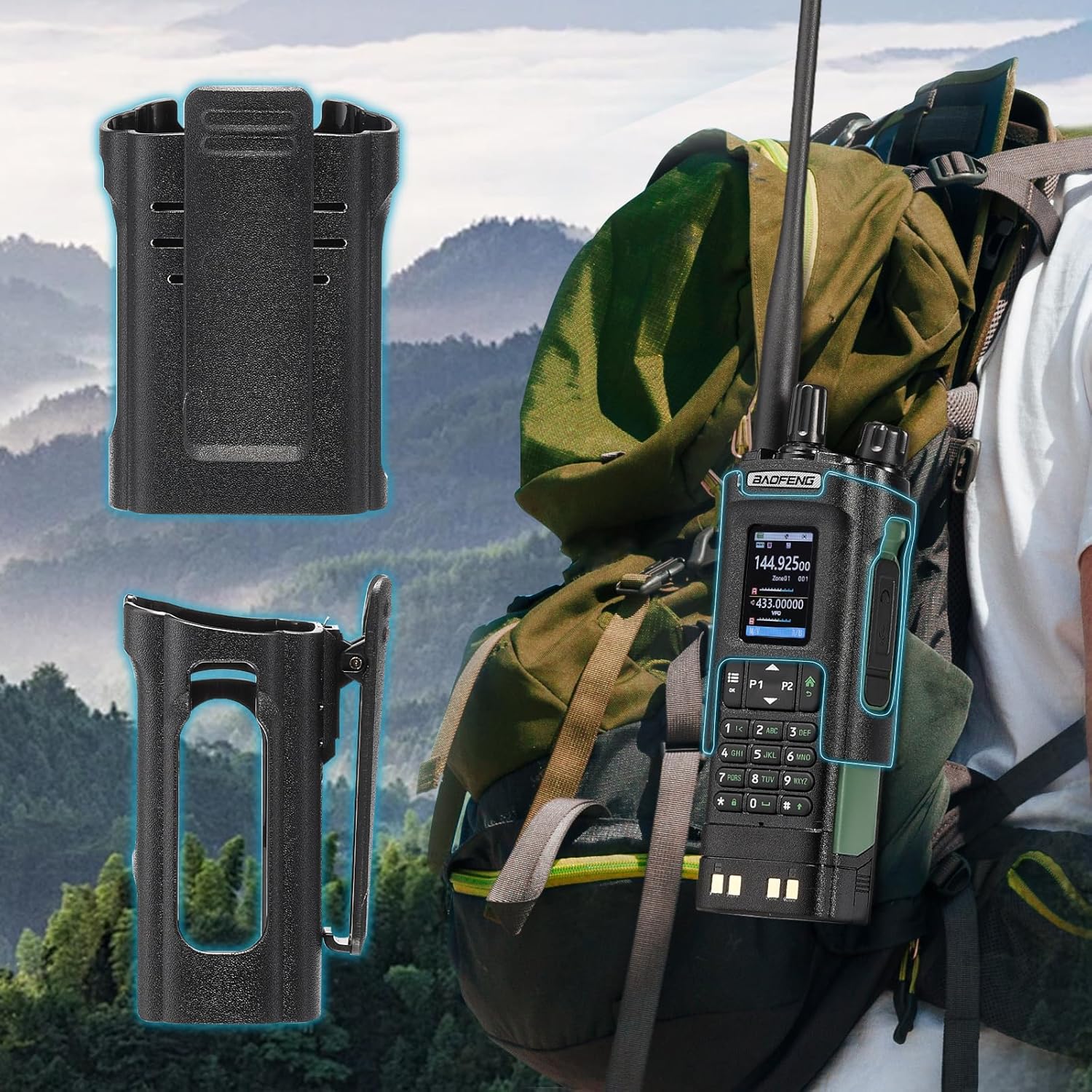
Image: The BAOFENG UV-32 radio demonstrating both direct USB-C charging and charging via its desktop cradle.
5.2 Antenna beszerelése
- Select the appropriate antenna: the standard UV antenna for general VHF/UHF use or the long airband antenna for enhanced aviation signal reception.
- Csavarja a kiválasztott antennát az óramutató járásával megegyező irányba a rádió tetején található antennacsatlakozóra, amíg kézzel meg nem húzódik. Ne húzza túl.

Image: The BAOFENG UV-32 radio illustrating the use of two different antennas: a standard antenna for UHF/VHF and a longer antenna specifically designed for airband reception.
5.3 Övcsipesz felszerelése
- Igazítsa az övcsipeszt a rádió hátulján található csavarlyukakhoz.
- Rögzítse az övcsipeszt a mellékelt csavarokkal.
- The radio case holder can be used to attach the radio to a backpack or belt for secure carrying.

Image: The BAOFENG UV-32 radio securely mounted to a backpack strap using its belt clip and an additional case holder, demonstrating portability.
6. A rádió kezelése
6.1 Be-/kikapcsolás és hangerő
A rádió bekapcsolásához és a hangerő növeléséhez forgatja el a Be-/Kikapcsoló/Hangerő gombot az óramutató járásával megegyező irányba. A hangerő csökkentéséhez és a rádió kikapcsolásához forgatja el az óramutató járásával ellentétes irányba.
6.2 Kijelző végeview
The 2.0-inch color display provides essential information:
- Frekvencia/Csatorna: Displays the current operating frequency or channel number.
- Akkumulátor szint: Az akkumulátor hátralévő töltöttségét jelzi.
- Jelerősség: Shows the strength of received signals.
- Üzemmód jelzők: Icons for various functions like GPS, Bluetooth, power level, etc.

Image: A close-up of the BAOFENG UV-32's 2-inch color display, showing detailed frequency, channel, and status information.
6.3 Csatorna mód vs. Frekvencia mód
A rádió két fő üzemmódban működik:
- Frekvencia üzemmód (VFO): Allows direct input of frequencies for scanning or temporary use.
- Csatorna mód (MR): Uses pre-programmed channels for quick access to stored frequencies.
Nyomja meg a MENÜ button and navigate to the mode setting to switch between VFO and MR modes.
6.4 Frekvencia kiválasztása
- Billentyűzet: In Frequency Mode, directly enter the desired frequency using the numeric keypad.
- Quick Channel Knob: Rotate the top knob to quickly scroll through frequencies or channels.
- Fel/le nyilak: Use the arrow keys (P1/P2) to fine-tune frequencies or navigate channels.
6.5 Küldés és vétel
- Ensure an antenna is properly connected.
- Válassza ki a kívánt frekvenciát vagy csatornát.
- Küldéshez nyomja meg és tartsa lenyomva a PTT gombot a rádió oldalán. Beszéljen tisztán a mikrofonba.
- Engedje el a PTT gombot az adás leállításához és a vételi módba való visszatéréshez.
- Teljesítményszintek: The UV-32 offers High (H), Medium (M), and Low (L) power settings. Adjust this in the menu to balance range and battery life.
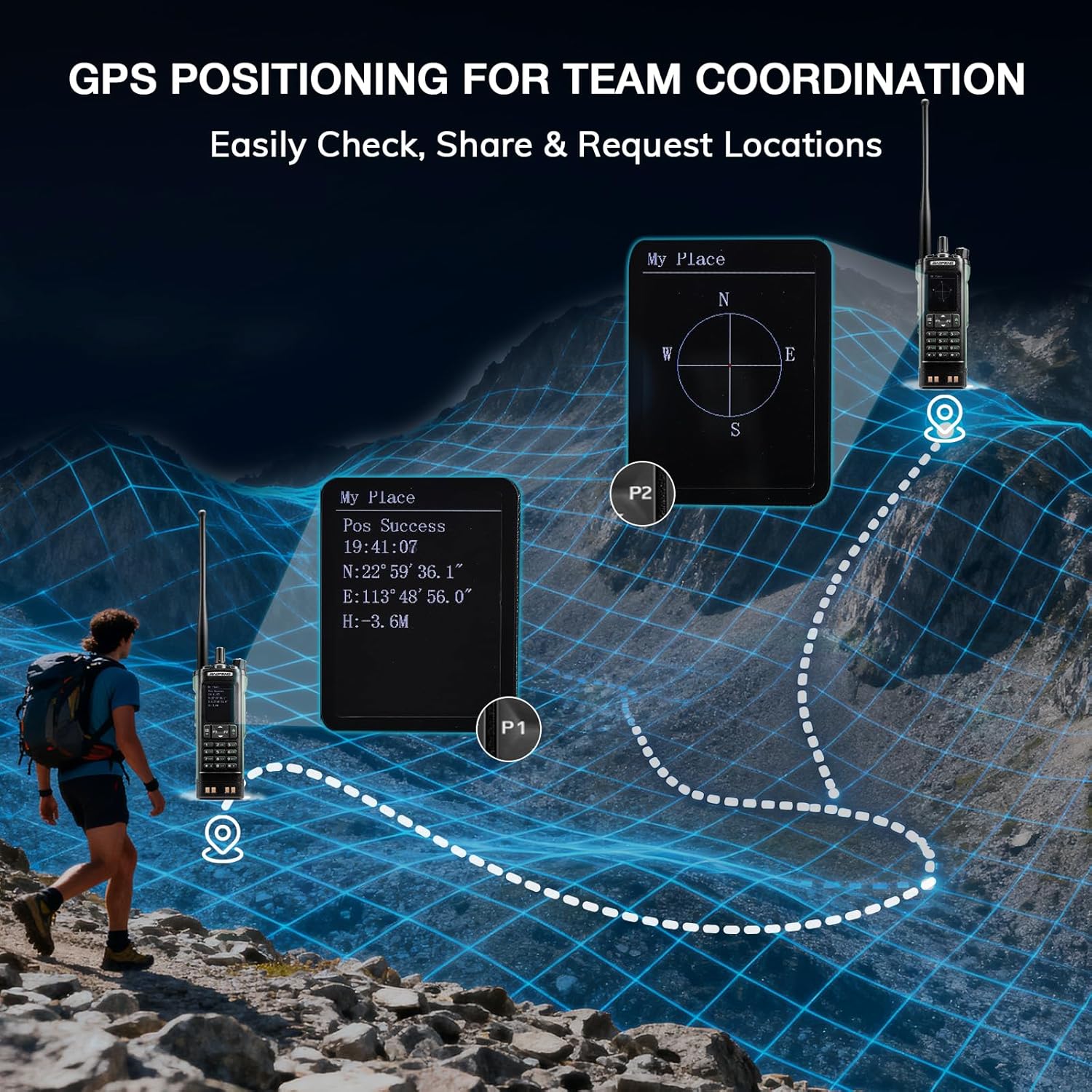
Image: The BAOFENG UV-32 radio's display showing different power output levels (High, Medium, Low) and an external SWR meter for measurement.
6.6 Programozási lehetőségek
The UV-32 offers several methods for programming frequencies and settings:
- Wireless APP Programming: Connect your radio to a smartphone (iOS/Android) via Bluetooth using the dedicated BT app for quick and wireless programming.
- CHIRP szoftver: For advanced or bulk programming, use CHIRP software on a PC. Select "UV-17ProGPS" as the radio model in CHIRP.
- Billentyűzet programozása: Basic programming can be done directly on the radio using the keypad and menu system.
- Egygombos frekvenciamásolás: This feature allows for easy cloning of frequencies from another radio. Refer to the radio's on-screen prompts or full manual for specific steps.

Image: An illustration depicting the various programming methods available for the BAOFENG UV-32, including mobile app (Bluetooth), CPS software, CHIRP software, and direct keypad input.

Image: Two BAOFENG radios illustrating the one-key frequency copy function, allowing for quick and easy channel cloning between devices.
6.7 GPS-navigáció
The integrated GPS module provides real-time location data:
- Access the GPS function through the radio's menu.
- View your current latitude, longitude, and altitude.
- The radio supports sharing your location or requesting coordinates from other team members for improved coordination.

Image: A visual representation of the BAOFENG UV-32's GPS functionality, showing how it displays coordinates and facilitates location sharing for team coordination in outdoor environments.
6.8 Enhanced Airband Reception
For clearer reception of aviation signals, utilize the dedicated AM antenna included with your UV-32. This specialized antenna is designed to provide more accurate and stable airband listening compared to standard UV dual-band antennas.
6.9 NOAA időjárás-rádió
The UV-32 can receive NOAA weather alerts. Consult the radio's menu for instructions on how to scan for and select NOAA channels in your area.
6.10 Testreszabható oldalsó gombok
The radio features four customizable side keys (P1, P2, and two others). These can be programmed via the menu or programming software to quickly access frequently used functions such as scan, monitor, or power level adjustment.

Image: A close-up of the BAOFENG UV-32's side, highlighting the customizable P1 and P2 function keys.
7. Karbantartás
7.1 A rádió tisztítása
Törölje át a rádió felületét egy puha,amp ruhával. Ne használjon erős vegyszereket vagy súrolószereket. Használat előtt győződjön meg róla, hogy minden csatlakozó száraz.
7.2 Az akkumulátor gondozása
- Az első használat előtt töltse fel teljesen az akkumulátort.
- Kerülje az akkumulátor túltöltését vagy teljes lemerülését.
- Hosszabb használaton kívül az akkumulátort hűvös, száraz helyen tárolja.
7.3 Tárolás
When storing the radio for a long time, remove the battery and store it separately. Keep the radio in a dry, dust-free environment away from direct sunlight and extreme temperatures.
8. Hibaelhárítás
| Probléma | Lehetséges ok | Megoldás |
|---|---|---|
| A rádió nem kapcsol be | Az akkumulátor nincs megfelelően behelyezve, vagy lemerült. | Győződjön meg arról, hogy az akkumulátor biztonságosan rögzítve van. Töltse fel teljesen az akkumulátort. |
| Nem lehet továbbítani | Antenna not connected. Incorrect frequency/channel. Low power setting. | Attach antenna. Verify frequency/channel. Increase power level. |
| Gyenge vételi/átviteli hatótávolság | Obstructions. Low power setting. Incorrect antenna. | Move to an open area. Increase power. Ensure correct antenna is used and properly connected. |
| Programming errors with CHIRP/APP | Incorrect radio model selected. Connection issues. Outdated software/firmware. | Ensure "UV-17ProGPS" is selected in CHIRP. Re-establish Bluetooth connection. Update software/firmware if available. |
9. Műszaki adatok
| Funkció | Részlet |
|---|---|
| Márka | BAOFENG |
| Modellszám | UV-32 |
| Csatornák száma | 1000 |
| Frekvencia tartomány | UHF, VHF |
| Teljesítménykimenet | Up to 10W (selectable High, Medium, Low) |
| Kijelző | 2.0 hüvelykes színes kijelző |
| Akkumulátor | 2500mAh lítium-ion (tartozék) |
| Töltés | USB-C, Desktop Charger Base |
| Különleges jellemzők | Digital Display, Dual Band, USB-C Rechargeable, Wireless APP Programming, Wireless Channel Clone, GPS, NOAA Reception |
| Kapcsolati protokoll | Bluetooth |
| Termék méretei | 1.2"M x 2.2"Sz x 4"Ma |
| Vízállósági szint | Nem vízálló |
10. Garancia és támogatás
Your BAOFENG UV-32 radio comes with an 18 hónap garancia. BAOFENG also provides életre szóló támogatást ehhez a termékhez.
For technical assistance, warranty claims, or further inquiries, please visit the official BAOFENG website or contact their customer support directly. Keep your purchase receipt as proof of purchase for warranty services.