
Henkion LT-600S Multi-function Network Cable Tester User Manual
Modell: LT-600S
1. Bevezetés
The Henkion LT-600S is a versatile network cable tester designed for comprehensive network diagnostics. It integrates multiple functions including UTP cable testing, cable tracing, optical power measurement (OPM), visual fault locator (VFL), Power over Ethernet (PoE) detection, RJ45 Time Domain Reflectometer (TDR) for cable length measurement, and various network tools. This manual provides detailed instructions for the safe and effective use of your device.
2. Biztonsági információk
- Használat előtt figyelmesen olvassa el az összes utasítást.
- Ne kísérelje meg szétszerelni vagy módosítani a készüléket.
- Kizárólag a megadott hálózati adaptert használja töltéshez.
- Ne tegye ki a készüléket szélsőséges hőmérsékletnek, páratartalomnak vagy közvetlen napfénynek.
- Tartsa távol a készüléket víztől és egyéb folyadékoktól.
- Handle optical fiber connections with care; avoid direct eye exposure to VFL light.
3. A csomag tartalma
Ellenőrizze, hogy minden tétel megvan-e a csomagban:
- Main Tester Unit (Host) x1
- Remote Receiver Unit x1
- C típusú töltőkábel x1
- RJ45 to BNC Connector x1
- Csavarhúzó x1
- Zsinór x1
- Tool Bag x1
- RJ45 Cable x1
- RJ11 Cable x1
- BNC Alligator Clip x1
- Csomagolódoboz x1
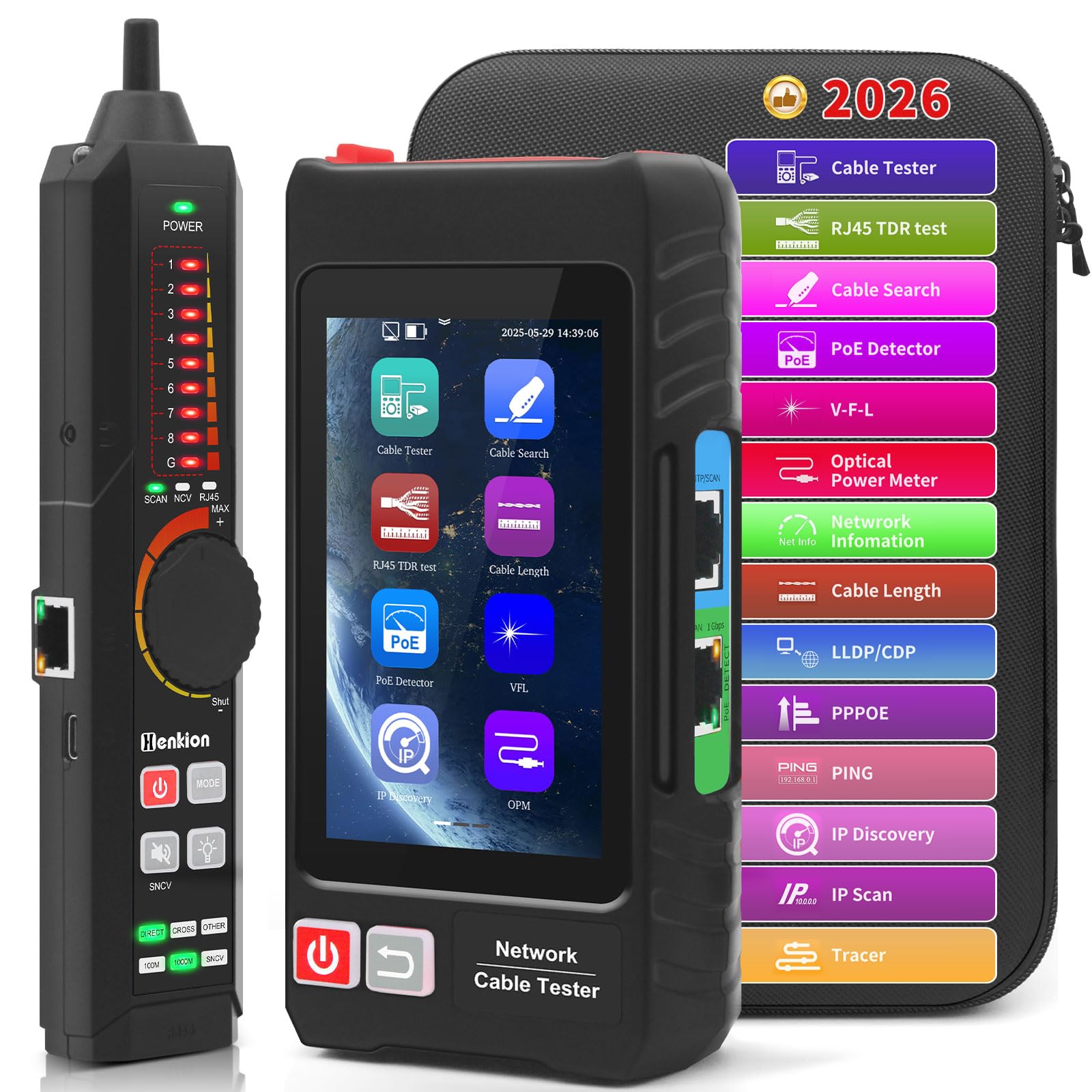
4. Eszköz végeview
The Henkion LT-600S consists of a main tester unit with a 4-inch IPS touch screen and a remote receiver unit. Key components and interfaces are detailed below:

Fő tesztelő egység:
- 4 hüvelykes IPS érintőképernyő: Displays test results and navigation menus.
- RJ45 hálózati port: For connecting network cables for various tests.
- PD Power Tested Port: For PoE detection.
- Optical Power Meter (OPM) Port: For optical signal power and insertion loss tests.
- Visual Fault Locator (VFL) Port: For identifying fiber optic fault points.
- C típusú töltőport: For charging the main unit.
- Fülhallgató port: For audio feedback during cable tracing.
- Navigációs gombok: A menü navigációjához és kiválasztásához.
Remote Receiver Unit:
- UTP Cable Test Port: For connecting the other end of the UTP cable during testing.
- UTP Cable Sequence Indicator: LEDs display the cable wire sequence.
- Érzékenység szabályozó gomb: Adjusts the sensitivity for cable tracing.
- Mód jelző: Shows the current operating mode (SCAN, NCV, MAX).
- Cable Type Indicator: Displays detected cable type (OPEN, CROSS, OTHER).
- C típusú töltőport: For charging the remote unit.
5. Beállítás
5.1 A készülék töltése
Both the main tester unit and the remote receiver unit are equipped with rechargeable lithium-ion batteries. Use the provided Type-C cable to charge both units. A full charge ensures extended operation.
5.2 Be-/Kikapcsolás
Press and hold the power button on each unit to turn it on or off. The main unit's IPS screen will illuminate upon startup.
6. Használati útmutató
6.1 UTP Cable Test
This function tests the connection sequence, type, and remote kit of UTP cables, quickly detecting near-end, mid-end, and far-end fault points of RJ45 cable connectors.
- Connect one end of the RJ45 cable to the RJ45 Network Port on the main unit.
- Connect the other end of the RJ45 cable to the UTP Cable Test Port on the remote receiver unit.
- On the main unit's touch screen, navigate to the "Cable Test" function.
- Initiate the test. The screen will display the connection status, wiremap, and any detected faults.

6.2 Kábelnyomó
The digital signal Ethernet cable tracer helps quickly locate target cables (BNC, network, telephone, and other metal cables) from bundles, effectively rejecting noise and false signals.
- Connect the cable to be traced to the main unit.
- Select the "Cable Search" function on the main unit.
- Use the remote receiver unit to scan the cable bundle. The receiver will emit an audible tone, increasing in volume as it approaches the target cable.
- Adjust the sensitivity knob on the remote unit for precise tracking.

Video: Demonstration of cable testing, PoE test, and port flashing using a similar network cable tester (NOYAFA NF-8508).
Videó: Végeview of a multifunctional network detector (NOYAFA NF-810) showing wiremap, cable scanning, PoE switch detection, and phone line polarity judgment.
6.3 RJ45 TDR Cable Test & Length Measurement
The TDR function allows testing of cable pair status, length, attenuation, reflectivity, impedance, skew, and other parameters. It can measure opens in network cables up to 3000 meters.
- Connect the RJ45 cable to the main unit.
- Select the "RJ45 TDR Test" or "Cable Length" function.
- Start the test. The screen will display detailed parameters and the measured cable length.
- Reports can be created and saved via the FTP function.
6.4 Optical Power Meter (OPM) and Visual Fault Locator (VFL)
The built-in OPM is used for signal power and insertion loss testing of optical equipment. The VFL helps easily and accurately determine the position of optical fiber fault points.
- For OPM: Connect the optical fiber to the OPM port. Select the OPM function to measure optical power.
- For VFL: Connect the optical fiber to the VFL port. Activate the VFL function to emit a red laser light, which helps locate breaks or bends in the fiber.

6.5 PoE-érzékelés
The RJ45 PoE Tester supports IEEE802.3BT/AT/AF and non-standard protocol detection. It displays power supply voltage, power supply pins, and pin polarity.
- Connect the network cable from the PoE source to the PD Power Tested Port.
- Select the "PoE Detect" function.
- The screen will display PoE protocol, voltage, and active pins.

Video: Demonstration of a PoE cable tester in action.
6.6 Hálózati eszközök
The device includes a suite of network tools such as IP discovery, IP address scan, PING test, LLDP/CDP detection, Port flashing, and PPPOE dial-up.
- Connect the main unit to the network via the RJ45 Network Port.
- Select the desired network tool from the menu.
- Follow the on-screen prompts to perform the test (e.g., enter an IP address for PING test).
- Port villogása: This feature helps quickly identify the physical port on a switch or other network device connected to the tester by making its LED flash.

Video: Demonstration of port flashing, PING test, PoE test, cable tracing, and length measurement using a similar network cable tester (NOYAFA NF-8601S).
6.7 PD Power Detection & NCV Detection & FTP
- PD Power Test: Detects if the power output of a PoE switch is normal and identifies the pins used for power supply.
- NCV Scan Function: Non-Contact Voltage detection with sound and light alarms, supporting the distinction between live and neutral wires.
- FTP Function: Enables users to copy test reports and data via network FTP for easy record keeping and analysis.
7. Karbantartás
- Rendszeresen tisztítsa a készüléket puha, száraz ruhával. Ne használjon súrolószereket vagy oldószereket.
- Store the device in its protective tool bag when not in use to prevent damage.
- Győződjön meg arról, hogy a töltőportok por- és törmelékmentesek.
- Charge the batteries periodically if the device is stored for a long time to maintain battery health.
8. Hibaelhárítás
| Probléma | Lehetséges ok | Megoldás |
|---|---|---|
| A készülék nem kapcsol be. | Alacsony akkumulátortöltöttség vagy hibás bekapcsológomb. | Charge the device fully. Ensure the power button is pressed correctly. |
| Pontatlan kábelteszt eredmények. | Poor cable connection, damaged cable, or incorrect test mode. | Ensure cables are securely connected. Check cable for physical damage. Verify correct test mode is selected. |
| Cable tracing signal is weak or noisy. | Low sensitivity setting, external interference, or long cable length. | Increase the sensitivity on the remote unit. Move away from strong electromagnetic sources. |
| Screen freezes during firmware update. | Szoftverhiba. | Use a paperclip to press the reset button (if available) or power cycle the device. Avoid interrupting firmware updates. |
9. Műszaki adatok
- Modell: LT-600S
- Kijelző: 4-inch IPS Touch Screen, 800*480 resolution
- Tesztelt kábeltípusok: RJ45 UTP, BNC, Telephone, various metal cables
- Cable Test Functions: Wiremap, sequence, type, fault location (near-end, mid-end, far-end)
- TDR Measurement Range: Up to 3000 meters for opens
- PoE Detection: IEEE802.3BT/AT/AF and non-standard protocols (voltage, pins, polarity)
- Optikai teljesítménymérő (OPM): Signal power and insertion loss test
- Vizuális hibakereső (VFL): Fiber optic fault point determination
- Hálózati eszközök: IP discovery, IP address scan, PING, LLDP/CDP, Port flashing, PPPOE dial-up
- Egyéb funkciók: NCV detection, FTP data transfer
- Akkumulátor: Main Unit: 3.7V 4000mAh Li-ion; Remote Unit: 3.7V 2000mAh Li-ion
- Töltés: C típusú
- Tétel súlya: 620 g
- Méretek: 24.89 x 18.8 x 4.83 cm (csomag méretei)
- Megfelelés: UL 61010-1, IEC 61010-2-030, CE Marked, RoHS Compliant
10. Garancia és támogatás
Henkion products are designed for reliability and performance. For warranty information, technical support, or service inquiries, please refer to the contact information provided with your purchase or visit the official Henkion webKérjük, őrizze meg a vásárlást igazoló bizonylatot garanciális igények esetén.