Mi van a dobozban
The AVIOT TE-Q3 earbuds come with the following components:
- Fülhallgató (L / R)
- Töltő tok
- Silicone Ear Tips (XS/S/M/L sizes, M pre-installed)
- C típusú USB töltőkábel
- Felhasználói kézikönyv

Image: Contents of the AVIOT TE-Q3 package, showing the earbuds, charging case, various sized ear tips, a USB Type-C cable, and the user manual.
Beállítás
1. A megfelelő fülpárnák kiválasztása
Choosing the correct ear tip size is crucial for optimal sound quality and noise cancellation. Experiment with the included XS, S, M, and L silicone ear tips to find the best fit for your ears. A snug fit ensures proper seal and comfort.

Image: A selection of silicone ear tips in different sizes, from extra small to large, designed to provide a comfortable and secure fit for various ear canal sizes.
2. Kezdeti párosítás
- Nyissa ki a töltőtokot. A fülhallgatók automatikusan párosítási módba lépnek.
- Az eszközén (okostelefon, táblagép stb.) lépjen a Bluetooth-beállításokhoz.
- Select "AVIOT TE-Q3" from the list of available devices.
- A csatlakozás után egy hangjelzés fogja megerősíteni a sikeres párosítást.
3. Többpontos kapcsolat
The TE-Q3 supports multipoint connection, allowing you to connect to two devices simultaneously. To set this up:
- Connect the earbuds to your first device as described in "Initial Pairing."
- Kapcsold ki a Bluetooth-t az első eszközön. A fülhallgatók újra párosítási módba lépnek.
- Connect the earbuds to your second device.
- Re-enable Bluetooth on your first device. The earbuds should now be connected to both devices.
The earbuds will intelligently switch audio playback between the two connected devices.
Kezelési útmutató
Érintse meg a Vezérlők lehetőséget
The AVIOT TE-Q3 earbuds feature intuitive touch controls for managing playback, calls, and ambient sound modes. The touch-sensitive area is located on the stem of each earbud.
- Egyetlen érintés: Zene lejátszása/szüneteltetése, hívások fogadása/befejezése.
- Dupla érintés: Ugrás a következő számra.
- Hármas érintés: Hangos asszisztens aktiválása.
- Érintse meg és tartsa: Toggle between Active Noise Cancellation (ANC) and Transparency Mode.
- Csúsztatás fel/le: Adjust volume (up on right earbud, down on left earbud).
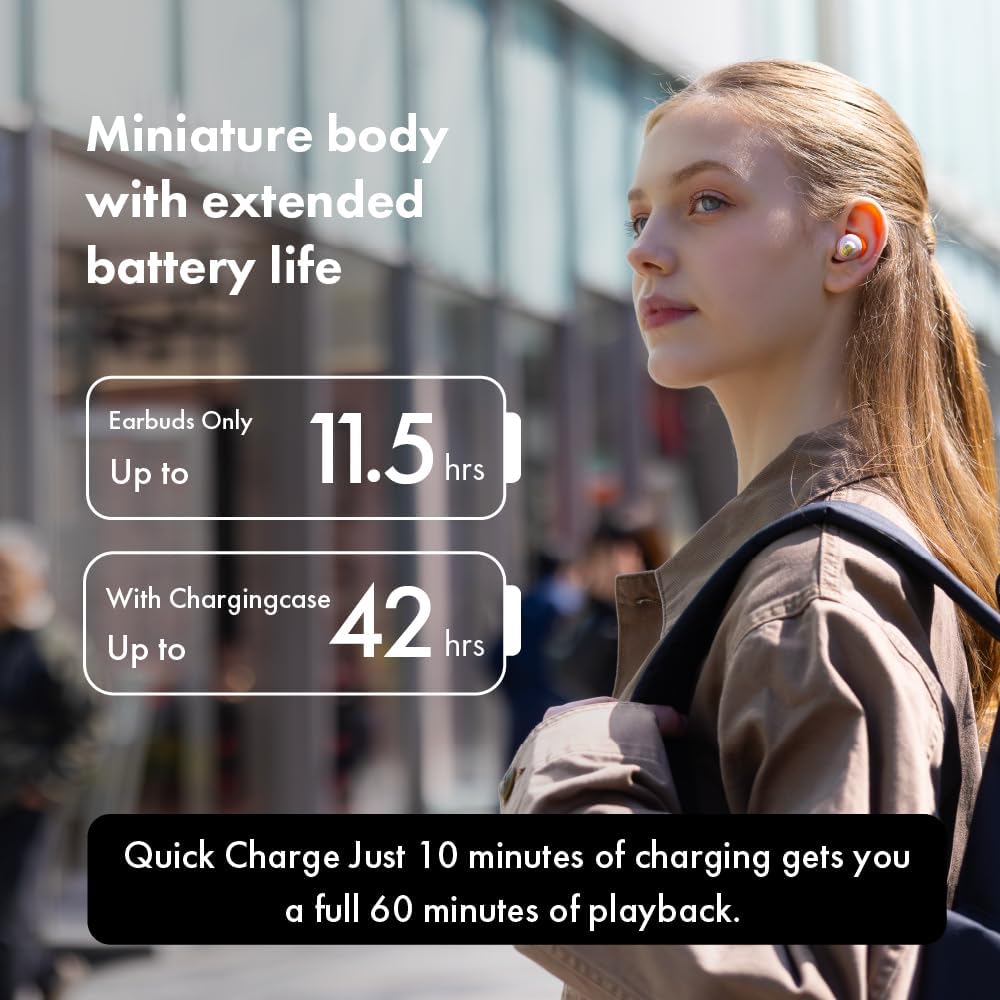
Image: A person demonstrating how to adjust the earbud in their ear, highlighting the touch control functionality on the stem.
Környezeti hangmódok
The earbuds offer various ambient sound modes to suit your environment:
- Aktív zajszűrés (ANC): Csökkenti a külső zajokat az magával ragadó zenehallgatási élmény érdekében.
- Átlátszósági mód: Lehetővé teszi a környezeted hangjainak hallását hanganyagok hallgatása közben, ezáltal javítva a helyzetfelismerést.
- Normál mód: Normál hanglejátszás zajszűrés vagy átlátszóság nélkül.
Toggle between these modes using the touch controls or the dedicated AVIOT Sound Me app.
AVIOT Sound Me App
Download the "AVIOT Sound Me" app for advanced customization and features:
- EQ testreszabás: Hangbeállítás profifileaz Ön preferenciái szerint.
- Firmware frissítések: Tartsd naprakészen a fülhallgatóidat a legújabb funkciókkal és fejlesztésekkel.
- Fülhallgató keresése: Hangjelzéssel megtalálhatja az elveszett fülhallgatókat.
- Easy Chat: Automatically lowers music volume and enhances vocals for conversations.
Karbantartás
Tisztítás
Regularly clean your earbuds and charging case to maintain optimal performance and hygiene. Use a soft, dry cloth to wipe down the surfaces. For ear tips, remove them from the earbuds and clean with mild soap and water, then dry thoroughly before reattaching.
Vízállóság
The AVIOT TE-Q3 earbuds are IPX4 waterproof, meaning they are resistant to splashing water from any direction. They are suitable for workouts and light rain, but should not be submerged in water.
Hibaelhárítás
Csatlakozási problémák
- Fülhallgatók nem párosíthatók: Ensure the earbuds are fully charged and in pairing mode (blinking indicator light). Turn off and on Bluetooth on your device.
- Szakaszos kapcsolat: Menjen közelebb a készülékéhez. Kerülje az akadályokat a fülhallgatók és a készülék között.
Hangminőségi problémák
- Alacsony hangerő vagy gyenge hangzás: Ensure ear tips are properly sealed in your ear canal. Clean any debris from the earbud nozzles.
- Sound is tinny or strange: This might be related to the "Adaptive Sound Leakage Compensation" feature. Try disabling it in the AVIOT Sound Me app settings.
Wearing Detection Malfunction
If wearing detection (auto-pause/play) stops working, try placing the affected earbud back into the charging case, closing it for a few seconds, and then taking it out again. This often resolves the issue.
Műszaki adatok
| Funkció | Részlet |
|---|---|
| Modell neve | TE-Q3 |
| Csatlakozási technológia | Vezeték nélküli (Bluetooth 5.3) |
| Vezeték nélküli tartomány | 10 méter |
| Zajszabályozás | Aktív zajszűrés |
| Illesztőprogram típusa | 10 mm-es dinamikus meghajtó |
| Akkumulátor üzemideje (fülhallgató) | Akár 11.5 óra (ANC kikapcsolva) |
| Akkumulátor üzemideje (töltőtok) | Akár 42 óra (ANC kikapcsolva) |
| Gyors töltés | 10 perc töltés 60 percnyi lejátszáshoz |
| Vízállósági szint | IPX4 |
| Ellenőrzési módszer | Érintés |
| Mikrofon | Beépített mikrofon |
| Többpontos párosítás | Igen |
| Anyag | Szilikon (fülpárnák) |
Garancia és támogatás
For warranty information and customer support, please refer to the official AVIOT webweboldalon, vagy forduljon a viszonteladóhoz. Őrizze meg a vásárlást igazoló bizonylatot garanciális igények esetén.
További segítségért látogassa meg a következőt: AVIOT Store on Amazon.
Hivatalos termékvideók
AVIOT TE-Q3 Wireless Noise Cancelling Earbuds - Overview
Videó: Egy tisztviselő végeview of the AVIOT TE-Q3 Wireless Noise Cancelling Earbuds, showcasing a kialakításukat és főbb jellemzőiket.
AVIOT TE-Q3 Wireless Noise Cancelling Earbuds - Features Highlight
Video: A short video highlighting the main features of the AVIOT TE-Q3 earbuds, including noise cancellation and compact design.