
Cudy FS1010P
Cudy 8 Port PoE+ Switch with 2 Uplink Ports
Model: FS1010P
Használati útmutató
1. Bevezetés
This manual provides detailed instructions for the installation, configuration, and operation of your Cudy FS1010P 8 Port PoE+ Switch. Please read this manual thoroughly before using the device to ensure proper functionality and safety.

Image: The Cudy FS1010P 8 Port PoE+ Switch, highlighting its 8 PoE+ ports and 2 uplink ports.
2. A termék jellemzői
The Cudy FS1010P is an unmanaged 8-port PoE+ switch designed for reliable network expansion and power delivery. Key features include:
- 8 PoE+ Ports: Provides power and data over a single Ethernet cable, compliant with IEEE 802.3af/at standards.
- 2 Uplink Ports: Dedicated ports for connecting to a router or network backbone.
- 120W Total PoE Power: Sufficient power budget for multiple PoE devices such as IP cameras, VoIP phones, and wireless access points.
- PD Detect and Port Power Prioritization: Automatically detects PoE devices and delivers up to 32W per port (802.3at) or 15.4W (802.3af). Prioritizes power delivery to critical devices.
- Kiterjesztés mód: Extends PoE and data transmission distance up to 250 meters (820 feet) at 10 Mbps per port.
- VLAN mód: Isolates PoE+ ports from each other to enhance network security and performance.
- Watchdog Function: Automatically detects and restarts unresponsive PoE devices, ensuring continuous operation.
- Plug and Play: Requires no software or configuration for basic operation.
- Ventilátor nélküli kialakítás: Ensures silent operation, suitable for various environments.
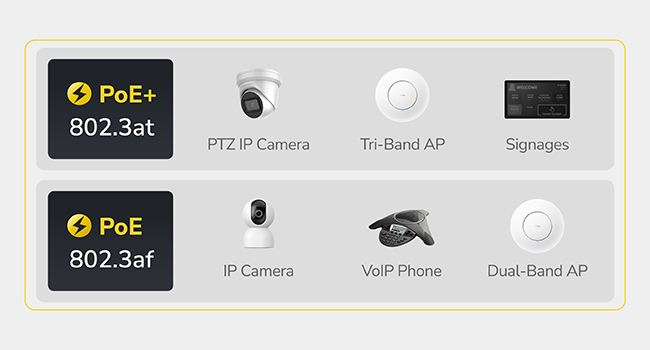
Image: Illustration of devices compatible with PoE (802.3af) and PoE+ (802.3at) standards, including IP cameras, VoIP phones, and access points.
3. A csomag tartalma
Ellenőrizze, hogy a következő tételek megtalálhatók-e a csomagban:
- Cudy FS1010P PoE+ Switch
- Tápkábel
- Telepítési útmutató

Image: The Cudy FS1010P switch, power cord, and quick installation guide as included in the product box.
4. Fizikai túlerőview
Familiarize yourself with the ports and indicators on the switch.
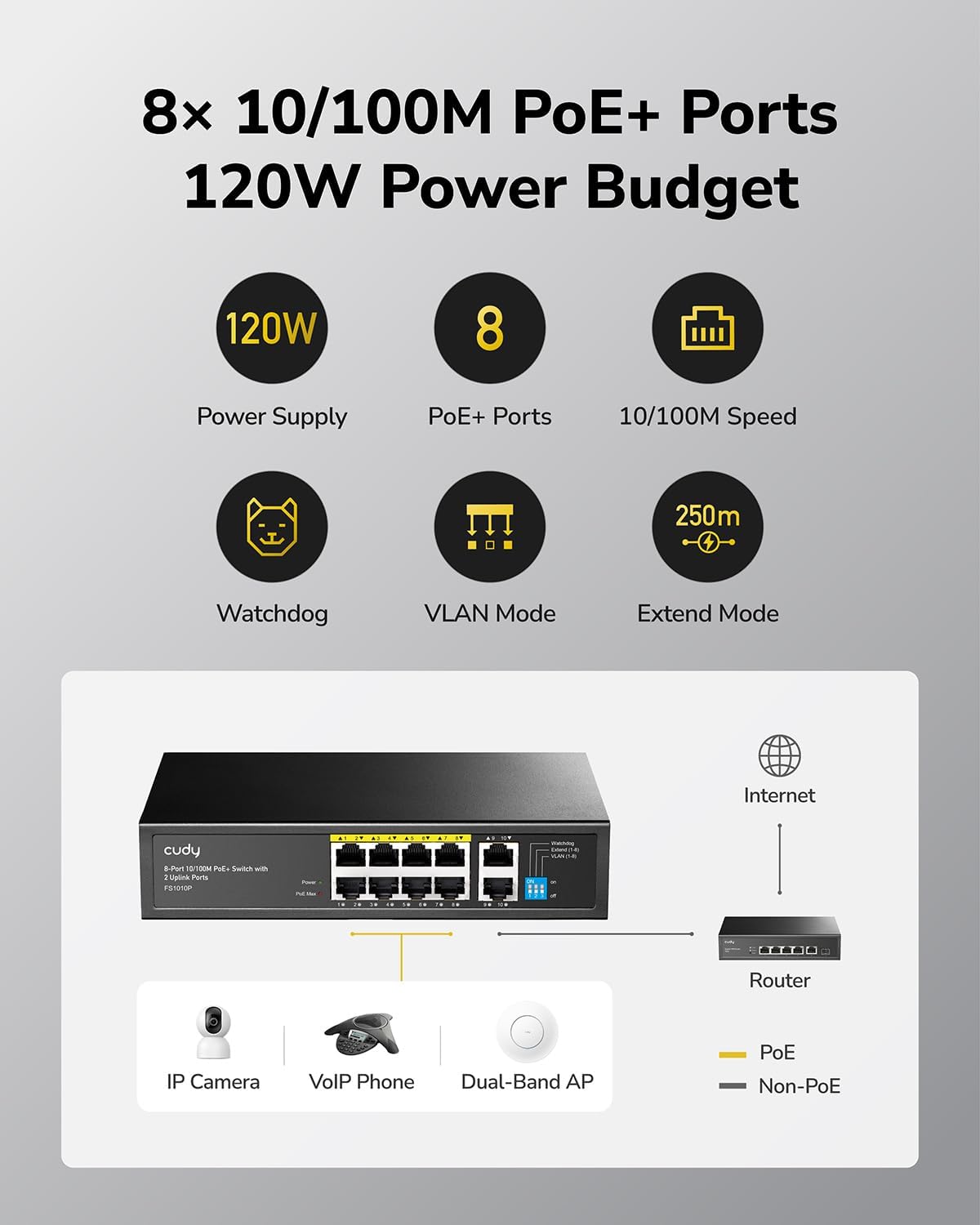
Image: A diagram showing the front panel of the Cudy FS1010P switch with 8 PoE+ ports, 2 uplink ports, and LED indicators for power, PoE Max, and port status.
LED kijelzők:
- PWR (teljesítmény): A kapcsoló áramellátási állapotát jelzi.
- PoE Max: Flashes when the total PoE power budget reaches 90% utilization.
- Link/Act (Per Port): Jelzi a hálózati aktivitást és az egyes portok kapcsolati állapotát.
DIP kapcsolók:
The FS1010P features DIP switches for selecting different operating modes:
- Kiterjesztés mód: When enabled, extends the PoE and data transmission distance.
- VLAN mód: When enabled, isolates PoE+ ports for enhanced security.
5. Beállítási utasítások
The Cudy FS1010P is a plug-and-play device, requiring minimal setup.
- Csatlakoztassa az áramot: Connect the provided power cord to the switch's power input and then to a power outlet. The PWR LED will illuminate.
- Connect Uplink: Connect one of the 2 uplink ports (ports 9 or 10) to your router or network backbone using a standard Ethernet cable.
- PoE eszközök csatlakoztatása: Connect your PoE-compatible devices (e.g., IP cameras, VoIP phones, wireless access points) to any of the 8 PoE+ ports (ports 1-8) using Ethernet cables. The switch will automatically detect and power these devices.
- Kapcsolat ellenőrzése: Check the Link/Act LED for each connected device. A solid light indicates a successful connection, and a flashing light indicates data activity.

Image: A hand plugging an Ethernet cable into a port on a network switch, illustrating the connection process.
6. Üzemmódok
The FS1010P offers two special operating modes configurable via DIP switches:
6.1. Mód kiterjesztése
Extend Mode allows for longer cable runs for PoE devices. When enabled, the transmission distance for PoE and data can reach up to 250 meters (820 feet). Note that in Extend Mode, the data rate per port is limited to 10 Mbps.
- Engedélyezni: Set the corresponding DIP switch to the "ON" position for Extend Mode.
- Letiltása: Set the corresponding DIP switch to the "OFF" position for Normal Mode (100m distance, 10/100 Mbps).

Image: A visual representation of the Extend Mode DIP switch setting, showing extended range up to 250m at 10 Mbps and normal range of 100m at 10/100 Mbps.
6.2. VLAN Mode
VLAN Mode enhances network security by isolating the PoE+ ports from each other. This prevents broadcast storms and unauthorized access between connected devices on different ports, improving overall network stability and security.
- Engedélyezni: Set the corresponding DIP switch to the "ON" position for VLAN Mode.
- Letiltása: Set the corresponding DIP switch to the "OFF" position for Normal Mode (ports communicate freely).
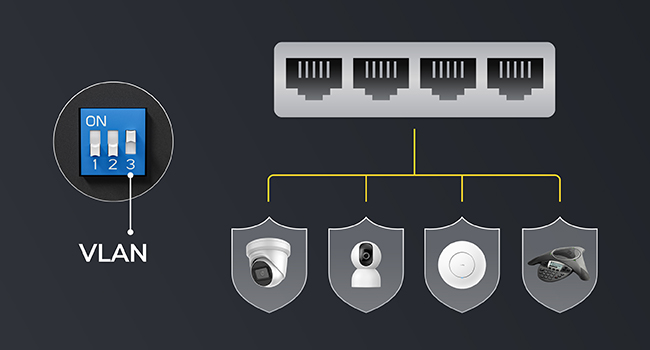
Image: A diagram showing the VLAN Mode DIP switch setting, illustrating how ports are isolated from each other for enhanced security.
7. PoE Management
The FS1010P incorporates intelligent Power over Ethernet management features.
7.1. PoE Watchdog
The Watchdog function continuously monitors the status of connected PoE devices. If a device becomes unresponsive, the switch will automatically restart the corresponding PoE port to restore functionality, ensuring reliable operation without manual intervention.
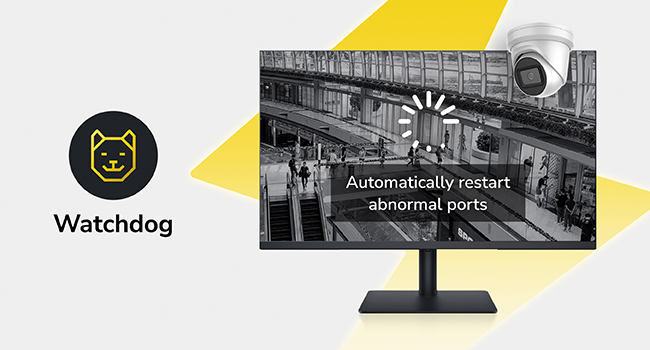
Image: An icon representing the Watchdog feature, with an illustration of a camera being automatically restarted by the switch.
7.2. Intelligent Power Management
The switch features intelligent power management to prevent overload. If the total power consumption exceeds the 120W budget, the switch will automatically remove power from the lowest priority devices to maintain stability for critical connections. The PoE Max LED will flash when 90% of the power budget is utilized.

Image: A graphic showing a "PoE Max" warning when 90% of the power budget is used, and an illustration of intelligent power management automatically shedding power from less critical devices if the budget is exceeded.
8. Műszaki adatok
| Modellszám | FS1010P |
| Portok száma | 10 (8 PoE+ ports, 2 Uplink ports) |
| PoE Szabvány | IEEE 802.3af / at |
| Teljes PoE energiaköltségvetés | 120W |
| Adatátviteli sebesség | 10/100 Mbps (PoE+ ports), 10/100 Mbps (Uplink ports) |
| Extend Mode Distance | Up to 250m (820ft) at 10 Mbps |
| Méretek (H x Sz x Ma) | 220 mm x 150 mm x 44 mm (8.66" × 5.91" × 1.73") |
| Tétel súlya | 1.98 font |
| Tok anyaga | Műanyag |
| Üzemi hőmérséklet | 0°C és 40°C között (32°F és 104°F között) |
| EMC védelem | Surge: Power DM 2kV, CM 4kV; RJ45 CM 4kV. ESD: Contact 6kV; Air 8kV. |

Image: The Cudy FS1010P switch with its dimensions labeled: 8.66 inches (length), 5.91 inches (width), and 1.73 inches (height).
9. Hibaelhárítás
- Nincs áram: Ensure the power cord is securely connected to both the switch and a working power outlet. Check if the PWR LED is illuminated.
- Nincs kapcsolat/aktivitás a porton:
- Verify the Ethernet cable is properly connected at both ends.
- Győződjön meg arról, hogy a csatlakoztatott eszköz be van kapcsolva és megfelelően működik.
- Próbáljon ki egy másik Ethernet-kábelt vagy portot.
- PoE eszköz nem kap áramot:
- Confirm the device is PoE-compatible (IEEE 802.3af/at).
- Check the PoE Max LED. If it's flashing, the power budget might be exceeded. Disconnect non-essential PoE devices or use a switch with a higher power budget.
- Ensure the cable length does not exceed 100 meters (or 250 meters if Extend Mode is enabled).
- Slow Network Speed in Extend Mode: This is normal. Extend Mode limits port speed to 10 Mbps to achieve longer distances. For higher speeds, disable Extend Mode (limiting distance to 100m).
- Intermittent Device Connection: The Watchdog function should automatically restart unresponsive devices. If issues persist, check the device itself or the cable.
10. Biztonsági információk
- Ne tegye ki a készüléket víznek vagy túlzott páratartalomnak.
- Ne próbálja meg saját kezűleg felnyitni vagy megjavítani a készüléket. Minden szervizelési munkát bízzon szakképzett személyzetre.
- A túlmelegedés elkerülése érdekében gondoskodjon megfelelő szellőzésről a kapcsoló körül.
- Csak a készülékhez mellékelt hálózati adaptert használja.
- The device is equipped with surge and ESD protection. However, avoid installing during lightning storms.
Image: A graphic depicting lightning bolts and a shield icon, representing the switch's built-in surge and ESD protection features.
11. Garancia és támogatás
A jótállási információkért és a technikai támogatásért kérjük, forduljon a hivatalos Cudy weboldalhoz. website or contact Cudy customer service. The installation guide included in your package may also contain specific warranty details.
Gyártó: Shenzhen Cudy Technology Co., Ltd.