
Rollei Rollei PDF-S 240
Rollei PDF S 240 SE Multiscanner felhasználói kézikönyv
Model: PDF-S 240 SE
Bevezetés
The Rollei PDF S 240 SE Multiscanner is a versatile device designed to digitize your cherished memories from various analog formats. This manual provides comprehensive instructions for setting up, operating, and maintaining your scanner, ensuring you can easily convert your old photos, negative films, slides, and business cards into high-quality digital files.

The Rollei PDF S 240 SE Multiscanner, a compact device for digitizing various media.
Főbb jellemzők:
- Multiscanner for Photos, Slides, and Negatives: Digitize and convert old photos, negative films, slides, and business cards.
- Nagy felbontás: Offers 1800 dpi resolution, interpolatable up to 2400 dpi, for detailed scans.
- Automatic Color Correction and Exposure: Ensures optimal image quality with automatic or manual adjustments.
- Önálló működés: No computer connection required for scanning; view results on the integrated 2.4-inch TFT color screen.
- Direct Saving: Save scanned data directly to SD, SDHC, or MMC cards.
- USB átvitel: Easily transfer JPG files to your PC or Mac via USB.

Illustration of the scanner's 4-in-1 capabilities, including 135 film, 35mm slides, name cards, and postcards.
Beállítás
1. Kicsomagolás és a tartalom ellenőrzése
Carefully unpack all items from the box. Ensure all components are present and undamaged. The standard package includes:
- 1x Rollei PDF-S 240 SE Scanner
- 1x Negative Holder
- 1x Slide Holder
- 1x Photo Tray
- 1x tápkábel
- 1x Felhasználói kézikönyv
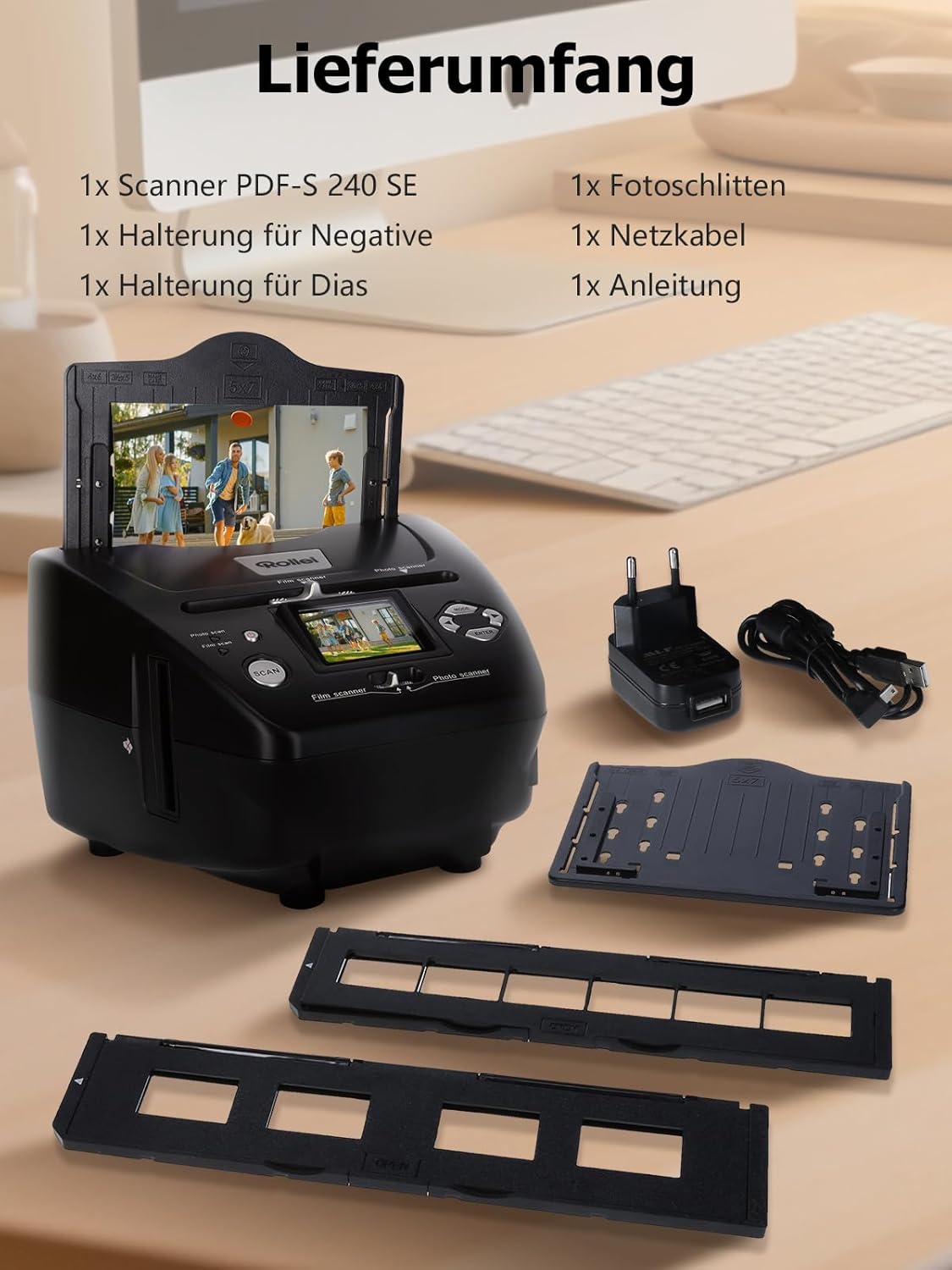
Egy végeview of the items included in the Rollei PDF S 240 SE package, showing the scanner, various holders, and cables.
2. Tápfeszültség csatlakozás
Connect the provided power cable to the scanner's power input and plug it into a standard electrical outlet. The scanner is ready for use once powered on.
3. Memóriakártya behelyezése (opcionális)
To save scanned images directly on the device, insert a compatible SD, SDHC, or MMC memory card into the designated memory card slot. Ensure the card is inserted correctly until it clicks into place.
Kezelési útmutató
1. Eszköz végeview és Vezérlők
Familiarize yourself with the scanner's buttons and ports:

Diagram showing the various parts and controls of the Rollei PDF S 240 SE scanner, including buttons, ports, and holders.
- BE/KI kapcsoló
- Control LED Photo Scan Mode
- Control LED Film Scan Mode
- Szkennelés gomb
- Switch for Scan Mode
- Mini USB 2.0 Port
- Memory Card Slot for SD/SDHC and MMC Cards
- Bal gomb
- Enter gomb
- Jobb gomb
- Mód gomb
- Input Slot for Photo Tray
- Slider for Selecting Scan Template
- 5.1 cm TFT-LCD Color Monitor
- Slide Holder in Input Slot for Slides and Negatives
- Diatartó
- Negative Holder
- Photo Tray Size 9 x 13 cm
- Photo Tray Size 10 x 15 cm
- Photo Tray Size 13 x 18 cm
2. Scanning Films and Slides
Use the Negative Holder for film strips and the Slide Holder for mounted slides.
- Insert your film strip into the Negative Holder or your slide into the Slide Holder.
- Slide the loaded holder into the designated film scanner slot on the side of the device.
- Use the mode switch to select 'Film Scan' mode.
- Adjust settings like exposure and color correction using the navigation buttons and the 2.4-inch TFT display.
- Press the 'Scan' button to capture the image.
- The scanned image will appear on the display. You can then save it to your memory card.

Visual guide for film scanning, showing the negative and slide holders and their insertion into the scanner.
3. Scanning Photos and Business Cards
Use the Photo Tray for paper photos and business cards.
- Place your photo or business card onto the Photo Tray.
- Insert the Photo Tray into the top input slot of the scanner.
- Use the mode switch to select 'Photo Scan' mode.
- Adjust settings as needed using the display and navigation buttons.
- Press the 'Scan' button to capture the image.
- The scanned image will be displayed. Save it to your memory card.

Visual guide for scanning photos and business cards, illustrating the use of the photo tray.
4. Átadás Files egy Számítógéphez
To transfer your digitized photos to a PC or Mac:
- Csatlakoztassa a szkennert a számítógéphez USB-kábellel.
- The scanner will be recognized as a removable storage device.
- Navigate to the scanner's drive and copy the JPG files a számítógépére.

Image demonstrating the USB connection for fast scanning and transferring digitized photos to a laptop.
Karbantartás
A szkenner tisztítása
Regular cleaning ensures optimal performance and image quality.
- Külső: Wipe the exterior of the scanner with a soft, dry, lint-free cloth. Do not use liquid cleaners or abrasive materials.
- Szkennelési terület: Use a soft brush or compressed air to gently remove dust and debris from the film and photo scanning slots. Avoid touching the internal lens or sensor directly.
- Tartók: Clean the film and photo holders with a soft, dry cloth. Ensure they are free of dust before inserting media.
Tárolás
When not in use, store the scanner in a cool, dry place, away from direct sunlight and extreme temperatures. Keep it covered to prevent dust accumulation.
Hibaelhárítás
This section addresses common issues you might encounter with your Rollei PDF S 240 SE Multiscanner.
| Probléma | Lehetséges ok | Megoldás |
|---|---|---|
| A szkenner nem kapcsol be. | No power supply; loose cable. | Check power cable connection; ensure outlet is functional. |
| Scanned images are blurry or unclear. | Dust on media or scanner lens; incorrect focus/settings. | Clean media and scanner lens; adjust focus/exposure settings. |
| Colors are inaccurate. | Incorrect color correction settings. | Use automatic color correction or manually adjust color balance. |
| Nem lehet képeket menteni a memóriakártyára. | Memory card full or incompatible; card not inserted correctly. | Check card compatibility and free space; reinsert card; try a different card. |
| Nem lehet átvinni fileszámítógéphez. | Loose USB cable; driver issue; scanner not recognized. | Ensure USB cable is securely connected; try a different USB port; restart computer and scanner. |
Műszaki adatok
Detailed technical specifications for the Rollei PDF S 240 SE Multiscanner:
- Márka: Rollei
- Gyártó: RCP Technik GmbH & Co. KG
- Modell/sorozat: PDF-S 240 SE
- Termék méretei: 14.7 x 20.8 x 22 cm
- Modellszám: Rollei PDF-S 240
- Szín: Fekete
- Kijelző mérete: 2.4 hüvelyk
- Wattage: 4.5 watt
- Meghajtó típusa: AC
- Tartalmazott elemek: Nem
- Tétel súlya: 890 g
- Média típusa: Photo, Film
- Szkenner típusa: Film
- Csatlakozástechnika: USB 2.0
- Felbontás: 1800 dpi
- Színmélység: 24 bites
Garancia és támogatás
Jótállási információk
The Rollei PDF S 240 SE Multiscanner comes with an Exchange Warranty for a full 24 months a vásárlás dátumától számítva. Kérjük, őrizze meg a vásárlást igazoló bizonylatot garanciális igények esetén.
Ügyfélszolgálat
For any questions, technical assistance, or support, our experts are available to help you.


Images illustrating the availability of help and support, along with contact details and warranty information.
- Telefonos támogatás: +49 40 270 750 277 (Monday-Friday, 10:00 AM to 4:00 PM CET)
- Ingyenes visszaküldés: Conveniently within 14 days.
For additional resources and FAQs, please visit the official Rollei webweboldalon, vagy vegye fel a kapcsolatot közvetlenül ügyfélszolgálatunkkal.
Ask a question about this manual
Ask about setup, troubleshooting, compatibility, parts, safety, or missing instructions. Manuals+ will review the question and use this page’s manual context to help answer it.