
1. Entwodiksyon
This manual provides essential information for setting up, operating, and maintaining your HP OmniDesk Slim Desktop PC, Model S03-0006. This desktop PC is designed for daily tasks, offering an Intel Core i3-14100 processor, ample memory, and various connectivity options for productivity and entertainment.
2. Pake kontni
Verifye ke tout atik yo prezan nan pakè a:
- HP S03-000 OmniDesk Slim Desktop PC
- Pwovizyon pou pouvwa
- USB Black Wired Keyboard (if included with specific bundle)
- USB Wired Mouse (if included with specific bundle)
Note: Additional accessories may be sold separately.
3. Pwodwi souview
The HP OmniDesk Slim Desktop PC features a compact design with essential components for efficient computing.

Figi 3.1: HP OmniDesk Slim Desktop PC showcasing li mens profile, Intel Core i3-14100 processor, 8GB DDR5 RAM, 256GB SSD, Intel UHD Graphics 710, Wi-Fi 6, Bluetooth 5.4, Windows 11, and dual display support.
3.1. Pò ak Konektè
Familiarize yourself with the various ports on your desktop PC for connecting peripherals and displays.
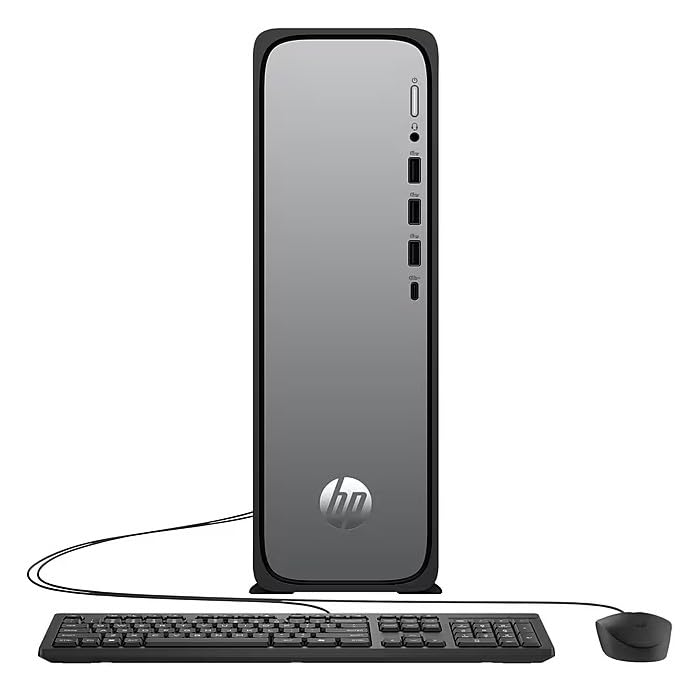
Figi 3.2: Front and rear port layout of the HP OmniDesk Slim Desktop PC. Front ports include a headphone/microphone combo jack, USB Type-A 5Gbps ports, and a USB Type-C 10Gbps port. Additional ports (typically rear) include 4 USB 2.0 Type-A, 1 RJ-45 (Ethernet), 1 HDMI Out, and 1 DisplayPort 1.4.
- Pò devan:
- Konbine ekoutè/mikwofòn
- USB Type-A 5Gbps signaling rate (3 ports)
- USB Type-C 10Gbps signaling rate (1 port)
- Pò dèyè:
- USB 2.0 Type-A (4 ports)
- RJ-45 (Ethernet)
- HDMI 1.4b (1 port)
- DisplayPort 1.4a (1 port)
4. Gid Enstalasyon
Follow these steps to set up your HP OmniDesk Slim Desktop PC:
- Konekte Monitè a: Connect your monitor to the PC using an HDMI or DisplayPort cable. Ensure the cable is securely plugged into both the PC and the monitor.
- Konekte periferik: Plug in your USB keyboard and mouse into the available USB ports on the PC.
- Konekte pouvwa: Connect the power supply cable to the PC's power input, then plug the other end into a wall outlet or surge protector.
- Pouvwa sou: Press the power button on the front of the PC. The system will boot up, and you will see the Windows 11 setup screen.
- Premye enstalasyon Windows: Follow the on-screen instructions to complete the Windows 11 setup, including language, region, network connection, and user account creation.
5. Operasyon Enstriksyon
5.1. Operasyon debaz
- Limen/Etenyen: Press the power button to turn on the PC. To shut down, click the Start button, then Power > Shut down.
- Rekòmanse: Klike sou bouton Kòmanse a, answit sou Pouvwa > Rekòmanse.
- Mòd dòmi: Klike sou bouton Kòmanse a, answit sou Pouvwa > Dòmi.
5.2. Konekte nan yon rezo
Your PC supports both wired (Ethernet) and wireless (Wi-Fi) network connections.
- Koneksyon filaire: Connect an Ethernet cable from your router or modem to the RJ-45 port on the back of the PC.
- Koneksyon san fil (Wi-Fi 6):
- Klike sou ikòn Wi-Fi a nan ba travay la.
- Chwazi rezo Wi-Fi ou vle a nan lis la.
- Antre kle sekirite rezo a (modpas) si yo mande w la, epi klike sou Konekte.
5.3. Dual Display Support
To extend your desktop to a second monitor:
- Connect the second monitor to an available video output port (HDMI or DisplayPort) on your PC.
- Klike dwa sou Desktop la epi chwazi Anviwònman ekspozisyon.
- Under "Multiple displays," select how you want the displays to behave (e.g., Extend these displays, Duplicate these displays).
6. Antretyen
- Mizajou lojisyèl: Regularly check for and install Windows updates to ensure system stability and security. Go to Anviwònman > Mizajou Windows.
- Mizajou chofè: Keep your device drivers updated. HP Support Assistant (MyHP) can help manage these updates.
- Netwayaj: Use a soft, dry cloth to clean the exterior of the PC. Avoid liquid cleaners directly on components. Ensure ventilation openings are clear of dust.
- Done backup: Regilyèman fè bak enpòtan filesou yon disk ekstèn oswa yon depo nan nwaj la pou evite pèt done.
NAN. Depanaj
| Pwoblèm | Solisyon posib |
|---|---|
| Odinatè a pa limen. |
|
| Pa gen ekspozisyon sou monitè a. |
|
| Pa gen koneksyon entènèt. |
|
| Periferik yo (klavye/sourit) pa fonksyone. |
|
8. Espesifikasyon
| Non modèl | HP OmniDesk Desktop HP S03-000 PC |
| Nimewo Modèl | OmniDesk Slim S03-0006 |
| Processeur | Intel Core i3-14100 (3.5 GHz, 6 MB Cache) |
| Grafik | Intel UHD Graphics 710 (Entegre) |
| RAM | 8 GB DDR5 (4800 MT/s), Max 64 GB |
| Depo | 256 GB SSD (Solid State Drive) |
| Sistèm operasyon | Windows 11 Kay |
| Koneksyon | Realtek Wi-Fi 6 (2x2), Bluetooth 5.4, Gigabit Ethernet (RJ-45) |
| Pò |
|
| Dimansyon (H x W x P) | 11.61 x 3.94 x 11.97 pous |
| Pwa | 8.38 liv |
| Sètifikasyon | ENERGY STAR certified, EPEAT Gold with Climate+ |
9. Garanti ak sipò
9.1. Enfòmasyon sou Garanti
This HP OmniDesk Slim Desktop PC comes with a 90-jou garanti limiteTanpri gade dokiman garanti ki vini ak pwodwi ou a pou tèm ak kondisyon espesifik yo.
9.2. Sipò teknik
Pou asistans teknik, telechaje chofè, oswa plis enfòmasyon, tanpri vizite sipò ofisyèl HP la. website. You can also utilize the pre-installed MyHP application for device customization, optimization, and access to helpful messages and settings.
Always provide your product model number (S03-0006) and serial number when contacting support.