
Entwodiksyon
Welcome to the HP OmniDesk M03 AI Desktop PC. This manual provides essential information for setting up, operating, maintaining, and troubleshooting your new computer. The HP OmniDesk M03 is designed for performance and efficiency, featuring an Intel Core Ultra 7 265 processor with dedicated AI cores, 16GB DDR5 RAM, and a 2TB NVMe SSD, running on Windows 11 Home.
Ki sa ki nan bwat la
Verifye ke tout konpozan yo prezan nan anbalaj la:
- HP OmniDesk Desktop PC
- Wireless klavye
- Sourit
- Quick Setup Gid
- Pouvwa kab

Image: The HP OmniDesk M03 desktop PC, wireless keyboard, mouse, and power cable, illustrating the contents of the product box.
Enstalasyon
1. Konekte periferik
Before powering on your PC, connect your monitor, keyboard, and mouse.
- Siveye: Connect your monitor to the PC using an HDMI or DisplayPort cable. The ports are located on the rear of the PC.
- Klavye ak sourit: The included keyboard and mouse are wireless. Insert batteries (if not pre-installed) and connect their USB receiver to an available USB port on the PC.
- Pouvwa: Connect the power cable to the PC's power input on the rear and then to a wall outlet.
- Rezo (Si ou vle): For a wired internet connection, connect an Ethernet cable from your router to the RJ45 port on the rear of the PC.

Image: Rear panel of the HP OmniDesk M03, highlighting the DisplayPort, HDMI, USB, and Ethernet ports for connecting external devices.

Imaj: Bò kote view of the HP OmniDesk M03 AI Desktop PC, showing its compact tower design.
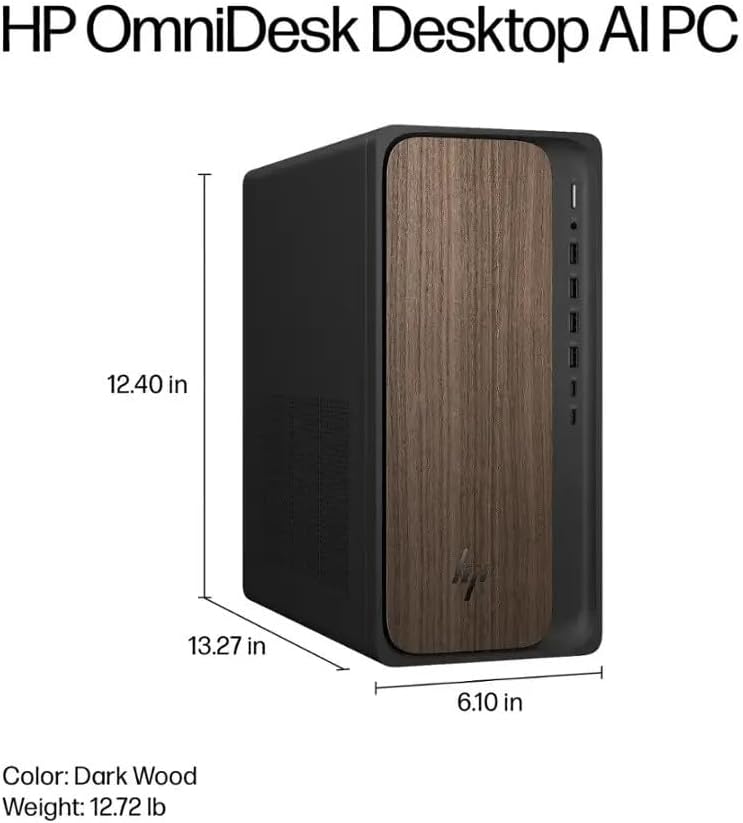
Image: Diagram illustrating the location and type of front and rear ports on the HP OmniDesk M03, including USB-A, USB-C, HDMI, DisplayPort, and audio jacks.
2. Limen ak Premye Konfigirasyon
Yon fwa tout periferik yo konekte:
- Peze bouton pouvwa a ki sitiye sou devan PC a.
- Follow the on-screen instructions to complete the Windows 11 Home initial setup, including language selection, network connection (if not wired), account creation, and privacy settings.

Imaj: Devan view of the HP OmniDesk M03, showing the power button at the top right and various USB ports below it.
Operating Your PC
Windows 11 Kay
Your HP OmniDesk M03 comes pre-installed with Windows 11 Home. Familiarize yourself with the operating system's interface, Start menu, and settings. Microsoft provides extensive online resources for Windows 11 usage.
AI Karakteristik
The Intel Core Ultra 7 265 processor includes dedicated AI cores and Intel AI Boost, enhancing performance for AI-driven applications and features within Windows 11, such as AI Copilot. These features can assist with tasks, content creation, and system optimization.
Koneksyon
- Wi-Fi 6 (802.11ax): Connect to wireless networks for internet access. Manage Wi-Fi settings through the Windows 11 network settings.
- Bluetooth 5.4: Pair wireless devices such as headphones, speakers, or additional input devices. Access Bluetooth settings via the Windows 11 settings menu.
- Ethernet: For a stable, high-speed wired connection, ensure an Ethernet cable is connected to the RJ45 port.
Antretyen
Cleaning Your PC
- Eksteryè: Sèvi ak yon ti moso twal mou, ki san pèl dampened with water or a mild cleaning solution to wipe down the exterior. Avoid harsh chemicals.
- Vantilasyon: Netwaye pousyè ki sou griy vantilasyon yo detanzantan avèk lè konprese pou asire bon sikilasyon lè a epi pou anpeche li chofe twòp.
- Pò: Kenbe pò yo pwòp san pousyè ak debri.
Mizajou lojisyèl
Regularly update Windows 11 and device drivers to ensure optimal performance, security, and compatibility. Access Windows Update through the Settings menu.
Done sovgad
It is recommended to regularly back up your important data to an external drive or cloud storage to prevent data loss.
Depanaj
Seksyon sa a adrese pwoblèm komen ou ka rankontre.
- Pa gen pouvwa:
- Asire w ke kab kouran an byen konekte ak òdinatè a ak priz miray la.
- Verifye si priz miray la fonksyone byen lè w branche yon lòt aparèy.
- Pa gen ekspozisyon:
- Check that the monitor is powered on and correctly connected to the PC via HDMI or DisplayPort.
- Asire w ou chwazi bon sous opinyon an sou monitè w la.
- Pa gen koneksyon entènèt:
- For Wi-Fi, check if the Wi-Fi adapter is enabled and if you are connected to the correct network with the right password.
- Pou koneksyon filaire, asire w kab Ethernet la byen konekte epi routeur ou a ap fonksyone.
- Klavye/Sourit la pa reponn:
- Check battery levels for wireless devices.
- Ensure the USB receiver is plugged into a functional USB port.
- Eseye rekòmanse PC a.
Pou pwoblèm ki pi konplèks, al gade sipò HP a. websit oswa kontakte sèvis kliyan.
Espesifikasyon
Detailed technical specifications for the HP OmniDesk M03 AI Desktop PC:
| Eleman | Spesifikasyon |
| Processeur | Intel Core Ultra 7 265 (20-Core, up to 5.3 GHz, Intel AI Boost) |
| Sistèm operasyon | Windows 11 Kay (64-bit) |
| memwa (RAM) | 16GB DDR5 5600 MHz |
| Depo | SSD 2TB PCIe NVMe M.2 |
| Grafik | Grafik Intel entegre |
| Sòti videyo | 1x HDMI 2.1, 1x DisplayPort 1.4a |
| Pò USB (Devan) | 2x USB-A 5Gbps, 2x USB-A 10Gbps, 1x USB-C 5Gbps, 1x USB-C 10Gbps |
| Pò USB (Dèyè) | 4x USB 2.0 Kalite-A |
| Pò odyo | 1x Headphone/Microphone Combo, 1x Line Input, 1x Line Output |
| Rezo | Wi-Fi 6 (802.11ax), Bluetooth 5.4, Gigabit Ethernet (RJ45) |
| Dimansyon (H x W x P) | 13.3" x 6.1" x 12.4" (33.8 santimèt x 15.5 santimèt x 31.5 santimèt) |
| Pwa | 11.77 lb (5.34 kg) |

Image: Diagram showing the height (13.27 inches), width (6.10 inches), and depth (12.40 inches) of the HP OmniDesk M03 desktop PC.
Garanti ak sipò
Enfòmasyon sou Garanti
Your HP OmniDesk M03 AI Desktop PC comes with a 90-jou garanti limite. This warranty covers defects in materials and workmanship under normal use. For detailed terms and conditions, please refer to the warranty documentation included with your product or visit the official HP support websit.
Sipò pou Kliyan
For technical assistance, troubleshooting, or warranty claims, please contact HP Customer Support:
- Sipò sou entènèt: Vizite ofisyèl la Sipò HP Websit for drivers, manuals, and troubleshooting guides.
- Sipò telefòn: Refer to the Quick Setup Guide or HP's websit pou nimewo kontak rejyonal yo.
Lè w ap kontakte sipò a, tanpri gen modèl pwodwi w la (M03) ak nimewo seri a pare.