
Entwodiksyon
This manual provides essential information for setting up, operating, maintaining, and troubleshooting your HP 15.6-inch FHD IPS Touchscreen Laptop. Please read this guide thoroughly to ensure optimal performance and longevity of your device. This laptop features an AMD Ryzen 7 7730U processor, 64GB DDR4 RAM, 2.28TB storage (2TB SSD + 288GB Docking Station Set), AMD Radeon Graphics, and runs on Windows 11 Pro.
Enstalasyon
Unpacking and Initial Power-On
Carefully remove all components from the packaging. Connect the power adapter to the laptop and a power outlet. Press the power button to turn on the laptop. Follow the on-screen instructions to complete the initial Windows 11 Pro setup.
Pwodwi pou Telefòn enkli
Your laptop package includes the following accessories:
- 1x 7-in-1 Docking Station with 256GB Storage
- 1x Kat MicroSD 32GB ak adaptè
- 1x Kab Done Kalite-C
- 1x Kab chaje 3 an 1
- 1x twal netwayaj syèd
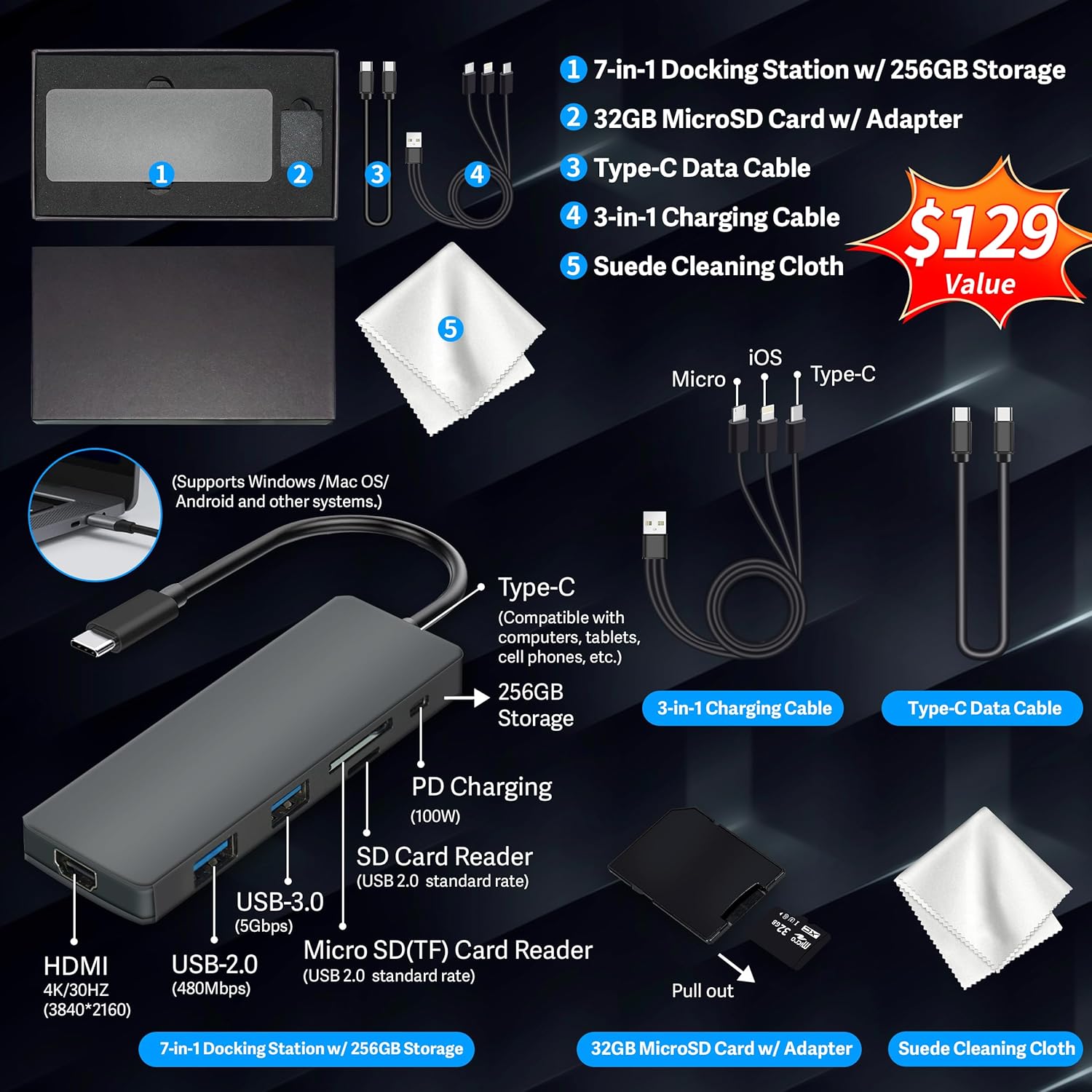
Figure 1: Included accessories, including the 7-in-1 docking station, various cables, and a cleaning cloth.
Itilizasyon Laptop ou a
Ekspozisyon Karakteristik
The HP 15.6-inch laptop features an FHD IPS touchscreen display with a resolution of 1920 x 1080 pixels and an anti-glare coating. This display provides clear and vibrant visuals from various viewang ing.

Figure 2: The 15.6-inch FHD IPS display offers crisp and vivid details.
Koneksyon ak Periferik
Your laptop is equipped with various connectivity options and integrated features to enhance your user experience.
- 720p HD Camera: For video calls and online meetings.
- Wi-Fi 6: For high-speed wireless internet connectivity.
- Bluetooth: For connecting wireless peripherals such as mice, keyboards, and headphones.
- Klavye nimerik: A full numeric keypad is integrated for efficient data entry and calculations.

Figure 3: Key features for staying connected and productive, including the numeric keypad.
The laptop includes multiple ports for connecting external devices:
- 2x USB Type-A ports
- 1x USB Type-C port
- 1x HDMI pò
- 1x Headphone/Microphone Combo jack

Figure 4: Multi-port configuration on the laptop for various connections.
Pèfòmans ak Multitach
Equipped with an AMD Ryzen 7 7730U processor, 64GB DDR4 RAM, and AMD Radeon Graphics, this laptop is designed for efficient multitasking and demanding applications. The 2.28TB storage (2TB SSD + 288GB Docking Station Set) provides ample space and fast access to your files.

Figure 5: Core specifications for performance and storage.

Figure 6: Laptop demonstrating effortless multitasking with several applications running simultaneously.
The laptop is designed for extended use, offering reliable battery life to support your daily tasks.

Figure 7: The laptop supports continuous work throughout the day with its battery performance.
Antretyen
To ensure the longevity and optimal performance of your HP laptop, follow these maintenance guidelines:
- Netwayaj: Use the provided suede cleaning cloth or a soft, lint-free cloth to clean the screen and exterior. Avoid harsh chemicals.
- Mizajou lojisyèl: Regularly update your Windows 11 Pro operating system and drivers to ensure security and performance.
- Swen batri: Avoid fully discharging the battery frequently. For long-term storage, charge the battery to about 50-70%.
- Vantilasyon: Asire w ouvèti vantilasyon laptop la pa bouche pou anpeche li chofe twòp. Sèvi ak laptop la sou yon sifas ki di e plat.
- Depo: Sere laptop la nan yon kote ki fre epi sèk, lwen limyè solèy dirèk ak tanperati ekstrèm.
Depanaj
Seksyon sa a adrese pwoblèm komen ou ka rankontre ak laptop ou a.
Laptop la pa limen
- Asire w adaptè kouran an byen konekte ak laptop la ak yon priz kouran ki fonksyone.
- Verifye si priz kouran an fonksyone byen lè w branche yon lòt aparèy.
- Si batri a konplètman vide, kite l chaje pou omwen 15-30 minit anvan ou eseye limen l.
Screen Remains Blank
- Check if the laptop is powered on (power indicator light).
- Try connecting an external monitor to see if display output is available.
- Adjust screen brightness using the function keys.
Pwoblèm koneksyon Wi-Fi
- Asire w ke Wi-Fi a aktive nan paramèt Windows yo.
- Rekòmanse routeur ou ak modèm ou.
- Mete ajou chofè Wi-Fi ou yo atravè Manadjè Aparèy la.
- Check for any physical obstructions or interference.
Pèfòmans Ralanti
- Fèmen aplikasyon ki pa nesesè k ap fonksyone nan background nan.
- Tcheke Manadjè Tâch la pou pwosesis ki konsome anpil CPU oswa RAM.
- Asire w ke sistèm operasyon ou an ak chofè yo ajou.
- Fè yon pwogram netwayaj disk ak defragmantasyon (pou HDD, pa nesesè pou SSD).
- Fè eskanè pou viris oswa malveyan.
Espesifikasyon
Below are the detailed technical specifications for your HP 15.6-inch FHD IPS Touchscreen Laptop.

Figure 8: Laptop dimensions and weight for portability.
| Karakteristik | Detay |
|---|---|
| Mak | HP |
| Non modèl | HP 15.6" FHD IPS Touchscreen Laptop |
| Gwosè ekran | 15.6 pous |
| Rezolisyon ekspozisyon | 1920 x 1080 piksèl (FHD) |
| Kalite ekspozisyon | LED IPS Touchscreen |
| Processeur | AMD Ryzen 7 7730U (8 Cores, 2 GHz base) |
| Koprosesè grafik | Grafik AMD Radeon (Entegre) |
| Memwa RAM | 64 GB DDR4 (3200 MHz) |
| Depo | 2 TB SSD + 288 GB Docking Station Set (Total 2.28 TB) |
| Sistèm operasyon | Windows 11 Pro |
| Koneksyon | Wi-Fi 6 (802.11ax), Bluetooth, HDMI, USB |
| Pò | 2x USB Type-A, 1x USB Type-C, 1x HDMI, 1x Headphone/Microphone Combo |
| Webkam | Kamera HD 720p |
| Klavye | Full-size with Numeric Keypad |
| Dimansyon (L x W x P) | 14.17" x 9.29" x 0.73" |
| Pwa atik | 3.52 liv (apeprè 1.6 kg) |
| Koulè | Ajan |
| UPC | 196188514924 |
| ASIN | B0FX2NR2WN |
Enfòmasyon sou Garanti
Your HP laptop comes with a manufacturer's warranty. For upgraded components (RAM/SSD), a 1-year warranty is provided by SnowBell. The original 1-year manufacturer warranty applies to all other components of the laptop. Please retain your proof of purchase for warranty claims. For detailed terms and conditions, refer to the warranty documentation included with your product or visit the official HP support websit.
Sipò
For further assistance, technical support, or service inquiries, please refer to the following resources:
- Sipò Ofisyèl HP Websit: Vizite support.hp.com for drivers, manuals, and troubleshooting guides.
- Èd sou entènèt: Utilize the built-in Windows 11 Pro help features for software-related questions.
- Contact Retailer: For issues related to upgraded components or purchase, contact SnowBell or your point of purchase.