
1. Entwodiksyon
This manual provides comprehensive instructions for the VECHTEL Android 15 Car Radio, model 4 Core 4G+128G. This advanced multimedia system is designed to enhance your driving experience with features such as a 9-inch Incell HD touchscreen, wireless CarPlay and Android Auto, GPS navigation, Bluetooth, Wi-Fi, and FM/RDS radio. Please read this manual carefully before installation and operation to ensure proper use and to maximize the product's capabilities.
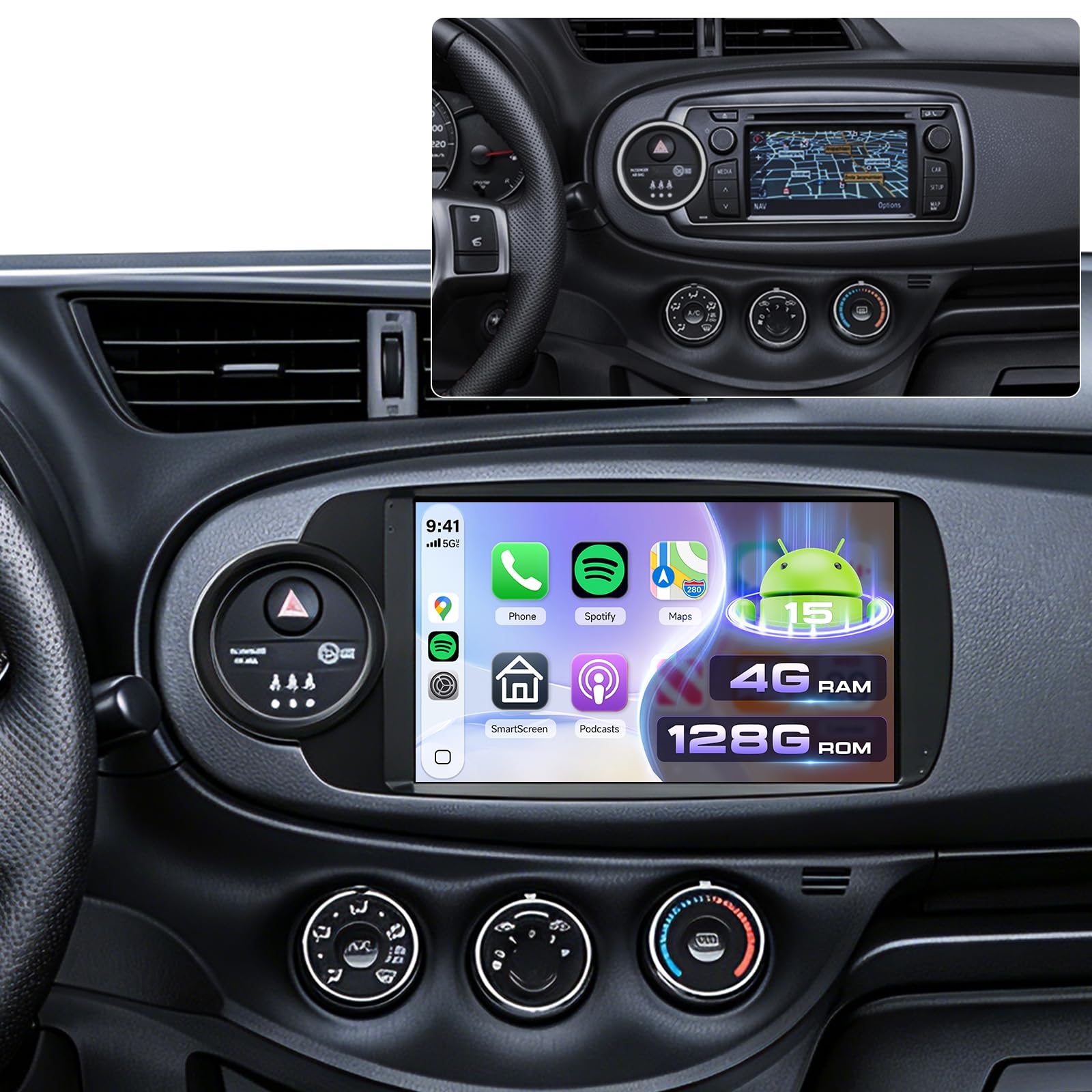
Image 1.1: VECHTEL Android 15 Car Radio main unit. This image shows the front view of the car radio with its 9-inch Incell HD touchscreen display.
2. Konpatibilite Veyikil
This car radio is specifically designed for Toyota Yaris models manufactured between 2012 and 2017. It is compatible with vehicles equipped with a silver climate knob ring as standard, including versions with a factory CD radio and small screen, as well as those with large touchscreens. This unit is not suitable for vehicles that do not have the silver climate knob ring.
Anvan achaasing or installing, verify your vehicle's model year and dashboard configuration. It is recommended to send a photo of your central dashboard to the seller for confirmation if unsure.
3. Enfòmasyon sou Sekirite
- Enstalasyon pwofesyonèl rekòmande: Due to the complexity of automotive electrical systems, professional installation is highly recommended to prevent damage to the unit or your vehicle.
- Pwovizyon pou pouvwa: Konekte aparèy la sèlman ak yon ekipman pou kouran 12V DC ak tè negatif.
- Fil elektrik: Ensure all wiring connections are secure and correctly matched to avoid short circuits or malfunctions. Refer to the wiring diagram provided with the product.
- Sekirite Kondwi: Do not operate the unit's complex functions or watch videos while driving. Always prioritize road safety.
- Tanperati: Evite ekspoze aparèy la nan tanperati ekstrèm oswa anba limyè solèy dirèk pou yon peryòd tan pwolonje.
- Netwayaj: Use a soft, dry cloth for cleaning the screen and unit. Avoid abrasive cleaners or solvents.
4. Enstalasyon ak Enstalasyon
This section provides general guidance for installation. Specific wiring diagrams and mounting instructions are typically included in a separate guide or with the product packaging. Always consult those specific documents for detailed steps.
4.1. Chèk Pre-Enstalasyon
- Dekonekte batri: Before starting any electrical work, disconnect the vehicle's negative battery terminal to prevent electrical shorts.
- Verifye konpozan yo: Ensure all components listed in your product's packing list are present.
- Dashboard Removal: Carefully remove the existing car radio and dashboard trim panels according to your vehicle's service manual.
4.2. Koneksyon fil elektrik
Connect the wiring harness from the VECHTEL unit to your vehicle's wiring. Pay close attention to:
- Pouvwa fil: Constant 12V (yellow), Accessory 12V (red), Ground (black).
- Oratè Fil: Match positive and negative terminals for each speaker.
- Antèn: Konekte antèn radyo a.
- GPS Antèn: Monte antèn GPS la nan yon kote ki klè. view of the sky (e.g., dashboard, under windshield).
- Pò USB: Route the USB extension cables to an accessible location.
- Antre Kamera Dèyè: Connect the rear camera video input and trigger wire if installing a camera.
- Steering Wheel Control Wires: Connect SWC wires if your vehicle supports them.
4.3. Monte inite a
Secure the VECHTEL unit into the dashboard opening using the provided mounting brackets and screws. Ensure it is firmly seated and does not obstruct any vehicle controls.
4.4. Premye Limen ak Konfigirasyon
- Rekonekte batri machin nan.
- Limen machin nan. Aparèy la ta dwe limen otomatikman.
- Follow the on-screen prompts for initial setup, including language selection, time zone, and Wi-Fi connection.
- Test all functions: radio, Bluetooth, GPS, USB, and steering wheel controls.
5. Operasyon Enstriksyon
5.1. Touchscreen and Android 15 Interface
The unit features a responsive 9-inch Incell HD touchscreen. Navigate the Android 15 operating system by tapping, swiping, and pinching. The home screen provides access to frequently used applications and widgets. You can customize the home page display with optional layouts.
5.2. CarPlay san fil ak Android Auto
This unit supports wireless connections for both Apple CarPlay and Android Auto, allowing seamless integration of your smartphone's features.
- Asire w ke Bluetooth ak Wi-Fi aktive sou smartphone ou.
- On the car radio, open the "CarPlay" or "Android Auto" application.
- Follow the on-screen instructions to pair your phone via Bluetooth. Once paired, the system will automatically establish a Wi-Fi connection for CarPlay/Android Auto.
- You can now access navigation, music, calls, and messages directly from the car radio's screen, often with advanced voice control via Siri or Google Assistant.
5.3. Navigasyon GPS
The integrated GPS module allows for both offline and online navigation.
- Kat jeyografik offline: Pre-installed maps or maps downloaded via Wi-Fi can be used without an internet connection. Access them through the designated "Navigation" app.
- Kat sou entènèt: Connect to Wi-Fi or a mobile hotspot to use online navigation applications (e.g., Google Maps, Waze) downloaded from the Play Store.
5.4. Bluetooth Koneksyon
Use Bluetooth for hands-free calling and audio streaming.
- Go to the "Bluetooth" application on the car radio.
- Aktive Bluetooth sou telefòn ou epi chèche aparèy ki disponib yo.
- Select the car radio's Bluetooth name (e.g., "VECHTEL Car Radio") from your phone's list and pair.
- Konfime kòd koneksyon an sou tou de aparèy yo.
- Yon fwa konekte, ou ka fè/resevwa apèl epi jwe mizik san fil.
5.5. Wi-Fi and App Installation
Connect the unit to a Wi-Fi network or mobile hotspot to access the internet and download applications.
- Navigate to "Settings" > "Network & Internet" > "Wi-Fi".
- Chwazi rezo Wi-Fi ou vle a epi antre modpas la.
- Once connected, open the "Play Store" app to download and install various applications (e.g., streaming services, utility apps).
5.6. FM/RDS Radio
Access local radio stations with clear audio quality.
- Open the "Radio" application.
- Use the scan function to automatically find and save available stations.
- Tune manually or select from your saved presets. RDS (Radio Data System) provides additional information like station name and traffic updates where available.
5.7. Koneksyon USB
The unit includes dual USB ports for media playback and device charging.
- Connect USB drives containing audio or video files.
- Aksè files through the "File Manager" or a dedicated media player app.
5.8. Rear Camera Display
If a compatible rear camera is installed and connected, the display will automatically switch to the camera view lè yo mete machin nan an vitès bak.
5.9. Kontwòl nan volan an (SWC)
The unit supports integration with your vehicle's existing steering wheel controls. Configuration may be required:
- Go to "Settings" > "Steering Wheel Controls" (or similar).
- Follow the on-screen instructions to map your vehicle's steering wheel buttons to the corresponding functions on the car radio.
5.10. Split Screen Fonksyon
Fonksyon ekran divize a pèmèt ou egzekite de aplikasyon an menm tan sou ekran 9 pous la.
- Louvri premye aplikasyon ou vle itilize a.
- Press and hold the "Recent Apps" button (or swipe up from the bottom and hold, depending on Android version) to enter split-screen mode.
- Select the second application from the recent apps list or app drawer.
5.11. Anviwònman EQ
Adjust audio output to your preference using the Equalizer (EQ) settings.
- Access the "EQ" or "Sound Settings" application.
- Choose from preset sound modes or manually adjust frequency bands to customize the audio profile.
6. Antretyen
- Netwayaj ekran: Sèvi ak yon twal mou, ki pa gen pousyè, yon ti kras mouyeampened with water or a screen cleaner, to gently wipe the touchscreen. Avoid excessive pressure.
- Mizajou lojisyèl: Periodically check for software updates via the unit's settings menu or the manufacturer's websit la pou asire pèfòmans optimal ak aksè a nouvo fonksyonalite yo.
- Swen Jeneral: Kenbe aparèy la pwòp de pousyè ak debri. Evite vide likid sou aparèy la.
NAN. Depanaj
Seksyon sa a adrese pwoblèm komen ou ka rankontre. Pou pwoblèm ki pi konplèks, kontakte sèvis kliyan.
- Pa gen pouvwa:
- Check all power connections (12V constant, accessory, ground).
- Verify vehicle's fuse for the radio.
- Ensure the vehicle battery is connected and charged.
- Pa gen son:
- Check volume level and mute settings.
- Verify speaker wire connections.
- Asire w ke ou chwazi bon sous odyo a.
- Siyal GPS pèdi/pa egzak:
- Asire w antèn GPS la byen konekte epi li gen yon vizyon klè. view nan syèl la.
- Deplase machin nan nan yon zòn ouvè lwen bilding ki wo oswa vejetasyon epè.
- Pwoblèm koneksyon Bluetooth:
- Ensure Bluetooth is enabled on both the car radio and your phone.
- Efase ansyen koneksyon yo sou tou de aparèy yo epi eseye konekte yo ankò.
- Rekòmanse tou de aparèy yo.
- CarPlay/Android Auto pa konekte:
- Verify Wi-Fi and Bluetooth are active on your phone.
- Asire w ke sistèm operasyon telefòn ou an ajou.
- Check app permissions for CarPlay/Android Auto on your phone.
8. Espesifikasyon
| Mak | VECHTEL |
| Modèl | 4 Core 4G+128G |
| Sistèm operasyon | Android 15 |
| RAM | 4 GB |
| ROM (Depo Entèn) | 128 GB |
| Gwosè ekran | 9 inches Incell HD Touchscreen |
| Koneksyon Teknoloji | Bluetooth, USB, Wi-Fi |
| Karakteristik espesyal | Integrated Bluetooth, Wireless CarPlay, Wireless Android Auto, GPS Navigation, Touchscreen, Integrated Wi-Fi |
| Audio Sòti Mode | Stereo |
| Konfigirasyon chanèl son antoure | 4.1 |
| Kodaj videyo | H.264, H.265/HEVC |
| Dimansyon pwodwi | 6.4P x 19.9L x 11.6H cm |
| Sortie pouvwa | 45 Watts |
| Kantite Chanèl | 4 |
9. Garanti ak sipò
For warranty information, please refer to the documentation included with your product or contact the retailer where the product was purchased. VECHTEL provides customer support for technical assistance and troubleshooting.
If you encounter issues not covered in this manual, or require further assistance, please contact VECHTEL customer service through the platform of purchase or visit the official VECHTEL store page for contact details.
Sipò sou entènèt: Visit the VECHTEL Store on Amazon