
1. Entwodiksyon
This user manual provides detailed instructions for the setup, operation, and maintenance of your BL Android TV Box 11.0. Designed for an enhanced home entertainment experience, this device transforms your television into a smart hub, offering access to a wide range of streaming content, applications, and multimedia features. Please read this manual carefully before using the product to ensure optimal performance and longevity.
2. Pake kontni
Tanpri verifye ke tout atik ki nan lis anba a yo enkli nan pakè ou a:
- Android TV Box (1 unit)
- Kontwòl Remote (1 inite)
- Adaptè kouran (1 inite)
- Kab HDMI (1 inite)
- Manyèl itilizatè (1 inite)

Image: All components included in the BL Android TV Box 11.0 package.
3. Enstalasyon
Follow these steps to set up your BL Android TV Box:
- Konekte kab HDMI a: Insert one end of the HDMI cable into the HDMI OUT port on the TV Box and the other end into an available HDMI input on your television.
- Konekte adaptè pouvwa a: Plug the power adapter into the DC IN port on the TV Box, then plug the other end into a power outlet.
- Konekte sou rezo a: Once powered on, connect the TV Box to your network. You can use either Wi-Fi (2.4G/5G Dual Band) or an Ethernet cable for a wired connection. Navigate to 'Settings' > 'Network' to configure your connection.
- Premye konfigirasyon: Follow the on-screen prompts to complete the initial setup, including language selection, time zone, and Google account login.
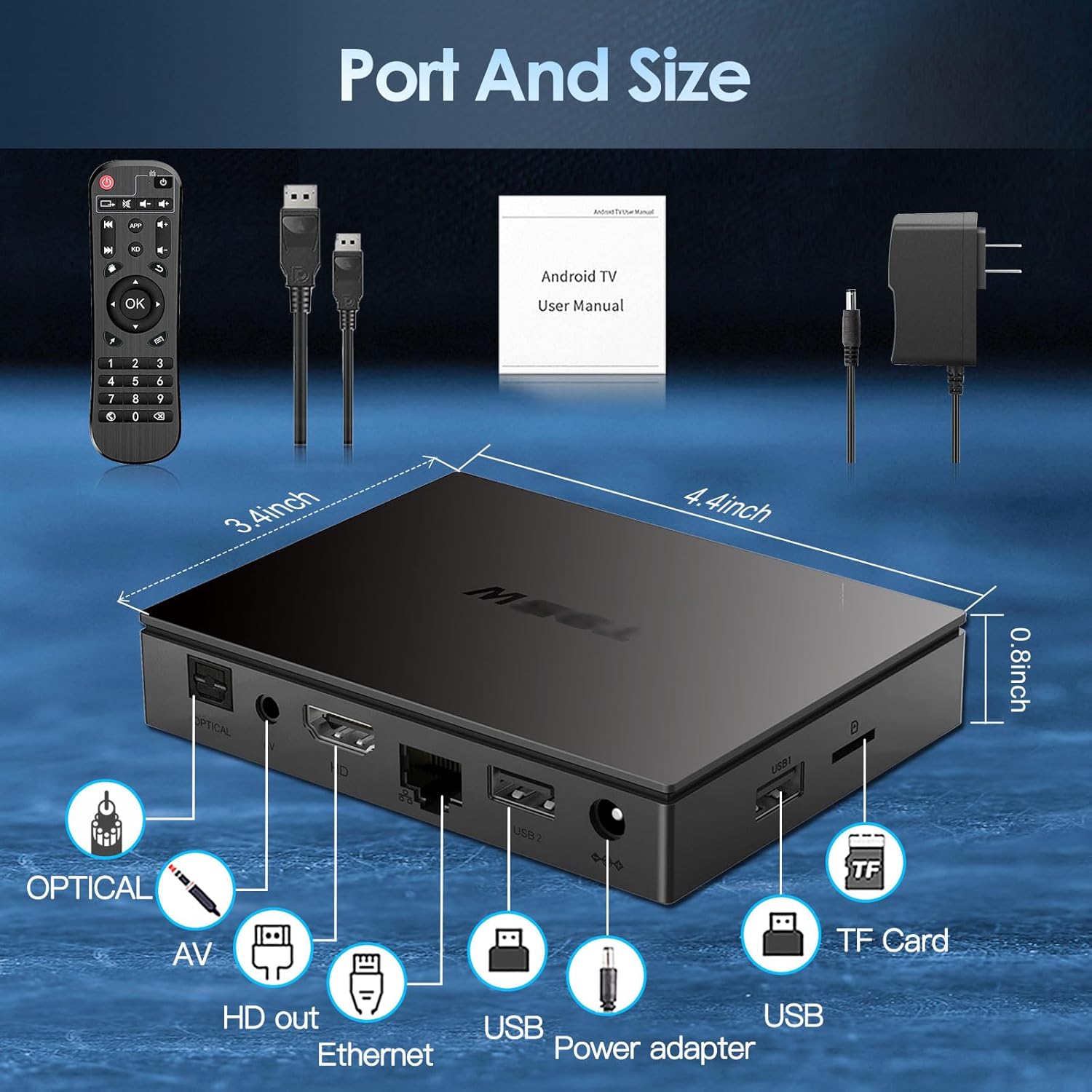
Image: Visual guide for connecting the BL Android TV Box to your television and power.
4. Operasyon Enstriksyon
Once set up, you can begin using your BL Android TV Box to access various features:
- Navigasyon: Use the included remote control to navigate through the Android 11.0 interface. The directional pad and 'OK' button are used for selection, while 'Back' and 'Home' buttons provide quick navigation.
- Aksè Aplikasyon: The home screen displays pre-installed applications like YouTube, Netflix, Google Play Store, and Chrome. You can download additional apps from the Google Play Store.
- Media lèktur: Play local media files from USB drives or TF cards connected to the TV Box. The device supports various video and audio formats.
- Miroir ekran: Utilize the wireless screen mirroring function to cast content from your smartphone or tablet to your TV. This feature supports Airplay, DLNA, and Miracast protocols.

Image: The user interface of the Android 11.0 operating system on the TV Box.

Image: Demonstration of wireless screen mirroring from mobile devices to the TV.
5. Karakteristik
The BL Android TV Box 11.0 is equipped with advanced features for a superior entertainment experience:
- Powerful Amlogic S905W2 CPU: Powered by a Quad-Core Cortex-A35 processor, ensuring smooth performance, efficient image processing, and broad app compatibility.
- Ultra-High Definition Viewing: Supports 4K HDR10+ technology and the latest AV1 encoding, delivering realistic visuals, efficient video compression, and enhanced picture quality.
- Wi-Fi Doub-Band ak Bluetooth 5.0: Features 2.4G/5G dual-band Wi-Fi for stable and fast wireless connectivity, and Bluetooth 5.0 for connecting peripherals like headphones, speakers, keyboards, and gamepads.
- Miroir ekran san fil: Allows you to mirror content from your mobile devices to your TV, facilitating easy sharing of photos and videos.

Imaj: Plis paseview of the Amlogic S905W2 processor.
Image: Highlighting 4K HDR10+ video decoding capabilities.

Image: Connectivity options including Dual Wi-Fi and Bluetooth 5.0.
6. Antretyen
To ensure the longevity and optimal performance of your BL Android TV Box, follow these maintenance guidelines:
- Netwayaj: Sèvi ak yon twal mou epi sèk pou netwaye deyò aparèy la. Evite itilize pwodui netwayaj likid oswa materyèl abrazif.
- Vantilasyon: Ensure the TV Box is placed in a well-ventilated area to prevent overheating. Do not block the ventilation openings.
- Mizajou lojisyèl: Tcheke regilyèman pou wè si gen mizajou sistèm nan nan meni 'Paramèt' la pou asire w ke ou gen dènye fonksyonalite ak patch sekirite yo.
- Kouran koupe byen: Always power off the device correctly before unplugging it to prevent data corruption.
NAN. Depanaj
If you encounter issues with your BL Android TV Box, refer to the following common troubleshooting steps:
- Pa gen pouvwa: Ensure the power adapter is securely connected to both the TV Box and a working power outlet. Try a different outlet if necessary.
- Pa gen imaj/siyal: Verify that the HDMI cable is correctly connected to both the TV Box and your television. Ensure your TV is set to the correct HDMI input source.
- Pa gen koneksyon Wi-Fi: Check your router and ensure it is working correctly. Re-enter your Wi-Fi password in the TV Box settings. If issues persist, try restarting both the TV Box and your router.
- Kontwòl Remote pa reponn: Check the batteries in the remote control and replace them if needed. Ensure there are no obstructions between the remote and the TV Box.
- Aplikasyon an bloke/kraze: Try clearing the cache of the problematic app in 'Settings' > 'Apps'. If the issue persists, uninstall and reinstall the app.
- Pèfòmans Ralanti: Close unused applications running in the background. Consider performing a factory reset if performance issues are severe and persistent (Note: This will erase all data and settings).
8. Espesifikasyon
| Karakteristik | Spesifikasyon |
|---|---|
| Nimewo Modèl | BL-Android-TV-Box-11.0 |
| Sistèm operasyon | Android 11.0 |
| CPU | Amlogic S905W2 Quad-Core Cortex-A35 |
| RAM | 4GB |
| ROM | 32GB |
| Sòti videyo | 4Kx2K@60fps (HDMI 2.1) |
| Dekodaj videyo | AV1, HDR10+, H.265, H.264, etc. |
| Koneksyon Wi-Fi | 2.4G/5G Dual-Band Wi-Fi |
| Bluetooth | Bluetooth 5.0 |
| Ethernet | 10/100M |
| Pò | HDMI 2.1*1, USB 2.0*2, Optical, AV, Ethernet, TF Card Slot, Power Adapter Port |
| Dimansyon | 11.2L x 8.6W x 2.1H cm |

Image: Port layout and dimensions of the BL Android TV Box.
9. Garanti ak sipò
Your BL Android TV Box 11.0 comes with a standard manufacturer's warranty. For specific warranty terms and conditions, please refer to the documentation provided with your purchase or contact the seller directly. If you require technical assistance or have questions not covered in this manual, please reach out to the customer support team of the brand BL. Contact information can typically be found on the product packaging or the brand's official websit.