
Entwodiksyon
This manual provides detailed instructions for the GEEZER G100 Wireless Keyboard and Mouse Combo. Please read this manual thoroughly before use to ensure proper setup, operation, and maintenance of your new peripheral set. This combo offers a full-size keyboard with a comfortable palm rest and a silent optical mouse, connecting wirelessly via a single 2.4GHz USB nano receiver.

Figure 1: GEEZER G100 Wireless Keyboard and Mouse Combo (Milk Tea Color)
Kontni pake
- 1 x GEEZER G100 Wireless Keyboard
- 1 x GEEZER Wireless Optical Mouse
- 1 x Reseptè Nano USB (ki estoke anndan sourit la)
- 1 x Manyèl Enstriksyon (dokiman sa a)
- Note: Batteries are not included. The keyboard requires 1x AAA battery, and the mouse requires 1x AA battery.
Enstalasyon
1. Enstale pil
- Pou Sourit la: Open the battery cover on the underside of the mouse. Insert one AA battery, ensuring correct polarity. Close the battery cover.
- Pou klavye a: Open the battery compartment on the underside of the keyboard. Insert one AAA battery, ensuring correct polarity. Close the battery cover.
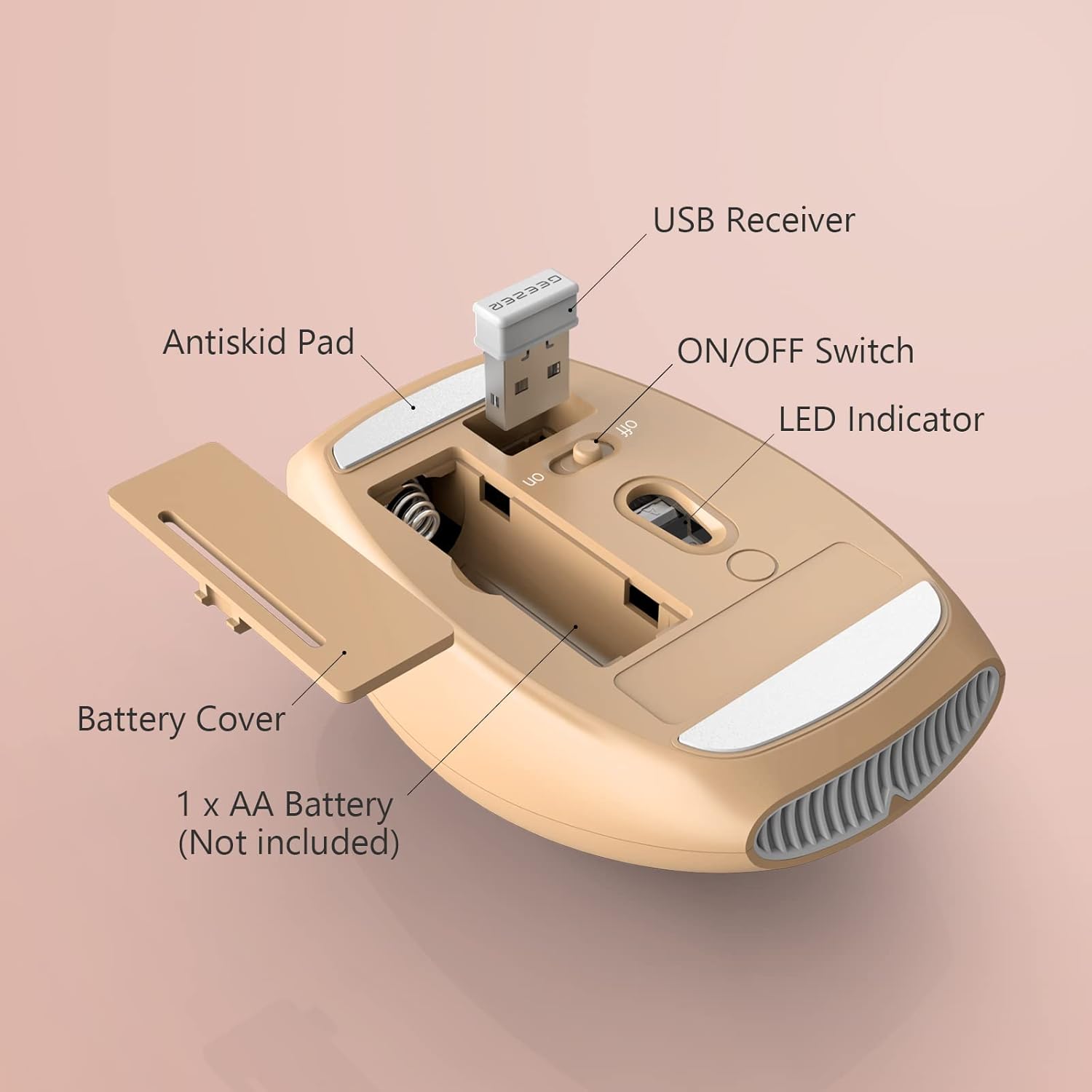
Figure 2: Mouse battery compartment and USB receiver location.

Figure 3: Keyboard battery compartment and foldable stands.
2. Connect the USB Nano Receiver
- Locate the USB nano receiver, which is typically stored in the battery compartment of the mouse for safekeeping.
- Plug the USB nano receiver into an available USB port on your computer (PC, Laptop, Desktop, Chromebook, Mac, Smart TV, etc.).
- Sistèm nan ta dwe detekte epi enstale chofè ki nesesè yo otomatikman. Pa gen okenn enstalasyon lojisyèl adisyonèl ki nesesè.

Figure 4: USB Nano Receiver in use.
3. Power On
- Turn on the mouse using the ON/OFF switch located on its underside.
- Turn on the keyboard using the ON/OFF switch located on its underside.
Your keyboard and mouse should now be ready for use. The working range is up to 10m/33ft.
Enstriksyon Operasyon
Karakteristik klavye
- Layout tout gwosè: The keyboard features a 106-key full-size layout, including a numeric keypad for efficient data entry.
- Palm Rest: An integrated comfortable wrist rest is designed to reduce wrist fatigue during prolonged typing.
- Kle trankil: The keys are designed for less noise, providing a quieter typing experience.
- Kanpe pliyab: Adjustable foldable stands on the underside allow you to set the keyboard at a comfortable typing angle.
- Function (Fn) Keys: Utilize the Fn key in combination with F1-F12 keys for various multimedia and system shortcuts. Refer to the keycap legends for specific functions (e.g., volume control, media playback).

Figure 5: Keyboard Fn Shortcut Keys.
Karakteristik sourit
- Konsepsyon optik: Provides precise cursor control with a DPI of 1200.
- Klik an silans: The mouse buttons are designed for completely mute clicks, ideal for quiet environments.
- Comfortable Hand-feeling: Smooth surfaces and ergonomic shape ensure comfortable use.
Antretyen
- Netwayaj: Use a soft, dry cloth to clean the surfaces of the keyboard and mouse. For keys, a small brush can be used to remove dust and debris. Avoid using harsh chemicals or abrasive materials.
- Ranplasman batri: Replace batteries when performance degrades. Ensure correct battery type (1x AAA for keyboard, 1x AA for mouse) and polarity.
- Depo: When not in use for extended periods, turn off both the keyboard and mouse using their respective ON/OFF switches to conserve battery life. Store the USB nano receiver in the mouse's battery compartment to prevent loss.
Depanaj
- Pa gen repons nan klavye/sourit:
- Asire w pil yo byen enstale epi yo pa fin itilize. Ranplase yo si sa nesesè.
- Verify both the keyboard and mouse are switched ON.
- Check that the USB nano receiver is securely plugged into a working USB port on your computer. Try a different USB port if available.
- Ensure the devices are within the 10m/33ft operating range of the receiver.
- Rekòmanse òdinatè w lan.
- Koneksyon ki ralanti oswa ki tanzantan:
- Move the keyboard and mouse closer to the USB nano receiver.
- Remove any large metal objects or electronic devices that might interfere with the 2.4GHz wireless signal.
- Ensure no other 2.4GHz wireless devices are causing interference.
- Fonksyon dòmi otomatik:
- If the keyboard or mouse enters sleep mode after a minute of inactivity, simply click the mouse or press any key on the keyboard to wake it up. This is a power-saving feature.
Espesifikasyon
| Modèl pwodwi | G100 |
| Dimansyon klavye | 436 x 182 x 24 mm (17.17 x 7.17 x 0.94 pous) |
| Pwa klavye | 545g ± 5g (1.2 lbs) |
| Keyboard Key Quantity | 106 keys (Full-size) |
| Dimansyon sourit | 103 x 69 x 35 mm (4.06 x 2.72 x 1.38 pous) |
| Pwa sourit | 75g ± 5g (0.17 lbs) |
| Mouse Button Quantity | 3 kle |
| Koneksyon Teknoloji | 2.4G san fil |
| Sistèm konpatib yo | Windows XP/X/Win 7/8/10/2000/ME Vista, iOS OS, etc. |
| Range opere | Jiska 10 mèt (33 pye) |

Figure 6: Keyboard and Mouse Dimensions.
Garanti ak sipò
For after-sales service and quality assurance, if you encounter any problems during use, please contact GEEZER via Amazon email. We commit to responding within 12 hours and providing satisfactory solutions.
Pou plis asistans, tanpri vizite GEEZER Store on Amazon.