
1. Entwodiksyon
The G-MARK G4000IEM is a professional UHF wireless in-ear monitor system designed for stage performances, studio recording, band rehearsals, and live events. It provides reliable, high-quality audio monitoring with features such as broad frequency response, low latency, strong anti-interference capabilities, and stable signal transmission over a wide coverage area.
Karakteristik kle:
- Premium Monitoring System: Offers a broad frequency response of 50Hz-20KHz and less than 5ms latency for real-time audio monitoring.
- Bonjan anti-entèferans: UHF receiver with PLL phase-locked frequency synthesis, covering 550 MHz-580 MHz with 100 adjustable frequencies.
- Stable Signal & Broad Coverage: Dual-antenna receiver with advanced digital signal processing for enhanced signal and extended range up to 160-320 feet.
- Practical & Durable Design: Constructed with high-quality brushed metal for longevity, featuring an intuitive LCD display and operation buttons.
- Sistèm dilatabl: Designed to be an expandable wireless monitoring system.
- Anilasyon bri: Built-in noise cancellation for focused audio monitoring.
2. Enfòmasyon sou Sekirite
Tanpri li epi konprann tout enstriksyon sekirite yo anvan ou itilize aparèy sa a. Kenbe manyèl sa a pou referans pita.
- Pwovizyon pou pouvwa: Use only the specified power adapter for the transmitter. Ensure the voltage matche ak kondisyon aparèy yo.
- Batri: The bodypack receiver requires two AA batteries (not included). Ensure correct polarity when inserting batteries. Do not mix old and new batteries, or different types of batteries. Remove batteries if the device will not be used for an extended period.
- Imidite: Do not expose the device to rain, moisture, or extreme humidity.
- Chalè: Kenbe aparèy la lwen sous chalè tankou radyatè, recho, recho oswa lòt aparèy ki pwodui chalè.
- Vantilasyon: Ensure proper ventilation for the transmitter unit, especially if rack-mounted. Do not block ventilation openings.
- Netwayaj: Netwaye sèlman avèk yon twal sèk. Pa sèvi ak pwodui netwayaj likid oswa ayewosòl.
- Sèvis: Pa eseye fè sèvis pwodui sa a tèt ou. Refere tout sèvis yo bay pèsonèl sèvis kalifye.
- Pwoteksyon pou tande: Prolonged exposure to high volume levels can cause permanent hearing damage. Set the volume to a comfortable level before placing earphones in your ears.
3. Pake kontni
Carefully unpack your G-MARK G4000IEM system and verify that all items listed below are present and in good condition.
- G-MARK G4000IEM Transmitter Unit
- 2 x G-MARK G4000IEM Bodypack Receivers
- 2 x In-Ear Earphones
- 2 x Transmitter Antennas
- Adaptè kouran pou transmetè
- Audio Cables (e.g., 1/4" to 1/4" or XLR to 1/4")
- Manyèl Itilizatè (dokiman sa a)

Figure 3.1: G-MARK G4000IEM System Product List
4. Konpozan pwodwi yoview
4.1. Bodypack Receiver
The bodypack receiver is a compact unit designed for personal monitoring. It features an antenna for signal reception, a frequency display, IR pairing window, battery compartment, volume adjustment knob, and a 3.5mm earphone input.

Figure 4.1: Bodypack Receiver Components
- Antèn: Receives wireless signals from the transmitter.
- Ekspozisyon frekans: Shows the current operating frequency.
- IR Pairing Window: Used for infrared synchronization with the transmitter.
- Lòj batri: Holds two AA batteries (not included).
- Volume Adjustment Knob: Controls the output volume to the earphones.
- Antre 3.5mm: Connects to the included in-ear earphones.
4.2. Inite Transmetè
The transmitter unit is the central hub of the system, sending audio signals wirelessly to the bodypack receivers. It features input jacks for audio sources, controls for channel selection, and a damping adjustment knob.

Figure 4.2: Transmitter Unit Front Panel
- DampBouton Ajisteman: Reduces clicking sounds and provides a softer button feel.
- Ekspozisyon LCD: Shows frequency, channel, and other operational information.
- Channel Controls (CH-A, CH-B): Buttons for selecting and adjusting frequencies for each channel.
- SET bouton: Enters adjustment state for frequency selection.
- Fenèt IR: For infrared synchronization with bodypack receivers.
- Bouton pouvwa: Turns the transmitter unit on or off.
- Pò antèn: Connect the included antennas for signal transmission.
- Entran Audio: (Typically XLR or 1/4" combo jacks on the rear, not visible in this image) Connect audio sources like mixing consoles.
5. Gid Enstalasyon
5.1. Transmitter Connection
- Connect the provided antennas to the antenna ports on the rear of the transmitter unit.
- Connect the power adapter to the transmitter's DC input and plug it into a suitable power outlet.
- Connect your audio source (e.g., mixing console, audio interface) to the audio input jacks on the transmitter using appropriate cables.
- Peze bouton pouvwa a pou limen transmetè a.
5.2. Bodypack Receiver Setup
- Open the battery compartment on the bodypack receiver.
- Insert two AA batteries, ensuring correct polarity.
- Fèmen lòj batri a.
- Connect the included in-ear earphones to the 3.5mm input jack on the bodypack receiver.
5.3. IR Pairing (Frequency Synchronization)
To ensure the bodypack receiver receives audio from the transmitter, you must synchronize their frequencies using the IR pairing function.

Figure 5.1: IR Match Process
- On the transmitter, press the SET button to enter the adjustment state for the desired channel (CH-A or CH-B).
- Sèvi ak la ▲ (moute) oswa ▼ (down) buttons to select the desired frequency.
- Turn on the bodypack receiver.
- Align the IR pairing window on the bodypack receiver with the IR window on the transmitter.
- Hold them in alignment until you hear a beep sound, indicating that the frequencies of the transmitter and the bodypack receiver are successfully matched. The frequency displayed on the bodypack should now match the transmitter.
6. Operasyon
6.1. Power On/Off
- Transmetè: Peze a POUVWA button on the front panel. The display will illuminate.
- Bodypack Receiver: Vire a ON/OFF/Volim knob clockwise to power on. The display will illuminate. Turn counter-clockwise until it clicks to power off.
6.2. Seleksyon frekans
The G4000IEM system offers 100 adjustable frequencies within the 550 MHz-580 MHz range to avoid interference.
- On the transmitter, press the SET button for the channel you wish to adjust (CH-A or CH-B). The frequency display will blink.
- Sèvi ak la ▲ (moute) oswa ▼ (down) buttons to cycle through available frequencies.
- Once the desired frequency is selected, press SET again to confirm, or wait a few seconds for it to automatically save.
- After changing the transmitter frequency, re-perform the IR pairing process (Section 5.3) to synchronize the bodypack receiver.
6.3. Ajisteman Volim
Adjust the monitoring volume using the Bouton Ajisteman Volim on the bodypack receiver. Start with a low volume and gradually increase it to a comfortable listening level to prevent hearing damage.
6.4. Wireless Range and Performance
The system provides a stable signal range of 160-320 feet (approximately 50-100 meters) in optimal conditions. Obstacles such as walls and other wireless devices can affect performance.

Figure 6.1: Wireless Range and Dual Antenna System
6.5. Fonksyonalite Bluetooth
The G4000IEM system supports wireless Bluetooth transmission, allowing for additional connectivity options. Refer to the transmitter's display for Bluetooth pairing indicators.
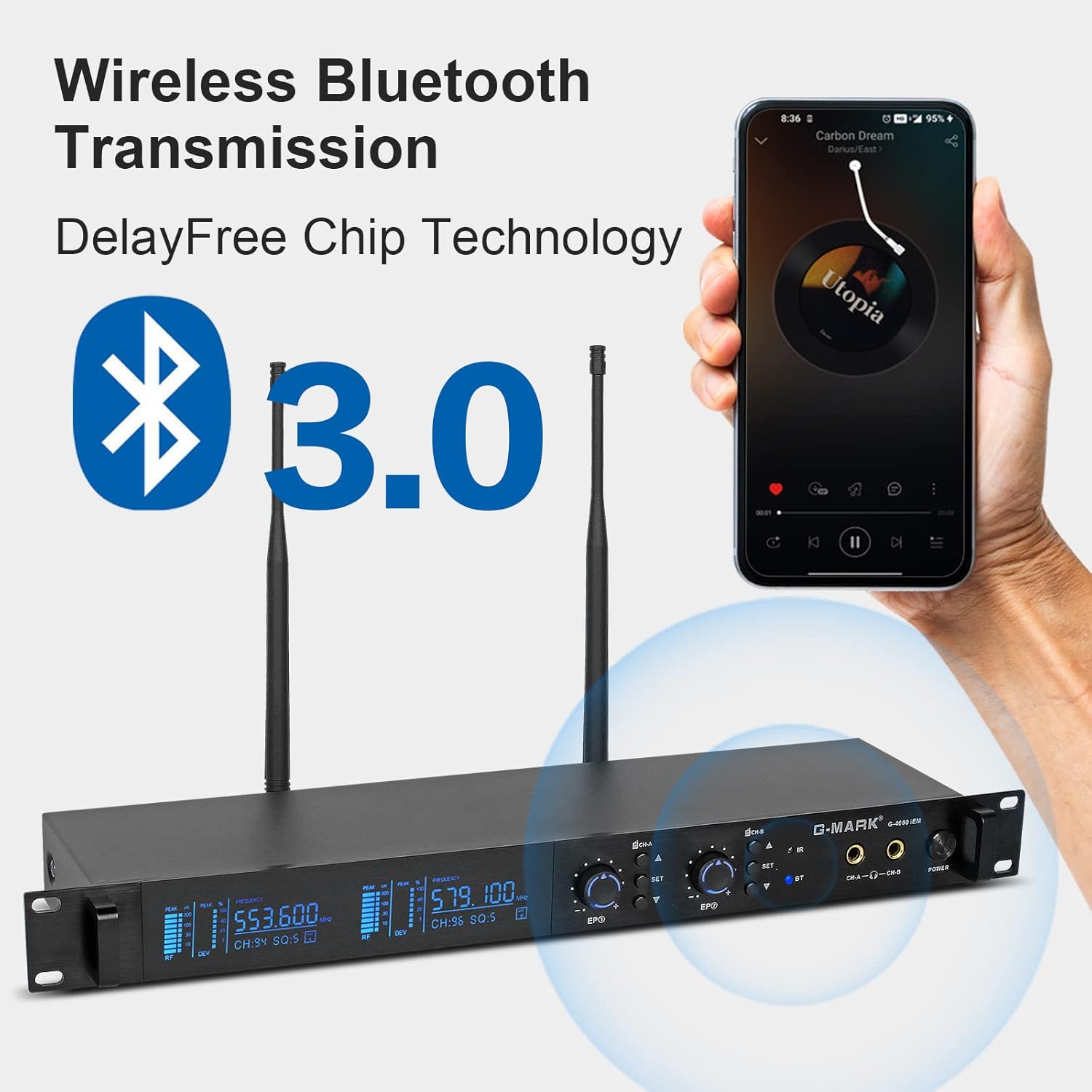
Figure 6.2: Wireless Bluetooth Transmission
7. Antretyen
- Netwayaj: Use a soft, dry cloth to clean the surfaces of the transmitter and bodypack receivers. Do not use abrasive cleaners, solvents, or chemical sprays.
- Depo: Sere sistèm nan nan yon kote ki fre epi sèk, lwen limyè solèy dirèk ak tanperati ekstrèm lè w pa ap itilize li.
- Swen batri: Remove batteries from the bodypack receivers if they will not be used for an extended period to prevent leakage and damage.
- Jesyon kab: Avoid sharp bends or kinks in audio and power cables to prevent damage.
NAN. Depanaj
If you encounter issues with your G-MARK G4000IEM system, refer to the following common problems and solutions:
- Pa gen son nan ekoutè yo:
- Ensure the bodypack receiver is powered on and has fresh batteries.
- Check that the earphones are securely plugged into the 3.5mm jack.
- Verify the bodypack receiver's volume knob is turned up.
- Confirm the transmitter is powered on and receiving an audio input signal.
- Perform IR pairing again to ensure frequencies are synchronized (Section 5.3).
- Entèferans oswa estatik:
- Change the operating frequency on the transmitter (Section 6.2) and re-pair the bodypack.
- Ensure the transmitter and receiver antennas are fully extended and unobstructed.
- Move the transmitter and receiver away from other wireless devices, Wi-Fi routers, or large metal objects.
- Check for strong local RF interference sources.
- Kout distans san fil:
- Ensure antennas on both transmitter and receiver are properly connected and oriented.
- Minimize obstructions between the transmitter and receiver.
- Check battery levels in the bodypack receiver.
- Transmetè a pa limen:
- Verify the power adapter is securely connected to both the transmitter and a working power outlet.
- Asire w ke priz kouran an aktif.
9. Espesifikasyon teknik
| Karakteristik | Spesifikasyon |
|---|---|
| Nimewo Modèl | G4000IEM |
| Mak | G-MAK |
| Koneksyon Teknoloji | San fil (RF) |
| Teknoloji Kominikasyon San Fil | RF |
| Repons Frekans | 50Hz - 20KHz |
| UHF Frequency Coverage | 550 MHz - 580 MHz |
| Adjustable Frequencies | 100 |
| Latansi | Mwens pase 5ms |
| Wireless Range | 160FT - 320FT (approx. 50-100 meters) |
| Plasman Zòrèy | Nan Zòrèy |
| Faktè fòm | Nan Zòrèy |
| Kontwòl bri | Anile aktif bri |
| Jack kas ekoutè | 3.5mm Jack |
| Bodypack Power Source | 2 x AA pil (pa enkli) |
| Materyèl patiraj | Metal (Transmitter) |
| Kantite Atik | 2 (Bodypacks) |
10. Garanti ak sipò
Genuine G-MARK audio products come with a 1-ane garanti manifakti. This warranty covers defects in materials and workmanship under normal use. For troubleshooting, replacement of discontinuous/defective parts, or any other customer service inquiries, please contact G-MARK customer support through your retailer or the official G-MARK websit.