
Entwodiksyon
This manual provides comprehensive instructions for the operation and maintenance of your MUSRUN MP3 Player (Model: k188). Designed for portability and high-fidelity audio, this device offers a range of features including Bluetooth connectivity, FM radio, voice recording, and support for various audio formats. Please read this manual thoroughly to ensure proper use and to maximize your listening experience.

Image: The MUSRUN MP3 Player shown alongside its included accessories: a sport armband, wired earphones, and various cables.
Ki sa ki nan bwat la
Verifye ke tout atik yo prezan nan pakè a:
- MUSRUN MP3 Player (Model: k188)
- USB Chaje Kab
- Adjustable Sport Armband
- Fil kònè
- 3.5mm AUX kab
- Manyèl Itilizatè (dokiman sa a)

Image: All components included with the MUSRUN MP3 Player, neatly arranged.
Enstalasyon
1. Chaje Aparèy la
Before first use, fully charge the MP3 player. Connect the provided USB cable to the player's USB port and the other end to a computer's USB port or a 5V, 0.5-2A USB wall adapter. The battery indicator on the screen will show charging status.

Image: The MP3 player's display showing battery level, emphasizing its long battery life and fast charging capability.
2. Mete yon Kat Mikwo SD
The MP3 player has built-in memory and supports an external Micro SD card up to 128GB for expanded storage. Locate the TF Micro SD Card Slot on the side of the device. Gently insert the Micro SD card until it clicks into place.
3. Transferring Music and Files
To transfer music, audiobooks, or other files nan jwè MP3 la:
- Konekte jwè MP3 a nan òdinatè w lan lè l sèvi avèk kab USB yo bay la.
- Jwè a ap parèt kòm yon lektè disk amovible sou òdinatè w la.
- Trennen epi depoze odyo ou vle a files (MP3, WMA, APE, FLAC, WAV, AAC-LC, ACELP, OGG) or other files into the player's storage or the Micro SD card.
- Retire aparèy la nan òdinatè w la san danje anvan ou dekonekte kab USB a.
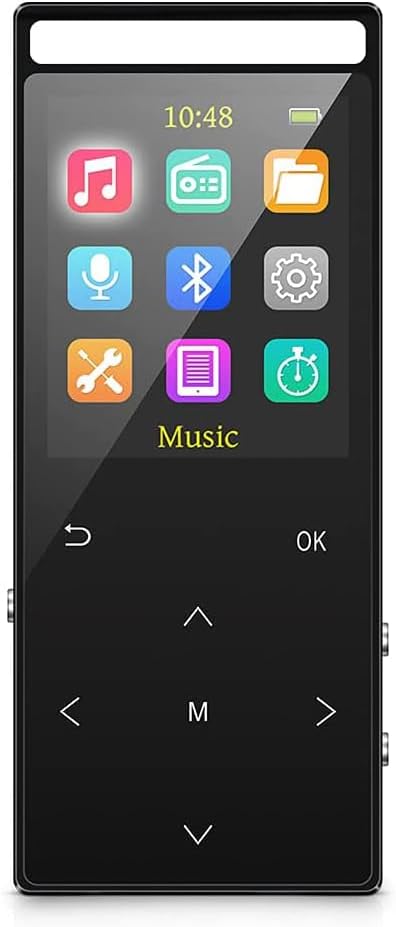
Image: Illustration of connecting the MP3 player to a computer for music transfer.
Enstriksyon Operasyon
Layout Aparèy ak Kontwòl

Image: Detailed diagram showing the location and function of each button and port on the MP3 player.
- Bouton Retounen: Navige tounen nan ekran anvan an oswa nan meni anvan an.
- Bouton jwe/poz: Kòmanse oswa poz lèktur.
- Up bouton: Moves selection up in menus or increases volume (when not in menu).
- Menu (M) Button: Accesses context-sensitive options or main menu.
- Left/Previous Button: Navigates left in menus or skips to previous track.
- Right/Next Button: Navigates right in menus or skips to next track.
- Desann bouton: Moves selection down in menus or decreases volume (when not in menu).
- On/Off/Vol+ Button: Long press to power on/off. Short press to increase volume.
- Record/Vol- Button: Long press to start voice recording. Short press to decrease volume.
- Lock switch: Slides to lock/unlock the buttons to prevent accidental presses.
- TF Micro SD Card Slot: For inserting an external memory card.
- Ekouteur Jack: Sòti odyo 3.5mm pou kas ekoutè.
- Mikwo: Built-in microphone for voice recording.
- Pò USB: Pou chaje ak transfè done.
Lèktur Klas Mizik
- Jwe chante: Navigate to the "Music" icon on the main menu. You can browse by Artists, Albums, Genres, or Playlists. To play all songs in a folder, create folders on your PC and transfer songs into them. Playing one song from a folder will play the entire folder.
- Jwe aleatwa: While a song is playing, press the M button, then select "Play Mode" and choose "Shuffle" or other desired modes.
- Fòma sipòte: The player supports MP3, WMA, APE, FLAC, WAV, AAC-LC, ACELP, OGG.

Image: The MP3 player displaying supported audio formats and equalizer options.
Koneksyon Bluetooth
The player features Bluetooth 5.2 for connecting to wireless headphones or speakers.
- From the main menu, select the "Bluetooth" icon.
- Turn on Bluetooth on the MP3 player.
- Asire w ke kas ekoutè Bluetooth ou a oswa oratè a nan mòd koneksyon.
- The player will scan for available devices. Select your device from the list to connect.

Image: The MP3 player demonstrating its Bluetooth connectivity with wireless headphones.
Radyo FM
Pou itilize fonksyon radyo FM la:
- Connect wired headphones to the earphone jack. The wired headphones act as the FM antenna. The FM function will not work without them, even if using Bluetooth for audio output.
- Navigate to the "FM Radio" icon on the main menu.
- Perform an automatic channel search.
- Use the Up/Down buttons to switch between channels. Press the M button for additional options.

Image: The MP3 player being used for FM radio, highlighting the need for wired headphones as an antenna.
Fonksyon anrejistreman
The MP3 player supports three types of recording:
- Line-In Record: Connect the MP3 player to a computer/phone via an audio line (3.5mm AUX cable). Play audio on the source device and start recording on the MP3 player to capture the sound.
- Dosye radyo FM: Record FM radio programs directly from the player.
- Dosye vwa: Use the built-in microphone to record voice memos. Long press the Record/Vol- button to initiate voice recording.
Lòt Fonksyon
- E-liv: Li tèks files (TXT format).
- Foto Viewer: View imaj files.
- Revèy Alam: Mete alam.
- Revèy dòmi: Found in "Settings" under "Shutdown Setting". Set a time (max 99 minutes) after which the player will automatically turn off. This is useful for listening before sleep.
- Oto Off: Also in "Shutdown Setting". This feature turns off the player after a set period (e.g., 3, 10, or 30 minutes) of no operation to save power. If using Sleep Timer, it is recommended to disable Auto Off or set it to the longest duration (30 minutes).
Antretyen
- Netwayaj: Sèvi ak yon twal mou epi sèk pou netwaye aparèy la. Evite pwodui netwayaj likid oswa materyèl abrazif.
- Swen batri: To prolong battery life, avoid fully discharging the battery frequently. Charge the device regularly. Store in a cool, dry place if not used for extended periods.
- Depo: Keep the device away from extreme temperatures, direct sunlight, dust, and moisture.
Depanaj
- Problem: FM radio does not work.
- Solisyon: Ensure wired headphones are connected. They serve as the antenna for the FM radio, regardless of whether you are using Bluetooth for audio output.
- Problem: Cannot find audio book/songs or incorrect number of songs/files.
- Solisyon:
- Verify that your audio files are in a supported format (MP3, WMA, APE, FLAC, WAV, AAC-LC, ACELP, OGG).
- Use the "Refresh" function under the music icon to rescan the library after adding or deleting songs.
- Problem: MP3 player scan takes a long time.
- Solisyon: A full scan is activated when you reinsert the memory card while the device is on, or when you use the refresh function after adding/delating songs. The more tracks saved, the longer the scan will take. This is normal behavior.
- Problem: Player is frozen or not working.
- Solisyon: Use a thin object (like a needle or paperclip) to press the reset button located in the microphone hole on the left side of the MP3 player. This can resolve most software-related issues.
- Problem: All songs are gone after factory settings reset.
- Solisyon: No, songs are retained unless you perform a "format disk" operation. Factory reset only clears settings, not user data.
Espesifikasyon
| Karakteristik | Detay |
|---|---|
| Mak | MUSRUN |
| Nimewo Modèl | k188 |
| Kapasite Depo memwa | 64 GB (internal) + supports up to 128GB Micro SD |
| Koneksyon Teknoloji | Bluetooth 5.2, Aux |
| Fòma odyo sipòte | MP3, WMA, APE, FLAC, WAV, AAC-LC, ACELP, OGG |
| Gwosè ekran | 1.8 pous |
| Karakteristik espesyal | Built-In Speaker, Voice Recorder, Equalizer, FM Radio, E-book, Picture Viewer, Alarm Clock, Line-in Record |
| Pwa atik | 2.89 ons |
| Batri | 1 pil ityòm Polymère (enkli) |
Garanti ak sipò
For warranty information and technical support, please refer to the contact details provided with your purchase documentation or visit the official MUSRUN websit la. Kenbe prèv acha ou a pou nenpòt reklamasyon garanti.