
Uvod
Welcome to the HP OmniDesk M03 AI Desktop PC. This manual provides essential information for setting up, operating, maintaining, and troubleshooting your new computer. The HP OmniDesk M03 is designed for performance and efficiency, featuring an Intel Core Ultra 7 265 processor with dedicated AI cores, 16GB DDR5 RAM, and a 2TB NVMe SSD, running on Windows 11 Home.
Što je u kutiji
Provjerite jesu li sve komponente prisutne u pakiranju:
- HP OmniDesk Desktop PC
- Bežična tipkovnica
- Miš
- Quick Setup Guide
- Kabel za napajanje

Image: The HP OmniDesk M03 desktop PC, wireless keyboard, mouse, and power cable, illustrating the contents of the product box.
Postavljanje
1. Povezivanje perifernih uređaja
Before powering on your PC, connect your monitor, keyboard, and mouse.
- Monitor: Connect your monitor to the PC using an HDMI or DisplayPort cable. The ports are located on the rear of the PC.
- Tipkovnica i miš: The included keyboard and mouse are wireless. Insert batteries (if not pre-installed) and connect their USB receiver to an available USB port on the PC.
- Vlast: Connect the power cable to the PC's power input on the rear and then to a wall outlet.
- Mreža (nije obavezno): For a wired internet connection, connect an Ethernet cable from your router to the RJ45 port on the rear of the PC.

Image: Rear panel of the HP OmniDesk M03, highlighting the DisplayPort, HDMI, USB, and Ethernet ports for connecting external devices.

Slika: Bočno view of the HP OmniDesk M03 AI Desktop PC, showing its compact tower design.
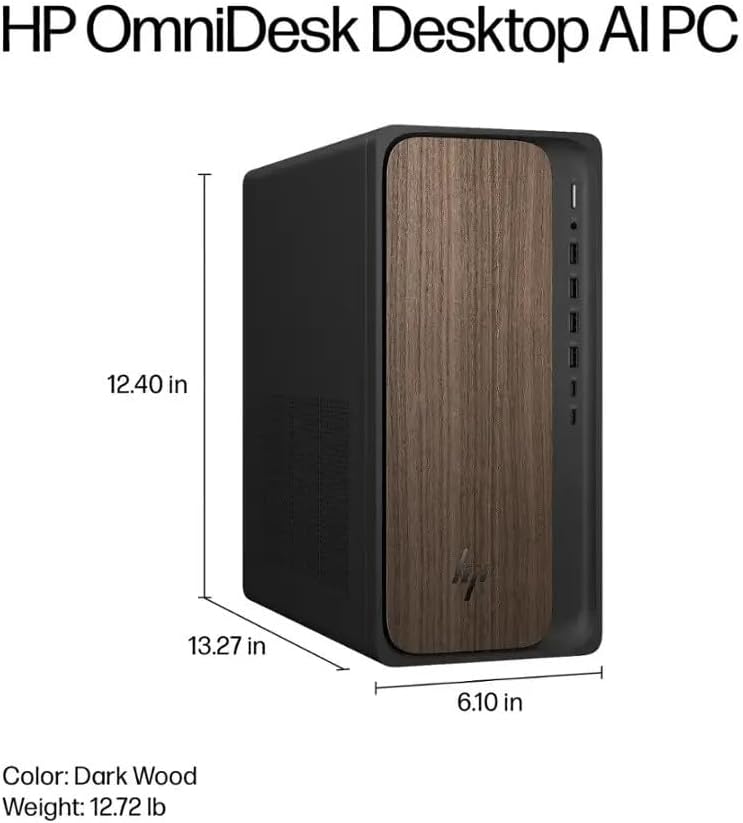
Image: Diagram illustrating the location and type of front and rear ports on the HP OmniDesk M03, including USB-A, USB-C, HDMI, DisplayPort, and audio jacks.
2. Uključivanje i početno postavljanje
Nakon što su svi periferni uređaji spojeni:
- Pritisnite gumb za napajanje koji se nalazi na prednjoj strani računala.
- Follow the on-screen instructions to complete the Windows 11 Home initial setup, including language selection, network connection (if not wired), account creation, and privacy settings.

Slika: prednja strana view of the HP OmniDesk M03, showing the power button at the top right and various USB ports below it.
Upravljanje računalom
Windows 11 Home
Your HP OmniDesk M03 comes pre-installed with Windows 11 Home. Familiarize yourself with the operating system's interface, Start menu, and settings. Microsoft provides extensive online resources for Windows 11 usage.
AI značajke
The Intel Core Ultra 7 265 processor includes dedicated AI cores and Intel AI Boost, enhancing performance for AI-driven applications and features within Windows 11, such as AI Copilot. These features can assist with tasks, content creation, and system optimization.
Povezivost
- Wi-Fi 6 (802.11ax): Connect to wireless networks for internet access. Manage Wi-Fi settings through the Windows 11 network settings.
- Bluetooth 5.4: Pair wireless devices such as headphones, speakers, or additional input devices. Access Bluetooth settings via the Windows 11 settings menu.
- Ethernet: For a stable, high-speed wired connection, ensure an Ethernet cable is connected to the RJ45 port.
Održavanje
Cleaning Your PC
- Vanjski: Koristite mekanu krpu koja ne ostavlja dlačice dampened with water or a mild cleaning solution to wipe down the exterior. Avoid harsh chemicals.
- Ventilacijski otvori: Povremeno čistite prašinu s ventilacijskih rešetki komprimiranim zrakom kako biste osigurali pravilan protok zraka i spriječili pregrijavanje.
- Priključci: Održavajte otvore bez prašine i ostataka.
Ažuriranja softvera
Regularly update Windows 11 and device drivers to ensure optimal performance, security, and compatibility. Access Windows Update through the Settings menu.
Sigurnosna kopija podataka
Preporučuje se redovito izrađivati sigurnosne kopije važnih podataka na vanjski pogon ili u oblaku kako biste spriječili gubitak podataka.
Rješavanje problema
Ovaj odjeljak obrađuje uobičajene probleme s kojima se možete susresti.
- Bez napajanja:
- Provjerite je li kabel za napajanje sigurno spojen i na računalo i na zidnu utičnicu.
- Provjerite je li zidna utičnica funkcionalna tako da u nju priključite drugi uređaj.
- Nema zaslona:
- Check that the monitor is powered on and correctly connected to the PC via HDMI or DisplayPort.
- Provjerite je li na monitoru odabran ispravan ulazni izvor.
- Nema internetske veze:
- For Wi-Fi, check if the Wi-Fi adapter is enabled and if you are connected to the correct network with the right password.
- For wired connection, ensure the Ethernet cable is properly connected and your router is working.
- Tipkovnica/miš ne reagira:
- Check battery levels for wireless devices.
- Ensure the USB receiver is plugged into a functional USB port.
- Pokušajte ponovno pokrenuti računalo.
Za složenije probleme obratite se HP-ovoj podršci webstranicu ili se obratite službi za korisnike.
Tehnički podaci
Detailed technical specifications for the HP OmniDesk M03 AI Desktop PC:
| komponenta | Specifikacija |
| Procesor | Intel Core Ultra 7 265 (20-Core, up to 5.3 GHz, Intel AI Boost) |
| Operativni sustav | Windows 11 Home (64-bitni) |
| Memorija (RAM) | 16GB DDR5 5600MHz |
| Skladištenje | 2TB PCIe NVMe M.2 SSD |
| Grafika | Integrirana Intel Graphics |
| Video izlaz | 1x HDMI 2.1, 1x DisplayPort 1.4a |
| USB priključci (prednji) | 2x USB-A 5Gbps, 2x USB-A 10Gbps, 1x USB-C 5Gbps, 1x USB-C 10Gbps |
| USB priključci (stražnji) | 4x USB 2.0 Type-A |
| Audio priključci | 1x Headphone/Microphone Combo, 1x Line Input, 1x Line Output |
| Mreža | Wi-Fi 6 (802.11ax), Bluetooth 5.4, Gigabit Ethernet (RJ45) |
| Dimenzije (V x Š x D) | 33.8 cm x 15.5 cm x 31.5 cm |
| Težina | 11.77 lb (5.34 kg) |

Image: Diagram showing the height (13.27 inches), width (6.10 inches), and depth (12.40 inches) of the HP OmniDesk M03 desktop PC.
Jamstvo i podrška
Informacije o jamstvu
Your HP OmniDesk M03 AI Desktop PC comes with a 90-dnevno ograničeno jamstvo. This warranty covers defects in materials and workmanship under normal use. For detailed terms and conditions, please refer to the warranty documentation included with your product or visit the official HP support webmjesto.
Korisnička podrška
For technical assistance, troubleshooting, or warranty claims, please contact HP Customer Support:
- Mrežna podrška: Posjetite službenu osobu HP podrška Webmjesto za upravljačke programe, priručnike i vodiče za rješavanje problema.
- Telefonska podrška: Refer to the Quick Setup Guide or HP's webmjesto za regionalne kontakt brojeve.
When contacting support, please have your product model (M03) and serial number ready.