
1. Uvod
The Jauarta MY8236B is a compact and reliable digital multimeter designed for accurate electrical measurements. It features a clear 4000-count display and a new generation layout for enhanced usability. This instrument is suitable for various applications including power electronic circuit measurement, new energy equipment testing, power system strength testing, automotive circuit maintenance, and educational purposes.
Važna sigurnosna napomena: Always keep the inside of the meter clean and dry to prevent electric shock or damage to the meter. Read all safety warnings and operating instructions before using this instrument.
2. Značajke proizvoda
- Čisti zaslon: Features a new display and function layout for improved readability.
- 4000 Counts Reading: Provides industrial-grade readings up to 4000 counts for precise measurements.
- Široka primjena: Versatile for power electronics, new energy, automotive, and educational testing.
- Točno i pouzdano: Designed for high reliability in electronic parameter detection.
- Izdržljiva konstrukcija: Made from excellent ABS material, offering impact and scratch resistance.
3. Sadržaj paketa
Molimo provjerite sadržaj paketa prilikom primitka:
- 1 x Jauarta MY8236B Digital Multimeter
- 2 x Multimeter Test Leads (Red and Black)
- 1 x korisnički priručnik
4. Postavljanje
4.1 Ugradnja baterije
The Jauarta MY8236B multimeter requires two 1.5V AAA batteries (not included) for operation.
- Pronađite poklopac odjeljka za baterije na stražnjoj strani multimetra.
- Pomoću odvijača odvrnite vijak(e) koji pričvršćuju poklopac baterije.
- Remove the cover and insert two 1.5V AAA batteries, observing the correct polarity (+ and -) as indicated inside the compartment.
- Vratite poklopac baterije i zategnite vijak(e).
4.2 Spajanje mjernih kabela
Pravilno spajanje mjernih kabela ključno je za točna i sigurna mjerenja.

Image: Close-up of the multimeter's input jacks. The black COM jack, the red VΩmA jack, and the red 10A jack are visible.
- Umetnite crni ispitni kabel u COM (Obična) utičnica.
- Za većinu volumenatage, resistance, and small current measurements (up to 400mA), insert the red test lead into the VΩmA utičnica.
- Za mjerenja visoke struje (do 10 A), umetnite crveni mjerni kabel u 10A jack. Ensure the rotary switch is set to the appropriate 10A range.

Image: The Jauarta MY8236B Digital Multimeter shown with its red and black test leads properly connected to the input jacks.
5. Upute za rad
5.1 Uključivanje/isključivanje i odabir funkcija
To power on the multimeter, rotate the central rotary switch from the 'OFF' position to the desired measurement function. To power off, rotate the switch back to 'OFF'.
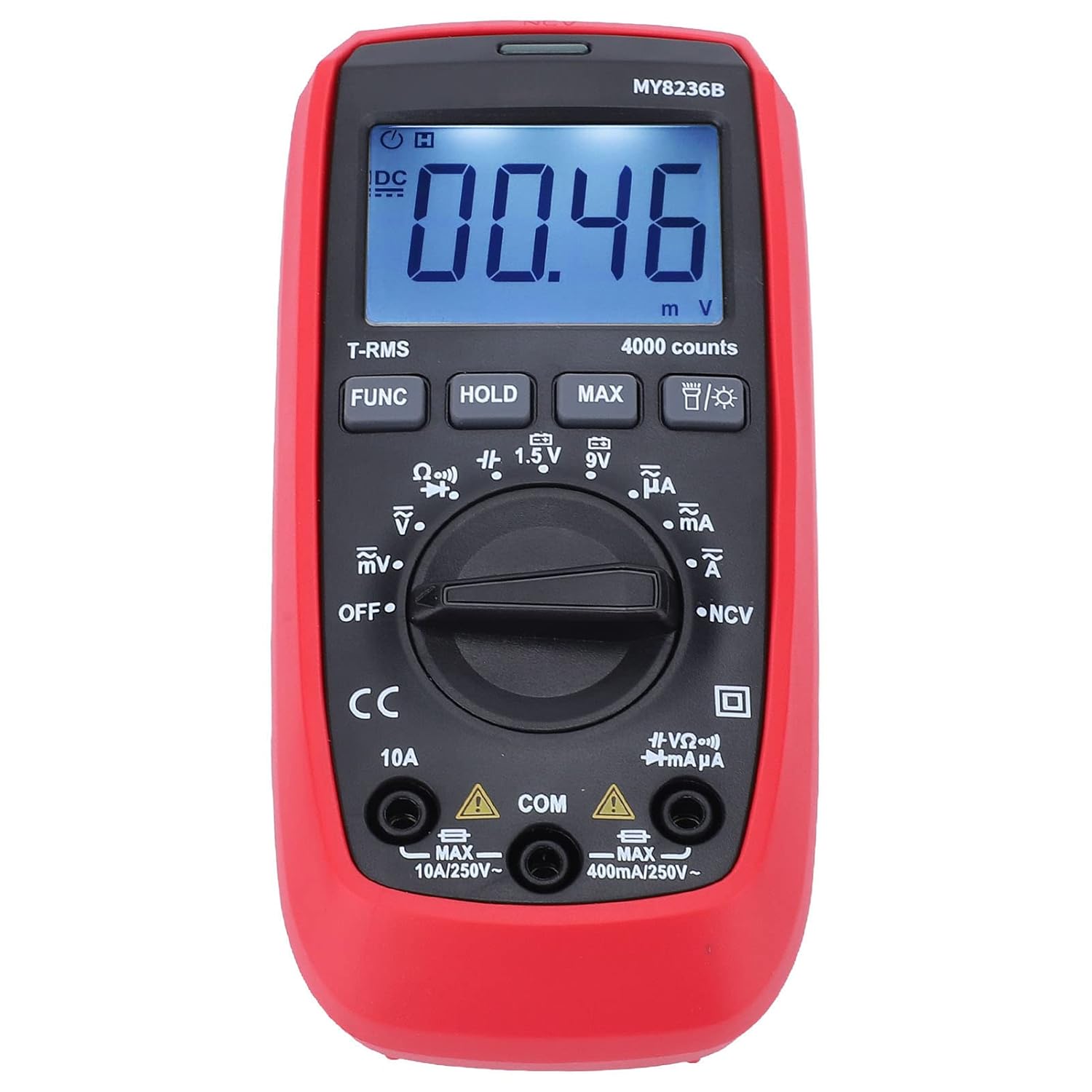
Slika: prednja strana view of the Jauarta MY8236B Digital Multimeter, highlighting the central rotary switch for function selection and the digital display.
5.2 Mjerenje DC Voltage (V–)
- Set the rotary switch to the 'V–' range. Select an appropriate range (e.g., 4V, 40V, 400V) higher than the expected voltage. Ako je objtagAko je e nepoznato, počnite s najvišim rasponom i smanjite ga po potrebi.
- Spojite crveni mjerni kabel na pozitivni (+) pol strujnog kruga, a crni mjerni kabel na negativni (-) pol.
- Pročitajte svtage vrijednost na zaslonu.
5.3 Mjerenje AC Voltage (V∼)
- Set the rotary switch to the 'V∼' range. Select an appropriate range higher than the expected voltage.
- Spojite mjerne kabele preko AC voltatage izvor.
- Pročitajte svtage vrijednost na zaslonu.
5.4 Mjerenje istosmjerne struje (A–)
Oprez: Nikada ne spajajte multimetar paralelno s voltmetrom.tage source when measuring current. Always connect it in series with the load. Ensure the correct input jack (VΩmA or 10A) is used.
- Isključite strujni krug.
- Break the circuit at the point where current is to be measured.
- Set the rotary switch to the 'A–' range (e.g., µA, mA, or 10A).
- Connect the red test lead to the appropriate current input jack (VΩmA for up to 400mA, 10A for up to 10A).
- Spojite multimetar serijski s krugom.
- Restore power to the circuit and read the current value.
5.5 Measuring AC Current (A∼)
Follow the same safety precautions and connection method as for DC current, but set the rotary switch to the 'A∼' range.
5.6 Measuring Resistance (Ω)
Oprez: Ensure the circuit is de-energized before measuring resistance. Do not measure resistance on a live circuit.
- Turn off power to the circuit or component.
- Set the rotary switch to the 'Ω' range.
- Spojite mjerne kabele preko komponente ili strujnog kruga koji se mjeri.
- Očitajte vrijednost otpora na zaslonu.
5.7 Posebne funkcije
- Tipka FUNC: Used to switch between different functions within a single rotary switch position (e.g., AC/DC, Diode/Continuity).
- Tipka HOLD: Zamrzava trenutno očitanje na zaslonu. Ponovno pritisnite za otpuštanje.
- Gumb MAX: Displays the maximum measured value.
- Gumb za pozadinsko osvjetljenje: Activates or deactivates the display backlight for better visibility in low-light conditions.
6. Održavanje
6.1 Čišćenje
To maintain accuracy and prevent damage, keep the multimeter clean and dry. Wipe the case with a damp cloth and mild detergent. Do not use abrasives or solvents. Ensure no moisture enters the meter.
6.2 Zamjena baterije
Kada se na zaslonu pojavi indikator baterije, odmah zamijenite baterije kako biste osigurali točna očitanja. Upute za ugradnju baterija potražite u Odjeljku 4.1.
6.3 Skladištenje
If the multimeter is not used for an extended period, remove the batteries to prevent leakage and damage. Store the instrument in a cool, dry place away from direct sunlight and extreme temperatures.
7. Rješavanje problema
- Nema zaslona: Check if the batteries are correctly installed and have sufficient charge. Replace batteries if necessary. Ensure the rotary switch is not in the 'OFF' position.
- Netočna očitanja: Verify that the test leads are properly connected to the correct input jacks and that the rotary switch is set to the appropriate function and range. Ensure the circuit is de-energized for resistance measurements.
- No Reading for Current: Check if the fuse is blown. If measuring high current, ensure the red lead is in the 10A jack.
- Display Shows 'OL' (Overload): The measured value exceeds the selected range. Switch to a higher range or ensure the input is within the meter's maximum specifications.
8. Specifikacije
| Parametar | Raspon |
|---|---|
| DC Voltage | 400mV, 4V, 40V, 400V, 600V |
| AC Voltage | 400mV, 4V, 40V, 400V, 600V |
| Istosmjerna struja | 400µA, 4000µA, 40mA, 400mA, 10A |
| AC struja | 400µA, 4000µA, 40mA, 400mA, 10A |
| Otpornost | 400Ω, 4kΩ, 40kΩ, 400kΩ, 4MΩ, 40MΩ |
| Prikaz broja | 4000 broji |
| Vrsta baterije | 2 x 1.5V AAA baterije |
| Materijal | ABS |
| Težina artikla | 323 g |
| Dimenzije parcele | 16 x 11 x 5 cm |
9. Sigurnosne informacije
- Prije upotrebe uvijek provjerite multimetar i mjerne kabele ima li oštećenja. Ne koristite ako su oštećeni.
- Nemojte primjenjivati voltage or current that exceeds the maximum rated input for any range.
- Budite oprezni pri radu s voltagiznad 30 V AC RMS, 42 V peak ili 60 V DC. Ovi volumenitagpredstavljaju opasnost od strujnog udara.
- Uvijek odspojite mjerne kabele iz strujnog kruga prije promjene funkcija ili raspona.
- Ne koristite mjerač u eksplozivnim plinovima, parama ili prašnjavim okruženjima.
- Ensure your hands are dry when operating the meter.
10. Jamstvo i podrška
For warranty information or technical support, please refer to the documentation provided with your purchase or contact Jauarta customer service through your retailer. Keep your purchase receipt as proof of purchase.