
1. Proizvod je gotovview
The SIRUI SVM-165 Professional Carbon Fiber Camera Monopod with VH-10 Fluid Video Head is a versatile and lightweight support system designed for photographers and videographers. Its modular design allows for multiple configurations, providing stability and flexibility for various shooting scenarios.

Image: The SVM-165 monopod shown in its compact form, as a full monopod with fluid head, and as a monopod with its integrated tripod base.
2. Ključne značajke
- Rapid One-Step Height Adjustment: Features SIRUI's new rapid release system, allowing quick extension or retraction of the monopod by rotating the twist lock. Achieve a shooting height of up to 57 inches (1450mm) swiftly.
- Lightweight Carbon Fiber Construction: The SVM-165 monopod, with a 36mm max tube diameter, weighs 3.4 lbs (1.52 kg) and supports loads up to 22 lbs (10 kg), making it ideal for dynamic shooting.
- Modular 3-in-1 Design: The mounting plate, monopod leg, and tripod base are detachable and combinable, offering three configurations: a monopod with adjustable feet, an extension rod, and a low-angle camera tripod base.
- Quick Lock/Release Head: Both the monopod top and tripod base incorporate an innovative quick-release system. Pull down the collar to release or insert the top plate to automatically lock your device.
- Smooth Pan and Tilt Base: The monopod base allows 360° swiveling and 36° tilting in any direction smoothly and stably, functioning as an additional mini tripod.

Image: The SVM-165's modular design, showcasing its versatility as a monopod, trekking pole, and desktop tripod.
3. Komponente i montaža
3.1. Fluid Video Head (VH-10) Details
The VH-10 Fluid Video Head provides smooth and precise control for panning and tilting. It features a camera platform with 1/4" and 3/8" screws, a tilt locking knob, a bubble level, and a panning lock. The handle allows for ergonomic adjustment.

Image: Close-up of the VH-10 Fluid Video Head, detailing its various controls and features.
3.2. Monopod Leg and Base
The monopod leg is constructed from solid carbon fiber for durability and reduced weight. The base features anti-slip feet and a leather wrist strap for secure handling.

Image: Illustration of the monopod's height adjustments and material features.
4. Upute za postavljanje
4.1. Attaching the Fluid Head
- Ensure the monopod's top mounting plate is clear.
- Align the base of the VH-10 Fluid Video Head with the monopod's quick-release system.
- Press down firmly until you hear a 'click', indicating the head is securely locked into place.

Image: Visual guide for the one-step assembly of the head to the monopod.
4.2. Adjusting Monopod Height
The monopod features a rapid one-step height adjustment system. Simply rotate the twist lock to extend or retract the monopod sections to your desired height. Ensure the lock is fully engaged after adjustment to prevent slippage.
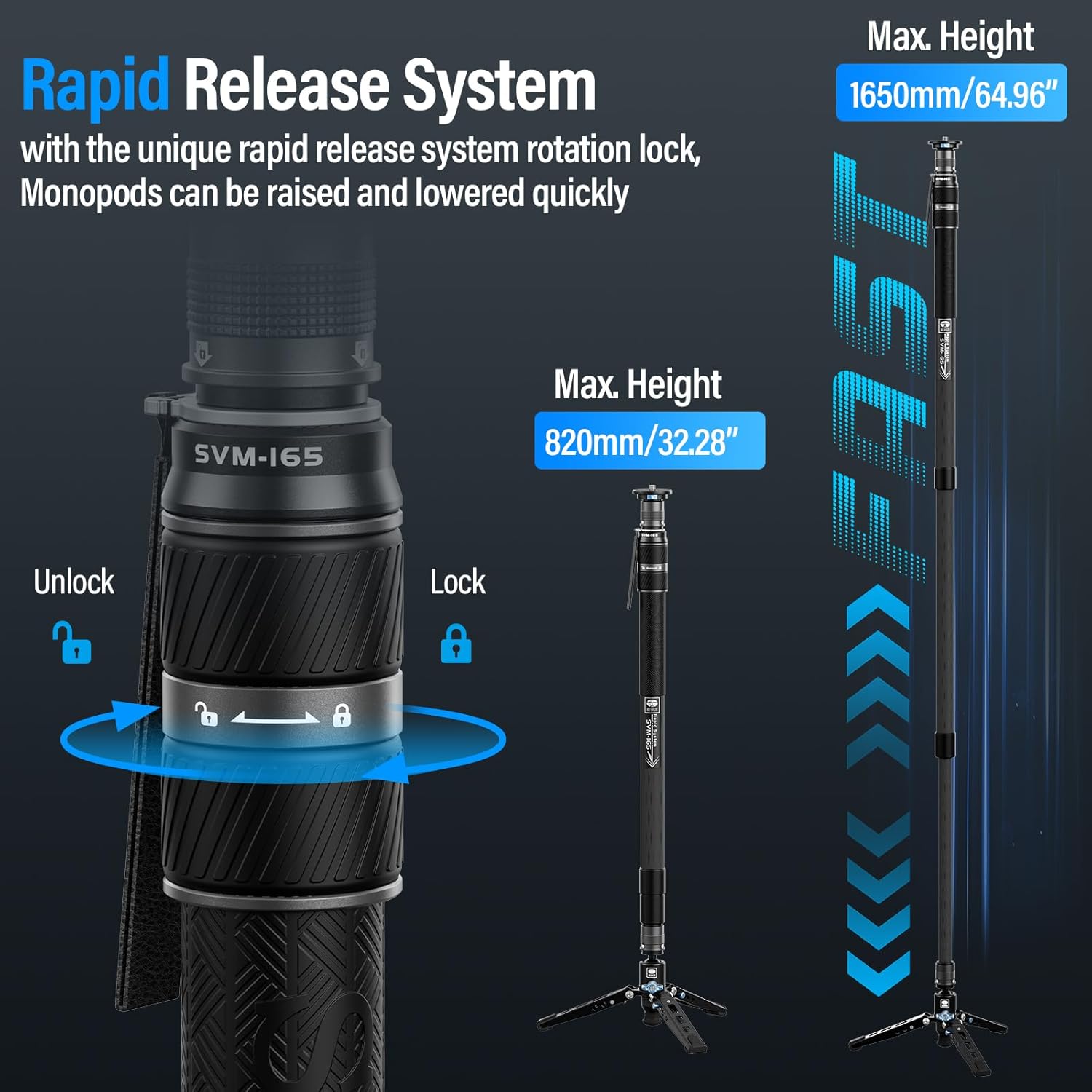
Image: How to use the rapid release system for height adjustment.
4.3. Converting to Desktop Tripod or Extension Rod
To convert the monopod, detach the main monopod leg from the tripod base. The tripod base can then be used independently as a low-angle or desktop tripod. The monopod leg can be used as an extension rod.
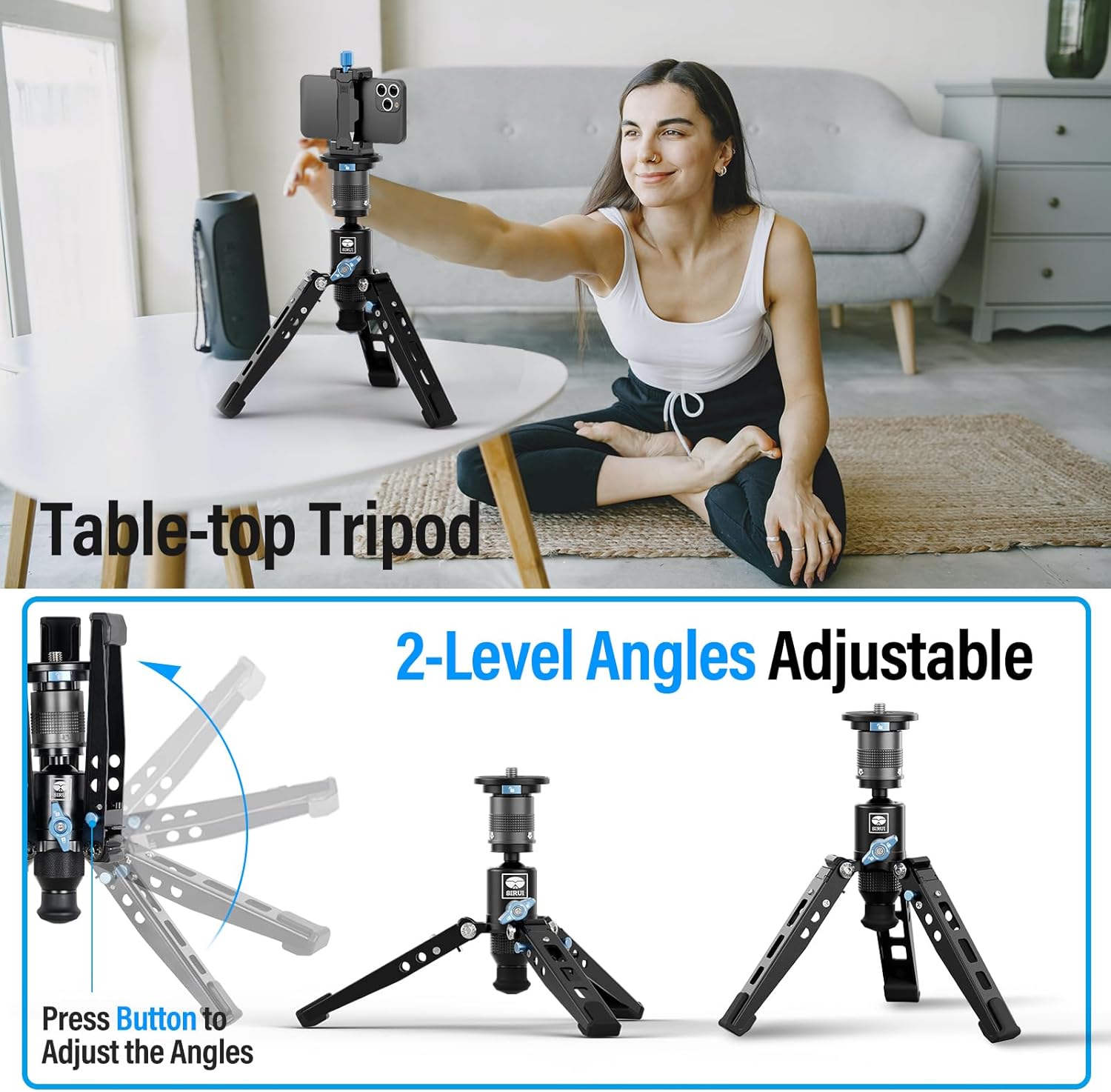
Image: The monopod configured as a table-top tripod, illustrating its adjustable angles.
5. Upute za rad
5.1. Using the Fluid Video Head
To achieve smooth camera movements, unlock the tilt and pan locking knobs on the VH-10 Fluid Video Head. Use the handle to guide your camera for desired pan and tilt motions. Re-lock the knobs to secure the camera in position.
5.2. Utilizing the 360° Rotation Ball Base
The monopod's base features a 360° rotation ball. Loosen the ball locking knob to allow for 360° swiveling and 36° tilting. This provides flexibility for dynamic shots and quick repositioning. Tighten the knob to lock the desired direction.

Image: Instructions for operating the 360° rotation ball base.
5.3. Panoramic Shooting
The fluid head allows for 360° panoramic views. Ensure the panning lock is disengaged to allow free rotation. Use the integrated scale for precise angle adjustments during panoramic photography or videography.

Image: Demonstrating the 360° panoramic and tilt capabilities of the fluid head.
5.4. Video Demonstration: Quick Release Setup System
Video: This video demonstrates the quick release setup system of the SIRUI SVM monopod and the VA-5X Video Fluid Head, showcasing rapid height adjustment and quick attachment/detachment of the camera and head. Note: The video features the SVM-145 model, but the quick release system functionality is identical to the SVM-165.
6. Održavanje
- Regularly clean the carbon fiber tubes with a soft, damp krpom za uklanjanje prašine i prljavštine.
- Izbjegavajte korištenje jakih kemikalija ili abrazivnih materijala koji bi mogli oštetiti završni sloj.
- Inspect all locking mechanisms and screws periodically to ensure they are tight and functioning correctly.
- Store the monopod in a dry, cool place, away from extreme temperatures and humidity.
7. Rješavanje problema
- Problem: Dijelovi monopoda se ne zaključavaju sigurno.
Solution: Ensure the twist locks are fully rotated to the 'lock' position. Clean any debris from the locking mechanisms. - Issue: Fluid head movements are stiff or jerky.
Solution: Check if the tilt and pan locking knobs are fully disengaged. If the issue persists, contact customer support. - Issue: Camera not attaching securely to the head.
Solution: Verify that the quick-release plate is correctly aligned and fully inserted until it clicks into place. Ensure the camera screw on the plate is tightened.
8. Specifikacije
| Specifikacija | Vrijednost |
|---|---|
| Naziv modela | SVM-165 |
| Materijal | Karbonska vlakna |
| Težina artikla | 7.28 funti (3.3 kg) |
| Ograničenje težine (maksimalno opterećenje) | 22 funti (10 kg) |
| Maksimalna visina | 68.7 inča (1745 mm) |
| Minimalna visina | 57 inches (1450 mm) - for one-step adjustment |
| Tip glave stativa | Video Heads (VH-10 Fluid Video Head) |
| Posebne značajke | Rotatable, Lightweight, Adjustable, Modular Design |
| Kompatibilni uređaji | Camera (DSLR, Mirrorless) |
| Boja | Crna |
9. Jamstvo i podrška
SIRUI products are manufactured to high-quality standards. For specific warranty information, please refer to the warranty card included with your product or visit the official SIRUI website. For technical support, product inquiries, or service, please contact SIRUI customer service through their official channels.
Više informacija i kontakt podatke možete pronaći na SIRUI Store on Amazon.