
1. Uvod
The EPEVER MPPT XTRA-N series solar charge controller utilizes advanced Maximum Power Point Tracking (MPPT) technology to ensure optimal power harvesting from your solar panels. Designed for various solar power systems, this controller offers high efficiency, comprehensive protection features, and compatibility with multiple battery types, including lead-acid and lithium-ion batteries. This manual provides essential information for the safe and efficient operation of your XTRA 1210N controller.

Slika 1: Prednja strana view of the EPEVER MPPT XTRA-N Solar Charge Controller.
2. Ključne značajke
- Napredna MPPT tehnologija: Ensures maximum power point tracking efficiency of over 99.5% and conversion efficiency up to 98%, leading to 20-30% more power from your solar panel.
- Svestrana kompatibilnost baterija: Supports various battery types including lead-acid (AGM, GEL, Flooded, USER) and lithium-ion batteries.
- Višenamjenski LCD zaslon: Provides real-time energy statistics and allows manual setting of battery types and charge control parameters.
- Sveobuhvatna elektronička zaštita: Includes safeguards against PV reverse polarity, PV overload current, PV short-circuit, input overvoltage/podvoltage, battery reverse polarity, battery overvoltage/overdischarge, load short-circuit/overload, and overheating.
- Automatic Limiter: Features automatic charge power and current limiting.
- Wide MPP Operating Voltage Raspon: Optimizes performance across varying solar conditions.
- Negative Grounding: Designed with negative grounding on the poles.
- Funkcije koje se mogu programirati: Fully programmable via PC software for advanced customization.
- Više načina rada: Offers various working modes for load control.

Figure 2: High efficiency and versatile compatibility of the controller.

Figure 3: Supported battery types for the EPEVER MPPT controller.
3. Postavljanje i instalacija
3.1 Sigurnosna upozorenja
- WARNING: The controller may be damaged if the maximum PV open circuit voltage (Voc) exceeds 100V (for XTRA**10N models) at minimum operating ambient temperature.
- ATTENTION: When PV modules are connected in series, the PV open circuit voltage must not exceed 92V (for XTRA**10N models) at an ambient temperature of 25℃.
3.2 Veza je završenaview
Ensure all connections are secure and correct before powering on the system. Refer to the diagrams below for proper wiring and port identification.

Figure 4: Labeled ports on the EPEVER MPPT Solar Charge Controller.
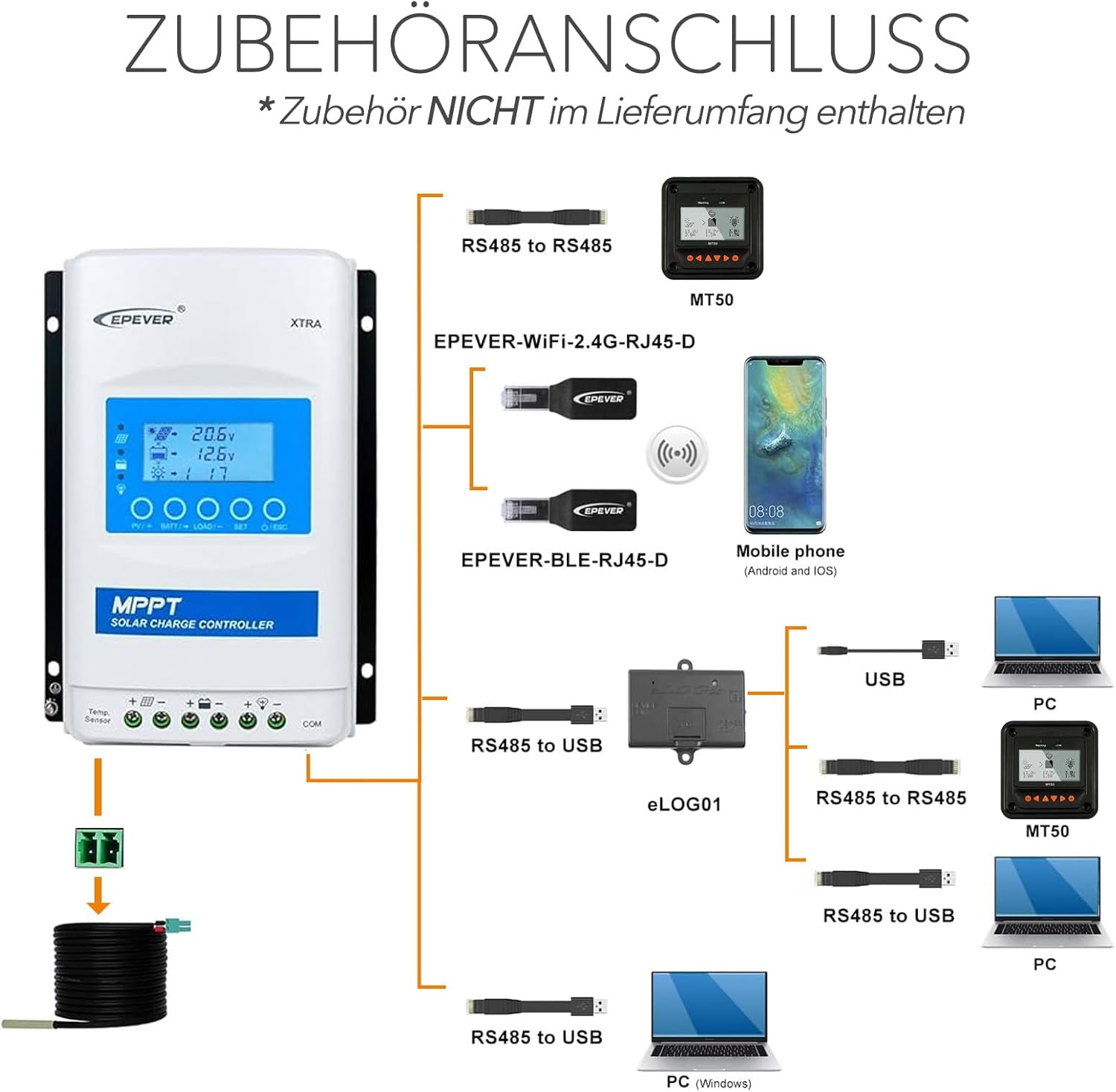
Figure 5: Accessories connection diagram for the controller.
3.3 Redoslijed spajanja
Follow these steps for a safe and correct installation:
- Connect the battery to the charge controller. Ensure correct polarity.
- Connect the load to the charge controller (if applicable). Ensure correct polarity.
- Connect the solar panel(s) to the charge controller. Ensure correct polarity and that the PV open circuit voltage does not exceed the controller's maximum input voltage.

Figure 6: Basic installation diagram.

Slika 7: Nprample connection sequence for solar modules and battery.
4. Upute za rad
The EPEVER XTRA-N controller features a multifunction LCD display for monitoring system status and adjusting parameters. Upon successful connection, the controller will automatically detect the system voltage (12V/24VDC auto work).
4.1 LCD zaslon i tipke
The LCD provides real-time data such as battery voltage, ulazni PV volumentage, charging current, and load status. Use the buttons below the display to navigate menus and adjust settings. Refer to the detailed product manual for specific menu navigation and parameter adjustment procedures.
4.2 Postavljanje vrste baterije
It is crucial to set the correct battery type for optimal charging and battery longevity. This can be done manually via the LCD display. The controller supports lead-acid (AGM, GEL, Flooded, USER) and lithium-ion batteries. Incorrect settings can damage your battery.
4.3 Načini upravljanja opterećenjem
The controller offers multiple working modes for load control, allowing you to customize when the load is powered. These modes can typically be configured through the LCD display or via PC software.
5. Održavanje
Regular maintenance ensures the longevity and optimal performance of your EPEVER MPPT XTRA-N controller.
- Provjerite veze: Periodically inspect all wiring connections to ensure they are tight and free from corrosion. Loose connections can lead to power loss or overheating.
- Očistite kontroler: Keep the controller clean and free from dust and debris. Use a dry cloth to wipe the surface. Ensure ventilation openings are not blocked.
- Provjerite ima li oštećenja: Visually inspect the controller for any signs of physical damage, such as cracks or discoloration.
- Monitor performansi: Regularly check the LCD display for normal operation and energy statistics to ensure the system is performing as expected.
6. Rješavanje problema
If you encounter issues with your EPEVER MPPT XTRA-N controller, consider the following basic troubleshooting steps:
- Nema zaslona/napajanja: Provjerite spojeve baterije i provjerite napunjenost baterijetage is within the operating range. Verify the fuse or circuit breaker is not tripped.
- Bez punjenja: Provjerite jesu li solarni paneli ispravno spojeni i primaju li dovoljno sunčeve svjetlosti. Provjerite ulazni volumen PV panela.tage on the display. Verify PV polarity.
- Učitavanje ne radi: Check load connections and ensure the load current does not exceed the controller's rating. Verify the load control mode settings.
- Kodovi grešaka: If the LCD displays an error code, consult the full product manual for specific definitions and solutions.
- Pregrijavanje: Ensure the controller is installed in a well-ventilated area and not exposed to direct sunlight or excessive heat sources. Check for blocked ventilation fins.
For persistent issues, contact EPEVER customer support or a qualified technician.
7. Specifikacije

Figure 8: Physical dimensions and weight of the controller.
| Parametar | Vrijednost |
|---|---|
| Model | XTRA 1210N (Xtra-N) |
| Nazivni sustav Voltage | 12/24VDC Auto Work |
| Nazivna struja punjenja | 10A |
| Nazivna struja pražnjenja | 10A |
| Maks. PV otvoreni krug Voltage | 100 V |
| Maks. Punite snagu | 130 W/12 V, 260 W/24 V |
| Vrsta zaslona | LCD |
| Radna temperatura | -25°C do +45°C |
| Indeks zaštite | IP30 |
| Dimenzije (D x Š x V) | 17.5 x 14.3 x 4.8 cm |
| Težina | 0.57 KG |
| Materijal | Metal or Metallic Composite |

Figure 9: Model and certification details on the controller's label.
8. Jamstvo i podrška
The EPEVER MPPT XTRA-N Solar Charge Controller comes with a 2 godine jamstva proizvođača. Ovo jamstvo pokriva nedostatke u materijalu i izradi pri normalnoj uporabi.
For technical support, warranty claims, or further assistance, please refer to the contact information provided with your product packaging or visit the official EPEVER webmjesto.