
AIOMEST AI-5000G
AIOMEST AI-5000G Digital Anemometer User Manual
Model: AI-5000G
1. Uvod
The AIOMEST AI-5000G Digital Anemometer is a professional handheld instrument designed for accurate measurement of wind speed, wind temperature, and air flow. Featuring a three-cup design for precision, a large display, and multiple unit options, it is suitable for various applications including shooting, sailing, surfing, drone operation, HVAC, and environmental monitoring.
2. Sadržaj paketa
Nakon otvaranja paketa, molimo provjerite jesu li svi dolje navedeni artikli prisutni i u dobrom stanju:
- AIOMEST AI-5000G Anemometer (1)
- Rechargeable Battery (1)
- USB kabel za punjenje tipa C (1)
- Odvijač (1)
- kompas (1)
- Korisnički priručnik (1)

Image: The AIOMEST AI-5000G Anemometer shown with its included accessories: USB Type-C charging cable, screwdriver, and the instruction manual.
3. Značajke proizvoda
- Professional Three-Cup Design: Ensures accurate wind measurement without constant alignment.
- Enhanced Accuracy & Extended Range: Wind speed from 0.3-30 m/s (±5%), temperature from -10℃ to 45℃ (±2℃).
- Veliki LCD zaslon: Clear display with backlight function for visibility in low light.
- Više jedinica: Switch between m/s, Km/h, ft/min, knots, MPH for wind speed; ℃/℉ for temperature; CFM, CMS, CMM for air volume.
- Max/Min/Current Measurement: One-button calculation for maximum, minimum, and current values.
- Pohrana podataka: Convenient function for storing measurement data.
- Priključak za punjenje Type-C: For quick and easy recharging.
- Automatski način mirovanja: Screen turns off after 5 minutes of inactivity to conserve battery.
- Integrirani kompas: For directional reference during measurements.
- Tripod Mounting Hole: Equipped with 1/4" screw hole for stable, long-term monitoring (tripod not included).
- Izdržljiv dizajn: Compact, waterproof, and dustproof.
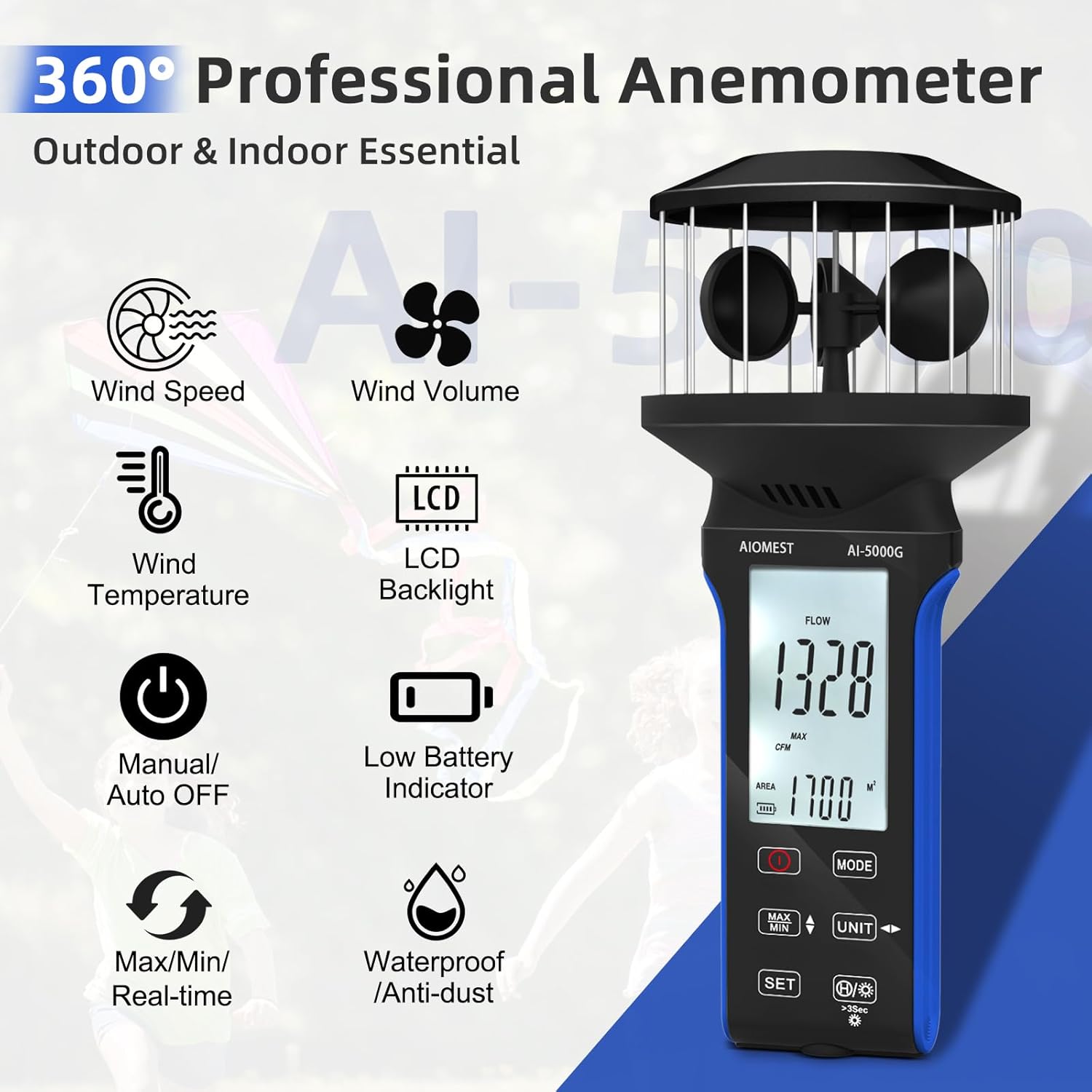
Image: The AIOMEST AI-5000G Anemometer highlighting its key features such as wind speed, wind volume, wind temperature, LCD backlight, manual/auto off, low battery indicator, Max/Min/Real-time, and waterproof/anti-dust capabilities.
4. Početak rada (Postavljanje)
4.1 Punjenje uređaja
The AI-5000G is equipped with a rechargeable battery. Before first use, or when the low battery indicator appears on the screen, connect the device to a power source using the provided USB Type-C charging cable.
- Locate the Type-C charging port, typically on the side or bottom of the device.
- Insert the Type-C end of the cable into the anemometer and the USB-A end into a compatible USB power adapter or computer port.
- The charging indicator (if present) will show the charging status.

Slika: Krupni plan view of the AIOMEST AI-5000G Anemometer, specifically showing the Type-C rechargeable port located on the side of the device.
4.2 Uključivanje/isključivanje
- Za uključivanje uređaja, pritisnite i držite tipku VLAST button (usually marked with a circle and a vertical line).
- Za isključivanje pritisnite i držite tipku VLAST ponovno pritisnite tipku dok se zaslon ne isključi.
- The device features an auto-sleep mode, turning off the screen after 5 minutes of inactivity to save power.

Image: The AIOMEST AI-5000G Anemometer displaying its front panel with the screen and touch buttons, including the power button, mode button, MAX/MIN button, unit button, and set button.
5. Operacija
5.1 Razumijevanje zaslona
The large LCD screen provides real-time readings and indicators:
- Glavno područje prikaza: Shows the current wind speed, temperature, or air flow value.
- Pokazatelji jedinica: Displays the active measurement unit (e.g., m/s, ℃, CFM).
- Indikatori načina rada: Shows if MAX, MIN, or current mode is active.
- Indikator baterije: Prikazuje preostalo trajanje baterije.
- Indikator pozadinskog osvjetljenja: Indicates if the backlight is on.
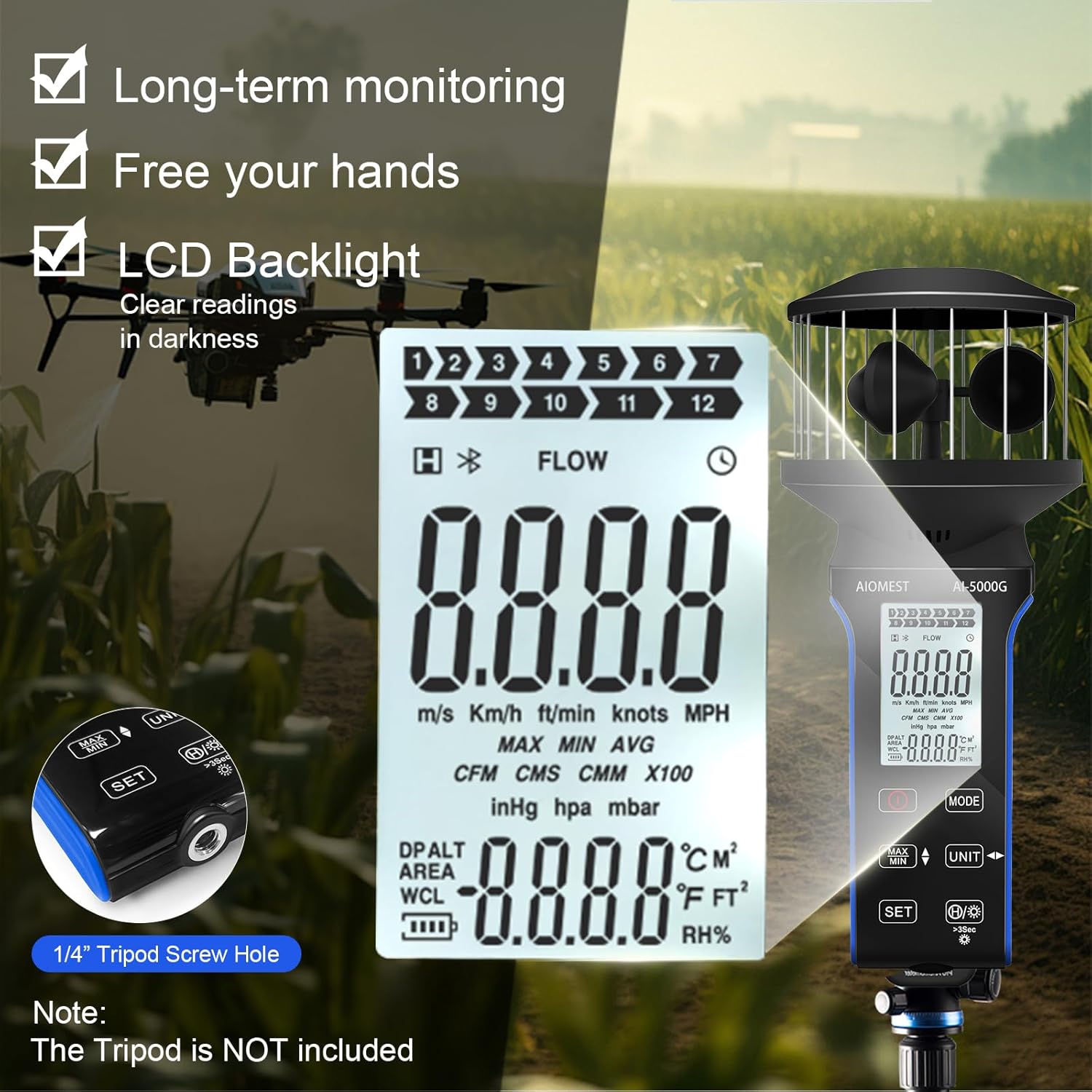
Slika: Detaljna view of the AIOMEST AI-5000G Anemometer's LCD screen, showing various measurement units (m/s, Km/h, ft/min, knots, MPH, CFM, CMS, CMM), MAX/MIN/AVG indicators, temperature units (℃/℉), and a 1/4" tripod screw hole on the side.
5.2 Promjena mjernih jedinica
Pritisnite tipku JEDINICA button to cycle through available measurement units for wind speed, temperature, and air volume.
5.3 MAX/MIN/Current Measurement
Pritisnite tipku MAKS./MIN button to switch between displaying the maximum, minimum, or current real-time measurement value. This is useful for capturing peak or lowest readings over a period.
5.4 Air Flow Area Setting
For accurate air volume (CFM, CMS, CMM) measurements, you may need to set the area. Refer to the specific instructions in the included paper manual for detailed steps on using the SET button to configure the area value.
5.5 Backlight and Auto-Off
- To activate or deactivate the LCD backlight, press the Pozadinsko osvjetljenje button (often integrated with another button, look for a light bulb icon).
- The device automatically enters sleep mode after 5 minutes of inactivity to conserve battery. Press any button to wake it up.
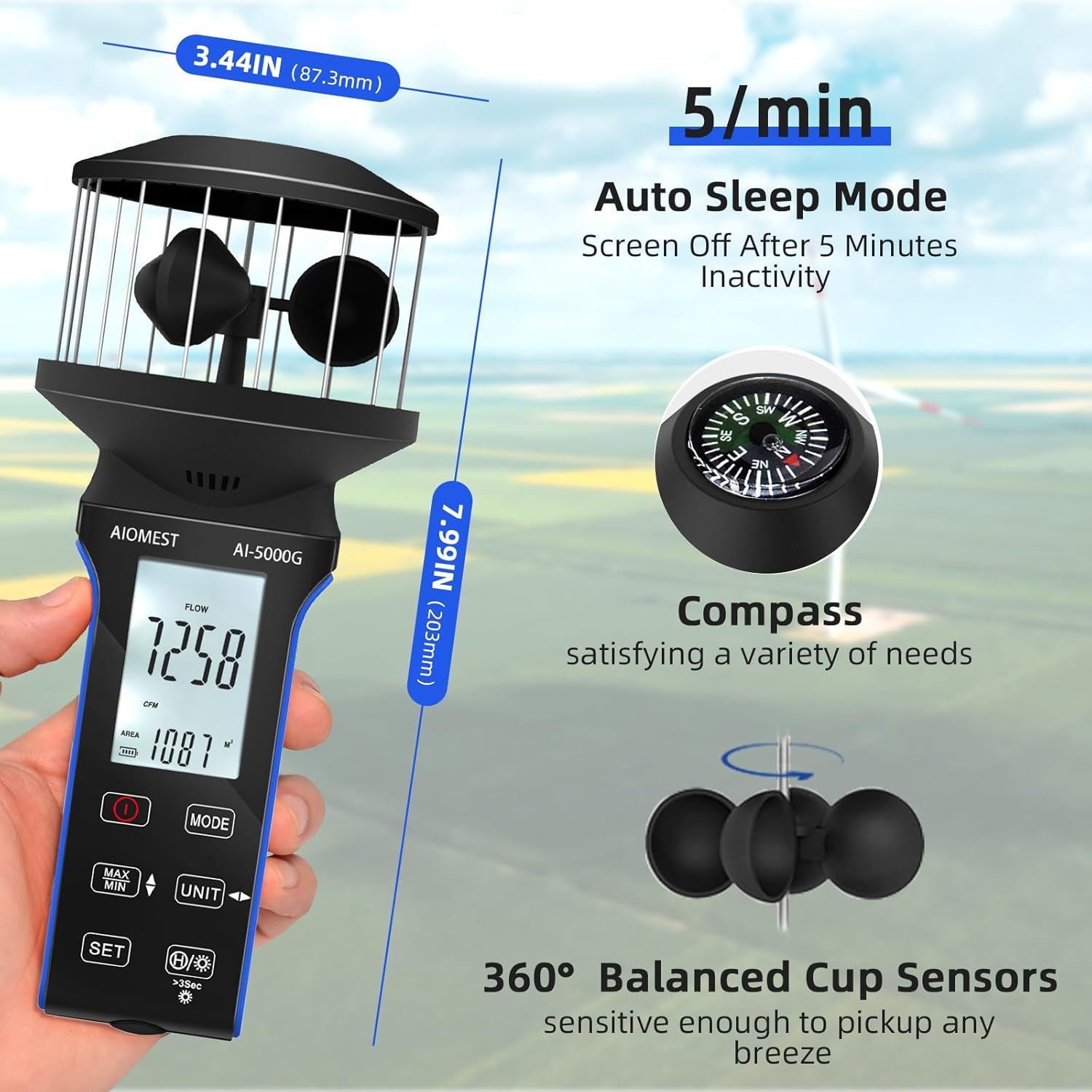
Image: The AIOMEST AI-5000G Anemometer displaying its dimensions (7.99 inches height, 3.44 inches width), illustrating the 5-minute auto sleep mode, the integrated compass, and the 360° balanced cup sensors.
5.6 Svestrane primjene
The AI-5000G is designed for a wide range of uses:
- Aktivnosti na otvorenom: Shooting, sailing, surfing, drone piloting.
- Industrijska upotreba: HVAC system testing, vehicle optimization.
- Praćenje okoliša: Assessing wind conditions for various purposes.

Image: A collage showing various applications of the AIOMEST AI-5000G Anemometer, including drone operation, air vent measurement, vehicle optimization, boat usage, HVAC systems, and storm monitoring.
6. Specifikacije
| Parametar | Vrijednost |
|---|---|
| Raspon brzine vjetra | 0.3 ~ 30 m / s |
| Rezolucija brzine vjetra | 0.1 |
| Točnost brzine vjetra | ±5% |
| Raspon temperature | -10 ℃ ~ 45 ℃ (14 ℉ ~ 113 ℉) |
| Točnost temperature | ±2 ℃ (±3.6 ℉) |
| Raspon protoka zraka | 0-999900 (CMM /CMS/CFM) |
| Air Flow Resolution | 0.001-100 |
| Područje protoka zraka | 0.001-9999 |
| Potrošnja energije | Oko 3 mA |
| Dimenzije | 203 * 87.3 * 87.3 mm (7.99 * 3.44 * 3.44 inches) |
| Težina | cca. 180 g (uključujući bateriju) |
| Materijal | Plastični |
| Zemlja podrijetla | Kina |
7. Održavanje i njega
- Čišćenje: Za čišćenje uređaja koristite meku, suhu krpu. Nemojte koristiti abrazivna sredstva za čišćenje ili otapala.
- Skladištenje: Anemometar čuvajte na hladnom i suhom mjestu, dalje od izravne sunčeve svjetlosti i ekstremnih temperatura.
- Baterija: Ako skladištite bateriju dulje vrijeme, provjerite je li djelomično napunjena (oko 50%) i punite je svakih nekoliko mjeseci kako biste održali njezino zdravlje.
- Zaštita senzora: Avoid physical impact to the wind cups and ensure they are free from obstructions for accurate readings.
8. Rješavanje problema
If you encounter issues with your AIOMEST AI-5000G Anemometer, please refer to the following common problems and solutions:
- Uređaj se ne uključuje: Provjerite je li baterija napunjena. Spojite se na izvor napajanja pomoću Type-C kabela i pokušajte ponovno.
- Netočna očitanja: Check that the wind cups are spinning freely and are not obstructed. Ensure the device is held in an open area, free from turbulence. Verify that the correct measurement unit is selected.
- Zaslon nije vidljiv: Activate the backlight function. If the battery is low, recharge the device.
- Gumbi ne reagiraju: Ensure the device is not in a locked mode (if applicable, refer to the paper manual). Try restarting the device by powering it off and on.
Za probleme koji nisu ovdje obuhvaćeni, obratite se korisničkoj podršci.
9. Korisnička podrška
For technical assistance, warranty information, or any inquiries regarding your AIOMEST AI-5000G Digital Anemometer, please contact AIOMEST customer support. Refer to the contact information provided in your product packaging or visit the official AIOMEST webmjesto.
AIOMEST-US
Seller ID: AHD248QUYEJFS
Za najnovije informacije o podršci posjetite AIOMEST Store on Amazon.
Ask a question about this manual
Ask about setup, troubleshooting, compatibility, parts, safety, or missing instructions. Manuals+ will review the question and use this page’s manual context to help answer it.