
NUX Loop Core Stereo
NUX Loop Core Stereo gitarska looper pedala Upute za uporabu
Model: Loop Core Stereo
Uvod
The NUX Loop Core Stereo Guitar Looper Pedal is a versatile and powerful tool designed for guitarists and musicians. It offers extensive recording capabilities, built-in rhythm tracks, and flexible output options for various setups. This manual provides detailed instructions for setting up, operating, maintaining, and troubleshooting your Loop Core Stereo pedal.
Ključne značajke
- High-definition color LCD display for clear visual feedback.
- Up to 6 hours of stereo recording time.
- 99 user memories for saving and recalling loops.
- Built-in rhythm tracks with 50 diverse patterns.
- Split output functionality for sending signals to two amplifiri.
- Cab simulation for direct output to a mixer or audio interface.
- Integrated MIDI control for advanced integration.
- High-quality audio processing: 44.1kHz sampling rate, 24-bit A/D converter, 32-bit floating signal processing.
- Flexible input/output options: Mono/L/R inputs, Mono/L/R/Phones outputs.
Vodič za postavljanje
Sadržaj paketa
Prije nego što počnete, provjerite jesu li svi elementi prisutni:
- NUX Loop Core Stereo Pedal
- Korisnički priručnik (ovaj dokument)
- MIDI Cable (included as per product features)
- Note: A 9V DC power supply is required and sold separately.
Spajanje pedale
- Priključak za napajanje: Connect a 9V DC power adapter (center negative) to the DC 9V input jack on the pedal.
- Ulaz instrumenta: Connect your guitar or instrument to the "IN A (MONO)" input jack. For stereo input, connect a second instrument or stereo source to "IN B".
- AmpIzlaz miksera/usisavača:
- For mono output, connect "OUT A (MONO)" to your amplifier ili mikser.
- For stereo output, connect "OUT A (MONO)" to your left amplifier/mixer input and "OUT B" to your right ampulaz za lifier/mixer.
- For split output (e.g., drums to one amp, guitar to another), use "OUT A (MONO)" and "OUT B" as desired.
- Slušalice: Connect headphones to the dedicated headphone jack for silent practice.
- USB veza: Connect the pedal to your computer via the USB port for firmware updates or managing saved loops.
- MIDI veza: Use the MIDI IN/OUT ports for external MIDI control or synchronization with other MIDI devices.
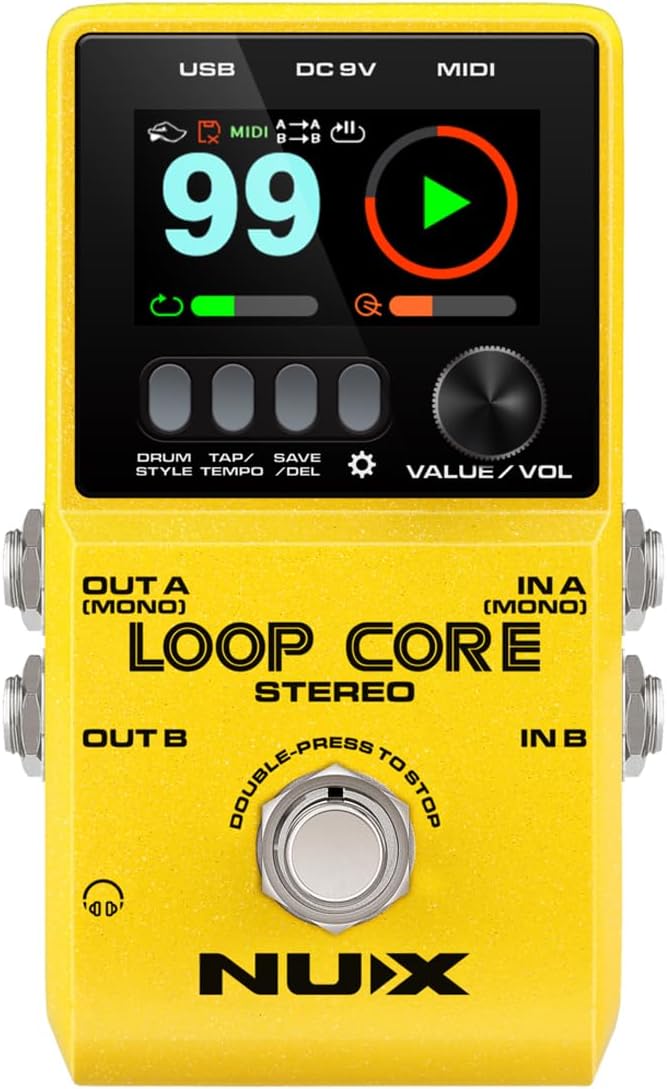
Slika 1: Prednja strana view of the NUX Loop Core Stereo Pedal, showing the input and output jacks, footswitch, and control knobs.
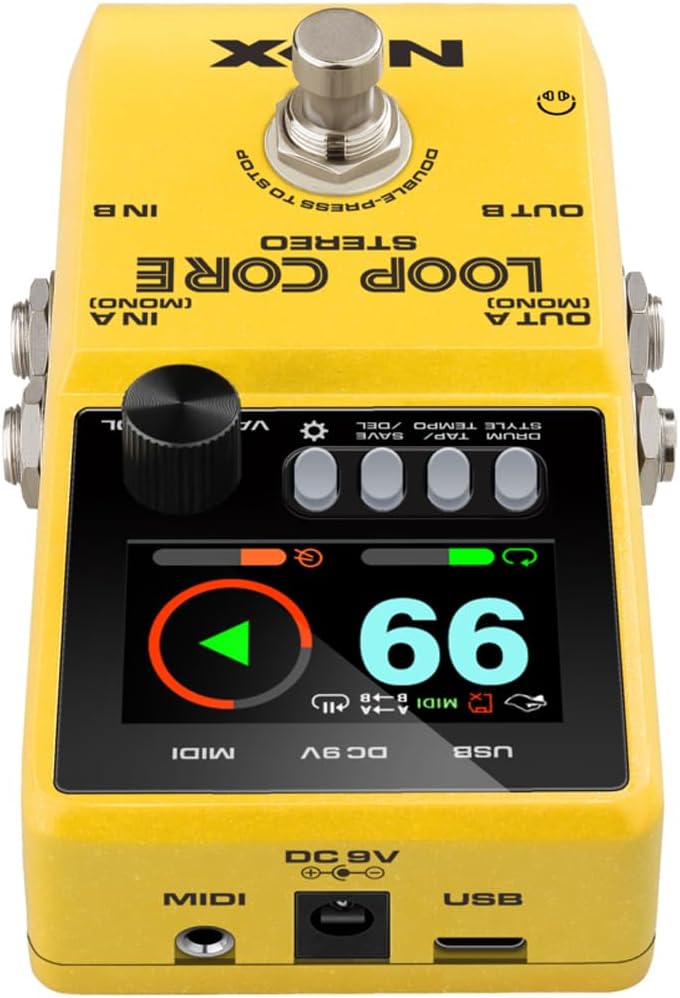
Slika 2: Od vrha prema dolje view of the NUX Loop Core Stereo Pedal, highlighting the color LCD display, control buttons, and VALUE/VOL knob.
Upute za rad
Osnovne funkcije petlje
- Početak snimanja: Press the footswitch once to begin recording your loop. The REC indicator will light up.
- Stop Recording/Start Playback: Press the footswitch again to stop recording and immediately start playback of your recorded loop. The PLAY indicator will light up.
- presnimavanje: During playback, press the footswitch once to enter overdub mode. You can now record additional layers over your existing loop. The DUB indicator will light up. Press the footswitch again to exit overdub mode and continue playback.
- Undo/Redo Last Overdub: Hold down the footswitch briefly to undo your last overdub. Hold it down again to redo the undone overdub.
- Zaustavi reprodukciju: Dvaput pritisnite nožnu sklopku za zaustavljanje reprodukcije.
- Erase Loop: While the loop is stopped, hold down the footswitch for 2 seconds to erase the current loop.
Rhythm Tracks
The Loop Core Stereo includes 50 built-in rhythm patterns to accompany your loops.
- Access Rhythm Styles: Hold down the "DRUM/STYLE/TEMPO" button to enter the drum style selection menu.
- Odaberite ritam: Turn the "VALUE/VOL" knob to browse through the available rhythm styles.
- Podesite tempo: Press the "TAP TEMPO" button repeatedly to set the desired tempo for the rhythm track.
- Adjust Rhythm Volume: Double-press the "VALUE/VOL" knob to access the drum level control. Turn the knob to adjust the rhythm volume independently.
Video 1: Demonstrates basic looping functions including recording, overdubbing, and adjusting rhythm tracks on the NUX Loop Core Stereo pedal. This video is provided by the seller, Everplay Music.
Saving and Managing Loops
The pedal features 99 user memories to store your creations.
- Save Loop: Press the "SAVE/DEL" button once to save the current loop to a memory slot. Use the "VALUE/VOL" knob to select a slot and press the button again to confirm.
- Recall Loop: Turn the "VALUE/VOL" knob to select a saved loop number. The display will show the selected memory. Press the footswitch to start playback.
- Delete Loop: Hold down the "SAVE/DEL" button for 2 seconds. Use the "VALUE/VOL" knob to select the loop you wish to delete and press the button again to confirm.
Napredne značajke
- Cab Simulation: The pedal includes cabinet simulation for direct output to a mixer or audio interface, providing a studio-quality tone without needing an amplifier. This feature is automatically applied to the "OUT A (MONO)" and "OUT B" outputs when connected to a mixer.
- MIDI kontrola: The Loop Core Stereo supports MIDI control for seamless integration with other MIDI-compatible devices. Refer to the detailed MIDI implementation chart in the full manual for specific CC messages and functionalities.
- Time Stretch: The pedal allows you to change the playback tempo of your recorded phrases without altering the key, enabling flexible practice and performance options.
Održavanje
- Čišćenje: Za čišćenje površine pedale koristite meku, suhu krpu. Izbjegavajte abrazivna sredstva za čišćenje ili otapala.
- Skladištenje: Pedalu čuvajte na hladnom i suhom mjestu, dalje od izravne sunčeve svjetlosti i ekstremnih temperatura.
- Napajanje: Always use a compatible 9V DC center-negative power supply to prevent damage. Disconnect power when not in use for extended periods.
- Ažuriranja firmvera: Povremeno provjeravajte službeni NUX website for firmware updates to ensure optimal performance and access new features. Updates can typically be installed via the USB connection.
Rješavanje problema
| Problem | Mogući uzrok | Otopina |
|---|---|---|
| No power/Pedal not turning on. | Incorrect power supply or faulty connection. | Ensure a 9V DC center-negative power supply is correctly connected. Check the power outlet. |
| Nema zvuka. | Incorrect cable connections, low volume, or incorrect input/output selection. | Verify all audio cables are securely connected. Check the "VALUE/VOL" knob on the pedal and your amplifier/mixer volume. Ensure correct input (Mono/L/R) and output (Mono/L/R/Phones) are used. |
| Loops are distorted or noisy. | Input signal too hot (clipping) or faulty cables. | Reduce the input level from your instrument. Try different cables. |
| Rhythm track not playing. | Rhythm volume is too low or rhythm is not activated. | Double-press the "VALUE/VOL" knob to adjust the drum level. Ensure a rhythm style is selected and activated. |
| Cannot save or delete loops. | Memorija puna ili neispravan rad. | Ensure you are following the correct steps for saving/deleting. If memory is full, delete old loops to free up space. |
Tehnički podaci
- Sampling stopa: 44.1kHz
- A / D pretvarač: 24-bitni
- Obrada signala: 32-bit floating
- Vrijeme snimanja: Up to 6 hours (Stereo)
- Korisnička sjećanja: 99
- Obrasci ritma: 50
- Ulazni: Mono/L/R (1/4" TS Jack)
- Izlazi: Mono/L/R (1/4" TS Jack), Phones (1/8" TRS Jack)
- Kontrolirati: Footswitch, Control Buttons, VALUE/VOL Knob
- Povezivost: USB (Mini-B), MIDI IN/OUT (5-pin DIN)
- Vlast: 9V DC, Center Negative (Power adapter sold separately)
- Dimenzije: 3.94 x 2.24 x 5.98 inča (100 x 57 x 152 mm)
- Težina: 14.4 unci (408 grama)
- Boja: Crno/Žuto
Jamstvo i podrška
NUX products are designed for reliability and performance. For warranty information, technical support, and service inquiries, please refer to the official NUX webstranicu ili se obratite lokalnom distributeru. Sačuvajte račun kao dokaz o kupnji za slučaj zahtjeva za jamstvo.
For the latest information and resources, visit: www.nuxefx.com
Ask a question about this manual
Ask about setup, troubleshooting, compatibility, parts, safety, or missing instructions. Manuals+ will review the question and use this page’s manual context to help answer it.