Uvod
This manual provides detailed instructions for the safe and efficient operation, maintenance, and troubleshooting of your Roborock S6 Pure Robot Vacuum and Mop. Please read this manual thoroughly before using the product and retain it for future reference.
Važne sigurnosne informacije
Uvijek se pridržavajte osnovnih sigurnosnih mjera opreza prilikom korištenja električnih uređaja kako biste smanjili rizik od požara, strujnog udara i ozljeda.
- Do not use the robot vacuum outdoors or on wet surfaces.
- Do not allow children to operate the robot vacuum.
- Pazite da je punjač postavljen na ravnu površinu uz zid.
- Remove any loose cables, small objects, or fragile items from the floor before operation.
- Do not use the robot vacuum to pick up large debris, sharp objects, or liquids.
- Only use the original charging dock and power adapter provided by Roborock.
Komponente proizvoda
Familiarize yourself with the main components of your Roborock S6 Pure.

Slika: Vrh view of the Roborock S6 Pure Robot Vacuum, showing the LiDAR sensor tower, power button, and spot cleaning button.
- LiDAR Navigation System: Za precizno mapiranje i navigaciju.
- Glavna četka: Za dubinsko čišćenje tepiha i tvrdih podova.
- Bočna četka: Uklanja otpad s rubova i kutova.
- Kanta za smeće: Skuplja prljavštinu i ostatke.
- Water Tank & Mop Cloth: Za funkcije brisanja podova.
- Dock za punjenje: For automatic recharging.
- Gumb za napajanje: To turn on/off and start/pause cleaning.
- Gumb za čišćenje mjesta: For targeted cleaning of small areas.
Vodič za postavljanje
1. Raspakiranje i postavljanje
- Pažljivo izvadite robotski usisavač i sav pribor iz ambalaže.
- Choose a suitable location for the charging dock. It should be placed against a wall, on a hard, level surface, with at least 0.5 meters (1.6 feet) clear space on both sides and 1.5 meters (4.9 feet) in front.
- Connect the power adapter to the charging dock and plug it into a wall outlet. Ensure the cable is neatly tucked away to prevent entanglement.
2. Početno punjenje
Place the robot vacuum onto the charging dock. Ensure the charging contacts on the robot align with those on the dock. The power indicator light on the robot will illuminate, indicating it is charging. Fully charge the robot before first use (approximately 3-5 hours).
3. Instalacija i povezivanje aplikacije
For full functionality, download the Roborock app on your smartphone.
- Scan the QR code in the quick start guide or search for "Roborock" in your app store.
- Otvorite aplikaciju i kreirajte račun.
- Follow the in-app instructions to add your S6 Pure robot vacuum. This typically involves connecting to the robot's Wi-Fi hotspot and then connecting the robot to your home Wi-Fi network.

Image: The Roborock S6 Pure robot vacuum next to a smartphone displaying the Roborock app interface, demonstrating advanced app control capabilities.
Upute za rad
1. Početak čišćenja
- Putem robotskih gumba: Press the Power button once to start a full clean. Press it again to pause. Press and hold to turn off.
- Putem aplikacije Roborock: Open the app, select your S6 Pure, and tap "Clean" to start. You can also select specific rooms or zones to clean.

Image: The Roborock S6 Pure robot vacuum cleaning a specific area, illustrating its selective room cleaning feature based on a mapped layout.
2. Mopping Function
The S6 Pure can vacuum and mop simultaneously. To use the mopping function:
- Napunite spremnik za vodu čistom vodom.
- Pričvrstite krpu za brisanje na spremnik za vodu.
- Slide the water tank assembly into the back of the robot until it clicks into place.
- Start a cleaning cycle. The robot will automatically switch to mopping mode on hard floors.
3. Mapping and Navigation
The S6 Pure uses Precision LiDAR Navigation to create an accurate map of your home. This map is used for efficient cleaning paths, multi-floor mapping, and setting no-go zones.

Image: A visual representation of the Roborock S6 Pure utilizing LiDAR navigation to map a room, showing distance measurements and effective home-mapping.

Image: An illustration depicting a multi-story house with the Roborock S6 Pure, showing how it can map and store layouts for different floors.
4. Glasovno upravljanje (Alexa)
The Roborock S6 Pure is compatible with Amazon Alexa. To enable voice control:
- Ensure your Roborock S6 Pure is connected to the Roborock app and your home Wi-Fi.
- Otvorite aplikaciju Amazon Alexa.
- Go to "Skills & Games" and search for "Roborock".
- Enable the Roborock skill and link your Roborock account.
- You can now use commands like: "Alexa, ask Roborock to start cleaning." or "Alexa, ask Roborock to go home."
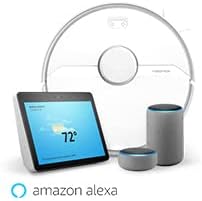
Image: The Roborock S6 Pure robot vacuum shown alongside Amazon Echo devices, illustrating its compatibility with Amazon Alexa for voice control.
Održavanje
Redovito održavanje osigurava optimalne performanse i produžuje vijek trajanja vašeg robotskog usisavača.
1. Kanta za smeće i filtar
- Ispraznite kantu za smeće: After each cleaning cycle, open the top cover, remove the dustbin, and empty its contents.
- Čisti filtar: Tap the filter to remove dust. The filter can also be rinsed with water; ensure it is completely dry before reinserting. Clean at least once a week, or more frequently if used often.
2. Glavna četka i bočna četka
- Glavna četka: Remove the main brush cover and the brush itself. Use the cleaning tool provided to cut and remove any tangled hair or debris. Clean weekly.
- Bočna četka: Check for tangled hair or debris. If necessary, remove the screw holding the side brush and clean it. Replace if damaged. Clean monthly.
3. Wheels and Sensors
- Kotači: Wipe the drive wheels and omnidirectional wheel with a dry cloth to remove dust and hair. Clean monthly.
- Senzori: Gently wipe all sensors (cliff sensors, wall sensor, charging contacts) with a soft, dry cloth. Clean monthly.
4. Mop Cloth and Water Tank
- Krpa za brisanje: Remove the mop cloth after each use and wash it thoroughly. It can be hand-washed or machine-washed.
- Spremnik za vodu: Empty any remaining water from the tank after each use. Rinse the tank if necessary.
Rješavanje problema
U ovom odjeljku potražite uobičajene probleme i njihova rješenja.
| Problem | Mogući uzrok | Otopina |
|---|---|---|
| Robot se ne uključuje. | Slaba baterija ili nije napunjena. | Postavite robota na punjač i provjerite je li potpuno napunjen. |
| Robot se ne može vratiti na stanicu za punjenje. | Charging dock is blocked or out of range. | Ensure the charging dock has clear space around it. Move the dock to a more central location if needed. |
| Učinkovitost čišćenja je slaba. | Dustbin full, brushes tangled, or filter clogged. | Empty the dustbin, clean the main brush and side brush, and clean or replace the filter. |
| Robot se često zaglavi. | Obstacles, loose cables, or dark surfaces. | Clear the cleaning area of obstacles. Use no-go zones in the app for problematic areas. |
| Problemi s povezivanjem aplikacije. | Incorrect Wi-Fi password, router issues, or robot offline. | Ensure correct Wi-Fi password. Restart your router and the robot. Re-pair the robot with the app if necessary. |
Tehnički podaci
| Značajka | Detalj |
|---|---|
| Naziv modela | S6Pure |
| Marka | roborock |
| Dimenzije proizvoda | 14 cm D x 14 cm Š x 4 cm V |
| Težina artikla | 15.17 funti |
| Trajanje baterije | Do 180 minuta |
| Vrsta filtra | Tkanina |
| Metoda kontrole | Glas, Aplikacija |
| Kompatibilni uređaji | Amazon Echo |
| Izvor napajanja | Napajanje na baterije |
| Voltage | 220 volti |
| UPC | 606015769620 |
Jamstvo i podrška
Za informacije o jamstvu i tehničku podršku, obratite se službenoj stranici Roborock-a. webweb-mjesto ili se izravno obratite njihovoj korisničkoj službi. Sačuvajte račun kao dokaz o kupnji za slučaj zahtjeva za jamstvo.
Mrežni resursi: www.roborock.com
Korisnički priručnik (PDF): Preuzmite PDF Priručnik