
Taw qhia
Thank you for choosing the Bigben 5000mAh MagSafe Compatible Wireless Power Bank. This portable power bank is designed to provide convenient wireless charging for compatible devices, as well as wired charging via its USB-C port. Please read this manual carefully before using the product to ensure safe and optimal performance.
Cov ntaub ntawv kev nyab xeeb
Yuav kom tiv thaiv kev raug mob lossis kev puas tsuaj rau koj lub cuab yeej, thov ua raws li cov kev ceev faj kev nyab xeeb hauv qab no:
- Tsis txhob muab lub hwj chim tso rau hauv qhov kub heev, tshav ntuj ncaj qha, lossis hluav taws.
- Tsis txhob muab lub hwj chim tso rau hauv dej lossis lwm yam kua.
- Avoid dropping, hitting, or disassembling the power bank.
- Khaws kom deb ntawm cov menyuam yaus.
- Tsuas yog siv cov cables thiab adapters uas muaj ntawv pov thawj.
- Yog tias lub hwj chim bank o, muaj ntxhiab tsw phem, lossis kub dhau, tsum tsis txhob siv tam sim ntawd.
- Pov tseg lub hwj chim bank lub luag haujlwm raws li cov cai hauv zos.
Ntim Cov Ntsiab Lus
Thov kos lub pob rau cov khoom hauv qab no:
- Bigben 5000mAh MagSafe Compatible Wireless Power Bank
- USB-C rau USB-C Them Nyiaj Cable
- Tus Neeg Siv Los Siv (cov ntawv no)
Khoom Tshajview
Familiarize yourself with the components of your power bank:

Duab: pem hauv ntej view of the Bigben 5000mAh Power Bank, highlighting the LED indicator lights and the USB-C port.
- LED Qhov taw qhia teeb: Four small lights indicating the remaining battery level.
- USB-C Port: For charging the power bank and for wired device charging.
- Wireless Charging Surface: The flat surface designed for MagSafe compatible wireless charging.
- Lub zog khawm: Qhib kev them nqi wireless thiab xyuas seb lub roj teeb muaj pes tsawg.
Teeb tsa
Charging Power Bank
Before first use, fully charge your power bank.
- Connect the provided USB-C cable to the power bank's USB-C port.
- Txuas lwm qhov kawg ntawm USB-C cable rau lub USB phab ntsa adapter (tsis suav nrog).
- The LED indicator lights will illuminate to show the charging status. When all four LEDs are solid, the power bank is fully charged.
LED Indicator Status:
- 1 LED: 0-25% charged
- 2 LEDs: 25-50% charged
- 3 LEDs: 50-75% charged
- 4 LEDs: 75-100% charged
Kev khiav haujlwm
Kev Them Nyiaj Wireless (Sib xws nrog MagSafe)
This power bank supports MagSafe compatible wireless charging up to 10W.
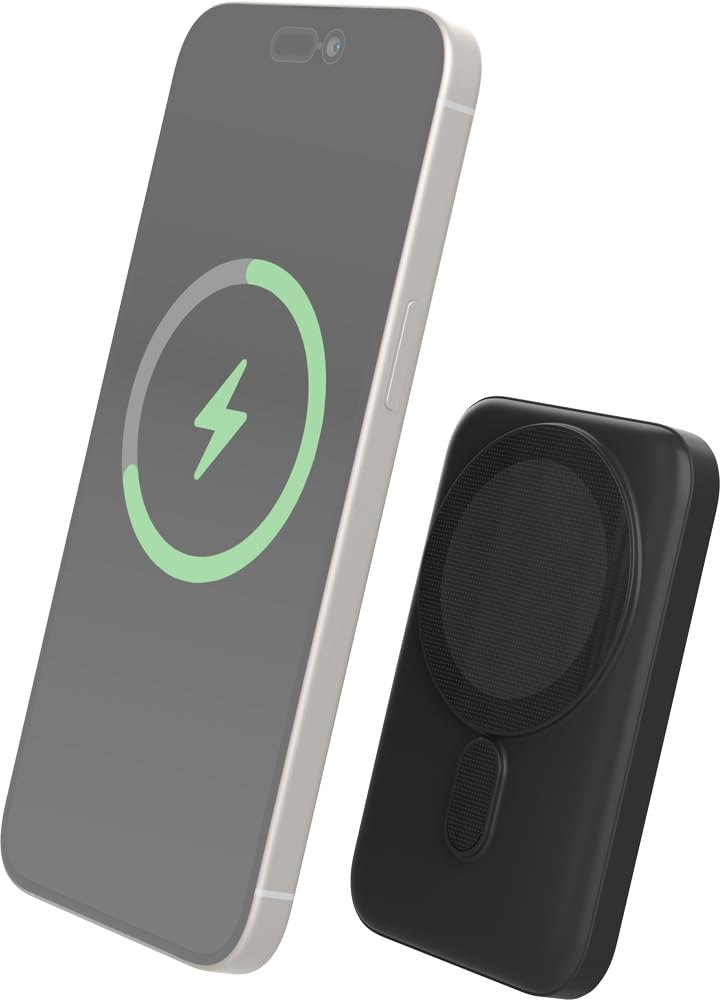
Image: The Bigben power bank magnetically connected to the back of a smartphone, illustrating the wireless charging function.
- Ensure your device is MagSafe compatible or has a MagSafe compatible case.
- Align the power bank with the back of your device. The magnets will snap it into place.
- The power bank will automatically begin charging your device. The LED indicators on the power bank will show its remaining charge.
- To stop charging, simply detach the power bank from your device.
Note: For optimal magnetic attachment and charging efficiency, ensure there are no obstructions between the power bank and your device.
Lub Wired Charging
You can also charge devices using a USB-C cable.
- Connect one end of a USB-C cable (not included, or use the provided one if suitable) to the power bank's USB-C port.
- Txuas lwm kawg ntawm lub cable rau koj lub cuab yeej lub chaw nres nkoj them.
- Lub hwj chim bank yuav pib them koj lub cuab yeej.
Kev tu
Ntxuav
- Disconnect the power bank from all devices and power sources before cleaning.
- Siv daim ntaub mos mos, qhuav, thiab tsis muaj plaub los so qhov chaw ntawd.
- Tsis txhob siv cov tshuaj hnyav, ntxuav cov kuab tshuaj, lossis cov tshuaj detergents.
Cia
- Khaws lub txhab nyiaj fais fab hauv qhov chaw txias, qhuav kom deb ntawm tshav ntuj ncaj qha thiab qhov kub thiab txias.
- Yog tias khaws cia rau lub sijhawm ntev, them lub txhab nyiaj fais fab kom txog li 50% txhua peb lub hlis txhawm rau tswj xyuas roj teeb.
Kev daws teeb meem
| Teeb meem | Kev daws teeb meem |
|---|---|
| Power bank tsis them |
|
| Device not charging wirelessly |
|
| Device not charging via cable |
|
| LED ntsuas tsis ua haujlwm |
|
Specifications
| Feature | Paub meej |
|---|---|
| Qauv nab npawb | 6128 |
| Roj teeb muaj peev xwm | 5000 mAh |
| Wireless Output | Up to 10W (MagSafe Compatible) |
| Input/Output Chaw nres nkoj | USB-C |
| Qhov hnyav | 300g XNUMX |
Warranty thiab Support
Bigben products are designed and manufactured to the highest standards. For warranty information or technical support, please refer to the warranty card included with your purchase or visit the official Bigben webqhov chaw.
For further assistance, please contact Bigben customer service.