1. Khoom Tshajview
The RioRand 0.56" Blue LED Digital Voltmeter is a compact device designed for measuring DC voltage in a range of 0 to 99.9V. It features a bright blue LED display for clear readings and is suitable for various applications, including automotive and DIY electronics projects. This manual provides essential information for the proper installation, operation, and maintenance of your voltmeter.

Image 1: The RioRand 0.56" Blue LED Digital Voltmeter displaying a voltage reading of 19.8V.
2. Cov lus qhia tshwj xeeb
| Feature | Specification |
|---|---|
| Kev ntsuas ntau | DC 0 - 99.9V |
| Hwj chim Mov Voltage | DC 5 - 28V (required for meter operation) |
| Cutting Size (Panel Mount) | 45.5 x 26.5mm (approx. 1.79 x 1.04 inches) |
| Zuag qhia tag nrho Dimensions | 48 x 29 x 21mm (approx. 1.89 x 1.14 x 0.83 inches) |
| Hom zaub | Three 0.56" LED digital tubes |
| Zaub Xim | Xiav |
| Refresh Rate | Approximately 500ms |
| Kev ntsuas qhov tseeb | 1% (+/- 1 digit) |
| Yam Nyhav | Kwv yees li 0.353 ooj (10g) |
| Qauv nab npawb | RRQWEUAAQAQAO |
3. Kev teeb tsa thiab kev teeb tsa
Before installation, ensure all power sources are disconnected to prevent electrical shock or damage to the device. The voltmeter requires a DC power supply between 5V and 28V to operate. It has three wires for connection:
- Hlau Hlau: Positive terminal for the meter's power supply (DC 5-28V).
- Hlau Hlau: Common ground for both the meter's power supply and the voltage raug ntsuas.
- Yellow/White Wire: Positive terminal for the voltage input to be measured (DC 0-99.9V).
Wiring Configurations:
- Self-Powered (Shared Source, 5V-28V Measurement):
Yog voltage you wish to measure is between 5V and 28V, and you want to use this voltage to power the meter itself:- Txuas lub Hlau Liab to the positive (+) of the voltage qhov chaw.
- Txuas lub Yellow/White Wire to the positive (+) of the voltage qhov chaw.
- Txuas lub Cov Hlau Dub to the negative (-) of the voltage qhov chaw.
- Separately Powered (Any 0V-99.9V Measurement):
Yog voltage you wish to measure is outside the 5V-28V range (e.g., below 5V or above 28V up to 99.9V), or if you prefer to isolate the meter's power:- Txuas lub Hlau Liab to the positive (+) of a separate DC 5-28V power supply.
- Txuas lub Cov Hlau Dub to the negative (-) of the separate DC 5-28V power supply.
- Txuas lub Yellow/White Wire to the positive (+) of the voltage qhov chaw koj xav ntsuas.
- Ensure the negative (-) of the voltage source you want to measure is also connected to the Cov Hlau Dub (common ground).
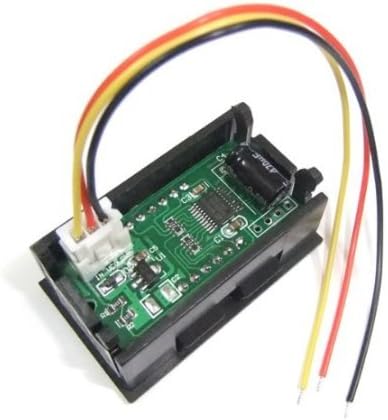
Duab 2: Rov qab view of the voltmeter showing the wiring connections. The red, black, and yellow/white wires are visible, connected to the circuit board.
Vaj huam sib luag Mounting: The voltmeter is designed for panel mounting. Cut an opening of approximately 45.5 x 26.5mm (1.79 x 1.04 inches) in your panel. Insert the voltmeter into the opening and secure it if necessary (mounting clips or screws are not typically included and may need to be sourced separately).
Ceeb toom: Always observe correct polarity when connecting the wires. Incorrect wiring can damage the voltmeter or the power source. Do not exceed the maximum input voltage of 99.9V for measurement or 28V for the meter's power supply.
4. Cov lus qhia ua haujlwm
Once properly wired and powered, the voltmeter will automatically display the measured DC voltage on its blue LED screen. The display updates approximately every 500 milliseconds, providing near real-time readings. No additional configuration or calibration is typically required for basic operation.
- Xyuas kom voltage being measured is within the 0-99.9V range.
- Readings are displayed with one decimal place (e.g., 12.5V).
5. Kev tu
The RioRand Digital Voltmeter is a low-maintenance device. Follow these guidelines to ensure its longevity:
- Ntxuav: Siv ib daim ntaub mos, qhuav los ntxuav cov zaub thiab casing. Tsis txhob siv cov tshuaj abrasive los yog cov kuab tshuaj.
- Ib puag ncig: Keep the device away from excessive moisture, dust, and extreme temperatures.
- Kev sib txuas: Periodically check wiring connections to ensure they are secure and free from corrosion.
- Cia: If storing the voltmeter for an extended period, disconnect it from all power sources and store it in a dry, cool place.
6. Kev daws teeb meem
If you encounter issues with your voltmeter, refer to the following troubleshooting steps:
- No Display / Voltmeter Not Turning On:
- Check the power supply to the red and black wires. Ensure it is within the DC 5-28V range and correctly connected with proper polarity.
- Verify that the power source itself is functional.
- Inspect the wires for any breaks or loose connections.
- Incorrect or Erratic Readings:
- Ensure the yellow/white wire is securely connected to the positive terminal of the voltage you wish to measure, and the black wire is connected to its negative/ground.
- Paub meej tias voltage being measured is within the 0-99.9V range. Voltages outside this range will not be displayed accurately.
- Check for any interference from nearby electrical components.
- Verify the accuracy of your reference voltage source if comparing readings.
- Display Shows '0.0' or '---':
- If '0.0' is displayed, it indicates either no voltage is being measured or the voltage is extremely low. Verify the connection of the yellow/white wire to the voltage qhov chaw.
- If '---' or a similar error is shown, it might indicate an out-of-range measurement or a connection issue. Recheck all wiring.
7. Warranty thiab Support
Specific warranty information for this product may vary depending on the retailer and region of purchase. Please refer to your purchase documentation or contact the seller directly for details regarding warranty coverage and return policies.
For technical support or further assistance, please contact RioRand customer service or the authorized distributor from whom you purchased the product. When contacting support, please have your product model number (RRQWEUAAQAQAO) and a detailed description of the issue ready.