
Gabatarwa
Thank you for choosing the Billboard Soul Advance True Wireless Stereo (TWS) Earbuds. These earbuds are designed to provide a superior audio experience with Active Noise Cancellation (ANC), Environmental Noise Cancellation (ENC), and a comfortable, splash-resistant design. This manual will guide you through the setup, operation, and maintenance of your new earbuds.
Bayanin Tsaro
- Do not expose the earbuds or charging case to extreme temperatures or direct sunlight for extended periods.
- Guji faduwa ko amfani da karfi fiye da kima akan na'urar.
- Keep the earbuds and charging case away from water and liquids, except for light splashes as per IPX4 rating. Do not submerge.
- Kada kayi ƙoƙarin ƙwace ko gyara samfurin. Wannan zai ɓata garanti.
- Yi amfani da kebul ɗin caji kawai da aka bayar ko ingantaccen daidai.
- Listening at high volumes for prolonged periods can cause hearing damage. Adjust volume to a safe level.
Abubuwan Kunshin
- Billboard Soul Advance TWS Earbuds (Left and Right)
- Cajin Cajin
- Kebul na Caji
- Manual mai amfani
Samfurin Ƙarsheview
Familiarize yourself with the components of your Billboard Soul Advance TWS Earbuds and charging case.
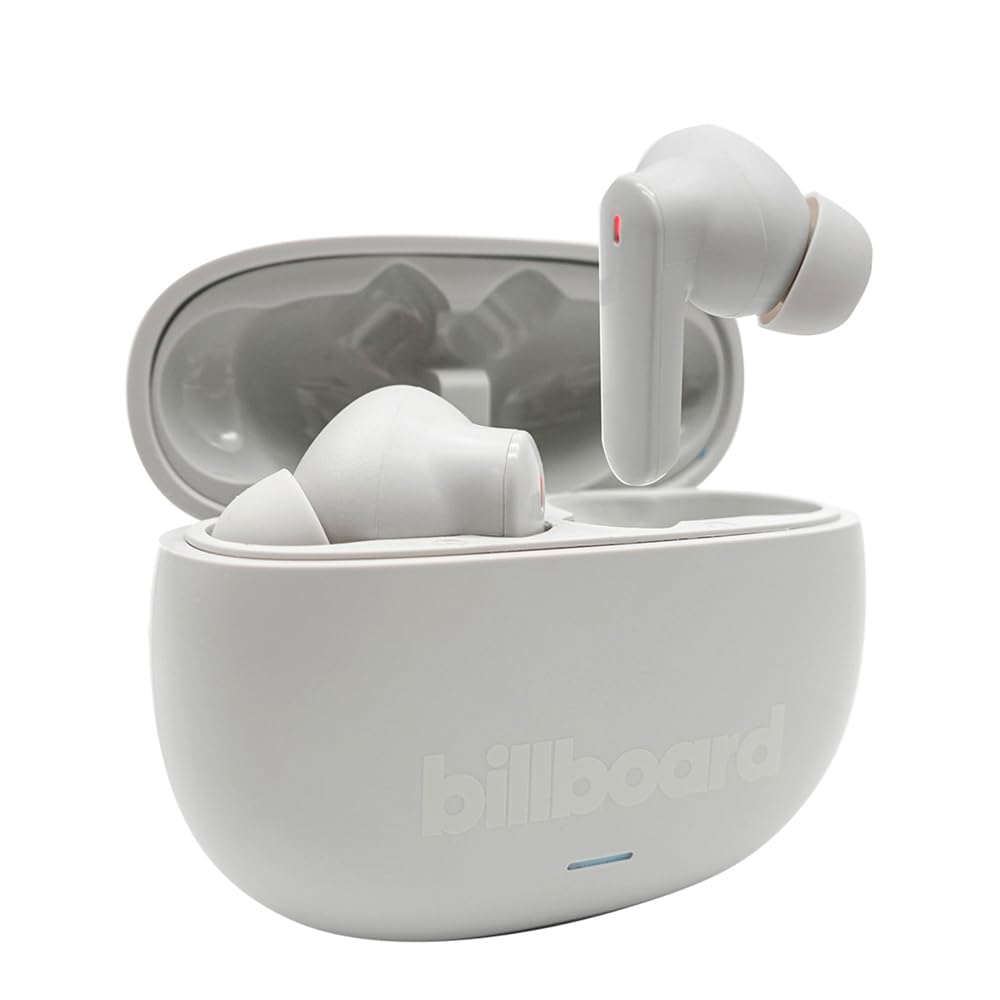
Image: The Billboard Soul Advance TWS Earbuds resting inside their open charging case. The earbuds are grey with red indicator lights visible, and the case is also grey with the 'billboard' logo embossed on the front.

Image: The Billboard Soul Advance TWS Earbuds charging case in a closed position. The case is grey with the 'billboard' logo embossed on the front and a small indicator light at the bottom.
Image: A person holding a single Billboard Soul Advance TWS earbud and the open charging case, demonstrating the compact size and design.
Saita
1. Cajin Kayan kunne da Case
Kafin amfani da farko, cikakken cajin belun kunne da cajin caji.
- Sanya belun kunne a cikin akwatin caji. Tabbatar an sanya su daidai a cikin ramukan da suka dace.
- Haɗa kebul na cajin USB zuwa tashar caji akan akwati kuma zuwa tushen wutar USB (misali, kwamfuta, adaftar bango).
- The indicator light on the case will show charging status. Once fully charged, the indicator will change or turn off. A full charge takes approximately 5 hours for the case and earbuds.
2. Haɗawa da Na'ura
To connect your earbuds to a smartphone or other Bluetooth-enabled device:
- Open the charging case. The earbuds will automatically enter pairing mode, indicated by flashing lights on the earbuds.
- A kan na'urarka, je zuwa saitunan Bluetooth kuma tabbatar da cewa Bluetooth yana kunne.
- Bincika available devices and select "Billboard Soul Advance" from the list.
- Once connected, the earbud indicator lights will stop flashing.
- Na'urar kunne za ta sake haɗawa ta atomatik zuwa na'urar da aka haɗa ta ƙarshe lokacin da aka cire daga harka, idan an kunna Bluetooth akan na'urar.
Aiki
Gudanar da taɓawa
The earbuds feature touch-sensitive controls on their outer surface. Specific functions may vary slightly by device or app.
| Aiki | Aiki |
|---|---|
| Taɓa Guda Daya (Hagu/Dama) | Kunna/Dakatar da kiɗa, Amsa/Ƙare kira |
| Taɓa sau biyu (Dama) | Waƙa ta gaba |
| Taɓa sau biyu (Hagu) | Waƙar da ta gabata |
| Taɓa Sau Uku (Hagu/Dama) | Kunna Mataimakin Murya |
| Danna Dogon Lokaci (Hagu/Dama) | Sauya Yanayin ANC/Tabbatar da Gaskiya |
| Incoming Call Long Press | ƙin ƙi kira |
Active Noise Cancellation (ANC) & Environmental Noise Cancellation (ENC)
The Soul Advance earbuds feature both ANC and ENC for an optimized listening and calling experience.
- Sokewar Hayaniyar ANC (ANC): Reduces external ambient noise, allowing for a more immersive audio experience. Activate/deactivate by long-pressing an earbud.
- Sokewar Hayan Muhalli (ENC): Utilizes 4 built-in microphones to filter out background noise during calls, ensuring clearer conversations for both you and the listener. This feature is active automatically during calls.

Image: A graphic illustrating the concept of Ultra ANC (Active Noise Cancellation), showing sound waves being blocked by headphones, emphasizing a quiet listening experience.
Kulawa
Tsaftacewa
- A hankali shafa belun kunne da akwati na caji tare da taushi, bushe, yadi mara laushi.
- Kada a yi amfani da masu tsabtace abrasive, barasa, ko kaushi na sinadarai.
- Tabbatar da cajin lambobin sadarwa a kan belun kunne biyu da akwati suna da tsabta kuma sun bushe don mafi kyawun caji.
Adana
Lokacin da ba a amfani da su, adana belun kunne a cikin cajin cajin su don kare su da kiyaye su caji.
Shirya matsala
| Matsala | Magani |
|---|---|
| Kunnen kunne ba sa haɗawa | Ensure earbuds are charged. Turn off and on your device's Bluetooth. Forget the device in Bluetooth settings and re-pair. |
| Abun kunne guda ɗaya kawai yana aiki | Place both earbuds back in the case, close it, then open again. Ensure both are charged. |
| Babu sauti | Duba ƙarar na'urar. Tabbatar cewa belun kunne suna da alaƙa. Gwada kunna sauti daban. |
| Matsalar caji | Ensure charging cable is securely connected. Clean charging contacts. Try a different USB port or cable. |
Ƙayyadaddun bayanai
- Sunan Samfura: Soul Advance
- Fasahar Haɗuwa: Mara waya
- Abubuwan da aka haɗa: Tashar caji
- Takamaiman Amfani: Outdoor activities, Sports
- Lokacin Caji: Kimanin Sa'o'i 5
- Na'urori masu jituwa: Wayoyi, Allunan hannu
- Matsayin Juriya na Ruwa: IPX4 (Mai tsayayya da Fasa)
- Matsakaicin Rayuwar Baturi: Awanni 27 (tare da cajin caji)
- Wurin Kunne: Cikin-Kunne
- Factor Factor: Cikin-Kunne
- Sarrafa amo: Sokewar Hayaniyar Aiki

Image: A graphic highlighting long battery life, showing headphones with '40H' and earbuds with '42H*' (battery + case), indicating extended usage times.
Bidiyoyin Samfur na hukuma
Video: Product demonstration video (0:49 duration).
Video: Product feature overview (0:44 duration).
Video: Additional product details (0:44 duration).
Video: Short product highlight (0:24 duration).
Video: Product feature showcase (0:24 duration).
Video: Detailed product review/demonstration (1:57 duration).
Video: Quick product overview (0:34 duration).
Video: Comprehensive product guide (2:00 duration).
Garanti da Taimako
Your Billboard Soul Advance TWS Earbuds come with a standard manufacturer's warranty. For detailed warranty information, please refer to the warranty card included in your package or visit the official Billboard website. For technical support or customer service, please contact the retailer or manufacturer directly.
For returns, a 30-day free return policy is available from the purchase date.